Tag: syndicated

  • Using Merge–#SQLNewBlogger

    Another post for me that is simple and hopefully serves as an example for people trying to get blogging as #SQLNewBloggers.

    I was playing with some data, loading it into staging tables and then moving it to a real table. I typically have done this with T-SQL, writing efficient upsert code that works well. However, I haven’t used Merge in a long time and thought I should practice a bit with the structure.

    Note: Merge isn’t that efficient and most experts do not recommend it (Aaron Bertrand, Dwain Camps). If you decide to use Merge, make sure you are aware of performance implications with your system. It should be fine with smaller sets, but be aware of potential issues if your data scale grows.

    There’s a nice Simple Talk article on Merge that helps you understand how this structure works. There are lots of tips and tricks with merge, but the basic idea is that I can decide to merge data from one table into another and handle the various cases of rows that exist or don’t exist, and what to do. This is the classic upsert, where we insert new rows and update existing ones.

    A Quick Scenario

    I was actually playing with some SQL Saturday data, so let’s use that and set up a few tables. We’ll set up an Event table and an EventStaging table with some data.

    CREATE TABLE Event
    (EventID INT PRIMARY KEY CLUSTERED
    , EventName VARCHAR(200)
    , City VARCHAR(100)
    , EventDate DATE
    )
    GO
    
    CREATE TABLE EventStaging
    (EventID INT PRIMARY KEY
    , EventName VARCHAR(200)
    , City VARCHAR(100)
    , EventDate DATE
    )
    GO
    
    INSERT Event
      VALUES 
       (1  , 'SQLSaturday #1 - Orlando 2007', 'Orlando', '2007-11-10')
    , (4  , 'SQLSaturday #4 Tweener(Sun) - Orlando 2008', 'Orlando', '2008-06-05')
    , (2  , 'SQLSaturday #2 - Tampa 2008', 'Tampa', '2008-02-15')
    , (3  , 'SQLSaturday #3 - Jacksonville 2008', 'Jacksonville', '2008-05-03')
    
    insert dbo.EventStaging
      values 
       (4  , 'SQLSaturday #4 - Orlando 2008', 'Orlando', '2008-06-07')
    , (5  , 'SQLSaturday #5 - Olympia 2008', 'Olympia', '2008-10-11')
    , (6  , 'SQLSaturday #6 - Cleveland 2008', 'Cleveland', '2009-02-01')
    , (7  , 'SQLSaturday #7 - Birmingham 2009', 'Birmingham', '2009-05-30')

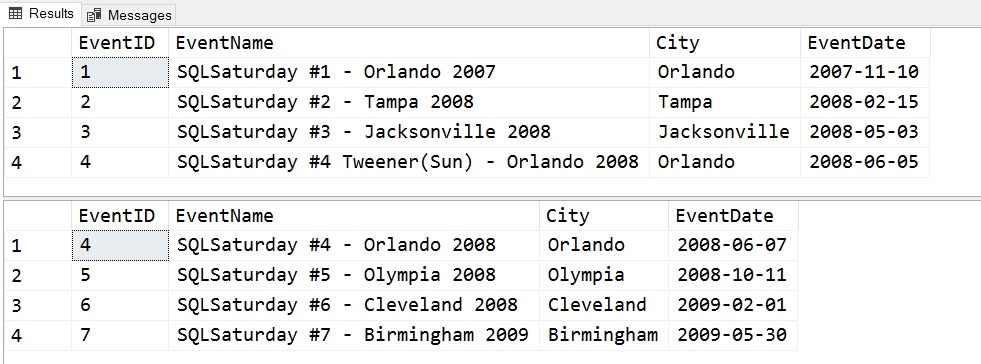
    The data is loaded into EventStaging and then needs to move to Event for the application. If you examinet the data, you’ll see that the events with ID =4 is in both tables with different data. Events 5, 6, 7 are only in the staging table and need to be moved.

    We can see the data here:
    2017-07-07 17_24_11-SQLQuery6.sql - (local)_SQL2014.Sandbox (PLATO_Steve (62))_ - Microsoft SQL Serv

    To move this data, let’s start with the merge header

    MERGE dbo.Event ev
      USING dbo.EventStaging es
      ON ev.EventID = es.EventID

    This opening is looking to merge data into the Event table using the EventStaging table as a data source. The join is included in the ON statement and follows the rules like any other join clause.

    The next part of the statement is similar to a CASE statement, with a series of WHEN MATCHED or WHEN NOT MATCHED statements with THEN clauses that determine what happened.

    MERGE dbo.Event ev
      USING dbo.EventStaging es
      ON ev.EventID = es.EventID
      WHEN MATCHED 
       THEN UPDATE 
        SET ev.EventName = es.EventName
          , ev.City = es.City
          , ev.EventDate = es.EventDate
      WHEN NOT MATCHED
       THEN INSERT (EventID, EventName, City, EventDate)
             VALUES (es.EventID, es.EventName, es.City, es.EventDate);

    The two statements I have listed handle the update and insert. The first says that when we match a row, meaning there is a row in EventStaging that matches Event on the EventID, we will update the Event table (that’s the MERGE target). In this case, the rows 5, 6, 7 will fall into this case.

    The WHEN NOT MATCHED is when there is a row in EventStaging that isn’t in Event, we insert the data. Note again, we don’t need to specify the table name in the INSERT.

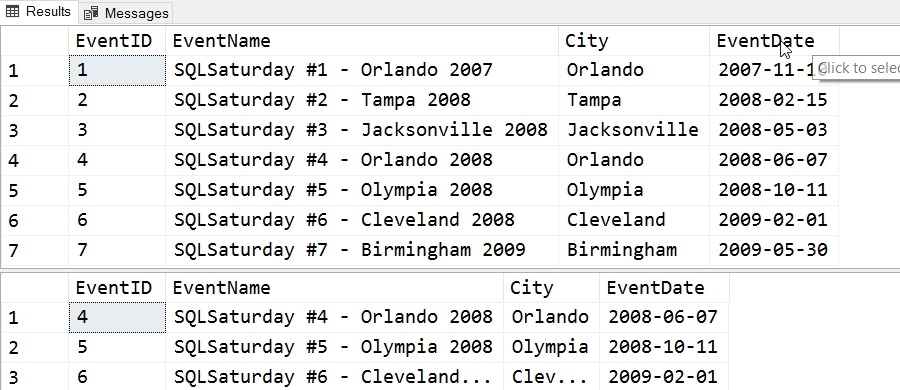
    When we run this command, the four rows in EventStaging are processed, with 3 inserts and 1 update. After running this, we can see the results here:
    2017-07-07 17_24_40-SQLQuery6.sql - (local)_SQL2014.Sandbox (PLATO_Steve (62))_ - Microsoft SQL Serv

    The name of the Orlando second event (#4) has changed, as has the date.

    This is a quick look at Merge, and a handy command that you should consider using with smaller sets of data.

  • T-SQL Tuesday #93–Interviewing Patterns

    tsqltuesdayIt’s time for T-SQL Tuesday, and this is a good topic. Not too close to T-SQL, but certainly something many people are interested in.

    Kendra Little hosts this month, and her topic is interviewing patterns and anti-patterns. Things that are good, or things that might appear good, but are bad. Be a candidate or an interviewer.

    You can read more about T-SQL Tuesday at tsqltuesday.com.

    Pattern: Groups

    One of the things that I think makes a good pattern for interviews is a group. It’s rare that any of us actually works alone or with just one person. Even if our group is 1 or 2 people, we often interact with others in different ways.

    Those other people depend on our knowledge and skill. Why not use them in an interview.

    I’ve had quite a few interviews like this, but they all are similar. Get the candidate in a conference room and bring in multiple people to ask questions. Usually it’s a round robin with everyone taking turns asking questions. Ideally, the same questions to all candidates from the same people. The discussions can veer into slightly different directions, but ideally in similar veins for everyone being considered.

    I’ve been in the candidate seat with as few as two (one isn’t a group) and as many as 12 or 13 others. This can be stressful, but if everyone is probing, then the candidate needs to interact and communicate with those that they’ll actually work with. In my mind, a good test.

    Anti-pattern: Confrontation

    I love the old Monty Python Silly Interview skit. I’ve been tempted to do something like this, but never have. It’s not fair to the candidate, and I’m not sure it tests anything well.

    I had a couple rough interviews in the past. One was where a VP of a small company was excited and interested after having talked with me over the phone and then in his office for 30-45 minutes. He then brought me to his consulting sysadmin/programmer, who peppered me with scenarios and questions. However, this gentlemen argued about every answer, and implied that I was answering incorrectly. In many cases I knew I wasn’t and said so, however the confrontation continued. In some cases, I just admitted I wasn’t sure.

    Later, I came to be friends with the guy, but never too close. He tended to rub me wrong most of the time because he was closed, cold, and argumentative. It was a good job, and we got along, but if he had been my boss (I was interviewing to be his), I wouldn’t have accepted.

    The other one was similar. I had a good phone interview with a technical person and then went in to meet the manager. He was brusk and short with me, constantly letting me know he was in charge, he didn’t think much of my credentials, and I should be expecting to work hard. With that offer was a pay cut I couldn’t accept, but not sure I would have in any case. His manner made me think that every day would have include some sort of insult, browbeating, or other unnecessary action.

    I think we can make an attempt to evaluate candidates without being jerks.

    Pattern: Flexibility

    The last pattern I like is the idea of quizzing people in a flexible manner. I’ve never liked schoolteachers or managers implying that most of our work is extremely set and susceptible to deadlines without flexibility. Or that we work a certain way. The real world isn’t like that.

    BTW, if you have hard deadlines, like shows or events, your stuff better be done well in advance, not hours before.

    When I’ve had good interviews, or gotten a good handle on a candidate’s skills, it’s from adapting to them. Some people like to show something on a computer. Some will whiteboard, some like to discuss the question in detail and ask their own questions. I’m OK in all those cases. When I work with the person, I get a better feel for how they think, how they solve problems, and what catches their eye.

    I can also evaluate their strengths and weaknesses, and decide where they might fit in our team.

    Evaluating someone is hard enough without being rigid about what we do. Expecting everyone to take a test well, or be able to answer any question orally, or any other specific way of interaction is asking to miss out on some potential good candidates, as well as potentially hiring someone that is good at interviewing, but not working.

  • The 2017 Data Platform Summit

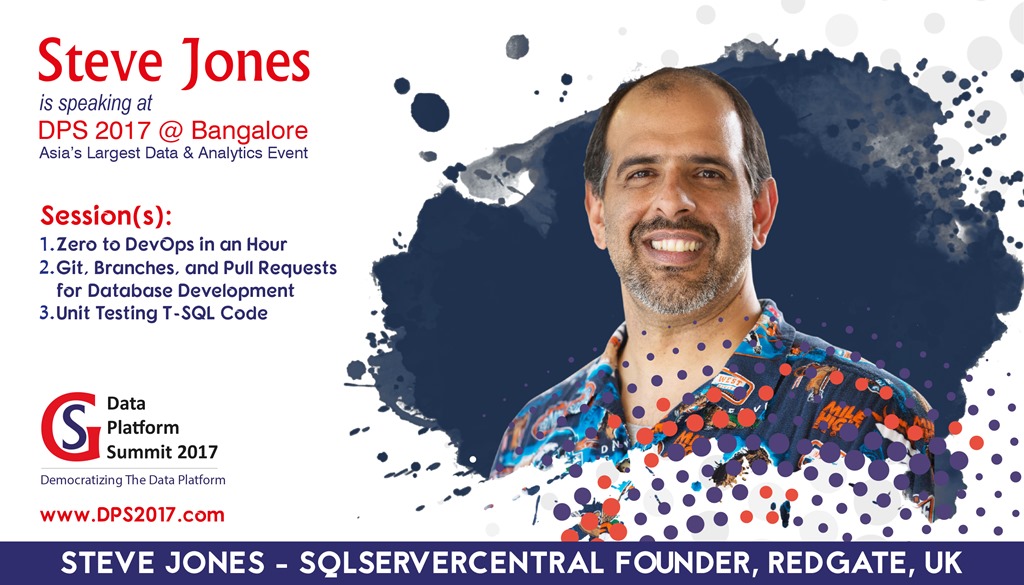
    I’m off in a couple days to India for a week of vacation and then the 2017 Data Platform Summit. This is my first time attending, and I’m excited to go. A new country to visit and present in.

    Print

    In addition to the sessions listed above, I’ve got a pre-con on Aug 15 on Building a Database DevOps process, and there are a few chalk talks as well. All in all, a busy week for me.

    If you’re in the area, consider coming to the event. You can visit the conference site at http://dataplatformgeeks.com/dps2017/

    If you want to see the cast, check out this video: The 2017 Star Cast

    Follow the event on Twitter with the #DPS2017 hashtag as well. See you in Bangalore.

  • Checking Your Database Properties–#SQLNewBlogger

    Another post for me that is simple and hopefully serves as an example for people trying to get blogging as #SQLNewBloggers.

    I was reading Grant’s Database Fundamental Series on Database Properties, and it got me thinking. I think this is a good set of knowledge to have, but building on the properties, can you check them programmatically?

    You can, and here’s how.

    There is a function, DatabasePropertyEX(), that provides you a way to check properties.  You can use this with two parameters to check your database. These parameters are:

    database name – The name of the database, where you can use dbname() for the current database.

    Property name – These are a series of items to check a value for.

    As an example, one of the items Grant mentions is the recovery model. I can check that with this code:

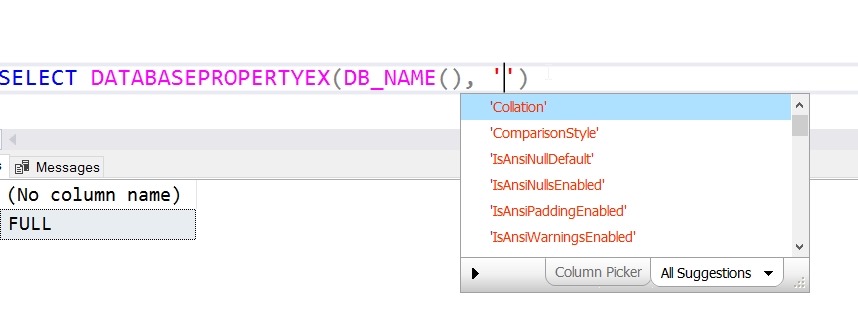
    SELECT DATABASEPROPERTYEX(DB_NAME(), ‘Recovery’)

    In the current database, I get this:

    2017-07-27 14_31_24-SQLQuery8.sql - (local)_SQL2016.TestingTSQL (PLATO_Steve (52))_ - Microsoft SQL

    There are many properties I can check, and I can see a nice list here from SQL Prompt, or I can check the BOL page.

    2017-07-27 14_31_59-SQLQuery8.sql - (local)_SQL2016.TestingTSQL (PLATO_Steve (52))_ - Microsoft SQL

    As nice as it can be to pop open SSMS and look at dialogs, learn to check things programmatically. Once you can do that, you can start to let the system check and alerts you to changes.