Tag: syndicated

  • Azure Labs–Minor Cluster Issues for SQL Server Setup

    During the process of building an Azure lab, I ran into a place where my cluster was not completely validated. I think this happened when a node failed and was re-provisioned, but in any case, when I ran SQL Server setup, the program failed cluster validation and would not install.

    If you find issues, try the command line to start setup. This is what I did. For the first node, I ran setup from the command line like this:

    Setup /SkipRules=Cluster_VerifyForErrors /Action=InstallFailoverCluster

    The same GUI popped up, and I was able to set various settings and save my config file.

    For the other nodes, I ran this:

    Setup /SkipRules=Cluster_VerifyForErrors /Action=AddNode

    Pretty simple, the platform installed and worked fine. Whatever cluster issue I had must have been transient, at least for my lab purposes.

  • DevOps–Fixing Poorly Named Constraints

    I was building some code the other day and kept getting problems in my deployment for a change. The deployment was having issues, and this came down to this statement.

    ALTER TABLE EventLogger DROP CONSTRAINT [PK__EventLog__5E548648B043C0BC]

    The problem was that this was the constraint on one developer’s workstation, but on another laptop, and in QA/Staging/Production, this constraint didn’t exist.

    When we deploy to other environments, such as QA and Production, we will always see the wrong constraint, as most deployment mechanisms look at the name of the object, not the function. Every upgrade script will typically try to run the above statement and then run an ALTER TABLE ADD CONSTRAINT later to add the PK back.

    If we have the correct name of the constraint in QA, the script will work. However, the name is likely different in each environment, so we need to fix this.

    We can find the name of the PK with this script:

    SELECT 
        A.TABLE_NAME, 
        A.CONSTRAINT_NAME, 
        B.COLUMN_NAME
    FROM 
        INFORMATION_SCHEMA.TABLE_CONSTRAINTS A, 
        INFORMATION_SCHEMA.CONSTRAINT_COLUMN_USAGE B
    WHERE 
           CONSTRAINT_TYPE = 'PRIMARY KEY' 
        AND A.CONSTRAINT_NAME = B.CONSTRAINT_NAME
    AND A.TABLE_NAME = ‘EventLogger’

    If we take the results of this, we can use this to produce a drop script. Here’s one way to do this. We’ll store the name of the constraint in a variable and use the EXEC() statement to execute some dynamic SQL. We then can execute the ADD CONSTRAINT with a new name later in the script.

    DECLARE @s VARCHAR(200)
    SELECT @s = A.CONSTRAINT_NAME
    FROM 
         INFORMATION_SCHEMA.TABLE_CONSTRAINTS A, 
         INFORMATION_SCHEMA.CONSTRAINT_COLUMN_USAGE B
    WHERE 
            CONSTRAINT_TYPE = 'PRIMARY KEY' 
         AND A.CONSTRAINT_NAME = B.CONSTRAINT_NAME
    
    AND A.TABLE_NAME = 'EventLogger'
    
    EXEC('alter table EventLogger drop constraint ' + @s)
    GO
    /*
    Other work
    */
    ALTER TABLE dbo.EventLogger ADD CONSTRAINT EventLoggerPK PRIMARY KEY (LogId)

    This is the type of DevOps change that I would release a table at a time, slowly cleaning up the constraint names. This will smooth your process and increase the reliability of your deployments.
  • SSoL: Where are my data and log files?

    I don’t think most of us need to know Linux, but if you end up managing a system, it’s good to have a little idea of how to get around. This is a short series of posts as I remember the skills I used to have back in university.

    This is easily documented, and once you start working, you’ll learn this, and it is documented, but after a few weeks when I actually go into a Linux VM, sometimes I forget. Most of the time I connect with SSMS, and it’s just another server.

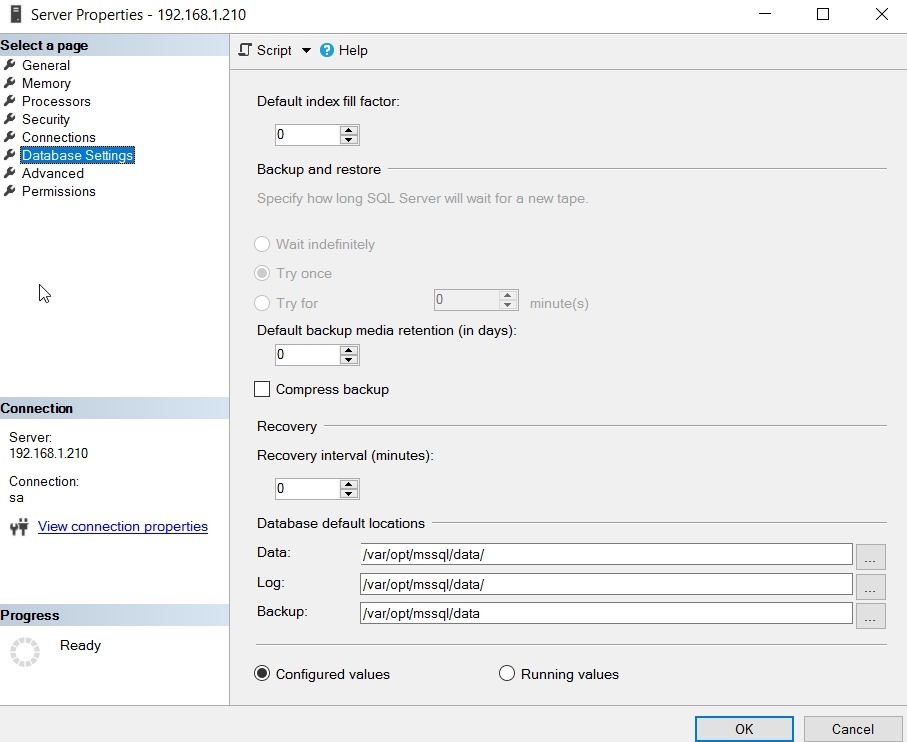
    Data and log files are stored in /var/opt/data. You can see this in SSMS by selecting the properties of the server instance.

    2017-06-15 11_21_18-Server Properties - 192.168.1.210

    If you check the Files tab in a database properties, you’ll also see this:

    2017-06-15 11_22_41-Database Properties - AlwaysEncrypted

    You can also get this in Linux by starting the file manager as root. In a terminal type:

    sudo nautilus

    and enter your password. Then browse to the folder (computer/var/opt/mssql/data) as shown here:

    2017-06-15 11_19_11-Ubuntu 64-bit SQL Server .210 - VMware Workstation

  • FizzBuzz–#SQLNewBlogger

    Another post for me that is simple and hopefully serves as an example for people trying to get blogging as #SQLNewBloggers. This is also a part of a basic series on git and how to use it.

    There’s been a programmer test that was used for awhile to see if a simple program could be constructed. It’s FizzBuzz, after a kids game, and designed to see if someone knows some logical program construction.

    The test is to produce a list from 1 to 100 and for multiples of 3, write “Fizz”, multiples of 5 produce “Buzz” and multiples of both produce “FizzBuzz”. This means you get:

    2017-07-06 10_18_44-SQLQuery1.sql - (local)_SQL2016.WideWorldImporters-RR (PLATO_Steve (64))_ - Micr

    It’s a simple test, but I wonder how long it would take you to write it in T-SQL? It took me about 2 minutes.

    Give yourself a little quiz today. For a challenge, also produce this in PoSh or some other language. I took about 5 minutes in PoSh, mostly because I had to look up some syntax.

    In case you think this doesn’t matter, I agree with Jeff Atwood. I’d like to look at someone’s code before I interview them for development. They should have some public code, maybe something they recommend.

    SQLNewBlogger

    If you’re looking for a blog topic, show us you can write this code.