Tag: syndicated

  • PowerShell $env Variables

    I was playing with containers the other day, reading a Simple Talk article on the topic, and noticed the code in PowerShell (PoSh) used the $env:xx syntax for variables. I know I’ve seen this before, but for some reason this struck me as something I knew little about.

    I decided to search a bit. One of the first links was from WindowsITPro, and they had some great code: Get-ChildItem ENV:. When I run that, I get lots of information:

    2017-06-14 14_59_52-powershell

    There are more items, but there are some interesting ones that I think could be useful for me, especially with automation. I have a OneDrive path, my home path, the Username, and more.

    I know I’ll never remember most of these, but really I just need to remember one: Get-ChildItem ENV:

  • T-SQL Tuesday #92–Hard Lessons

    A quick post, written last week as I’m relaxing in the mountains.

    This month the topic is lessons learned the hard way, from Raul Gonzalez. It’s interesting, and certainly one where I have experience. I make mistakes regularly, though I tend to fix them.

    You can read more about T-SQL Tuesday and learn how to participate, or even respond to old prompts at tsqltuesday.com.

    A Hard Lesson in Preparation

    I worked for a financial services company at one point, managing the live systems as well as performing database development. I had a few people working for me, some in each area, and we had contracts with a number of clients. Quite a few of these contracts specified a yearly DR test at a remote facility.

    The first year I was there, we packed up tapes and documentation, carpooled for 4 or 5 of us as if this were a disaster, and started rebuilding systems. Our contractor supplied xx servers as per our contract, and we had to start from scratch.

    We didn’t do well, and couldn’t get our web app or client server apps running completely. The db restored, but the system and docs were out of date. I knew this, and we updated some things, but we didn’t take the process seriously.

    A few months later our largest client was unhappy. Since we couldn’t get the website running, they wanted another test. At their site.

    Myself and another were chosen to fly to their site, shipping out spare servers and software. We had to wipe the drives and rebuild the system from scratch. Since the two of us had been at the DR test, we assumed we’d learned enough to do this in two days, sure we could rectify all the mistakes from the test team.

    We couldn’t. After two days, we didn’t have everything running, with too many dependencies and issues from various web components. Our developers had been running wild, with admin access to the webserver and database server, resulting in wonderful unique, snowflake servers that were hard to reproduce.

    Inadequate preparation, as well as poor security for years, contributed to the failure. I did get the database working, but that didn’t matter since this client used web access only. I had to take a large portion of the blame since I managed systems, and our company paid a penalty.

    It was embarrassing for me, personally and professionally. I hadn’t done a good enough job being ready for a disaster. This did server to motivate me to start cleaning up the systems and ensuring we could rebuild a new web server if needed, but it was a hard, and expensive lesson, to learn.

  • Bash on Windows

    With SQL Server coming on Linux, some people will want to learn a bit of Linux. Or perhaps they need to get re-acquainted with the OS, which is my situation. I grew up on DOS, but moved to Unix in university. I’ve dabbled in Linux over the years, but with no real use for it over Windows, I abandoned it a decade ago.

    Now, I’m trying to re-learn some things as I play with SQL Server on Linux.

    Recently I saw a quick video from Scott Hanselman on the Bash subsystem in Windows. I actually first saw this live at the Build 2016 announcement, but when it was added in Beta to Windows 10, I didn’t add it. I’ve been meaning to, but hadn’t.

    Until today.

    The video shows, but there are two things to do, well, really 3.

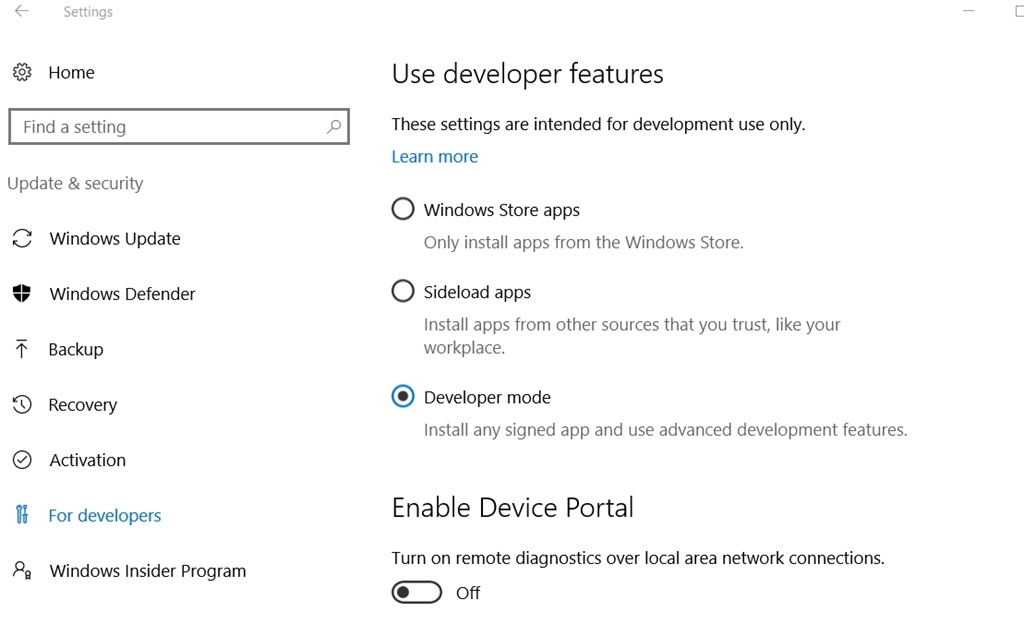
    First, enable developer mode. In the W10 Control Panel, type “developer” and you’ll find under Update and Security, a “For Developers” option. I’d enabled “developer mode” before, so that was done for me, but check that box (shown below).

    2017-06-28 16_34_18-Settings

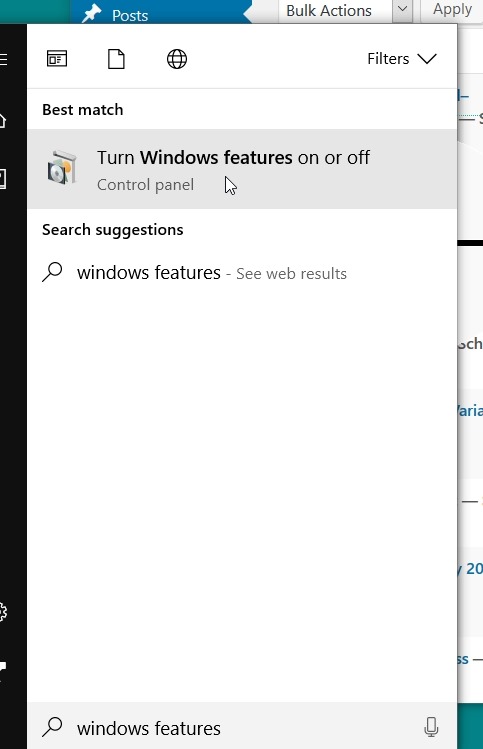
    Next, hit the Windows key and type “Windows features”. You’ll get this:

    2017-06-28 16_34_56-Photos

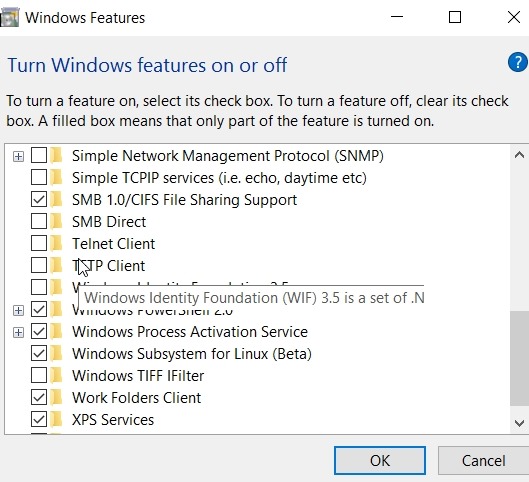
    Click that, and in the dialog, scroll down. You’ll find the Windows Subsystem for Bash. Check it.

    2017-06-28 16_35_32-Windows Features

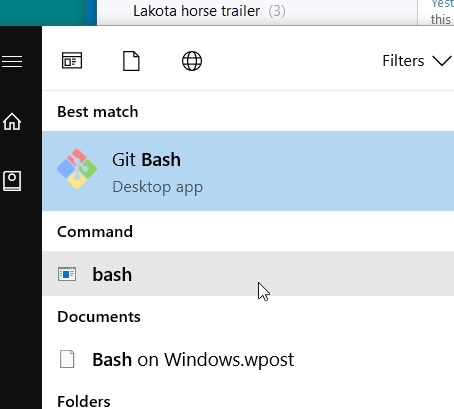
    Then Windows will tell you to reboot, so do that. After you reboot, type “bash”.

    2017-06-28 16_40_02-Editorials - sjones@dkranch.net - Evernote

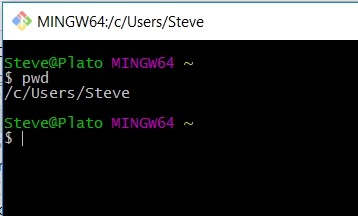
    The command “bash” will open the shell. Once you do that, you have bash running.

    2017-06-28 16_40_25-MINGW64__c_Users_Steve

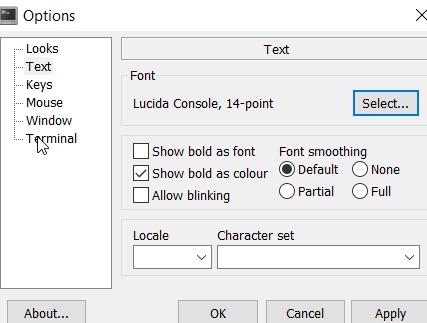
    There are options here, though I’m sad this doesn’t integrate into my ConEmu terminal. Maybe soon. The first thing I did was raise the font, because, well, I’m old.

    2017-06-28 16_40_49-Options

    I’ll have to play around, and get familiar with bash again. I won’t use it a lot, but it could be handy when working with SSoL and needing to SSH or otherwise connect to that vm without firing up rdp or my VMWare console.

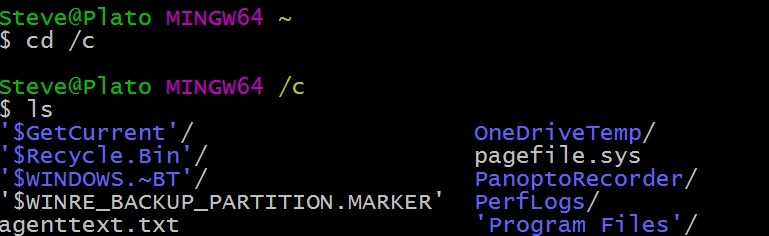
    I don’t remember lots of commands, but I did manage to get to my C: drive.

    2017-06-28 16_44_19-MINGW64__c

  • Becoming an MVP

    “Climb the mountain to see the world, not be seen by the world.”from Tim Ford.

    This past July 1 was the renewal date for a number of Microsoft MVPs. The program has changed in the last year, moving from a quarterly nomination/renewal to a monthly award. The first of every month moving forward will see new MVPs awarded. All MVPs are now renewed on July 1.

    For existing MVPs, we had a bit of a change, and some of us were up for renewal this year, and some next year. I happened to move from my Jan 1 date to next year, so that’s when I’ll find out if I am going to be recognized by Microsoft again.

    There were a few surprising changes last week, when a few people were not renewed as MVPs. I expect that the bar for being an MVP has been raised, with so many more individuals participating in blogging, speaking, software, and more. The level of community participation in 2015 might not have been enough in 2016 to be renewed.

    How do I Become an MVP?

    “Climb the mountain to see the world, not be seen by the world.” 

    As the quote notes, you should tackle the challenge without any concern about whether or not the world, or Microsoft in this case, notices.

    Help the community publicly. You can do this in many ways:

    • Write technical articles
    • Speak at technical events
    • Organize events
    • Build OSS software
    • Answer questions online

    There are any number of ways to be a community person, but do so because you want to. Become the best technical community person you can, and you won’t be sorry.

    If you meet some bar, and are nominated (feel free to ask others to nominate you), then you may be awarded, but you should help others because you want to. Not because you expect to be repaid with an MVP award.

    Help others because you want to help others, not because someone will see you helping.

    Once an MVP, always an MVP

    The people recognized by Microsoft are chosen based on their community contributions in a period of time. However, these are smart people who are capable, helpful, and friendly. They will always be an MVP to me, and likely always willing to help. They continue to learn, teach, and expand their knowledge of technology.

    They can always remember that they were recognized as an MVP by Microsoft, even if they aren’t today.