Tag: syndicated

  • MSBuild and Azure SQL Database

    I saw a report of a problem building a database with ReadyRoll in Azure SQL Database. This person wanted to use a local Shadow database in LocalDB and target an Azure SQL Database. I hadn’t build that config, so I decided to give it a try.

    Update: ReadyRoll has become SQL Change Automation,and this no longer applies. Contained users are supported with SQL Change Automation projects, which will solve this issue.

    I ended up with this:
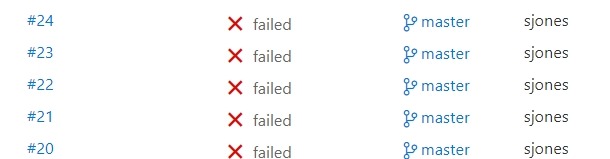
    2017-07-20 10_56_01-builds_azure-CI summary

    which was making me a little crazy. I’ve had most builds work really well. I tried a number of things, but kept getting a few items in the build. There were login errors or network errors, both of which bothered me since I could manually log in with SSMS from the same machine as my build agent.

    I suspected a few things here, one of which was the use of named pipes for the Shadow database and TCP for Azure SQL Database.

    Eventually, I decided to fall back with msbuild, ignoring VSTS, and make sure all my parameters were correct. I started here:

    C:\Windows\Microsoft.NET\Framework\v4.0.30319\msbuild builds_azure.sqlproj /p:TargetServer=”dkranchapps.database.windows.net” /p:TargetDatabase=”SSBuilds” /p:TargetUsername=”dlmdeploy” /p:TargetPassword=”astrongpassword” /p:ShadowServer=”(Localdb)\ShadowSSBuilds7″ /p:GenerateSqlPackage=True /p:SkipDriftAnalysis=True /p:ShadowUsername=”shadowuser” /p:ShadowPassword=”someotherpassword”

    I promptly got a VS build started and then this error:

    C:\Program Files (x86)\MSBuild\ReadyRoll\ReadyRoll.Data.Schema.SSDT.targets(513,5): error : An error occurred while attempting to
    create a patch script: Login failed for user ‘dlmdeploy’. [E:\Documents\Visual Studio 2015\Projects\builds_azure\builds_azure\buil ds_azure.sqlproj]
    Done Building Project “E:\Documents\Visual Studio 2015\Projects\builds_azure\builds_azure\builds_azure.sqlproj” (default targets)
    — FAILED.

    I verified the password in SSMS, verified the firewall and tried again. Same issue. Then I tried this:

    > sqlcmd -S dkranchapps.database.windows.net -U dlmdeploy -P “AStrongPassword”
    Sqlcmd: Error: Microsoft ODBC Driver 13 for SQL Server : Login failed for user ‘dlmdeploy’..

    Hmmm, that’s interesting. Why would this work in SSMS and not SQLCMD? My first thought was some driver setting, maybe ADO v ODBC, but that seems silly.

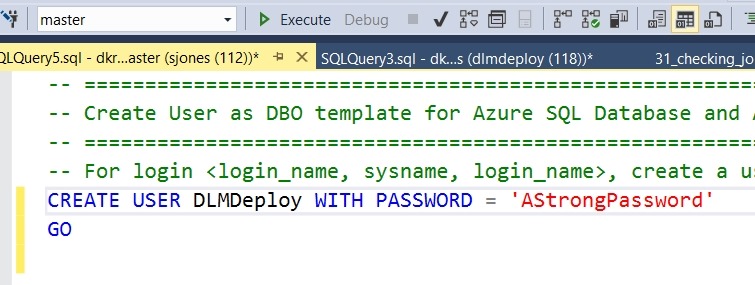
    Eventually I suspected some mismatch in databases, and found this post. It confirmed what I was about to test. I needed the same login/password in the master db as in the particular db I was using.

    I used SSMS and connected to master to create a user there.
    2017-07-20 11_06_42-SQLQuery5.sql - dkranchapps.database.windows.net.master (sjones (112))_ - Micros

    Once I did this, the build ran fine, both in the command line and in VSTS.

    A couple lessons here. First, in Azure, you connect to databases, but since some processes (like MSBuild) might connect to a default, you need the user in your db and in master. If you have multiple databases (as I do), I’d suggest separate accounts for building in each db.

    Second, work with the command line first. That’s the key. Once you have things working from there, it’s easy to move to a tool and automate your command line instructions.

  • SSoL: Adding disk space with a repartition

    I don’t think most of us need to know Linux, but if you end up managing a system, it’s good to have a little idea of how to get around. This is a short series of posts as I remember the skills I used to have back in university.

    While working with some SQL Server 2017 tests, I ran out of disk space. I tend to size my VMs around 40GB, and that works for some things, but I’ll run out of space.

    2017-06-15 10_09_14-Ubuntu 64-bit SQL Server .210 - VMware Workstation

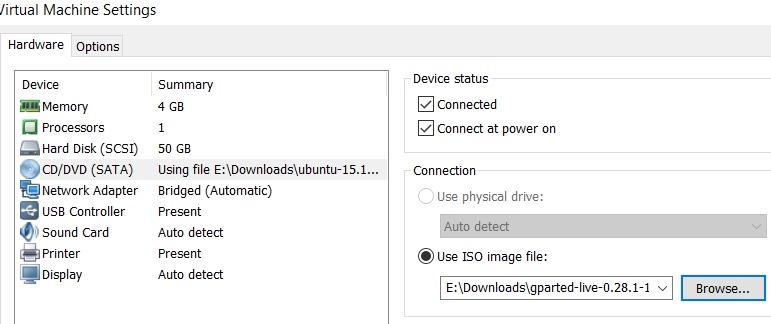
    I needed to expand the VMWare disk. That doesn’t mean Linux sees the space directly, and I had to figure out how to make the partition bigger. I could have added another disk, but I wanted to work through this process. I learned I needed to have an inactive partition, so I download gparted on a live cd and booted to that.

    2017-06-15 11_32_50-Virtual Machine Settings

    Next I started working through a few of the tutorials on Linux partitions. This one on AskUbuntu was helpful, as I ended up having to move my swap partition to the end of the disk.

    2017-06-15 11_42_23-Ubuntu 64-bit SQL Server .210 - VMware Workstation

    GParted isn’t completely intuitive for a Windows guy, but I muddled through it.

    Once I had the operations I wanted, I applied them, and partitions moved.

    2017-07-09 10_57_51-Ubuntu 64-bit SQL Server .210 - VMware Workstation

    I rebooted, and checking the main partition properties, I had space.

    2017-07-09 11_04_59-Ubuntu 64-bit SQL Server .210 - VMware Workstation

    Now, back to SQL Server on Linux.

  • Backup Log to Nul– #SQLNewBlogger

    Another post for me that is simple and hopefully serves as an example for people trying to get blogging as #SQLNewBloggers. This is also a part of a basic series on git and how to use it.

    There are times when you might be working on your demo/lab system and you generate a lot of tranasaction log activity. This isn’t data you want to save, so perhaps you want to remove the activity without saving it.

    There are a few choices:

    1. Run a normal log backup to a file, then delete the .trn file.
    2. Switch to simple mode
    3. Run a log backup to nul

    The first one is easy, but it’s a pain. I have to go to explorer, or open a VM, delete the file once I find it. The second one is what I’d suggest. In fact, as soon as you install SQL on a lab system, set model to Simple.

    The third item is valid, and I ran across this recently. When you use this syntax, make sure you use “nul” and not “null”. We are trying to send to /dev/nul, which is nowhere. If you backup here, then nothing happens. You can use this command:

    BACKUP Log sandbox2 TO DISK = N’nul’

    This will run a backup, and discard all of the backup data. When I say discard, I mean it’s not written anywhere.

    However, this is a real backup. It’s marked as such. This breaks a log chain, and you can do this with a full database backup as well, which means you really need another full backup after this to reestablish a baseline.

    Again, I ran across this, but it’s not what you want to do. If you need to clear the log, use

    ALTER DATABASE xx SET RECOVERY SIMPLE

    ALTER DATABASE xx SET RECOVERY FULL

    and take a full backup.

    More thoughts from Gail Shaw.

  • Using Test-DbaOptimizeForAdHoc

    I really like the dbatools project. This is a series of PowerShell cmdlets that are built by the community and incredibly useful for migrations between SQL Servers, but also for various administrative actions. I have a short series on these items.

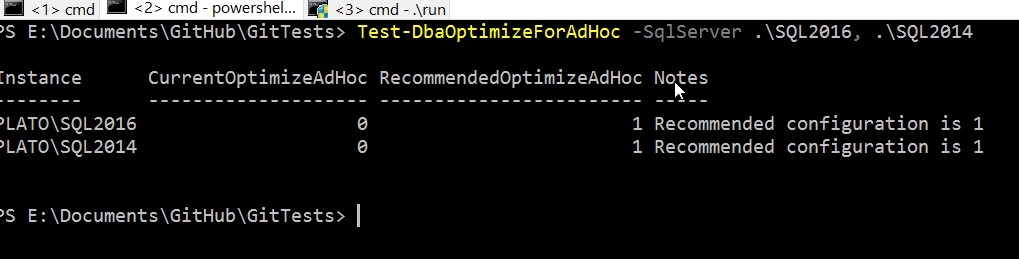
    One of the cmdlets is Dba-OptimizeForadHoc, which is designed to help you determine if this particular setting is enabled on your servers. There are plenty of ways you could get this data from sp_configure or PoSh, but this is a setting you might want to check in a hurry when there are potential performance issues.

    The cmdlet is easy to use and takes a –SqlServer parameter where you can list multiple instances. There are options for credentials that can be used for a connection, just remember that this credential needs to have rights to read the setting.

    2017-07-07 18_32_11-cmd - powershell

    If this cmdlet isn’t useful, check out the full list. I bet you find some that you will want to try out.