Tag: syndicated

  • DevOps – Downloading a File from the Internet with PoSh

    One of the things we need to do as data professionals is move data files around. Often we’ll get a local path, but in looking for public data sets, I wanted to get a file from the Internet. In this case, a rather large file.

    I could have put the URL in a browser, but the file was slow to load, and while waiting ten minutes or so for the download to complete and doing a “Save As” is quick, it isn’t easily repeatable. Plus, since I needed to get a few files, and might need to do it again, I thought a PoSh download would be better.

    A quick search turned up a few options. I could use System.Net.WebClient, or I could use Invoke-WebRequest. I decided to use the latter because it could use credentials or even parse the file prior to doing some save.

    I just had a simple item, so I used:

    Invoke-WebRequest -Uri “http://labrosa.ee.columbia.edu/millionsong/sites/default/files/AdditionalFiles/unique_tracks.txt” -OutFile “e:\Downloads\unique_tracks.txt”

    I could easily have wrapped this in a function to simulate a copy command, and I may do that at some point. For now, I can drop this in a file, copy/paste, and change a few filenames.

    If this were part of a regular process, such as getting files from a remote web server, I could easily automate this in a task on some server. For now, this is a quick, easy way to get a file from the Internet without a browser.

  • Renaming MDF/LDF Files–SQLNewBlogger

    Another post for me that is simple and hopefully serves as an example for people trying to get blogging as #SQLNewBloggers.

    I would guess many people would run into this situation at some point. A developer or DBA creates a database, then decides to rename it, but the logical and physical names aren’t correct. This post will look at how to do this. A couple of notes and then the process below.

    This might not matter to many of you, but in development, I sometimes find I’ll rename a database and then attempt to recreate (or deploy) a new database with the old name. The mdf/ldf files don’t match, and I realize it’s because I’m using defaults.

    However, I’d also say this is an issue in a DR situation. If the filenames don’t seem to match, someone might restore the wrong database or the wrong files. Or worse, think the can delete a file on the file system because there’s no database with that name.

    Renaming the Database

    This is easy. Right click, select Rename.

    2017-06-07 09_38_49-

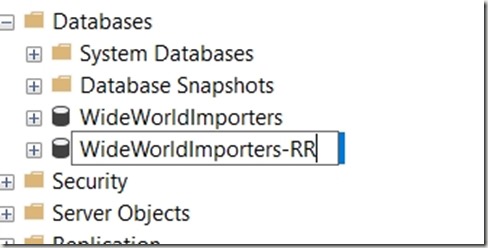
    Then type the name name. In this case, I’m going from WideWorldImporters-SSDT to WideWorldImporters-RR.
    2017-06-07 09_38_59-SQLQuery1.sql - (local)_SQL2016.msdb (PLATO_Steve (52)) - Microsoft SQL Server M

    That renames the database, but what about the files? If I run this:

    sp_helpdb ‘WideWorldImporters-RR’

    I get this:

    2017-06-07 09_42_00-SQLQuery1.sql - (local)_SQL2016.msdb (PLATO_Steve (53)) - Microsoft SQL Server M

    Not really what I want. I need these mdf/ldf files to be changed. How do I do this?

    I can get to the properties for the database and select the “Files” pane to get a list of files. Here I can change the logical name by clicking that field and typing a new name. I’ve done that here.

    2017-06-07 09_43_29-Database Properties - WideWorldImporters-RR

    However, if I scroll to the right to the File Name column, I can’t change anything.

    2017-06-07 09_43_44-SQLQuery1.sql - (local)_SQL2016.msdb (PLATO_Steve (53))_ - Microsoft SQL Server

    What I need to do is use the ALTER DATABASE command with the MODIFY FILE command. I need to do this twice.

    1. Change the physical file name
    2. Change the logical file name

    Let’s do that. Here’s the code to change the physical name.

    ALTER DATABASE [WideWorldImporters-RR]
     MODIFY FILE
     (   NAME = 'WideWorldImporters-SSDT_Data',
         FILENAME = 'C:\Program Files\Microsoft SQL Server\MSSQL13.SQL2016\MSSQL\DATA\WideWorldImporters-RR.mdf'
     );

    I need to repeat this for the log file and the MOT file. Once I change the names, I get this message.

    2017-06-07 09_48_38-SQLQuery1.sql - (local)_SQL2016.WideWorldImporters-RR (PLATO_Steve (53))_ - Micr

    This is key. If I were to restart my system now, when the database attempted to start and go through recovery, the files would not have been found. Now, I need to change the physical file names.

    To do that, I first need to take the database offline.

    USE master
    go
    ALTER DATABASE [WideWorldImporters-RR] SET OFFLINE

    Then I go to the location of the physical files and rename them in Windows Explorer.

    2017-06-07 09_53_35-DATA

    Now I bring the database online.

    ALTER DATABASE [WideWorldImporters-RR] SET ONLINE

    Once that’s done, I can then use ALTER DATABASE again to change the logical file names.

    ALTER DATABASE [WideWorldImporters-RR]
      MODIFY FILE (NAME='USERDATA_612671E2',
                   NEWNAME = 'WWI_UserData'
                   );


    And run a final sp_helpdb.

    2017-06-07 09_54_13-SQLQuery1.sql - (local)_SQL2016.master (PLATO_Steve (53))_ - Microsoft SQL Serve

    SQLNewBlogger

    An easy task, with a touch of research in Books Online, but not too difficult. This took me about 10 minutes to do, and since I realized this was a good skill, I took screenshots and saved code as I went.

    Then about 10 minutes to write this up.

  • T-SQL Tuesday #91–Early DevOps

    tsqltuesdayThis month the T-SQL Tuesday invitation is from Grant Fritchey, my colleague at Redgate Software. Surprise, surprise, the topic is DevOps.

    I write and talk about this a lot, but for this month I’ll look back at DevOps for me in 2001.

    If you want to participate in the blog party, you need to publish on the second Tuesday of the month, GMT time. You can see the invitations at tsqltuesday.com.

    2001, A DBA’s Journey

    I started working for a small startup in 2001. I was the DBA (dev and production) with 4-5 developers. Eventually we grew to 10 developers, a couple QA people, and a UX person. Our goal was to release code every Wednesday night, and developers would work from Tues-Mon am on that week’s changes.

    The initial plan when I started was to get together with the lead dev and produce the scripts to upgrade our web application as well as the database. Early on we had a small system, so it was a few hours on Monday afternoon putting together a script for the QA server. Inevitably we’d make changes if QA found issues, and then Wednesday night we’d go into the office and usually spend a few hours deploying and fixing things. Often we had another developer or two with us to ensure that we could get the changes out.

    Over a few months we started to try and smooth our process. We talked about the issues, and started small. First with version control, Visual SourceSafe at that time. We’d get everyone to check in changes, which let us more easily determine what had changed that week.

    We also talked about what made life easier for the lead dev and me. How could we package code to easily ensure it gets deployed. For the database, this meant ensuring all files were named easily and branched to a folder.

    Ultimately, the technical challenges were few. A few scripts that automatically packaged changes for us and deployed them. However, the biggest challenge was cultural. Getting all the developers to think forward about what was needed to get code to production and slightly alter their behavior. We also had to break habits of “fixing” code in QA. We had to learn to reset QA, change our scripts in version control, and then redeploy.

    Sharing information, communicating, and adhering to a consistent process for deployments, ensuring that we practiced our production deployment on QA, helped us move to a release process that consisted of a phone call and a few minutes instead of a late night at the office.

    DevOps works, but you have to work at building a process for your environment.

  • VSTS–Changing the Default Build Queue

    I wrote recently about the Release agent using the hosted queue as the default, which is sometimes a problem. The Build process has the same issue, though the way you change things is different.

    In a build, you see a set of tasks with various menu items across the top, as shown here.

    2017-06-01 19_48_11-Build-CI - Visual Studio Team Services

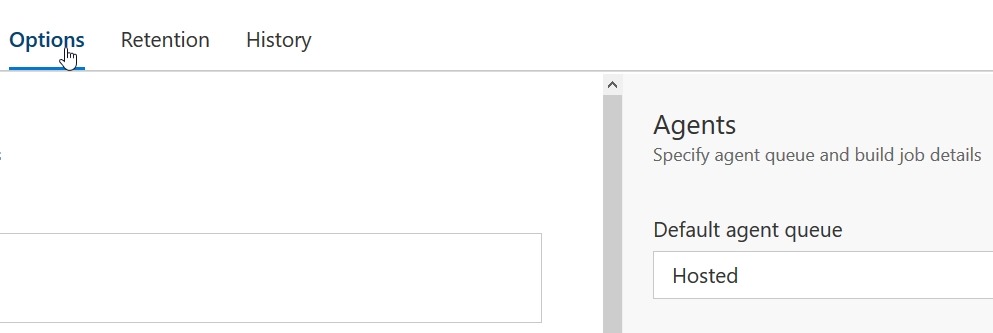
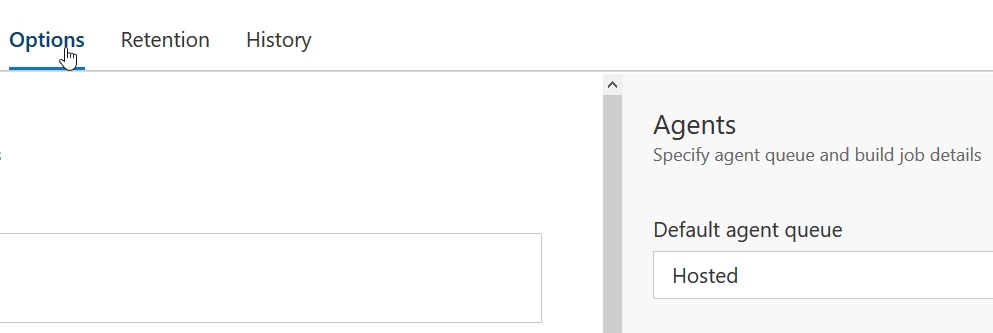
    If you click on Options, which will then be underlined, on the right side the Agents options appear. The default, as with releases, is the hosted agent. Change this to another pool if you want local builds.

    2017-06-01 19_48_19-Build-CI - Visual Studio Team Services

    Microsoft makes this the default for a couple reasons. One, it’s easier. No need to install an agent, which might be an issue for some people. I think it’s simple, but for some teams, you might not want this.

    The other reason is that while you get 240 minutes per month, if you’re like me and built often, you can blow by this. Also, I have machines available, so I’d rather build locally, and I wish I could make this a default.

    Microsoft wants to make money, and that’s fine. I like the service, and in a commercial environment I’d weight the cost here v purchasing something like TeamCity + add-ons, and then make a decisions. Since I dislike uncertainty, and not knowing the costs, I lean towards local builds always. YMMV.