Tag: syndicated

  • VSTS– Hosted Agent is the Default for Releases

    In keeping with the idea I don’t want this to get out of date, this is VSTS as of Jun 1, 2017. If your screen looks different, find a different article.

    I was setting up a test the other day using VSTS (Visual Studio Team Services) and once had something bite me (again). This has happened a few times this year as the service has evolved, but it is one of those things that I keep having to change.

    Here’s a new Release definition, where I start with an empty process. I clicked “New Release Definition” and then selected an Empty task, hooking this up to my current CI process.

    2017-06-01 16_32_14-New Empty Definition 01-Jun - Visual Studio Team Services

    Usually I add tasks, and then create a release and execute it. Since I mostly work with databases, I’m usually releasing to a local SQL Server instance and want to use my local agents. I have separate ones running on my desktop and laptops, so I can easily demo releases in different environments.

    However, when I’ve done this, usually things fail at first. If I’m not paying attention, I won’t notice my build agent looking like this:
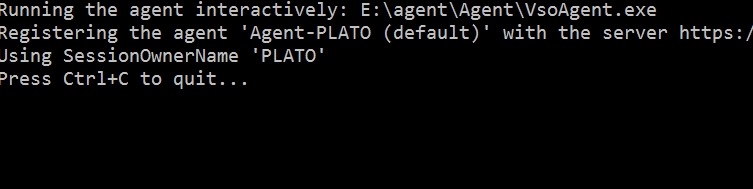
     2017-06-01 16_38_09-cmd - RunAgent.cmd

    That’s the screen showing nothing happening with my agent.

    Grouping Tasks in VSTS

    Earlier this year, the release process in VSTS changed to allow us to group tasks. I can now add different groups of phases, which I stumbled upon by clicking the arrow next to “Add Tasks”. This is a UI Fail because the arrow in other parts of VSTS is linked to the text to the left (like the Add environment area).
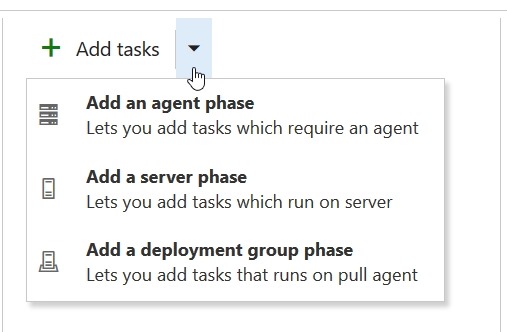
    2017-06-01 16_39_23-New Empty Definition 01-Jun - Visual Studio Team Services

    I stumbled on this one day, thinking the arrow let me add tasks, but I accidently added a new agent phase. By default, we have a single agent phase, but clicking the arrow allows more.

    What’s also interesting, and not intuitive to me, is that if I click on the “Run on agent” area, I get settings to the right. This is different than the old release section, which had the properties as a global item at the top.

    2017-06-01 16_41_54-WWI_SSDT - Microsoft Visual Studio

    This is where I need to change to the agent queue, in this case, the default for my desktop.

    2017-06-01 16_44_24-New Empty Definition 01-Jun - Visual Studio Team Services

    This might not be a big deal, and I’m sure lots of people are happy to use the hosted agent. I’m always wary of costs, so I try to avoid spending compute dollars in Azure when I don’t need to, and this is a place I want to avoid spending $$.

    Hopefully, after writing this, I’ll remember to set the queue for my future demos the first time. Now if I can just get the VSTS people to give me a “default” setting I can change…

  • Restore a BACPAC–#SQLNewBlogger

    Another post for me that is simple and hopefully serves as an example for people trying to get blogging as #SQLNewBloggers.

    I needed to get the WideWorldImporters sample database for a project and noticed that there was a BACPAC available. I downloaded it and needed to restore this as a database. At least, that’s what many people would think.

    However, if you go to the restore dialog, and select Device and then pick your location, there’s no filter for a .bacpac. In fact, if you choose one, it won’t restore. You’ll get the “no backupset selected” error.

    2017-05-30 08_51_40-Locate Backup File - PLATO_SQL2016

    How do you restore a .bacpac? Well, you import it. If you right click the databases folder in SSMS, you’ll see this:

    2017-05-30 08_54_40-SQLQuery16.sql - (local)_SQL2016.model (PLATO_Steve (60))_ - Microsoft SQL Serve

    The BACPAC is a DACPAC with data, in other words, a data-tier application with the data included. Once we click this, we get a wizard. Of course, there’s a introduction screen.

    2017-05-30 08_57_17-Import Data-tier Application

    Then we get to choose the file, or import one from Windows Azure storage. I’ll limit the image here to the relevant parts. You can see below I’ve selected the file I downloaded.

    2017-05-30 08_57_33-Import Data-tier Application

    Once I do that, the next screen allows me to set the database name and the paths. I shot this screen, and then changed the name, but forgot to reshoot. However, this is where you’d set the paths for files and change the name of the database.

    2017-05-30 08_58_30-Import Data-tier Application

    You get to verify your settings. I know many people blow by this screen, but make sure you double check this is what you want. Notice I moved the data, but not the log. I went back and fixed things, again, forgetting to reshoot the image.

    2017-05-30 08_59_25-Import Data-tier Application

    Once you click Finish, the import begins. This can take time, depending on the system you use.

    2017-05-30 08_59_31-Import Data-tier Application

    However, you get detailed progress. As you can see, I get a lot of details on what happened. There’s plenty more below this.

    2017-05-30 09_06_28-Import Data-tier Application

    But it worked, and I have my data.

    2017-05-30 09_07_28-SQLQuery1.sql - (local)_SQL2016.WideWorldImporters (PLATO_Steve (59))_ - Microso

    You should practice this. It’s simple, but know how to import a BACPAC. You never know when you might get one and someone is at your desk. Having to google to import a simple database is a little embarrassing.

    SQLNewBlogger

    This is a simple post, one that took longer to write than setup and perform, but a good skill to showcase. If you’re looking for something to blog, create a bacpac on another instance and import it into your local SQL Server.

  • Quitting VIM

    I saw this post from Joel Spolsky lately, noting that Stack Overflow has been helping 1 million developers exit VIM. It’s a funny post, but one that has some truth in it. I’ve gotten into VIM, almost always from git, but sometimes in Linux, and I often Google the exit.

    Fortunately I’ve learned a few things and  usually remember :wq.

    Other do too, since I actually didn’t need to Google that during a presentation where I committed without the –m, and got into VIM. I actually remembered :wq, posted just “:wq” on Twitter, and a few people laughed, since it’s maybe the one VIM command quite a few people need to remember.

    Hopefully just typing this post will tatoo that sequence into my head so I never end up reading the command list on Stack Overflow again.

    If you want to learn more about VIM, here’s a cheat sheet.

  • Save on IT/DevConnections this fall

    For the first time in many years, I won’t be at IT/DevConnections this fall.  I’m disappointed to miss the event, but I had other commitments around this time when I heard about being chosen as a speaker and this would be the fourth event in four weeks. That’s a bit much, and so I decided to pull out Sad smile

    However, this is another of those great shows where you can learn about a number of different technologies besides SQL Server. I’ve like having the variety, and seeing different perspectives on technology, data related or not.

    You don’t have to miss IT/DevConnections, however, and you can go for a discount for the next week. Register today and use the code MDS17 to save until June 1.