Tag: syndicated

  • Restore to a point in time–#SQLNewBlogger

    Another post for me that is simple and hopefully serves as an example for people trying to get blogging as #SQLNewBloggers. This is also a part of a basic series on git and how to use it.

    One of the things I had to show recently was a restore to a point in time, and I needed to actually lookup syntax. That’s a good excuse for a #SQLNewBlogger post, so here we go.

    When you restore, the default is to restore to the end of the backup file, whether full, diff, or log. In the latter, you have the option to stop early, and only restore part of the log. In doing this, you have two choices:

    • restore to a time
    • restore to a marked transaction

    Relatively few of us use marked transactions, but they can be useful. However, this post looks at time.

    Let’s do a few things and show how this works.

    Setup

    The first thing I need to do is get a database, with some data. I’ll create a database, add a table with a row, and then back up the database.

    CREATE DATABASE RestoreTime;
    GO
    USE RestoreTime
    GO
    CREATE TABLE BackupLog
    ( logdate DATETIME2 DEFAULT SYSDATETIME()
    , logmessage VARCHAR(200)
    )
    -- add a message
    INSERT dbo.BackupLog
            ( logdate, logmessage )
        VALUES ( SYSDATETIME(), '1st Log, before a backup' )
    GO
    BACKUP DATABASE RestoreTime TO disk = 'RestoreTime.bak'
    GO

    Next we want to add some data to the table and get some log records. In this case, I’ll use a simple loop to add a new row to the table every second. This gives me some points in time to look for and use to show I  am restoring to a point in time.

    DECLARE @seconds INT = 10,
            @starttime DATETIME2 = SYSDATETIME();
    
    WHILE (SYSDATETIME() < DATEADD( SECOND, @seconds, @starttime))
     BEGIN
      INSERT dbo.BackupLog
            ( logdate, logmessage )
        VALUES ( SYSDATETIME(), 'Log record entered at ' + CAST(SYSDATETIME() AS VARCHAR(30)) )
      WAITFOR DELAY '00:00:01'
     END
    
    GO
    BACKUP LOG RestoreTime TO DISK = 'RestoreTime.trn'
    GO

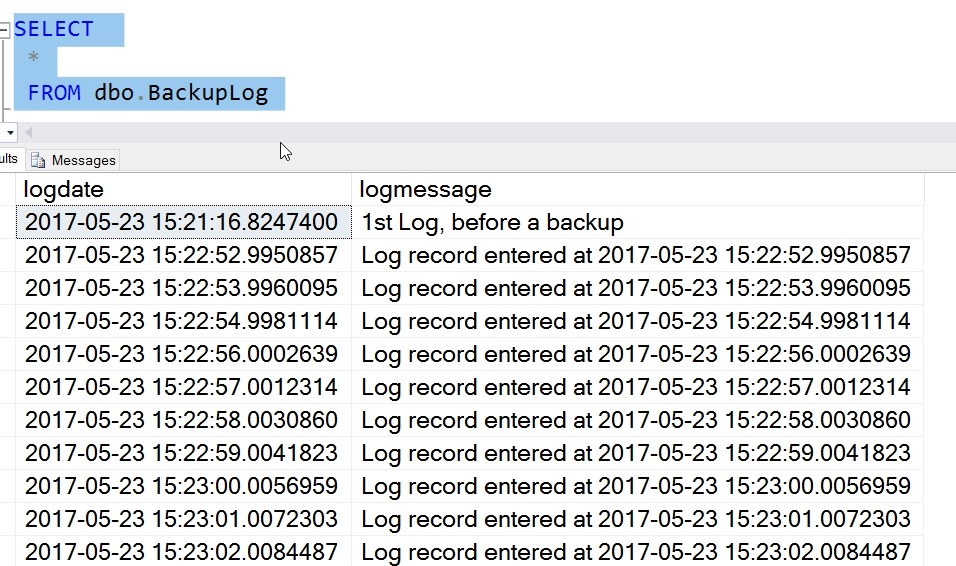
    I’ve added data, and my table looks like this:
    2017-05-23 15_23_12-SQLQuery8.sql - (local)_SQL2016.RestoreTime (PLATO_Steve (57))_ - Microsoft SQL

    My log backup contains all these records. If I restore the full backup and log now, by default I’ll end up in this state, with all these rows in my table. However, what if I want to only get the first 5?

    I can use the STOPAT syntax in my restore. I start by restoring the full with NORECOVERY and then the log. However, in the log, I’ll choose a time that is after row 5, but before 6. In this case, that’s 2017-05-23T15:22:57. Here’s the code:

    USE master
    GO
    RESTORE DATABASE RestoreTime FROM DISK = 'RestoreTime.bak' WITH NORECOVERY, replace
    GO
    RESTORE LOG RestoreTime FROM DISK = 'RestoreTime.trn' WITH RECOVERY, STOPAT = '2017-05-23T15:22:57'
    GO
    USE RestoreTime
    GO
    SELECT 
     *
     FROM dbo.BackupLog

    I have my results below

    2017-05-23 15_31_10-SQLQuery8.sql - (local)_SQL2016.RestoreTime (PLATO_Steve (57))_ - Microsoft SQL

    Only the log activity before this time is restored.

    SQLNewBlogger

    After I’d looked up the syntax, I spent only about 10 minutes setting up the demo and getting this ready. Practice skills and write about it. Show your next employer you are always learning and working.
  • Looking Back at Build–CosmosDB

    Part of a series looking back at Build 2017, going over the 20+ pages of notes I took.

    One of the big announcements at Build 2017 was the release of CosmosDB. This is a rebranding of DocumentDB, the document store in Azure, with some additional capabilities. You can also choose to store as

    • Column-family (columnar)
    • Key-Value
    • Graph

    The service is interesting in that it supports the MondoDB and Gremlin protocols for querying, which should allow some people to consider Azure instead of those platforms. The announcement was interesting from the data perspective. Microsoft focused a decent amount of time on this platform, and certainly people at the conference were very interested in the offering. Quite a few developers were thinking this would replace SQL Server, since it has some nice capabilities.

    One of the big ones is that CosmosDB offers < 10ms latency for reads and < 15ms for writes. They scale up to millions of transactions/sec, and also grow to PBs in size. There are some good guarantees for the database.

    They call it infinite, but that’s a marketing term. There’s a limit, and there certainly may be a limit you’re willing to store in the service. Jet.com was the featured customer and they talked about how much data they used and how they can scale the platform. I’m sure they went with DocumentDB and moved over, but they have their story in the keynote, if you want to watch. They get over 100 trillion, yes trillion, CosmosDB transactions/day. No matter what you do, a trillion of anything is a lot.

    Perhaps the more interesting thing is that Azure is offering five different consistency models in CosmosDB. They are

    • Strong
    • Bound Staleness
    • Session
    • Consistent Prefix
    • Eventual

    I don’t know how well these are supported in other platforms, but I like to see that developers have a choice. I’m not sure how many will understand the trade-offs and implications, and how many will get burned by choosing one over the others, but I’m glad the choice exists.

    They are also saying a money back guarantee. What that means, or how you get money back, is going to be something to see. I haven’t always been thrilled with the disclosure in billing for new parts of Azure services, but perhaps there is going to be some way to request credit, though I would hope that any telemetry that shows issues results in some credit.

    The other good thing is that the SLA is guaranteed across multiple dimensions: latency, throughput, availability, and consistency.

    Rimme Nehme, who demo’d the product, had an interesting quote. It was something like “developers can concentrate on the app, not the database.” Forgive me if I’ve slightly misquoted as I’m going from notes. While I cringe a bit as a data person, I do know that most developers don’t want to really work deep in the database, especially for many simple apps. If I were building some simple mobile app, I’d seriously look at CosmosDB, and I plan to learn a bit about it.

  • A Busy Few Years

    Last week on Twitter, a friend mentioned they were submitting to the PASS Summit and went through their previous speaking engagements. This person noted they had done over 40 talks in the last few years, which is a lot. I do more, but it’s part of my job. Ten talks a year in your spare time is quite a bit, and kudos to anyone that does that.

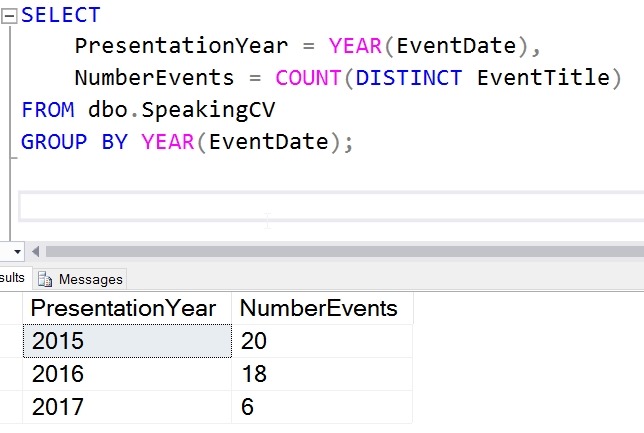
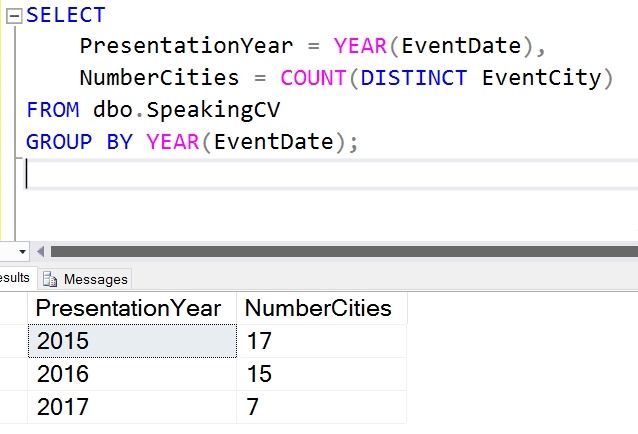
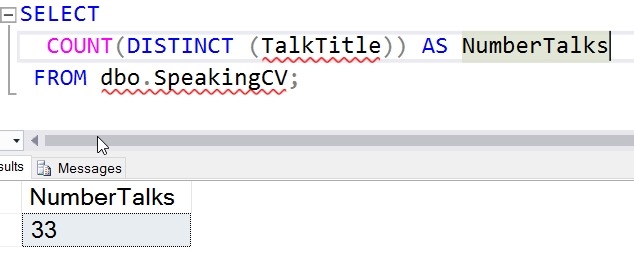
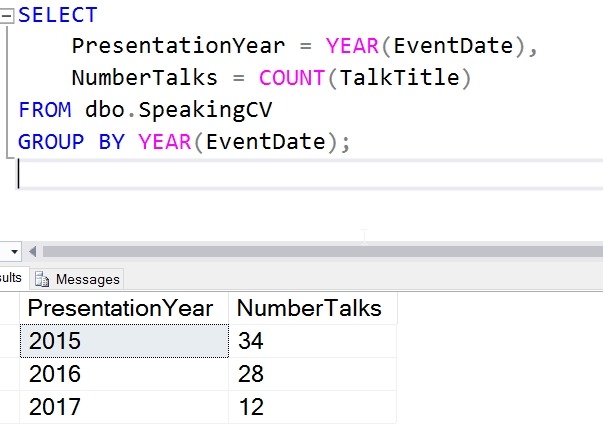
    I have a Speaking CV page, but I decided to load a bit of data into a database, where it should be but isn’t. With time constraints, I only loaded 2015-2017 into the db, but I’ll get the rest loaded at some point.

    In any case, I decided to run a few metrics and see where I stand.

    2017-05-19 15_41_39-SQLQuery2.sql - (local)_SQL2016.sandbox (PLATO_Steve (63))_ - Microsoft SQL Serv

    2017-05-19 15_44_16-SQLQuery2.sql - (local)_SQL2016.sandbox (PLATO_Steve (63))_ - Microsoft SQL Serv

    2017-05-19 15_44_59-SQLQuery2.sql - (local)_SQL2016.sandbox (PLATO_Steve (63))_ - Microsoft SQL Serv

    2017-05-19 15_45_38-SQLQuery2.sql - (local)_SQL2016.sandbox (PLATO_Steve (63))_ - Microsoft SQL Serv

    It’s been a busy few years.

  • La La Land Speaking at SQL Saturday #640

    I love LA. In many ways, it’s a fun city to visit, and I love taking a few minutes, even just a 10-20 minute walk along the boardwalk on some beach. I’ve looked forward to quite a few trips to LA in my life, and I often take advantage of offers to go back when I can. This was my last trip in 2015 to Huntington Beach.

    Photo Apr 09, 1 35 53 PM

    There are a few SQL Saturday events in LA, and the latest is #640 at the Microsoft Center in LA proper. I’m honored to have been accepted and am looking forward to the trip in June.

    I’ll be presenting my Continuous Integration for Databases talk, looking at how we can build a CI pipeline for our database code in an hour. We’ll go into detail with what CI means and the general process. I’ll use a few tools, but there are many ways to setup CI, so I don’t recommend one over the other.

    I’m redoing this talk for another event, and I’ll end up with a subset of that work for this event, but hopefully I’ll show you a few things that will help you in your daily work and improve your database code.

    There are lots of other great sessions, and this is a free day of training in LA, so pass the word and I’ll see you June 10.