In a previous post, I looked at the ways in which I could insert files into a Filetable folder programmatically. I used a NEWID() generation process, which mimics the constraint that is coded in the Filetable schema. However there was a comment asking if I could, or rather would, use the HierarchyID methods. It was on my list to investigate, so here it is.
I have a file, actually an image, that looks like this:

It’s a circle image, and the insert statement actually looks like this:
INSERT  INTO dbo.Pictures
        ( name
        , file_stream
        )
VALUES  ( 'circle.jpg'
        , 0xFFD8FFE000104A46494600010101006000600000FFE100684578696600004D4D002A000000080004011A0005000000010000003E011B0005000000010000004601280003000000010002000001310002000000120000004E00000000000000600000000100000060000000015061696E742E4E45542076332E352E313000FFDB0043000201010201010202020202020202030503030303030604040305070607070706070708090B0908080A0807070A0D0A0A0B0C0C0C0C07090E0F0D0C0E0B0C0C0CFFDB004301020202030303060303060C0807080C0C0C0C0C0C0C0C0C0C0C0C0C0C0C0C0C0C0C0C0C0C0C0C0C0C0C0C0C0C0C0C0C0C0C0C0C0C0C0C0C0C0C0C0C0C0C0C0C0CFFC0001108000A000D03012200021101031101FFC4001F0000010501010101010100000000000000000102030405060708090A0BFFC400B5100002010303020403050504040000017D01020300041105122131410613516107227114328191A1082342B1C11552D1F02433627282090A161718191A25262728292A3435363738393A434445464748494A535455565758595A636465666768696A737475767778797A838485868788898A92939495969798999AA2A3A4A5A6A7A8A9AAB2B3B4B5B6B7B8B9BAC2C3C4C5C6C7C8C9CAD2D3D4D5D6D7D8D9DAE1E2E3E4E5E6E7E8E9EAF1F2F3F4F5F6F7F8F9FAFFC4001F0100030101010101010101010000000000000102030405060708090A0BFFC400B51100020102040403040705040400010277000102031104052131061241510761711322328108144291A1B1C109233352F0156272D10A162434E125F11718191A262728292A35363738393A434445464748494A535455565758595A636465666768696A737475767778797A82838485868788898A92939495969798999AA2A3A4A5A6A7A8A9AAB2B3B4B5B6B7B8B9BAC2C3C4C5C6C7C8C9CAD2D3D4D5D6D7D8D9DAE2E3E4E5E6E7E8E9EAF2F3F4F5F6F7F8F9FAFFDA000C03010002110311003F00E97FE0E87FF82CA7ED35FB04FED85E09F03FC2BD6A5F87BE1097408B5C4D523D2ADAF1BC41746795248CBDC4722F970848C18940399373E43478FD75FF00827CFC68F177ED17FB0FFC2AF1D78F3461A078C7C59E19B2D4F57B110B42B14F244199846DF346AFC384392A1C024E335E95E2EF87BE1FF880968BAF687A3EB6B612F9F6C2FECA3B916F27F7D3783B5BDC60D6C5007FFFD9
        );
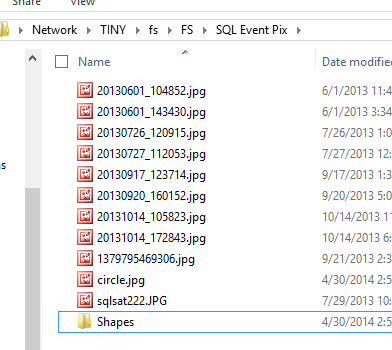
That puts the file in my Filetable in the root. However suppose I actually wanted that in a folder. Here’s my Filetable share and you’ll note I have a folder called Shapes.
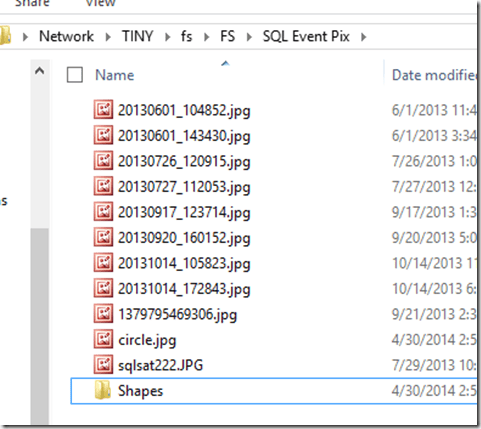
Can I insert this file directly in there, using T-SQL? Let’s try.
I wrote some code that would get the parent path and use that with GetDescendent(). However that didn’t work. I ran this:
DECLARE @parent HIERARCHYID, @node HIERARCHYID
SELECT @parent = path_locator
 FROM dbo.Pictures
 WHERE name = 'Shapes';

SELECT @node = max(path_locator)
 FROM dbo.Pictures
 WHERE path_locator.GetAncestor(1) = @parent

SELECT @parent, @node;


INSERT  INTO dbo.Pictures
        ( name
        , file_stream
        , path_locator
        )
VALUES  ( 'circle.jpg'
        , 0xFFD8FFE000104A46494600010101006000600000FFE100684578696600004D4D002A000000080004011A0005000000010000003E011B0005000000010000004601280003000000010002000001310002000000120000004E00000000000000600000000100000060000000015061696E742E4E45542076332E352E313000FFDB0043000201010201010202020202020202030503030303030604040305070607070706070708090B0908080A0807070A0D0A0A0B0C0C0C0C07090E0F0D0C0E0B0C0C0CFFDB004301020202030303060303060C0807080C0C0C0C0C0C0C0C0C0C0C0C0C0C0C0C0C0C0C0C0C0C0C0C0C0C0C0C0C0C0C0C0C0C0C0C0C0C0C0C0C0C0C0C0C0C0C0C0C0CFFC0001108000A000D03012200021101031101FFC4001F0000010501010101010100000000000000000102030405060708090A0BFFC400B5100002010303020403050504040000017D01020300041105122131410613516107227114328191A1082342B1C11552D1F02433627282090A161718191A25262728292A3435363738393A434445464748494A535455565758595A636465666768696A737475767778797A838485868788898A92939495969798999AA2A3A4A5A6A7A8A9AAB2B3B4B5B6B7B8B9BAC2C3C4C5C6C7C8C9CAD2D3D4D5D6D7D8D9DAE1E2E3E4E5E6E7E8E9EAF1F2F3F4F5F6F7F8F9FAFFC4001F0100030101010101010101010000000000000102030405060708090A0BFFC400B51100020102040403040705040400010277000102031104052131061241510761711322328108144291A1B1C109233352F0156272D10A162434E125F11718191A262728292A35363738393A434445464748494A535455565758595A636465666768696A737475767778797A82838485868788898A92939495969798999AA2A3A4A5A6A7A8A9AAB2B3B4B5B6B7B8B9BAC2C3C4C5C6C7C8C9CAD2D3D4D5D6D7D8D9DAE2E3E4E5E6E7E8E9EAF2F3F4F5F6F7F8F9FAFFDA000C03010002110311003F00E97FE0E87FF82CA7ED35FB04FED85E09F03FC2BD6A5F87BE1097408B5C4D523D2ADAF1BC41746795248CBDC4722F970848C18940399373E43478FD75FF00827CFC68F177ED17FB0FFC2AF1D78F3461A078C7C59E19B2D4F57B110B42B14F244199846DF346AFC384392A1C024E335E95E2EF87BE1FF880968BAF687A3EB6B612F9F6C2FECA3B916F27F7D3783B5BDC60D6C5007FFFD9
        , @parent.GetDescendent(@node,NULL)
        );
and got this:
Msg 6506, Level 16, State 10, Line 20
Could not find method ‘GetDescendent’ for type ‘Microsoft.SqlServer.Types.SqlHierarchyId’ in assembly ‘Microsoft.SqlServer.Types’
I found a note on StackOverflow that the implementation of the hierarchyID in a Filetable isn’t the same as elsewhere. I’m not sure if that’s the case, but I haven’t been able to document it.
However I decided to then try the method proposed as a comment in my last post. Insert, and then move.
DECLARE @id TABLE ( id UNIQUEIDENTIFIER )
DECLARE @streamid UNIQUEIDENTIFIER
  , @parentpath HIERARCHYID
  , @folder VARCHAR(1000);

SELECT  @folder = 'Shapes';

INSERT  INTO dbo.Pictures
        ( name
        , file_stream
        )
OUTPUT  inserted.stream_id
        INTO @id
VALUES  ( 'circle.jpg'
        , 0xFFD8FFE000104A46494600010101006000600000FFE100684578696600004D4D002A000000080004011A0005000000010000003E011B0005000000010000004601280003000000010002000001310002000000120000004E00000000000000600000000100000060000000015061696E742E4E45542076332E352E313000FFDB0043000201010201010202020202020202030503030303030604040305070607070706070708090B0908080A0807070A0D0A0A0B0C0C0C0C07090E0F0D0C0E0B0C0C0CFFDB004301020202030303060303060C0807080C0C0C0C0C0C0C0C0C0C0C0C0C0C0C0C0C0C0C0C0C0C0C0C0C0C0C0C0C0C0C0C0C0C0C0C0C0C0C0C0C0C0C0C0C0C0C0C0C0CFFC0001108000A000D03012200021101031101FFC4001F0000010501010101010100000000000000000102030405060708090A0BFFC400B5100002010303020403050504040000017D01020300041105122131410613516107227114328191A1082342B1C11552D1F02433627282090A161718191A25262728292A3435363738393A434445464748494A535455565758595A636465666768696A737475767778797A838485868788898A92939495969798999AA2A3A4A5A6A7A8A9AAB2B3B4B5B6B7B8B9BAC2C3C4C5C6C7C8C9CAD2D3D4D5D6D7D8D9DAE1E2E3E4E5E6E7E8E9EAF1F2F3F4F5F6F7F8F9FAFFC4001F0100030101010101010101010000000000000102030405060708090A0BFFC400B51100020102040403040705040400010277000102031104052131061241510761711322328108144291A1B1C109233352F0156272D10A162434E125F11718191A262728292A35363738393A434445464748494A535455565758595A636465666768696A737475767778797A82838485868788898A92939495969798999AA2A3A4A5A6A7A8A9AAB2B3B4B5B6B7B8B9BAC2C3C4C5C6C7C8C9CAD2D3D4D5D6D7D8D9DAE2E3E4E5E6E7E8E9EAF2F3F4F5F6F7F8F9FAFFDA000C03010002110311003F00E97FE0E87FF82CA7ED35FB04FED85E09F03FC2BD6A5F87BE1097408B5C4D523D2ADAF1BC41746795248CBDC4722F970848C18940399373E43478FD75FF00827CFC68F177ED17FB0FFC2AF1D78F3461A078C7C59E19B2D4F57B110B42B14F244199846DF346AFC384392A1C024E335E95E2EF87BE1FF880968BAF687A3EB6B612F9F6C2FECA3B916F27F7D3783B5BDC60D6C5007FFFD9
        );

SELECT  @streamID = id
FROM    @id
SELECT  @parentpath = path_locator
FROM    dbo.Pictures
WHERE   name = @folder

UPDATE  dbo.Pictures
SET     path_locator = path_locator.GetReparentedValue(hierarchyid::GetRoot(),
                                                       @ParentPath)
WHERE   stream_id = @StreamId
In this code, I insert the file, but save the PK, the streamID using the OUTPUT clause. From there, I get the path of the folder, and then I use the GetReparentedValue function to move the file to the folder.
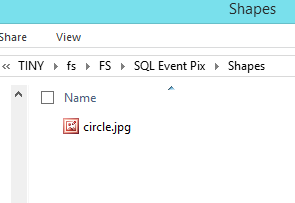
That works fine, and I look in my folder after running this and see the file.
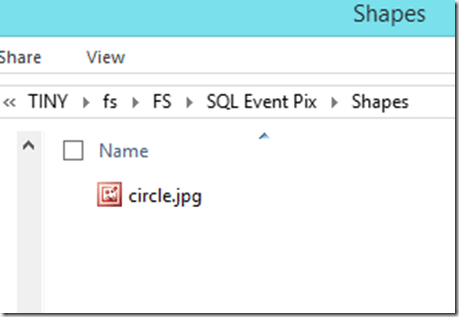
I’m not sure what the difference with the hierarchyIDs is with a Filetable, or why operations on Filetable structures cause errors with some functions, but this seems to work and is likely a better way to handle any of your T-SQL manipulations with Filetable data.



 Voice of the DBA