Tag: T-SQL

  • Computed Columns for Grouping–#SQLNewBlogger

    Another post for me that is simple and hopefully serves as an example for people trying to get blogging as #SQLNewBloggers.

    I ran into someone trying to do some grouping for an accounting report. In this case, they had a number of criteria where certain accounts were used to produce groups of values. For example, I might have these criteria:

    • Accounts from 400000 to 490000 are Operating Expenses
    • Accounts from 500000 to 502999 are Personal Expenses
    • Accounts from 503000 to 503999 are Materials and Services

    There would be other items, but if I have accounts and values, how do I sum and group in these ways?

    There are a few possibilities, but since I might move accounts around, I thought that computed columns might help with grouping here. This post looks are a way you can do this.

    Imagine I have some values like this:

    CREATE TABLE BudgettoActual
    (accountid INT
    , budget NUMERIC(10,2)
    , actual NUMERIC(10,2)
    )
    GO
    INSERT dbo.BudgettoActual
         (accountid, budget, actual)
    VALUES
         (400010, 300, 299),
         (501010, 100, 102),
         (502010, 200, 150),
         (503010, 400, 150),
         (507010, 800, 150)
    GO

    Now I can use a SUM with a CASE, but that makes a complex query. One way to simplify this for others is to use a computed column in the table that might include my criteria. I can use a CASE statement to create my groupings.

    ALTER TABLE dbo.BudgettoActual 
    ADD AccountGroup AS CASE
        WHEN accountid>= 400000 AND accountid < 489999 THEN 1
        WHEN accountid>= 501000 AND accountid < 503000 THEN 2
        WHEN accountid>= 503000 AND accountid < 504000 THEN 3
        WHEN accountid>= 507000 AND accountid < 508000 THEN 4
      ELSE 5
      END

    With this, I see this in my table:

    2021-05-12 11_35_15-SQLQuery5.sql - ARISTOTLE.sandbox (ARISTOTLE_Steve (52))_ - Microsoft SQL Server

    Now I have these different groups that I can use in a query and group by them. For example, I can get a quick look at my different categories with this code. I’ve put the categories in a CASE in the column list, but it could come from another table.

    SELECT
              CASE
                  WHEN ba.AccountGroup = 1 THEN
                      'Operating Revenues'
                  WHEN ba.AccountGroup = 2 THEN
                      'Personal Expenses'
                  WHEN ba.AccountGroup = 3 THEN
                      'Materials and Services'
                  WHEN ba.AccountGroup = 4 THEN
                      'Reserves'
              END 'Object'
            , SUM (ba.budget) AS Budget
            , SUM (ba.actual) AS actual
    FROM     dbo.BudgettoActual AS ba
    GROUP BY ba.AccountGroup;

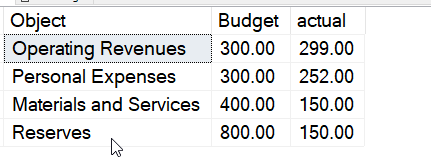
    This gives me a look at my financial numbers quickly.

    2021-05-12 11_36_20-SQLQuery5.sql - ARISTOTLE.sandbox (ARISTOTLE_Steve (52))_ - Microsoft SQL Server

    Rather than numbers, I could have used the title in the computed column, but that causes issues with ordering. With these numbers, I can choose numbers that are the order I need them in for a report (which can matter for financial reporting).

    I’d prefer to use a separate table mapping the AccountGroup to a title and then joining that in my report.

    This isn’t the only way to do this, but it is one way to handle complex grouping in a way that can make it easier for clients that might need to query this data.

    SQLNewBlogger

    This post took me about 10 minutes to write, but about 15 minutes to setup, which might be most of a writing session for a blog. However, it’s a good showcase of a creative way to solve an issue.

    Any of you could put together a similar post on a query issue you’ve run into and want to share.

  • 2020 Advent of Code – Day 5

    This series looks at the Advent of Code challenges.

    As one of my goals, I’m working through challenges. This post looks at day 5. I’m going to do this one in Python here, though I did solve it in other languages in my repo.

    Part 1

    This is an interesting problem, and one that’s simpler than it appeared at first. I started down the path of some hash bucket thing, moving to calculate rows before I got to the end and realized this is really a binary problem.

    As a result, after I loaded the data, I started here:

    SELECT 
       (SUBSTRING(d.SeatCode, 1, 1) * 64) +
       (SUBSTRING(d.SeatCode, 2, 1) * 32 ) +
       (SUBSTRING(d.SeatCode, 3, 1) * 16 ) +
       (SUBSTRING(d.SeatCode, 4, 1) * 8 ) +
       (SUBSTRING(d.SeatCode, 5, 1) * 4    ) +
       (SUBSTRING(d.SeatCode, 6, 1) * 2    ) +
       (SUBSTRING(d.SeatCode, 7, 1) * 1    ) AS row,
       (SUBSTRING(d.SeatCode, 8, 1) * 4    )  +
       (SUBSTRING(d.SeatCode, 9, 1) * 2    )  +
       (SUBSTRING(d.SeatCode, 10, 1) * 1    )  AS seat
      FROM dbo.Day5 AS d

    Here you can see I broke this into two binary sections. The first 7 characters get you a row code from 0 to 127. The last 3 values get you a 0 to 7 value. I should have been clued in when I saw the 0s here. In any case, this gets me the two binary values.

    The seat code is the row multiplied by 8 and then adding the seat. I took the above query, wrapped it with a CTE and then ordered by seat codes. This gave me the highest value, which solved the problem.

    WITH cteAirplane( ROW, seat)
    AS
    (SELECT
       (SUBSTRING(d.SeatCode, 1, 1) * 64) +
       (SUBSTRING(d.SeatCode, 2, 1) * 32 ) +
       (SUBSTRING(d.SeatCode, 3, 1) * 16 ) +
       (SUBSTRING(d.SeatCode, 4, 1) * 8 ) +
       (SUBSTRING(d.SeatCode, 5, 1) * 4    ) +
       (SUBSTRING(d.SeatCode, 6, 1) * 2    ) +
       (SUBSTRING(d.SeatCode, 7, 1) * 1    ) AS row,
       (SUBSTRING(d.SeatCode, 8, 1) * 4    )  +
       (SUBSTRING(d.SeatCode, 9, 1) * 2    )  +
       (SUBSTRING(d.SeatCode, 10, 1) * 1    )  AS seat
      FROM dbo.Day5 AS d
      --ORDER BY row desc
      )
      SELECT (row * 8)+seat AS seatID
      FROM cteAirplane
      ORDER BY seatID DESC

    Part 2

    The second part is a different problem. Now I need the seat codes, but I’m looking for a gap here. Meaning a missing seat code.

    I decided to use LAG here. I altered my first CTE to calculate the seat code directly rather than returning the row and seat. Then I added this CTE:

    cteValues (SeatID, diff)
    AS
    (
    SELECT seatid, SeatID - LAG(SeatID,1) OVER (ORDER BY SeatID) AS diff
    FROM cteAirplane
    )

    This CTE found the difference between each subsequent Seat codes using the OVER() clause. My final query was looking for a diff > 1, which returned 1 row. That was the answer.

  • Basic XML Queries–#SQLNewBlogger

    Another post for me that is simple and hopefully serves as an example for people trying to get blogging as #SQLNewBloggers.

    I ran across a question recently on querying an XML document. While I think XML is a pain and it’s not the future, there is a lot of it out there that you might need to deal with in a database. Legacy stuff will be there for awhile.

    In any case, someone was struggling with this code.

    DECLARE @x XML = 
    '<?xml version="1.0" encoding="UTF-8"?>
        <PartyID>
         <PartyID>147</PartyID>
         <CampaignID>
           <CampaignID>1</CampaignID>
           <Arc>A</Arc>
           <TicPosition>2</TicPosition>
         </CampaignID>
         <CampaignID>
           <CampaignID>1</CampaignID>
           <Arc>A</Arc>
           <TicPosition>13</TicPosition>
         </CampaignID>
       </PartyID>'

    SELECT
    Data.Col.value('(./PartyID)[1]', 'int') As Party_ID,
    Data.Col.value('(./CampaignID)[1]' , 'int') As Campaign_ID,
    Data.Col.value('(./Arc)[1]', 'varchar(1)') As Arc,
    Data.Col.value('(./TicPosition)[1]', 'varchar(10)') As TicPosition
    FROM @x.nodes('/PartyID/CampaignID') As Data(Col)

    The person got results where the Party_ID was NULL. Some of you might get what’s wrong, but it’s a question of understanding your context.

    In this case, the FROM clause helps us understand this. When we specify the node() method, we choose a path in the document. The path we pick is PartyID/CampaignID. This puts us here in the document:

        <CampaignID>1</CampaignID>
           <Arc>A</Arc>
           <TicPosition>2</TicPosition>
         </CampaignID>
         <CampaignID>
           <CampaignID>1</CampaignID>
           <Arc>A</Arc>
           <TicPosition>13</TicPosition>
         </CampaignID>

    If we are trying to specify paths on the current position with the period (.), we can only see these values. There is no PartyID here.

    However, similar to a folder navigation from the command line, if I use two periods (..), I move up one level. From here, I can get the PartyID. Therefore, my code is:

    2021-05-03 11_15_57-SQLQuery1.sql - ARISTOTLE.sandbox (ARISTOTLE_Steve (59))_ - Microsoft SQL Server

    SQLNewBlogger

    As soon as I saw this question, I knew the issue. It was a good reminder to me to watch the path, which is why I thought this was a good thing to post about. It cements this in my memory.

    In 10 minutes, I did this, just as you could.

  • Basic OFFSET–#SQLNewBlogger

    Another post for me that is simple and hopefully serves as an example for people trying to get blogging as #SQLNewBloggers.

    The other day I saw an article on the OFFSET clause in a SELECT. I had seen this come out and looked at it briefly in SQL Server 2012, but hadn’t done much with it.

    NOTE: if you use this, be sure you read about potential performance problems and solutions.

    The basic structure of this clause is that it is a part of the ORDER BY section of a query. After the column ordering, I can enter OFFSET and a value, which will skip those rows. I can optionally enter a number of rows to fetch.

    The structure is:

    <query>
    ORDER BY col1, col2
    OFFSET n ROWS FETCH NEXT 10 ROWS ONLY

    This code:

    WITH myTally(n)
    AS
    (SELECT n = ROW_NUMBER() OVER (ORDER BY (SELECT null))
      FROM (VALUES (1), (2), (3), (4), (5), (6), (7), (8), (9), (10)) a(n)
       CROSS JOIN (VALUES (1), (2), (3), (4), (5), (6), (7), (8), (9), (10)) b(n)
    )
    SELECT *
    FROM myTally
    ORDER BY n

    Will get me numbers from 1 to 100, each in a separate row. A tally table, with partial results shown in this image.

    2021-04-19 13_56_15-SQLQuery5.sql - ARISTOTLE.DMDemo_5_Prod (ARISTOTLE_Steve (61))_ - Microsoft SQL

    If I change this, and add an OFFSET, I can skip some rows. For example, I can skip 7 rows by adding that clause, as shown below.

    2021-04-19 13_58_58-SQLQuery5.sql - ARISTOTLE.DMDemo_5_Prod (ARISTOTLE_Steve (61))_ - Microsoft SQL

    If I only want a certain number, say 6 rows, I add the FETCH clause.

    2021-04-19 13_59_40-SQLQuery5.sql - ARISTOTLE.DMDemo_5_Prod (ARISTOTLE_Steve (61))_ - Microsoft SQL

    This is useful for pagination, saving some network bandwidth, and less buffer space on the client. Not necessarily helping the query processor, but it does make it easy for developers and with small result sets (and source table sizes), this is nice.

    It’s a fairly easy clause to use, but it can still require the full work on the server for looking through data, so be sure you read the link in the note above.

    SQLNewBlogger

    I was testing some code I’d seen from someone and it occurred to me to document the process a bit. I used a tally table, and wrote this around a couple of my experiments.

    You can do this as well, show some learning, testing, understanding of code in ten minutes.