Tag: T-SQL

  • Enabling Guest in a Database–#SQLNewBlogger

    Another post for me that is simple and hopefully serves as an example for people trying to get blogging as #SQLNewBloggers.

    The guest account exists in all your databases. This is installed by default, and guest is used to map a login that doesn’t otherwise have access to a database.

    Sound scary?

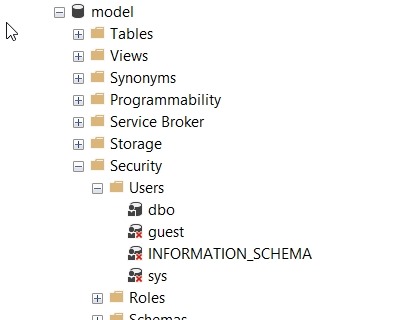
    It should. This would be bad if any login could connect to any database, potentially reading data using the guest account. Fortunately Microsoft has done two things. First, guest is disabled in all user databases. This is because it’s disabled in model, which is our template.

    2018-02-08 08_51_24-SQLQuery8.sql - (local)_SQL2016.AdventureWorks2014 (PLATO_Steve (74))_ - Microso

    Second, guest is typically assigned no rights. It’s a member of the public role, which also has no rights by default.

    Enabling Guest

    If you want to allow anonymous access for logins through the guest account, it’s easy. Be wary and careful of doing this and be sure you understand what rights have been granted to public if you do this. In general, I’d expect auditors and any compliance/security officers to be against this, but you should check.

    The user exists already, and just needs the CONNECT permission to get enabled. You can do this with this code:

    GRANT CONNECT TO guest

    If you want to remove permission, use

    REVOKE CONNECT FROM guest

    That’s it. Remember, by default this user can’t access any objects. I would recommend you not grant rights to guest, but use roles. Either one of the built in ones, or better yet, create your own role and choose limited permissions.

    SQLNewBlogger

    One of the ways you can showcase your knowledge, show you’re learning, and show you’re motivated to enhance your career is blogging. This post is an example of what you could write, in your own words, about something you’ve learned.

    This one took my about 5 minutes after I’d spent a little time getting guest enabled for a test project.

  • Getting Your SET Options

    Have you ever used @@options? I haven’t typically needed this, but there are times that you might wonder what options are set for a session. You can check in SSMS, look for defaults, etc., but there’s an easy way.

    SELECT @@OPTIONS

    This uses the @@options function, which contains a bitmap of your session settings. There are defaults with the sp_configure user options, but these can be overridden.

    If you want to get the options, which are also stored as bitmaps in various places, you can code them with this BOL article.

    Or use a script like this:

    DECLARE @i INT;
    SELECT @i = @@OPTIONS;
    SELECT ConstraintChecking = CASE WHEN (@i & 1 = 1 ) THEN 'ON' ELSE 'OFF' end,
            ImplicitTransactions = CASE WHEN (@i & 2 = 2 ) THEN 'ON' ELSE 'OFF' end,
            CursorCloseonCommit = CASE WHEN (@i & 4 = 2 ) THEN 'ON' ELSE 'OFF' end,
            AnsiWarnings = CASE WHEN (@i & 8 = 8 ) THEN 'ON' ELSE 'OFF' end,
            AnsiPadding = CASE WHEN (@i & 16 = 16 ) THEN 'ON' ELSE 'OFF' end,
            AnsiNulls = CASE WHEN (@i & 32 = 32 ) THEN 'ON' ELSE 'OFF' end,
            ArithAbortSetting = CASE WHEN (@i & 64 = 64 ) THEN 'ON' ELSE 'OFF' end,
            ArithIgnoreSetting = CASE WHEN (@i & 128 = 128 ) THEN 'ON' ELSE 'OFF' end,
            QuotedIdentifer = CASE WHEN (@i & 256 = 256 ) THEN 'ON' ELSE 'OFF' end,
            NoCount = CASE WHEN (@i & 512 = 512 ) THEN 'ON' ELSE 'OFF' end,
            AnsiNullDefaultOn = CASE WHEN (@i & 1024 = 1024 ) THEN 'ON' ELSE 'OFF' end,
            AnsiNullDefaultOff = CASE WHEN (@i & 2048 = 2048 ) THEN 'ON' ELSE 'OFF' end,
            ConcatNullYieldsNull = CASE WHEN (@i & 4096 = 4096 ) THEN 'ON' ELSE 'OFF' end,
            NumericRoundAbort = CASE WHEN (@i & 8192 = 8192 ) THEN 'ON' ELSE 'OFF' end,
            XactAbort = CASE WHEN (@i & 16384 = 16384 ) THEN 'ON' ELSE 'OFF' END

    For the row-based people, how about this:

    DECLARE @i INT;
    SELECT @i = @@OPTIONS;
    SELECT 'ConstraintChecking', CASE WHEN (@i & 1 = 1 ) THEN 'ON' ELSE 'OFF' END
    UNION 
    SELECT  'ImplicitTransactions', CASE WHEN (@i & 2 = 2 ) THEN 'ON' ELSE 'OFF' end
    UNION 
    SELECT  'CursorCloseonCommit', CASE WHEN (@i & 4 = 4 ) THEN 'ON' ELSE 'OFF' end
    UNION 
    SELECT  'AnsiWarnings', CASE WHEN (@i & 8 = 8 ) THEN 'ON' ELSE 'OFF' end
    UNION 
    SELECT  'AnsiPadding', CASE WHEN (@i & 16 = 16 ) THEN 'ON' ELSE 'OFF' end
    UNION 
    SELECT  'AnsiNulls', CASE WHEN (@i & 32 = 32 ) THEN 'ON' ELSE 'OFF' end
    UNION 
    SELECT  'ArithAbortSetting', CASE WHEN (@i & 64 = 64 ) THEN 'ON' ELSE 'OFF' end
    UNION 
    SELECT  'ArithIgnoreSetting', CASE WHEN (@i & 128 = 128 ) THEN 'ON' ELSE 'OFF' end
    UNION 
    SELECT  'QuotedIdentifer', CASE WHEN (@i & 256 = 256 ) THEN 'ON' ELSE 'OFF' end
    UNION 
    SELECT  'NoCount', CASE WHEN (@i & 512 = 512 ) THEN 'ON' ELSE 'OFF' end
    UNION 
    SELECT  'AnsiNullDefaultOn', CASE WHEN (@i & 1024 = 1024 ) THEN 'ON' ELSE 'OFF' end
    UNION 
    SELECT  'AnsiNullDefaultOff', CASE WHEN (@i & 2048 = 2048 ) THEN 'ON' ELSE 'OFF' end
    UNION 
    SELECT  'ConcatNullYieldsNull', CASE WHEN (@i & 4096 = 4096 ) THEN 'ON' ELSE 'OFF' end
    UNION 
    SELECT  'NumericRoundAbort', CASE WHEN (@i & 8192 = 8192 ) THEN 'ON' ELSE 'OFF' end
    UNION 
    SELECT  'XactAbort', CASE WHEN (@i & 16384 = 16384 ) THEN 'ON' ELSE 'OFF' END

    UPDATE: From the comments, an UNPIVOT might be easier to read for some of you.

    DECLARE @i INT;
    SELECT @i = @@OPTIONS;
    SELECT [Option], [Value]
    FROM(
    SELECT ConstraintChecking = CASE WHEN (@i & 1 = 1 ) THEN ‘ON’ ELSE ‘OFF’ end,
    ImplicitTransactions = CASE WHEN (@i & 2 = 2 ) THEN ‘ON’ ELSE ‘OFF’ end,
    CursorCloseonCommit = CASE WHEN (@i & 4 = 2 ) THEN ‘ON’ ELSE ‘OFF’ end,
    AnsiWarnings = CASE WHEN (@i & 8 = 8 ) THEN ‘ON’ ELSE ‘OFF’ end,
    AnsiPadding = CASE WHEN (@i & 16 = 16 ) THEN ‘ON’ ELSE ‘OFF’ end,
    AnsiNulls = CASE WHEN (@i & 32 = 32 ) THEN ‘ON’ ELSE ‘OFF’ end,
    ArithAbortSetting = CASE WHEN (@i & 64 = 64 ) THEN ‘ON’ ELSE ‘OFF’ end,
    ArithIgnoreSetting = CASE WHEN (@i & 128 = 128 ) THEN ‘ON’ ELSE ‘OFF’ end,
    QuotedIdentifer = CASE WHEN (@i & 256 = 256 ) THEN ‘ON’ ELSE ‘OFF’ end,
    NoCount = CASE WHEN (@i & 512 = 512 ) THEN ‘ON’ ELSE ‘OFF’ end,
    AnsiNullDefaultOn = CASE WHEN (@i & 1024 = 1024 ) THEN ‘ON’ ELSE ‘OFF’ end,
    AnsiNullDefaultOff = CASE WHEN (@i & 2048 = 2048 ) THEN ‘ON’ ELSE ‘OFF’ end,
    ConcatNullYieldsNull = CASE WHEN (@i & 4096 = 4096 ) THEN ‘ON’ ELSE ‘OFF’ end,
    NumericRoundAbort = CASE WHEN (@i & 8192 = 8192 ) THEN ‘ON’ ELSE ‘OFF’ end,
    XactAbort = CASE WHEN (@i & 16384 = 16384 ) THEN ‘ON’ ELSE ‘OFF’ END) AS options
    UNPIVOT (
    [Value] FOR [OPTION] IN ([ConstraintChecking],[ImplicitTransactions],[CursorCloseonCommit],[AnsiWarnings],[AnsiPadding],[AnsiNulls],[ArithAbortSetting],[ArithIgnoreSetting],[QuotedIdentifer],[NoCount],[AnsiNullDefaultOn],[AnsiNullDefaultOff],[ConcatNullYieldsNull],[NumericRoundAbort],[XactAbort])
    ) AS T1
    ORDER BY [Option]
    GO
  • No Default CONTEXT_INFO()

    I was doing a little testing of Row-Level Security (RLS) for the stairway, and one of the ways that some people implement RLS is with CONTEXT_INFO().

    I haven’t every really used CONTEXT_INFO in production, though it’s been around for some time. This is a way of setting some session information, as this data is stored for the connection. However, since it can be reset by the connection, it’s value isn’t necessarily trustworthy from a system perspective.

    If you don’t set this with SET CONTEXT_INFO, then a NULL is stored there for on-premises systems. This makes sense, there’s no initialization there.

    In Azure SQL Database, however, you get a GUID that’s a unique value. That’s good to know, as if you’re checking if this is NULL, you might assume you have something stored there, and since you need to CAST this back to the original datatype, this might cause issues.

    This could be a good way to store data for a single session, but beware. If the session drops and reconnects, you’ll lose your data.

  • Advent of Code 2017 Day 5–#SQLNewBlogger

    Another post for me that is simple and hopefully serves as an example for people trying to get blogging as #SQLNewBloggers.

    This is day 5 of the Advent of Code 2017. If you want to read about the puzzles, start with Day 1. This is going to be a crazy looping item, since it will move through the list, relative to the current spot, and incrementing items, I know this won’t be good in SQL.

    Still. Worth solving.

    Let’s load the data. I’ll use a table, but first, I’ll also add an identity. This will help me number instructions and figure out what the next one is.

    CREATE TABLE Day5
    ( InstructionKey INT IDENTITY(1,1)
    , Instruction INT)
    GO

    There are issues with identities, but this is a great trick:

    CREATE VIEW Day5V
    AS
    SELECT d.Instruction FROM dbo.Day5 AS d
    GO
    -- reusable code
    BULK INSERT Day5V FROM 'e:\Documents\GitHub\AdventofCode\2017\Day5\Input.txt' WITH (ROWTERMINATOR='\n')
    GO

    Now I can get to work. Here’s the logic I used.

    I wanted to first set some starting points. I have a counter (0 based, increment first). This determines how many times I jump around. I also need to track the current instruction key and the next key. And, of course, I need the instruction value.

    The identity is the array index, or the instruction key (which place am I in). In this case, I’ll try to follow this logic.

    Get the end (out of bounds, which is the max + 1). I loop until I get an jump outside of the end range. The loop does these items:

    • Get the current instruction jump
    • Set the next location to be the current key + the current jump
    • Update the current jump to increment by 1
    • Set the current instruction key to the next key
    • loop

    This seems to be what I need. On the test set, this worked fine. When I first set this up, I used this code:

    DECLARE @end INT ,
             @CurrentInstructionKey INT = 1 ,
             @Instruction INT ,
             @NextInstructionKey INT ,
             @counter INT = 0;
    SELECT @end = MAX(InstructionKey) + 1
    FROM dbo.Day5 AS d;
    
    -- SELECT [end] = @end;
    
    WHILE @CurrentInstructionKey < @end
    BEGIN
         SET @counter = @counter + 1;
         SELECT @Instruction = Instruction
         FROM Day5
         WHERE InstructionKey = @CurrentInstructionKey;
         SELECT @NextInstructionKey = @CurrentInstructionKey + @Instruction;
         UPDATE dbo.Day5
         SET Instruction = Instruction + 1
         WHERE InstructionKey = @CurrentInstructionKey;
         SET @CurrentInstructionKey = @NextInstructionKey;
    --PRINT @CurrentInstruction
    END;
    
    SELECT Counter = @counter ,
            [current] = @CurrentInstruction;

    When I ran this, it chugged for some time. I bet in Python or C#, which would solve quickly with arrays. With updates, it’s slow. Like minutes slow for 1074 rows.

    However, it worked.

    Part II

    In this part, this instructions are almost the same, but based on the current instruction value, we either increase or decrease the value. Not a big change. Our new update looks like:

    UPDATE dbo.Day5
    SET Instruction = Instruction + CASE
                                         WHEN @Instruction >= 3 THEN
                                             -1
                                         ELSE
                                             1
                                     END
    WHERE InstructionKey = @CurrentInstructionKey;

    This also works, albeit slowly. I left this around 5:30 and went to the gym.

    One of the easier puzzles.