Tag: T-SQL

  • Trekking Through Formatting Forest on the #SQLPrompt Treasure Map

    I enjoy themes, and when I ran across the SQL Prompt Treasure Island, I had to take a few minutes and go through it. I wrote about Code Snippet Cove recently, and this post continues to move across the map.

    Formatting Forest

    Walking through a forest can be daunting. Living in Colorado, I’ve had the chance to hike and explore the mountains of the state. If you’re near the top and can view landmarks, it seems easy. Walking through some forests, when you can’t see a peak, you get a little worried about which direction to go without a trail. It’s serious, as people die every year in my state because they get lost in the woods.

    Writing T-SQL isn’t a life or death endeavor, but it can be frustrating when we see code that’s formatted in a way that we don’t expect. I’ve seen truly ugly T-SQL code (from my perspective) in the SQLServerCentral forums, and I often need to copy and paste it into SSMS to get a sense of what’s happening. I used to reformat by hand, but CTRL+K,Y is an ingrained SQL Prompt habit that lets me get code into a style that I can work with.

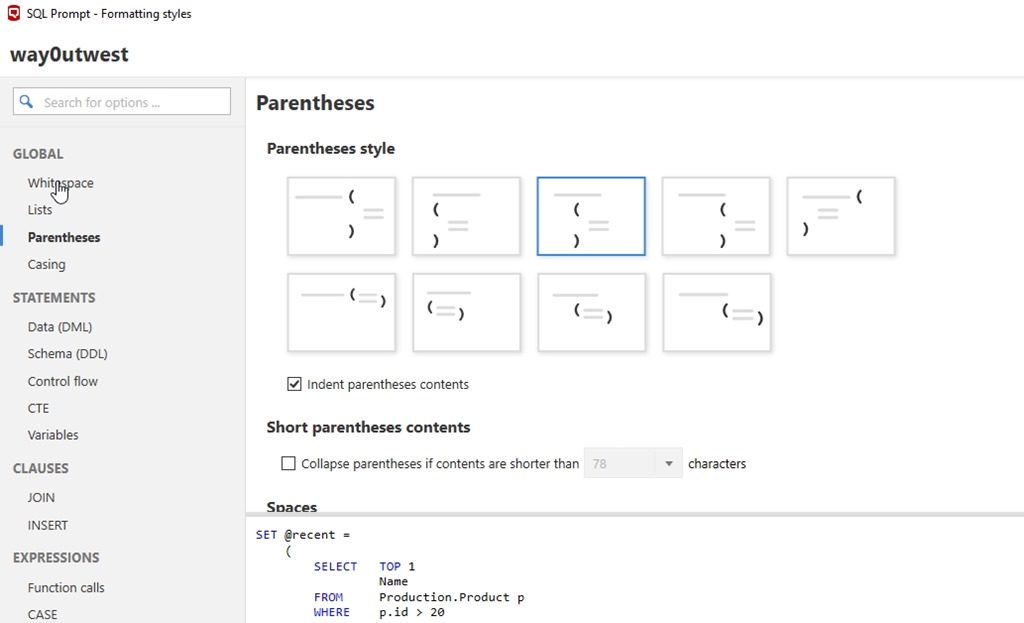
    The part of the treasure map that talks about formatting is long and detailed, and there are lots of resources that can help you format the code better.  Likely, however, you’ll want to open the formatting dialog (shown below) and play with settings to get what you want.

    2018-04-04 10_40_25-SQL Prompt - Formatting styles

    One of the best features, at least for me, is that I can quickly switch styles from my own to any other, such as a corporate standard. With a right click, I can choose another style, CTRL+K,Y to get to some other format, and then reverse that later.

    2018-04-04 10_41_22-

    I do this before committing to Version Control, as you should. If you haven’t tried SQL Prompt formatting, get an eval and give it a try. It’s amazing. This alone saves me a ton of time when writing code.

    In the next post, I’ll continue on to the Caves of Code Analysis.

  • Code Snippet Cove on the #SQLPrompt Treasure Map

    I’ve been away a bit in the last week with personal and family commitments. As a result, I feel a bit out of touch with work, and I have some catching up to do. However, when I ran across the SQL Prompt Treasure Island, I had to take a few minutes and go through it.

    Code Snippet Cove

    I love snippets. I first loved the idea in Visual Studio and Query Analyzer a long time ago, but SQL Prompt has taken this to a new level. I’ve used snippets quite often to make life easier and speed up development.

    This part of the island talks about all the tokens that are available. There are all sorts, but some of my favorite are using $CURSOR$ to ensure the cursor gets dropped where I want it. This lets me immediately start typing.

    I love $DATE$ and $USER$ for pre-populating comment sections of code, and there are plenty more metadata/environment type tokens that you can use, including the $PASTE$ for the clipboard.

    While the tokens are great, I think that just the Snippets themselves, with custom placeholders, such as $userrole$, which I use for adding security to object creates, are incredibly handy. I’ve even used partial snippets for joins. For one job, we constantly needed to put together  these tables: Product, ProductCategory, OrderHeader, OrderLine, and Address. We had a snippet that just contained these tables with the appropriate ON clauses for joins.

    Explore snippets, and you might never want to work without SQL Prompt again.

    In the next post, I’ll take at look at the rest of the map.

  • Date Fun with SQL Server

    I saw a people discussing date formats on Twitter after PASS put out an advertisement for a webinar with a mm-dd-yyyy format. Plenty of people were annoyed and wanted to be sure that they realized that much of the world might misinterpret 3-2-2018 as Feb 3, as opposed to the US Mar 2 view.

    That’s fair, and while some people noted that yyyy-mm-dd is the best format, I saw this tweet from Mladen Prajdic. It looks at the DATEFORMAT setting can cause issues.

    Here are a few reproductions. On my US centric system, I ran this:

    SET LANGUAGE ‘us_english’
    GO
    SET DATEFORMAT YMD
    GO
    DECLARE @dt DATETIME = ‘2016-03-02’;
    SELECT yyyy = YEAR(@dt) ,
    mm = MONTH(@dt) ,
    dd = DAY(@dt);
    GO
    SET LANGUAGE ‘French’;
    DECLARE @dt DATETIME = ‘2016-03-02’;
    SELECT yyyy = YEAR(@dt) ,
    mm = MONTH(@dt) ,
    dd = DAY(@dt);
    GO
    SET LANGUAGE ‘French’;
    DECLARE @dt DATETIME = ‘20160302’;
    SELECT yyyy = YEAR(@dt) ,
    mm = MONTH(@dt) ,
    dd = DAY(@dt);
    GO
    SET LANGUAGE ‘us_english’
    GO
    SET DATEFORMAT YMD

    My results:

    2018-03-27 10_56_20-SQLQuery10.sql - (local)_SQL2014.master (PLATO_Steve (53))_ - Microsoft SQL Serv

    Now, let’s change a few things. I’ll move to datetime2. If I do this, all three queries return 2016, 3, 2 for year, month, day. The same thing occurs with the DATE datatype.

    If you examine Mladen’s test, you’ll see that without dashes things work fine. However, with dashes, the datetime datatype has issues. These can manifest themselves with both SET LANGUAGE and SET DATEFORMAT settings.

    One thing to keep in mind is that SET LANGUAGE will automatically change the date formats to match that language, and you can override those with SET DATEFORMAT if needed.

    The takeaway? First, use modern datatypes. Not worth using datetime and avoiding the “2” if there is potential for incorrect dates.

    Second, avoid the dashes for now.

  • I learned about the order of logical operations #SQLNewBlogger

    Another post for me that is simple and hopefully serves as an example for people trying to get blogging as #SQLNewBloggers.

    I had logic in a CS curriculum many years ago and I’ve worked with AND and OR statements for years. I’ve sometimes confused myself, but I usually ensure I have parenthesis included to clarify the code. Not just for me, but for anyone that might glance at the code later.

    As a side note, I also try to format code so a quick glance can reveal what happens.

    However, I learned something new this week. I saw a question about the order of logical operations in this form: a or b and c.

    I had somewhat assumed, like math, we’d use a left to right evaluation. However, that’s not correct. Look at this snippet:

    2018-03-22 10_06_22-SQLQuery1.sql - (local)_SQL2014.SimpleTalk_1_Development (PLATO_Steve (57))_ - M

    If we went left to write, we’d have two rows from the OR (n=1, n=2) and then an AND that produces no rows. So no results?

    That’s not correct. According to BOL for OR,  the AND operations occur first. So n=2 AND n > 3 occurs, with 0 rows. Then the OR with n=1 is evaluated to return 1 row.

    Fascinating.

    At least to me. I’ve never thought because I’d write

    WHERE (n = 1 OR n = 2) AND n > 3

    or

    WHERE n = 1 OR (n = 2 AND n > 3)

    and be sure that what I wanted to occur would occur.

    A quick lesson. While it’s good to know what the order or evaluation is for your platform, don’t count on this. If there is a chance for confusion or unintended consequences, use parenthesis. It’s simpler and easier, and I might argue, more elegant.