Tag: T-SQL

  • T-SQL Tricks – Templates in SSMS

    There are lots of little tricks that you can use to become more proficient, and efficient, at writing T-SQL. Here’s a short one that might be more for administrators, but I think for developers it’s very handy as well.

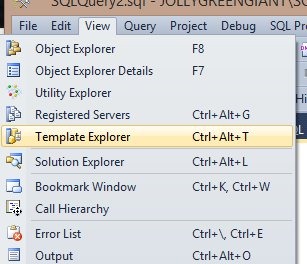
    SQL Server tools have included templates for years. I first started using them in Query Analyzer with SQL Server 2000. The tools have changed, but we still have templates in Management Studio (SSMS). We can access the templates by exposing the Template Browser from the View menu (as shown below).

    templates1

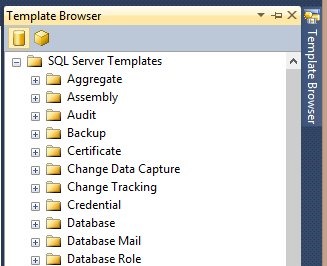
    We can also use the CTRL+ALT+T shortcut. Either of these will give us a tab on the right side of our SSMS main window, opposite the Object Explorer, as shown below.

    templates2

    Like all the windows in SSMS, I can detach this, move it, auto hide, etc.

    Each of these folders contains a series of default scripts that are installed with the tools. For example, I can look at the Backup folder and see three scripts in there. I can grab one of them with a left click and "drag" it to the query window and the script will appear in the query window as I’ve shown here.

    templates3

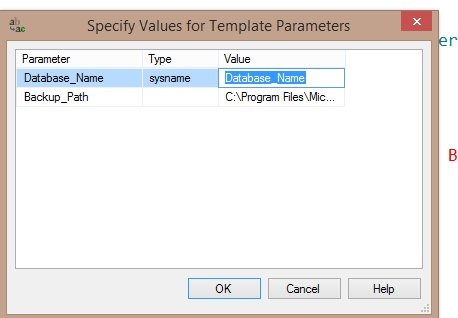
    A CTRL+Shift+M will give me the parameters in the script, which I can replace with my own values (or accept the defaults).

    templates4

    Many of these are generic, but they are useful. I’d encourage you to take a look at them and use them when you can.

    You can customize these, but that’s for another post.

  • Quick Schema Auditing

    I was working on a demo recently and needed to show that a little monitoring can help you catch schema changes. At first I looked at SQL Audit and DDL Triggers, but then I ran across a short custom metric on the SQL Monitor Metrics site that my company, Red Gate Software, put up to help people share their custom monitoring metrics and alerts.

    The metric is called Schema Modified, and it uses a really simple query. This is all is does:

    SELECT DATEDIFF(ss, '1970', MAX([modify_date]))
     FROM [sys].[objects];

    It calls this query every minute for each database on which you have it enabled. This gives you a count of the number of seconds between 1970 and the latest schema modification in your database.

    Now that’s not terribly useful, but if you look for changes in this metric, then it becomes interesting. For example, in one of my tests, I got this value

    1413904788

    If I continued to run the query,  the same value was returned if nothing changed in the database. However once I added a new object, then the value changed to

    1413905295

    That’s an increase, and my alerting was looking for changes in the value, so when this new count of seconds appeared, an alert was raised.

    Using the Information

    What good does it do you to know that something changed? Admittedly, this may or may not be useful. This doesn’t tell you what changed, and certainly help you determine who changed things.

    However, in more than a few of my development jobs, we knew people would change things. That wasn’t the issue. Really we wanted to know that something changed, and if so, we would investigate further. Often we could easily determine who made the change, based on what it was.

    This is really a trigger more for something like production, where I don’t expect changes, except when I deploy things. Any other change is cause for concern, and I might have alerts set to ping people when there’s a change. If we’re making the change, then we ignore the alert, because we’re aware of it.

    If we aren’t deploying changes, then we start investigating immediately.

  • Default Framing–Window Functions

    I’ve been playing with the window functions in T-SQL a bit, and I find them very interesting. They certainly solve some problems very well, in a way that’s much easier than has been available in T-SQL.

    However there are some things you need to understand. One of these things is the framing of the window, and the data processed. A quick example will show some of this.

    Imagine that I create a table and insert some data:

    CREATE TABLE HomeRuns
    ( hrid INT IDENTITY(1,1)
    , player VARCHAR(200)
    , team VARCHAR(200)
    , hrdate DATE
    , HRcount TINYINT
    CONSTRAINT hr_IDX PRIMARY KEY (hrid)
    );
    GO

    We add a few row, which I’ll keep short.

    INSERT HomeRuns (player, team, hrdate, HRcount)
     VALUES ('Troy', 'COL', '4/7/2013', 1)
          , ('Troy', 'COL', '4/18/2013', 1)
          , ('Troy', 'COL', '4/22/2013', 1)
          , ('Derek', 'NYY', '5/7/2013', 1)
          , ('Derek', 'NYY', '6/24/2013', 1)
          , ('Nelson', 'BAL', '3/31/2013', 1)
          , ('Nelson', 'BAL', '4/2/2013', 1)
          , ('Nelson', 'BAL', '4/20/2013', 1)
          , ('Lonnie', 'CLE', '5/9/2013', 3)
    ;
    GO

    This is a small set of data. Let’s imagine that I want to count the total home runs by team in each month. If I try to do this with windowing, I’ll get something like this:

    select 
      team
      , datename( mm, hrdate)
      , HR.hrdate
      , sum(HR.HRcount) over (partition by month(HR.hrdate), team)
     from dbo.HomeRuns HR

    When I run that, I see all the rows returned, which isn’t what we expect from aggregates. However it’s also not any kind or running total or examination of the data in a row by row processing that many window functions perform.

    That’s not completely accurate, but it’s a feeling many people get when starting with these structures. However the results highlight something. Let’s look at them:

    window_1

    We can see that for April, for Baltimore, we see 2 rows, with a total of 2 for each row. There was one home run hit on each day, and the total is 2, but both rows are processed as one window.

    Why?

    That’s because the framing, the section of the partition that’s examined by the window aggregate, is the “”RANGE” of the partition by default. The entire partition, so all rows in front of, and behind, the current row, are used for the results.

    This is a simple example, but it does show that you need to be aware of the default, which I don’t love. I wish the default were ROWS, and I’ll talk about that another time.

  • Intermediate T-SQL: Window Functions

    This is the third hour of a three hour set of presentations on intermediate T-SQL techniques and features.

    This presentation covers the window functions that are available in SQL Server. Some of these functions were introduced in SQL Server 2005 and some in SQL Server 2015. We start with a brief introduction to what a window is, how a partition works, and then look at ordering and framing of rows. Then we cover the following in demonstrations:

    ROW_NUMBER()

    RANK(), DENSE_RANK(), and NTILE()

    The OVER clause and windowing in SQL Server 2012

    Using PARTITION BY and ORDER BY in the OVER clause

    Default framing with RANGE and how ROWS are different

    PERCENTILE() functions

    This covers a lot of information in an hour, but I try to use small data sets to explain what is happening with the window functions and how they can improve the performance, as well as simplify the code, for a number of common queries.

    Slides: TSQL_Windowing.pptx

    Code: TSQL_Windowing_code.zip