Tag: T-SQL

  • Playing with Pivot

    I’ve been working on some skills, trying to grow some of my T-SQL, and started to mess with the PIVOT operator. This is a T-SQL construct that helps you turn row data into column data. It’s part of the SELECT query, and comes about in the FROM clause. There is an article on MSDN to help you understand this.

    Note: Performance of PIVOT can be challenging. Jeff Moden has a great piece on Cross Tabs and PIVOT. It is worth a read to understand the limitations and issues with PIVOT.

    Setup

    I’ve got some sample data I’ve put together. In this case, I have a set of data from the 2013 NFL season, with the scores for the Denver Broncos.

    CREATE TABLE Scores
    (
    Team varchar(3)
    , Opponent varchar(3)
    , gamedate datetime
    , TeamScore int
    , Oppscore int 
    );
    go
    
    INSERT INTO scores (team, opponent, gamedate, teamscore, oppscore)
    values
        ( 'DEN', 'BAL', '2013-9-5', 49, 27)
    ,   ( 'DEN', 'NYG', '2013-9-15', 41, 23)
    ,   ( 'DEN', 'OAK', '2013-9-23', 37, 21)
    ,   ( 'DEN', 'PHI', '2013-9-29', 52, 20)
    ,   ( 'DEN', 'DAL', '2013-10-6', 51, 48)
    ,   ( 'DEN', 'JAX', '2013-10-13', 35, 19)
    ,   ( 'DEN', 'IND', '2013-10-20', 33, 39)
    ,   ( 'DEN', 'WAS', '2013-10-27', 45, 21)
    ,   ( 'DEN', 'SD', '2013-11-10', 28, 20)
    ,   ( 'DEN', 'KC', '2013-11-17', 27, 17)
    ,   ( 'DEN', 'NE', '2013-11-24', 31, 34)
    ,   ( 'DEN', 'KC', '2013-12-1', 35, 28)
    ,   ( 'DEN', 'TEN', '2013-12-8', 51, 28)
    ,   ( 'DEN', 'SD', '2013-12-12', 20, 27)
    ,   ( 'DEN', 'HOU', '2013-12-22', 37, 13)
    ,   ( 'DEN', 'OAK', '2013-12-29', 34, 14)
    ;
    go

    The Problem

    I want to get an average score for the Broncos for each of their opponents. They had 13 opponents in 16 games, with 3 teams being played twice. However, I want to see the data sideways, but I’m only going to show the scores for the opponents with multiple games. In this case, I know the teams are “KC”, “OAK’, and “SD”.

    In other words, I want to see:

    Team     KC    OAK   SD

    DEN      X     Y     Z

    I want the real averages for the games in question. I could include the other teams, but let’s leave this alone. 

    Note that in my results I’ve limited things to Denver. I forgot to include the WHERE clause when I rewrote this post, but I had limited the winning team to DEN.

    The Query

    There are a couple parts to the query. First, there’s the column list, in this case, it’s a SELECT *. We’ll fix this as I dislike the asterisk, but let’s leave that for now. That means we have:

    select
        *

    Now, we need a FROM clause. The first part of the FROM clause will be my source data. This is a normal select, in this case, we’ have:

    select
              team
            , opponent
            , teamscore
            from scores
              results

    We need to embed this in parenthesis, so that gives us this:

    select
        *
      from
        ( select
              team
            , opponent
            , teamscore
            from scores
              results
        ) as rawdata

    So far this is a normal query. Not it’s time to PIVOT things. First we add a PIVOT clause to the end of the statement. The outline looks like this (with our query):

    select * from ( select team , opponent , teamscore from scores results ) as rawdata

    PIVOT

    ( aggregate(col) for var in ([col1], [col2], [col3]

    ) as pivotalias

    The PIVOT clause includes one (and only one) aggregate. You choose the aggregate and a column. In my example, I’ll be averaging the scores for the teamscore column.

    The next part of the clause is a pivot column, on which we are looing for data. This column must be in the  select list for the first part of the query. Next we have the “IN” clause, in which we list the various values that we are moving from rows to columns.

    In this case, I’m looking to move the divisional opponents to columns rather than rows. I’m pivoting on the Opponent column and looking for the AFC West opponents. Those teams are OAK, SD, and KC. That makes my query look like:

    select * from ( select team , opponent , teamscore from scores results ) as rawdata

    pivot

    ( avg(teamscore) for [Opponent] in ( [KC], [OAK], [SD] )

    ) as pivotresults;

    This will give me these results:

    team   KC   OAK  SD

    DEN    31   35   24

    I have the average scores for opponents as columns, not rows.

    Technically, I should include DEN as an opponent so I can actually build a proper grid. If I do that, I get:

    select
        *
      from
        ( select
              team
            , opponent
            , teamscore
            from
              scores results
        ) as rawdata
      pivot 
       ( avg(teamscore) for [Opponent] in ( [KC], [OAK], [SD], [DEN] ) 
       ) as pivotresults;

    And these results.

    team   KC   OAK  SD  DEN

    DEN    31   35   24  NULL

    Note that this gives me a NULL. I can handle that with an ISNULL, COALESCE, etc.

    If I add more data for the other teams, then I’ll get this:

    INSERT INTO scores (team, opponent, gamedate, teamscore, oppscore)
    values
        ( 'KC', 'DEN', '2013-9-5', 49, 27)
    ,   ( 'KC', 'SD', '2013-11-24', 38, 41)
    ,   ( 'OAK', 'DEN', '2013-9-23', 21, 37)
    ,   ( 'KC', 'DEN', '2013-9-29', 52, 20)
    ,   ( 'KC', 'SD', '2013-12-29', 24, 27)
    ,   ( 'KC', 'OAK', '2013-10-13', 24, 7)
    ,   ( 'KC', 'OAK', '2013-12-15', 56, 31)
    ,   ( 'OAK', 'DEN', '2013-10-27', 45, 21)
    ,   ( 'OAK', 'SD', '2013-10-6', 27, 17)
    ,   ( 'OAK', 'SD', '2013-10-27', 45, 21)
    ,   ( 'OAK', 'KC', '2013-10-13', 7, 24)
    ,   ( 'OAK', 'KC', '2013-12-15', 31, 56)
    ,   ( 'SD', 'DEN', '2013-11-10', 20, 28)
    ,   ( 'SD', 'DEN', '2013-11-10', 20, 28)
    ,   ( 'SD', 'OAK', '2013-10-6', 17, 27)
    ,   ( 'SD', 'OAK', '2013-11-10', 20, 28)
    ,   ( 'SD', 'KC', '2013-11-24', 41, 38)
    ,   ( 'SD', 'KC', '2013-12-29', 27, 24)
    ;
    go

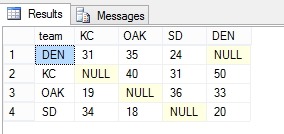
    And these results from the same query:

    pivot_a

    That’s pretty cool, though I’d argue that the data isn’t valuable for many people unless you’re trying to bet or analyze the performance of teams against each other.

    As I mentioned at the top, this isn’t necessarily the best way to move data. Performance can be an issue, however there are people that find this to be an easier way to write code and understand what it’s doing.

    I might argue that a cross tab can be just as easy to code and maintain, but you may feel the differently.

  • T-SQL–Converting Seconds to Time

    I was working on a small piece of code the other day that was calculating the seconds for an event. I had a function that returned me the seconds as an integer. That’s good, but I wanted to get that value back in minutes and seconds. The scale wasn’t so large as to worry about hours, or days (I hope).

    In any case, I could certainly do some math. Takes seconds, divide by 60 to get minutes, and then take the remainder and add that as seconds, concatenate, convert to time. Crazy.

    There’s an easier way using CONVERT.

    DECLARE @s INT
    SELECT
        @s = 325
    SELECT
        @s
      , CONVERT(TIME, DATEADD(SECOND, @s, 0));

    I can just add the seconds to the 0 time, which is midnight, and I’ll get the time back in the right datatype.

    This code gives me 5:25, which is correct. Five minutes and 25 seconds.

    If I increase the numbers, say into hours, I can take 4325 like this:

    DECLARE @s INT
    SELECT
        @s = 4325
    SELECT
        @s
      , CONVERT(TIME, DATEADD(SECOND, @s, 0));

    And get this;

    time

  • A Little Learning with Pluralsight

    I’ve been working on a new presentation on testing using the tSQLt framework and was curious how other people are using the framework. I read through the documentation and various articles on Simple Talk. I also went through the Google Group and StackOverflow tags for tSQLt, gathering lots of viewpoints on how the framework is used.

    However I wanted more. I’ve tested T-SQL code before, but usually in the simplistic way that I see most SQL Server developers running tests. Contriving a bit of data, building a query that checks things, and moving on. I’ve never written formal SQL tests, and wanted to learn something.

    I turned to my friend, Google, and was surprised to see a course on Pluralsight pop up. I didn’t think tSQLt was popular enough to build a course, but apparently it was, so I signed on and went through the course. It was interesting, and I got a nice set of hints on how Dave Green uses tSQLt and some ideas on how I could enhance my presentation.

    Then I went looking for a few more courses. Since I was a bit laid up with my knee surgery, I was stuck in bed and rather than watch TV, I wandered around the Pluralsight site a bit. I was surprised to find a course on SQL Prompt and went through that, getting a few tips and tricks that I hadn’t used before. I also started a course on CTEs from Joe Sack, and I’ve learned a couple tricks in there.

    Overall, I’m impressed with Pluralsight. I’ve had a subscription for some time as an MVP, but hadn’t accessed it. However I’ll be spending a few minutes here and there working my way through the offerings, trying to learn a bit more about SQL Server, as well as tackle some C# and security.

  • FileTable– Using GetParent for Inserts

    In a previous post, I looked at the ways in which I could insert files into a Filetable folder programmatically. I used a NEWID() generation process, which mimics the constraint that is coded in the Filetable schema. However there was a comment asking if I could, or rather would, use the HierarchyID methods. It was on my list to investigate, so here it is.

    I have a file, actually an image, that looks like this:

    circle

    It’s a circle image, and the insert statement actually looks like this:

    INSERT  INTO dbo.Pictures
            ( name
            , file_stream
            )
    VALUES  ( 'circle.jpg'
            , 0xFFD8FFE000104A46494600010101006000600000FFE100684578696600004D4D002A000000080004011A0005000000010000003E011B0005000000010000004601280003000000010002000001310002000000120000004E00000000000000600000000100000060000000015061696E742E4E45542076332E352E313000FFDB0043000201010201010202020202020202030503030303030604040305070607070706070708090B0908080A0807070A0D0A0A0B0C0C0C0C07090E0F0D0C0E0B0C0C0CFFDB004301020202030303060303060C0807080C0C0C0C0C0C0C0C0C0C0C0C0C0C0C0C0C0C0C0C0C0C0C0C0C0C0C0C0C0C0C0C0C0C0C0C0C0C0C0C0C0C0C0C0C0C0C0C0C0CFFC0001108000A000D03012200021101031101FFC4001F0000010501010101010100000000000000000102030405060708090A0BFFC400B5100002010303020403050504040000017D01020300041105122131410613516107227114328191A1082342B1C11552D1F02433627282090A161718191A25262728292A3435363738393A434445464748494A535455565758595A636465666768696A737475767778797A838485868788898A92939495969798999AA2A3A4A5A6A7A8A9AAB2B3B4B5B6B7B8B9BAC2C3C4C5C6C7C8C9CAD2D3D4D5D6D7D8D9DAE1E2E3E4E5E6E7E8E9EAF1F2F3F4F5F6F7F8F9FAFFC4001F0100030101010101010101010000000000000102030405060708090A0BFFC400B51100020102040403040705040400010277000102031104052131061241510761711322328108144291A1B1C109233352F0156272D10A162434E125F11718191A262728292A35363738393A434445464748494A535455565758595A636465666768696A737475767778797A82838485868788898A92939495969798999AA2A3A4A5A6A7A8A9AAB2B3B4B5B6B7B8B9BAC2C3C4C5C6C7C8C9CAD2D3D4D5D6D7D8D9DAE2E3E4E5E6E7E8E9EAF2F3F4F5F6F7F8F9FAFFDA000C03010002110311003F00E97FE0E87FF82CA7ED35FB04FED85E09F03FC2BD6A5F87BE1097408B5C4D523D2ADAF1BC41746795248CBDC4722F970848C18940399373E43478FD75FF00827CFC68F177ED17FB0FFC2AF1D78F3461A078C7C59E19B2D4F57B110B42B14F244199846DF346AFC384392A1C024E335E95E2EF87BE1FF880968BAF687A3EB6B612F9F6C2FECA3B916F27F7D3783B5BDC60D6C5007FFFD9
            );

    That puts the file in my Filetable in the root. However suppose I actually wanted that in a folder. Here’s my Filetable share and you’ll note I have a folder called Shapes.

    filetable_zb

    Can I insert this file directly in there, using T-SQL? Let’s try.

    I wrote some code that would get the parent path and use that with GetDescendent(). However that didn’t work. I ran this:

    DECLARE @parent HIERARCHYID, @node HIERARCHYID
    SELECT @parent = path_locator 
     FROM dbo.Pictures
     WHERE name = 'Shapes';
    
    SELECT @node = max(path_locator)
     FROM dbo.Pictures
     WHERE path_locator.GetAncestor(1) = @parent
    
    SELECT @parent, @node;
    
    
    INSERT  INTO dbo.Pictures
            ( name
            , file_stream
            , path_locator
            )
    VALUES  ( 'circle.jpg'
            , 0xFFD8FFE000104A46494600010101006000600000FFE100684578696600004D4D002A000000080004011A0005000000010000003E011B0005000000010000004601280003000000010002000001310002000000120000004E00000000000000600000000100000060000000015061696E742E4E45542076332E352E313000FFDB0043000201010201010202020202020202030503030303030604040305070607070706070708090B0908080A0807070A0D0A0A0B0C0C0C0C07090E0F0D0C0E0B0C0C0CFFDB004301020202030303060303060C0807080C0C0C0C0C0C0C0C0C0C0C0C0C0C0C0C0C0C0C0C0C0C0C0C0C0C0C0C0C0C0C0C0C0C0C0C0C0C0C0C0C0C0C0C0C0C0C0C0C0CFFC0001108000A000D03012200021101031101FFC4001F0000010501010101010100000000000000000102030405060708090A0BFFC400B5100002010303020403050504040000017D01020300041105122131410613516107227114328191A1082342B1C11552D1F02433627282090A161718191A25262728292A3435363738393A434445464748494A535455565758595A636465666768696A737475767778797A838485868788898A92939495969798999AA2A3A4A5A6A7A8A9AAB2B3B4B5B6B7B8B9BAC2C3C4C5C6C7C8C9CAD2D3D4D5D6D7D8D9DAE1E2E3E4E5E6E7E8E9EAF1F2F3F4F5F6F7F8F9FAFFC4001F0100030101010101010101010000000000000102030405060708090A0BFFC400B51100020102040403040705040400010277000102031104052131061241510761711322328108144291A1B1C109233352F0156272D10A162434E125F11718191A262728292A35363738393A434445464748494A535455565758595A636465666768696A737475767778797A82838485868788898A92939495969798999AA2A3A4A5A6A7A8A9AAB2B3B4B5B6B7B8B9BAC2C3C4C5C6C7C8C9CAD2D3D4D5D6D7D8D9DAE2E3E4E5E6E7E8E9EAF2F3F4F5F6F7F8F9FAFFDA000C03010002110311003F00E97FE0E87FF82CA7ED35FB04FED85E09F03FC2BD6A5F87BE1097408B5C4D523D2ADAF1BC41746795248CBDC4722F970848C18940399373E43478FD75FF00827CFC68F177ED17FB0FFC2AF1D78F3461A078C7C59E19B2D4F57B110B42B14F244199846DF346AFC384392A1C024E335E95E2EF87BE1FF880968BAF687A3EB6B612F9F6C2FECA3B916F27F7D3783B5BDC60D6C5007FFFD9
            , @parent.GetDescendent(@node,NULL)
            );

    and got this:

    Msg 6506, Level 16, State 10, Line 20

    Could not find method ‘GetDescendent’ for type ‘Microsoft.SqlServer.Types.SqlHierarchyId’ in assembly ‘Microsoft.SqlServer.Types’

    I found a note on StackOverflow that the implementation of the hierarchyID in a Filetable isn’t the same as elsewhere. I’m not sure if that’s the case, but I haven’t been able to document it.

    However I decided to then try the method proposed as a comment in my last post. Insert, and then move.

    DECLARE @id TABLE ( id UNIQUEIDENTIFIER )
    DECLARE @streamid UNIQUEIDENTIFIER
      , @parentpath HIERARCHYID
      , @folder VARCHAR(1000);
    
    SELECT  @folder = 'Shapes';
    
    INSERT  INTO dbo.Pictures
            ( name
            , file_stream
            )
    OUTPUT  inserted.stream_id
            INTO @id
    VALUES  ( 'circle.jpg'
            , 0xFFD8FFE000104A46494600010101006000600000FFE100684578696600004D4D002A000000080004011A0005000000010000003E011B0005000000010000004601280003000000010002000001310002000000120000004E00000000000000600000000100000060000000015061696E742E4E45542076332E352E313000FFDB0043000201010201010202020202020202030503030303030604040305070607070706070708090B0908080A0807070A0D0A0A0B0C0C0C0C07090E0F0D0C0E0B0C0C0CFFDB004301020202030303060303060C0807080C0C0C0C0C0C0C0C0C0C0C0C0C0C0C0C0C0C0C0C0C0C0C0C0C0C0C0C0C0C0C0C0C0C0C0C0C0C0C0C0C0C0C0C0C0C0C0C0C0CFFC0001108000A000D03012200021101031101FFC4001F0000010501010101010100000000000000000102030405060708090A0BFFC400B5100002010303020403050504040000017D01020300041105122131410613516107227114328191A1082342B1C11552D1F02433627282090A161718191A25262728292A3435363738393A434445464748494A535455565758595A636465666768696A737475767778797A838485868788898A92939495969798999AA2A3A4A5A6A7A8A9AAB2B3B4B5B6B7B8B9BAC2C3C4C5C6C7C8C9CAD2D3D4D5D6D7D8D9DAE1E2E3E4E5E6E7E8E9EAF1F2F3F4F5F6F7F8F9FAFFC4001F0100030101010101010101010000000000000102030405060708090A0BFFC400B51100020102040403040705040400010277000102031104052131061241510761711322328108144291A1B1C109233352F0156272D10A162434E125F11718191A262728292A35363738393A434445464748494A535455565758595A636465666768696A737475767778797A82838485868788898A92939495969798999AA2A3A4A5A6A7A8A9AAB2B3B4B5B6B7B8B9BAC2C3C4C5C6C7C8C9CAD2D3D4D5D6D7D8D9DAE2E3E4E5E6E7E8E9EAF2F3F4F5F6F7F8F9FAFFDA000C03010002110311003F00E97FE0E87FF82CA7ED35FB04FED85E09F03FC2BD6A5F87BE1097408B5C4D523D2ADAF1BC41746795248CBDC4722F970848C18940399373E43478FD75FF00827CFC68F177ED17FB0FFC2AF1D78F3461A078C7C59E19B2D4F57B110B42B14F244199846DF346AFC384392A1C024E335E95E2EF87BE1FF880968BAF687A3EB6B612F9F6C2FECA3B916F27F7D3783B5BDC60D6C5007FFFD9
            );
    
    SELECT  @streamID = id
    FROM    @id
    SELECT  @parentpath = path_locator
    FROM    dbo.Pictures
    WHERE   name = @folder
    
    UPDATE  dbo.Pictures
    SET     path_locator = path_locator.GetReparentedValue(hierarchyid::GetRoot(),
                                                           @ParentPath)
    WHERE   stream_id = @StreamId


    In this code, I insert the file, but save the PK, the streamID using the OUTPUT clause. From there, I get the path of the folder, and then I use the GetReparentedValue function to move the file to the folder.

    That works fine, and I look in my folder after running this and see the file.

    filetable_zc

    I’m not sure what the difference with the hierarchyIDs is with a Filetable, or why operations on Filetable structures cause errors with some functions, but this seems to work and is likely a better way to handle any of your T-SQL manipulations with Filetable data.