Tag: T-SQL

  • FileTable–Adding a file to a folder

    At my Filestream/Filetable talk yesterday at SQL Intersection, someone asked me about programmatically adding a file to a Filetable. Easy enough, I thought, since I’d seen someone do this in .NET and was thinking this has to be simple. Turns out it’s not quite so simple.

    I was assuming that I could use the GetDescendent method of the hierarchy ID for the path_locator field to get the path you needed and insert that. It turns out that’s not correct.

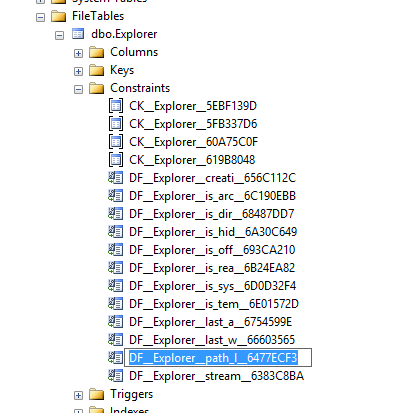
    I searched around when that didn’t work and found this post from Bob Beauchemin and a question on StackOverflow. If the two, Bob’s post explains things better. He actually dug into the Filetable, looking at the constraints and defaults in the schema. If you do that, you can find this constraint on the path_locator field:

    filetable_h

    The code in this constraint looks like this, which matches with what Bob and SO show as the way to calculate the path.

    ALTER TABLE [dbo].[Explorer] ADD  CONSTRAINT [DF__Explorer__path_l__6477ECF3]  
    DEFAULT (CONVERT(HIERARCHYID, '/' +     CONVERT(VARCHAR(20), CONVERT(BIGINT, SUBSTRING(CONVERT(BINARY(16), NEWID()), 1, 6))) + '.' +
         CONVERT(VARCHAR(20), CONVERT(BIGINT, SUBSTRING(CONVERT(BINARY(16), NEWID()), 7, 6))) + '.' +
         CONVERT(VARCHAR(20), CONVERT(BIGINT, SUBSTRING(CONVERT(BINARY(16), NEWID()), 13, 4))) + '/')) FOR [path_locator]
    GO

    This means that your insert statement needs to perform this calculation. For me, I decided to insert a jpg of a circle into the table, under the folder “books”. The folder looks like this:

    filetable_g

    Since I have the binary values for a circle image, I’ll use those, and then the code below. The first part of this code calculates the new path that’s needed, basing this on the path_locator value for the “Books” folder, and then building a NewID(). From there, it’s a simple insert.

    DECLARE @path HIERARCHYID
    DECLARE @new_path VARCHAR(675)
     
    SELECT  @path = path_locator
    FROM    dbo.Explorer
    WHERE   name = 'Books'
    
    SELECT  @new_path = @path.ToString()
            + CONVERT(VARCHAR(20), CONVERT(BIGINT, SUBSTRING(CONVERT(BINARY(16), NEWID()),
                                                             1, 6))) + '.'
            + CONVERT(VARCHAR(20), CONVERT(BIGINT, SUBSTRING(CONVERT(BINARY(16), NEWID()),
                                                             7, 6))) + '.'
            + CONVERT(VARCHAR(20), CONVERT(BIGINT, SUBSTRING(CONVERT(BINARY(16), NEWID()),
                                                             13, 4))) + '/'
    INSERT INTO dbo.Explorer
            ( stream_id
            , file_stream
            , name
            , path_locator
            )
    VALUES  ( NEWID()
            , 0xFFD8FFE000104A46494600010101006000600000FFE100684578696600004D4D002A000000080004011A0005000000010000003E011B0005000000010000004601280003000000010002000001310002000000120000004E00000000000000600000000100000060000000015061696E742E4E45542076332E352E313000FFDB0043000201010201010202020202020202030503030303030604040305070607070706070708090B0908080A0807070A0D0A0A0B0C0C0C0C07090E0F0D0C0E0B0C0C0CFFDB004301020202030303060303060C0807080C0C0C0C0C0C0C0C0C0C0C0C0C0C0C0C0C0C0C0C0C0C0C0C0C0C0C0C0C0C0C0C0C0C0C0C0C0C0C0C0C0C0C0C0C0C0C0C0C0CFFC0001108000A000D03012200021101031101FFC4001F0000010501010101010100000000000000000102030405060708090A0BFFC400B5100002010303020403050504040000017D01020300041105122131410613516107227114328191A1082342B1C11552D1F02433627282090A161718191A25262728292A3435363738393A434445464748494A535455565758595A636465666768696A737475767778797A838485868788898A92939495969798999AA2A3A4A5A6A7A8A9AAB2B3B4B5B6B7B8B9BAC2C3C4C5C6C7C8C9CAD2D3D4D5D6D7D8D9DAE1E2E3E4E5E6E7E8E9EAF1F2F3F4F5F6F7F8F9FAFFC4001F0100030101010101010101010000000000000102030405060708090A0BFFC400B51100020102040403040705040400010277000102031104052131061241510761711322328108144291A1B1C109233352F0156272D10A162434E125F11718191A262728292A35363738393A434445464748494A535455565758595A636465666768696A737475767778797A82838485868788898A92939495969798999AA2A3A4A5A6A7A8A9AAB2B3B4B5B6B7B8B9BAC2C3C4C5C6C7C8C9CAD2D3D4D5D6D7D8D9DAE2E3E4E5E6E7E8E9EAF2F3F4F5F6F7F8F9FAFFDA000C03010002110311003F00E97FE0E87FF82CA7ED35FB04FED85E09F03FC2BD6A5F87BE1097408B5C4D523D2ADAF1BC41746795248CBDC4722F970848C18940399373E43478FD75FF00827CFC68F177ED17FB0FFC2AF1D78F3461A078C7C59E19B2D4F57B110B42B14F244199846DF346AFC384392A1C024E335E95E2EF87BE1FF880968BAF687A3EB6B612F9F6C2FECA3B916F27F7D3783B5BDC60D6C5007FFFD9
            , 'Circle.jpg'
            , @new_path      
          );
    go


    If I now look at the folder, I see this:

    filetable_j

    An insert into the folder of a file.

    I could easily adapt this to stream in the binary values from a .NET application, or OPENROWSET, but this works well enough.

  • Is Unit Testing Important?

    This editorial was originally published on Nov 10, 2009. It is being re-run as Steve is on vacation.

    I saw a question on the SQLServerCentral ASK site the other day asking about unit testing for T-SQL stored procedures. There weren’t many responses, but they were interesting to me.

    I wondered how many people bothered to test their stored procedures as a unit. It seems that the idea of test driven development, or even of comprehensive testing of SQL code isn’t very mature. If a query runs and appears to return the data we want, do we bother to test for edge or unusual data conditions?

    Or do we even know how to write those kinds of tests?

    Testing your code as it’s being written is a well known way to reduce your technical debt and ensure better code when it’s released. It’s also a way to lower the cost of maintaining your software over its lifetime. However it slows down development as well.

    That’ s not why most people don’t test their code well. The big reason is that it’s B-O-R-I-N-G.

    But does it matter? Is there really an issue? After all most T-SQL queries are built to scale. If the data is correctly assembled into sets with a small set of data, it will work correctly on large sets of data. Maybe not efficiently, but it tends to work. So is unit testing of T-SQL code important?

    My guess is that it is not all that important. At least not as important as performance tuning. If you have extra time to spend on a query, I think most DBAs would prefer to spend it on making the SQL more efficient, not more tested.

    Steve Jones


    The Voice of the DBA Podcasts

    Everyday Jones

    The podcast feeds are available at sqlservercentral.mevio.com. Comments are definitely appreciated and wanted, and you can get feeds from there.

    You can also follow Steve Jones on Twitter:

    Overall RSS Feed: or now on iTunes!

    Today’s podcast features music by Everyday Jones. No relation, but I stumbled on to them and really like the music. Support this great duo at www.everydayjones.com.

    I really appreciate and value feedback on the podcasts. Let us know what you like, don’t like, or even send in ideas for the show. If you’d like to comment, post something here. The boss will be sure to read it.

  • Fixing CREATE TABLE

    I’ve always wondered about this. When I create a stored procedure I do this:

    CREATE PROCEDURE MyProc
      @param1 int
     as
     BEGIN
       -- add code here
     END;

    As is often the case, I realize that I’ve made some mistake and need to change the code later. So I’ll do this:

    ALTER PROCEDURE MyProc
      @param1 int
     as
     BEGIN
       -- add better code here
     END;

    In both cases, I’ve repeated lots of the code that I used the first time, though hopefully less of the bugs. If I create a function or view, I do something similar. However when I build a table, I do this:

    CREATE TABLE MyTable
     ( MyInt int
     );

    If I decide that’s not enough data storage, and it’s likely not, I would do this:

    ALTER TABLE MyTable
      ADD MyChar varchar(50);

    We’re used to this, but why do we do this? Why not this?

    ALTER TABLE MyTable
     ( MyInt int
     , MyChar varchar(50)
     );

    It’s almost as though DDL mixes the idea of code submission with architectural scaffolding. It’s inconsistent, and it’s the big reason why we can’t use comments in our table code like this:

    ALTER TABLE MyTable
     ( MyInt int  -- integer to store a pointer to this row, requires unique index for integrity
     , MyChar varchar(50) -- random value of some data I need to store for this example.
     );

    I don’t have any hopes that things will change, but it does make me wonder why SQL, which is often simple and highly versatile with a few consistent structures, would create this strange inconsistency.

    Steve Jones

    The Voice of the DBA Podcast

    Listen to the MP3 Audio ( 2.4MB) podcast or subscribe to the feed at iTunes and Mevio . feed

    The Voice of the DBA podcast features music by Everyday Jones. No relation, but I stumbled on to them and really like the music. Support this great duo at www.everydayjones.com.

  • Using multiple CTEs in one query

    This is a fairly simple thing to do, but I had to look it up the other day and thought it would make a good blog. This is a good example of a blog that everyone should write to show they know a particular skill.

    TL;DR: Use a comma between CTE definitions.

    Let’s imagine that you need to combine a few queries together and the code is complex. You decide to use a CTE to make things easier. Suppose I have this query:

    SELECT p.title , p.firstname , p.lastname FROM Person.BusinessEntity be INNER JOIN Person.Person p ON p.BusinessEntityID = be.BusinessEntityID WHERE ( SELECT COUNT(*) FROM Person.BusinessEntityAddress bea WHERE bea.BusinessEntityID = be.BusinessEntityID ) > 1 AND ( SELECT COUNT(*) FROM Person.PersonPhone pp WHERE pp.BusinessEntityID = be.BusinessEntityID ) > 1

    That’s ugly, and I want to move the subqueries. I know this is slightly contrived, but imagine that what you really want is a couple views like:

    CREATE VIEW BEACount AS SELECT bea.BusinessEntityID , cnt = COUNT(*) FROM Person.BusinessEntityAddress bea WHERE bea.BusinessEntityID = be.BusinessEntityID CREATE VIEW PersonPhoneCount AS SELECT bea.BusinessEntityID , cnt = COUNT(*) FROM Person.PersonPhone pp WHERE pp.BusinessEntityID = be.BusinessEntityID

    However you don’t want to create views, what you really want is to make both of these queries CTEs and then call them from the original query.

    I wasn’t sure how to do this, so I Googled. The first result was my friend, Pinal Dave’s blog. It took me about 10 seconds to read his explanation and apply it to my issue.

    WITH BEACountCTE AS ( SELECT bea.BusinessEntityID , cnt = COUNT(*) FROM Person.BusinessEntityAddress bea GROUP BY bea.BusinessEntityID ) , PersonPhoneCountCTE AS ( SELECT pp.BusinessEntityID , cnt = COUNT(*) FROM Person.PersonPhone pp GROUP BY pp.BusinessEntityID ) SELECT p.title , p.firstname , p.lastname FROM Person.BusinessEntity be INNER JOIN Person.Person p ON p.BusinessEntityID = be.BusinessEntityID INNER JOIN PersonPhoneCountCTE pp ON pp.BusinessEntityID = p.BusinessEntityID INNER JOIN BEACountCTE bea ON bea.BusinessEntityID = p.BusinessEntityID WHERE BEA.cnt > 1 AND PP.cnt > 1

    Note that at the top I have one WITH statement and both of my CTEs are separated by commas.

    Easy enough, a quick thing to look up, and a handy item to know. If you are breaking up queries and using CTEs to make things easier to read, use a comma between your CTEs.