Tag: T-SQL

  • Fixing CREATE TABLE

    I’ve always wondered about this. When I create a stored procedure I do this:

    CREATE PROCEDURE MyProc
      @param1 int
     as
     BEGIN
       -- add code here
     END;

    As is often the case, I realize that I’ve made some mistake and need to change the code later. So I’ll do this:

    ALTER PROCEDURE MyProc
      @param1 int
     as
     BEGIN
       -- add better code here
     END;

    In both cases, I’ve repeated lots of the code that I used the first time, though hopefully less of the bugs. If I create a function or view, I do something similar. However when I build a table, I do this:

    CREATE TABLE MyTable
     ( MyInt int
     );

    If I decide that’s not enough data storage, and it’s likely not, I would do this:

    ALTER TABLE MyTable
      ADD MyChar varchar(50);

    We’re used to this, but why do we do this? Why not this?

    ALTER TABLE MyTable
     ( MyInt int
     , MyChar varchar(50)
     );

    It’s almost as though DDL mixes the idea of code submission with architectural scaffolding. It’s inconsistent, and it’s the big reason why we can’t use comments in our table code like this:

    ALTER TABLE MyTable
     ( MyInt int  -- integer to store a pointer to this row, requires unique index for integrity
     , MyChar varchar(50) -- random value of some data I need to store for this example.
     );

    I don’t have any hopes that things will change, but it does make me wonder why SQL, which is often simple and highly versatile with a few consistent structures, would create this strange inconsistency.

    Steve Jones

    The Voice of the DBA Podcast

    Listen to the MP3 Audio ( 2.4MB) podcast or subscribe to the feed at iTunes and Mevio . feed

    The Voice of the DBA podcast features music by Everyday Jones. No relation, but I stumbled on to them and really like the music. Support this great duo at www.everydayjones.com.

  • Using multiple CTEs in one query

    This is a fairly simple thing to do, but I had to look it up the other day and thought it would make a good blog. This is a good example of a blog that everyone should write to show they know a particular skill.

    TL;DR: Use a comma between CTE definitions.

    Let’s imagine that you need to combine a few queries together and the code is complex. You decide to use a CTE to make things easier. Suppose I have this query:

    SELECT p.title , p.firstname , p.lastname FROM Person.BusinessEntity be INNER JOIN Person.Person p ON p.BusinessEntityID = be.BusinessEntityID WHERE ( SELECT COUNT(*) FROM Person.BusinessEntityAddress bea WHERE bea.BusinessEntityID = be.BusinessEntityID ) > 1 AND ( SELECT COUNT(*) FROM Person.PersonPhone pp WHERE pp.BusinessEntityID = be.BusinessEntityID ) > 1

    That’s ugly, and I want to move the subqueries. I know this is slightly contrived, but imagine that what you really want is a couple views like:

    CREATE VIEW BEACount AS SELECT bea.BusinessEntityID , cnt = COUNT(*) FROM Person.BusinessEntityAddress bea WHERE bea.BusinessEntityID = be.BusinessEntityID CREATE VIEW PersonPhoneCount AS SELECT bea.BusinessEntityID , cnt = COUNT(*) FROM Person.PersonPhone pp WHERE pp.BusinessEntityID = be.BusinessEntityID

    However you don’t want to create views, what you really want is to make both of these queries CTEs and then call them from the original query.

    I wasn’t sure how to do this, so I Googled. The first result was my friend, Pinal Dave’s blog. It took me about 10 seconds to read his explanation and apply it to my issue.

    WITH BEACountCTE AS ( SELECT bea.BusinessEntityID , cnt = COUNT(*) FROM Person.BusinessEntityAddress bea GROUP BY bea.BusinessEntityID ) , PersonPhoneCountCTE AS ( SELECT pp.BusinessEntityID , cnt = COUNT(*) FROM Person.PersonPhone pp GROUP BY pp.BusinessEntityID ) SELECT p.title , p.firstname , p.lastname FROM Person.BusinessEntity be INNER JOIN Person.Person p ON p.BusinessEntityID = be.BusinessEntityID INNER JOIN PersonPhoneCountCTE pp ON pp.BusinessEntityID = p.BusinessEntityID INNER JOIN BEACountCTE bea ON bea.BusinessEntityID = p.BusinessEntityID WHERE BEA.cnt > 1 AND PP.cnt > 1

    Note that at the top I have one WITH statement and both of my CTEs are separated by commas.

    Easy enough, a quick thing to look up, and a handy item to know. If you are breaking up queries and using CTEs to make things easier to read, use a comma between your CTEs.

  • Counting the Existing, and Missing, Rows

    I saw this as a problem recently from someone and thought it would make a good post. As I was building a quick solution, someone else posted theirs, but I decided to save mine as a blog post. It was a good, quick, T-SQL exercise for me to work on.

    I decided to take the Christmas season and use that as my example. My wife and I buy presents for the family and we try to understand what we’ve bought each year to balance out our efforts for each kid.

    My setup:

    CREATE TABLE People ( id INT , firstname VARCHAR(20) ); CREATE TABLE presents ( id INT , present VARCHAR(20) , value NUMERIC(6, 2) ); INSERT INTO People VALUES ( 1, 'Kyle' ), ( 2, 'Delaney' ), ( 3, 'Kendall' ), ( 4, 'Tia' ), ( 5, 'Steve' ) INSERT INTO presents VALUES ( 1, 'Book', 10 ), ( 1, 'Fire', 157 ), ( 3, 'Book', 8 ), ( 3, 'tablet', 162 ), ( 3, 'hat', 12 ), ( 4, 'bracelet', 80 )

    I’ve modeled this with two tables: one holding people and one with the presents. I need to join them together and see what I’ve bought.

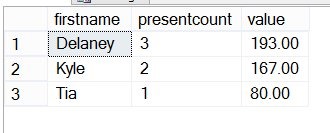
    SELECT p.firstname , presentcount = COUNT(ps.present) , value = ISNULL(SUM( ps.value), 0) FROM people p INNER JOIN presents ps ON p.id = ps.id GROUP BY p.firstname


    That gives me a count of gifts and money spent

    giftsa

    The problem is that it doesn’t let me know what people I haven’t bought for. For that I need to change to an outer join, in this case I’ll choose a left outer join since the people table is the one I need all rows from:

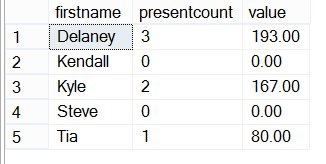
    SELECT p.firstname , presentcount = COUNT(ps.present) , value = ISNULL(SUM( ps.value), 0) FROM people p LEFT OUTER JOIN presents ps ON p.id = ps.id GROUP BY p.firstname

    Now I can see that Kendall and Steve haven’t received any presents yet. More work to be done:

    giftsb

    Outer joins are a quick way to find issues, but be sure you understand how they work. In this simple case, it’s an easy change.

    Now this looks like software I might actually use. Perhaps this would make a good project for me?

  • Checking Up on Developers

    This editorial was originally published on May 8, 2009. It is being re-run as Steve is on vacation.

    The other day I was reading Brad McGeHee’s post on duplicate indexes, and it struck a chord with me. That same issue is one I’ve seen many times with in house applications. Developers don’t understand indexing, they create one clustered index (CI) as the PK, and then they create the same index as a nonclustered (NCI) one. Either they don’t realize that the PK is an index, or they are ignorant of the differences between a CI and an NCI.

    What’s worse is that I see it in third party applications as well. If you’re selling a product, I think you ought to know how to tune it for a database. If you don’t, I’d like to see some recourse for clients. Maybe some common settlement in a lawsuit. A few of those and I bet you’d have more DBAs hired by software firms.

    Or a little more training for developers.

    For this Friday’s poll, I wanted to pick on developers a little. I like developers, I appreciate the work they do creating some great applications I use, but I also think they make some silly database mistakes. So this week:

    What are common mistakes developers make in SQL Server?

    Indexing is one area, but what other things do you see a lot from developers? I’m thinking a good list of mistakes here might be a nice checklist to go over with developers as they complete an application. It could be in code reviews, QA, pre-purchase requirements, RFPs, any number of places.

    I’ll add one more indexing issue that I’ve seen often in third party applications. Too often I’ve seen developers create a separate index on every single field in a table. For all tables! I realize that indexes improve query performance, but it does create an issue with inserts/updates, and space. Space isn’t an issue as much as it was in the past, but as data sizes get larger, I would not be surprised to see this becoming a problem in some applications. More indexes also impact backup time and size.

    Give us a response this Friday of the common mistakes that you see developers making, and that you wish they’d learn to avoid.

    Steve Jones


    The Voice of the DBA Podcasts

    Everyday Jones

    The podcast feeds are available atsqlservercentral.mevio.com. Comments are definitely appreciated and wanted, and you can get feeds from there.

    You can also follow Steve Jones on Twitter:

    Overall RSS Feed:  or now on iTunes! 

    Today’s podcast features music by Everyday Jones. No relation, but I stumbled on to them and really like the music. Support this great duo at www.everydayjones.com.