Tag: version control

  • KDiff3

    As I write more code, especially database code, and I collaborate with others (or myself), I find that I have the need to merge code more and more. It’s inevitable, and since I work across a couple machines, I even find that I need to merge my own code at times.

    One way to do this well is use a merge tool of some sort. KDiff3 is a popular one, that’s free, and it’s one that integrates nicely with SQL Source Control, which I also use for various tasks.

    If you install KDiff3 (use “choco instal kdiff3”) then you get a basic tool that allows you to compare files. If you start it, you’ll get a simple interface that lets you select multiple files and view them together in one interface. If you don’t use version control, apart from making a mistake, you also probably manage code like this.

    2016-04-07 14_20_47-Settings

    Or you might have this:

    2016-04-07 14_23_22-Settings

    Either way creates problems. If you have multiple people doing this, then you have other issues.

    KDiff gives you a nice interface to see the differences between files. As you can see below, I have the changes marked in each file.

    2016-04-07 14_26_43-Settings

    I can edit the files directly, or choose to merge them together. If I do the merge, I’ll get a third window that has the merged code.

    2016-04-07 14_28_41-Settings

    As you can see, if I click the merge area, I can choose the code from either of the original files.

    On the right is a scroll bar that lets me know where in the file the differences are.

    2016-04-07 14_26_49-Settings

    Software developers think nothing of these types of tools, but DBAs aren’t as easily used to using tools like this. I’d suggest that you download kdiff3 and give it a chance in trying to reconcile any code between team members or servers.

    And start using Version Control. It’s easy and incredibly useful.

  • Should Production Databases Be in a VCS?

    There was a great discussion recently on my true version of code editorial. It was interesting to see how some people viewed the idea of a version control system as the source of code, while others truly see the production SQL Server database as the truth. No matter how you view things, I had an interesting conversation with somebody later.

    This person asked if we could put the production database code into a VCS. Not as a way of tracking development tasks, but as a way of auditing production and ensuring that any changes in the VCS match with a separate VCS repository. This person noted that they would even like a process that automatically scripts objects and checks changes into a VCS. It’s an interesting idea, and one I hadn’t considered. However as I think about it, keeping a separate repo for production makes some sense.

    When I speak about Version Control, I usually recommend that the production database not be linked to a repo, but that’s usually because I don’t want production changes impacting ongoing development tasks. However, having a separate, production repo means that you have an independent way for the production DBA to verify what versions of code are deployed, and previously existed. This is separate from the development repo, which has to manage it’s own branches, merges, and potentially make mistake about tracking the versions sent to other environments.

    Production DBAs are often conservative about depending on others for the integrity and auditing of their own systems. After all, even when another individual or group makes a mistake, it’s the production DBA that is ultimately responsible. Keeping the object changes and deployments in a VCS, using tooling like SQL Source Control or even automated scripts, can give the DBA their own version of history, an audit trail, and a way to recover from problematic deployments without depending on developers or a full database restore.

    Steve Jones

    The Voice of the DBA Podcast

    Listen to the MP3 Audio ( 3.1MB) podcast or subscribe to the feed at iTunes and LibSyn.

  • What is the True Version of Code?

    As I’ve been working on more development tasks, I regularly hear from developers that a version control system (VCS) is the “true” version of our code. We should always look to a VCS for the actual code that we need to work with. I believe that, and I think it’s true.

    However I heard a DBA say that the true version of the code is always in production. That’s what’s being executed, especially in the database world. There is some truth here as well, but in my mind this speaks to a broken process. This means we have a more chaotic, and less “engineered” way of producing our software. Perhaps more importantly, we don’t have a good source from which development can proceeed.

    Certainly hot fixes need to occur, and there are times that you can’t wait for a set of changes to be made in development, tested, approved, and then deployed to production. I think you can overcome most of this, but there may always be cases where this happens, so I don’t think we should  argue about how fast a software deployment pipeline we can build.

    Instead I’d say that production changes should always be fed back to the VCS. Our code is an ever changing set of files that we can only really keep track of by using a proper VCS. We should be able to track back the view of production at any point in time to a set of versions for our files in a VCS.

    Certainly some of you have gotten by for years, perhaps your entire career, without a VCS. However I’d argue that isn’t a good position for your organization. What habits and skills you have could easily be lost if you leave, and your memory isn’t a point of record. A stable system, a VCS, should note the state of our systems, both in development and production.

    And if you’re worried about the cost of a VCS, there are plenty of free (as in beer) ones. I recommend Git, but there are plenty to choose from. In terms of overhead, certainly you can use tools like SQL Source Control or ReadyRoll, but even without those tools, using a VCS really just requires building some habits. If you aren’t willing to change your workflow slightly, there’s probably no way you will ever ensure your environment is under control in the long run. However, if you do change to a VCS, I think you’ll find it’s well worth the effort.

    Steve Jones

    The Voice of the DBA Podcast

    Listen to the MP3 Audio ( 3.2MB) podcast or subscribe to the feed at iTunes and LibSyn.

  • Git Pull in SQL Source Control

    I wrote recently on Git Push in SQL Source Control (SOC), and now wanted to add the other side of the story, pull. This process is even simpler.

    I’ll be working with a new database, one that has two client systems set up already with Git support. I know I haven’t tackled that part of SOC and Git, but I’ll do that in a new post.

    In this case, I’ve got a repository on Github for my Redgate and SQL in the City demos. It’s a sample database, but I’ve been making multiple changes to the database across time, using Version Control as a way of continuity, and then being able to rollback changes or see history.

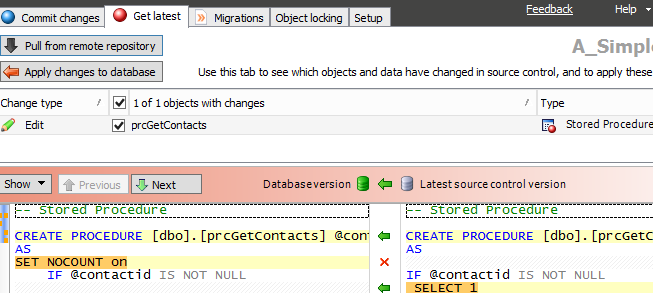
    I’ve got a connection in a VM to a second development machine. When I launch my VM, and SSMS, I go to the second SOC tab, the one that is labled “Get Latest.” You can see the image below, and notice that there are two buttons in the upper left. There is the familiar “Apply changes to database,” which has been the way that we pull changes from TFS and SVN, but now there is a new “Pull from remote respository.” This is the one specific to Git.

    2015-10-22 23_19_54-OneNote

    In this case, I’ve refreshed my database previously in sync with the local Git repo. Therefore the button is grayed out. However, I don’t know if there are remote changes until I click the other button.

    I do that and get the familiar four step dialog from SOC that checks for changes and then compares them to the local database. However what you don’t see is that a “git pull” is issued first, pulling changes from the remote repo. In my case, I had one change I’d made in London, actually, and hadn’t synced with my VM.

    2015-10-22 23_20_15-salesdemo-2015-02-25-1422-export-i-fgg5cstb - VMware Workstation

    This is the familiar SOC actions now where I see the changes and can use the “Apply changes to database” to compile this code in my local database.

    In some sense, this is less exciting then push, but it’s nice to be able to do this in the client.

    I’ll write some more on the workflow as I develop changes in the coming posts, which are going to be aimed at building a small database in Azure SQL database and moving changes from my local system to Git for tracking, and then to Azure for production use.