Tag: version control

  • Simple Merges KDiff3 at SQL in the City

    One of the hassles of working in a development team is that you will have conflicts between your code and another developer’s. That’s fine, and it’s a natural effect of allowing each person to work on parts of a database independently.

    However resolving conflicts can be a pain. Fortunately there are some nice utilities that can help make the process easier. 

    If you want to see this live, come to SQL in the City 2015 in London or Seattle this October.

    Here’s a quick example. I was simulating two developers, each with their own database, but linked to a common Git VCS repository. I went to commit a change and got this:

    2015-08-19 16_36_42-New notification

    SQL Source Control detects a conflict before committing the stored procedure on the left. As you can see, it has more fields in it, while the version in my VCS has a TOP clause. I can keep my version or update mine with what’s in VCS.

    Or, if you look to the right, you can see I have the option to “Merge” code. If I click Merge, then I’ll open KDiff3, which is installed on my system. SQL Source Control has detected this and given me the chance to resolve the issue.

    kdiff3_a

    I get a message that there are 3 conflicts, and none of them could be resolved. If there are places where the code can be merged automatically, KDiff3 will do that.

    Once I acknowledge this, I see my code. This looks like what I saw in SQL Source Control. My code is on the left, and the version from VCS is on the right. Below is the merged code, which has some placeholders where the code conflicts.

    2015-08-19 16_37_28-Your file _-_ Their file - KDiff3

    If I right click the first conflict, I get some choices. In this case, I’ll take the line from the left, which has no TOP clause.

    2015-08-19 16_37_38-Cortana

    This gets inserted into my code and I can move on to the second conflict. In this case, I’ll take the version on the right, which has nothing.

    2015-08-19 16_37_58-Your file _-_ Their file - KDiff3

    For the last conflict, I’ll also take the missing fields from the right.
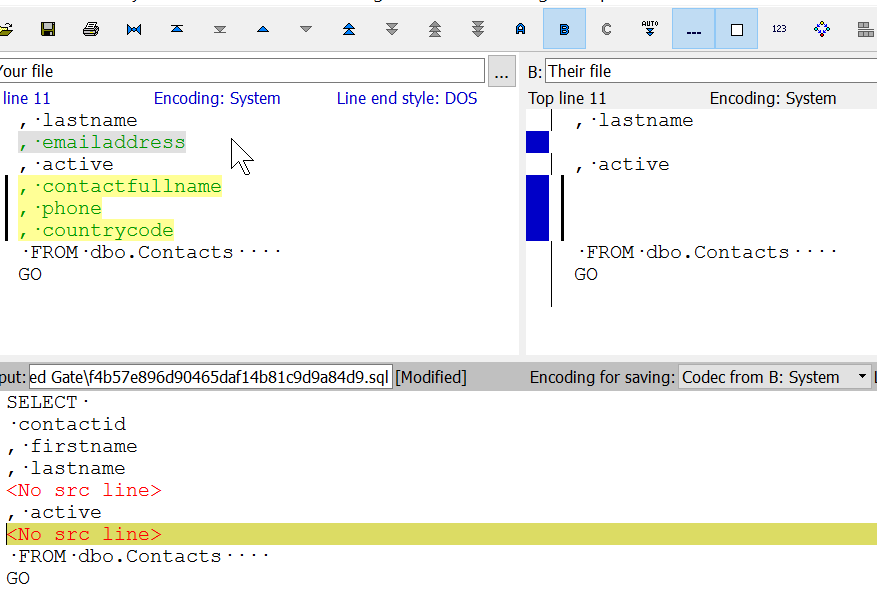
    2015-08-19 16_38_19-Your file _-_ Their file - KDiff3

    If I now save and close KDiff3, I’ll get the merged code in SSMS and SQL Source Control.

    2015-08-19 16_38_32-New notification

    Not the “Keep mine” is selected. I’ll commit this, which will be the most up to date version in our VCS. Other developers can update their code with this version, and if they have conflicts, SQL Source Control and KDiff3 make them easy (ier) to resolve.

    I’ll be showing you some basics of using a VCS with your database at SQL in the City 2015 this October. You can see this and more in London on October 16 or Seattle on October 26. If you can come to either event, register today and come pick up a few tips and tricks.

  • The History of the VCS

    I’ve been looking for ways to convince more DBAs to use a version control system for their code. I realize that many of you have gotten along without them for years, but that doesn’t mean it’s a good idea. A VCS is like a safety net, and someday you’ll be glad you have one.

    Recently I was reading about the history of VCS, and ran across some interesting posts. One on some amazing things, and another that has a timeline, showing us to be in a Renaissance period. If this is the Renaissance, then what comes next? I can’t even imagine, but I suspect someone will improve the process.

    It’s incredible to think about the ways in which we’ve managed versioning code in the past. I’m sure most of us have used comments to both document as well as preserve old code. Some of us have worked with simple backups of files, one per day (for a week or month), or dealt with a first generation system where only one person could work with a particular file.

    The move to CVCS systems, like TFS or Subversion, was a major improvement, allowing everyone to work on all the code, and merge their code with others when they needed to commit. That’s a system many of us inherently understand. It’s what we would do in an offline system. However the DVCS systems (Git, Mercurial), are much more complex, and they can be confusing. However separating the ability from committing changes to performing the merge can be valuable, especially in distributed development.

    More and more tools are integrating version control, including for database code. Whether you like or hate TFS, it includes lots of additional functionality to allow bugs, features, and other workflow items to link to the VCS items that solve them.

    The choice of which system works well in your environment will probably be driven by arguments from your development staff. Some will prefer one interface over another or feel the need to work offline, but I’m not sure it really matters which system you choose. I’d pick one of the modern CVCS or DVCS systems and use it.

    That’s what’s really important; you need to use the system and track your code. It’s frees you as a developer, allowing you to clean up your code, remove excess comments, and easily find out what worked (or didn’t) in previous code.

    Steve Jones

    The Voice of the DBA Podcast

    Listen to the MP3 Audio ( 2.9MB) podcast or subscribe to the feed at iTunes and LibSyn.

  • Why Use Version Control?

    I’ve spoken with quite a few people in the last few years that don’t see enough value in version control to actually implement it. Most of them agree using a VCS is a good idea, but they aren’t doing it. Maybe this analogy will help.

    I was listening to Ike Ellis talk about VCS and he said something like this. Imagine you had a ten foot board to walk across and it was laying on the ground. You’d be willing to walk, skip, dance, maybe cartwheel across it. After all, what are the consequences?

    Now imagine this board is 50 feet off the ground. How do you cross it now? Many of us would be more cautious. In fact, if you’re like me, you’re likely laying down on the board, gripping tightly as you move inch by inch.

    However, what if there were a net below you? And if you fell, this net would toss you right back onto the board where you’d fallen so you could continue on from the last place you’d had success.

    That safety net is your VCS, and when you’re working along coding, you’re crossing a board that’s quite a distance from the ground.

    Steve Jones

    The Voice of the DBA Podcast

    Listen to the MP3 Audio ( MB) podcast or subscribe to the feed at iTunes and LibSyn.

  • Deploy from VCS

    Are you confident in your version control practices and code backups? If so, are you willing to do this? Wipe your applications and database schema from your servers and redeploy things from your Version Control System (VCS).

    I’ve typically maintained code in a VCS, but I have to admit I’d be worried about being positive about which version of code was deployed to which server in many of my previous jobs. Only in one position would I have been positive about which code was deployed to every system.

    I was teaching a class recently with Ike Ellis and he mentioned a consultant he knew always asked this. The reason was that if you can’t be confident of the state of your development code, you can’t really have confidence in your refactoring. There will always be places in the code that no one is willing to allow changes, and your flexibility will be limited.

    That’s very true, though even if you know what code you have, I’m sure there will still be sections of your code that no one wants to change. However, our goal should be to get away from code that’s untouchable.

    We should be able to change any code in the system if we have a good reason. When we can make improvements, we should. We need the confidence that we can alter code when we see the need. That means that we need a repeatable, reliable, adaptable software development process. That’s something we can’t build without making the conscious decision to do so.

    Steve Jones

    The Voice of the DBA Podcast

    Listen to the MP3 Audio ( 2.0MB) podcast or subscribe to the feed at iTunes and LibSyn. feed