Author: way0utwest

  • There Are a Lot of Databases

    I was reading Andy Pavlo’s end-of-year review of the database world. He’s done this for a number of years, and there are links to previous recaps in the piece. He is an associate computer science professor at Carnegie Mellon University, working on quite a few database-related projects. In the review, he tends to track the database world from the perspective of business success and money. There are certainly parts of it that discuss technical changes, but my overall impression is more about the business and usage success than it is about the way database systems work.

    The main thing that struck me after reading the review was how many database systems there are in the world. I hadn’t heard of any of these: RaptorDB, TigerData, Tembo, StormDB, Translattice, FerretDB, DocDB, SpiralDB, Tantivy, SkySQL, HeavyDB, and more. I’m sure I missed listing some I didn’t recognize, and quite a few of these are PostgreSQL-based systems, but still, that’s a lot of database systems that exist and are having success.

    Last year, I ran into someone who worked at a company that had implemented ArangoDB for the software their company sold. This system had something to do with tracking parts and managing schematics for machines, which is a great place to use a graph database. I asked them why they didn’t pick a more well-known and used graph database like Neo4j. He answered that cost was a big reason, but if Arango failed to wrok, they felt could port their data over to another platform. He did mention that training new people was a challenge, which I believe is a good reason to stick with more mainstream systems. However, I understand that people placing bets on less well-known technologies is how the popularity of those platforms grows.

    As a side note, I keep confusing ArangoDB with AvacadoDB. Maybe because I like guacamole.

    If I look at DB-Engines, I see lots of platforms I recognize and a few I don’t, but overall this is a long list. Some you could argue aren’t really database platforms, but these are platforms people report they are using. There are 429 ranked, which is quite a few. I’m not sure there are that many different models of cars being produced in the US each year.

    Many of these are specialized platforms and might be suitable or even preferred in certain situations. I wonder if any of you reading this are running Hazelcast or Presto. Or anything else unusual. If you are, why? What’s better about one of these systems than the top 5-10 in any category?

    As I look around I realize there are so many databases available to choose from. Perhaps it’s just me, but I prefer choosing from a small list rather than a huge one. Do you feel the same way?

    Steve Jones

    Listen to the podcast at Libsyn, Spotify, or iTunes.

    Note, podcasts are only available for a limited time online.
  • Advice I Like: Ranch Rules

    Leave a gate behind you the way you first found it. – from Excellent Advice for Living

    This is a ranch rule. Leave something as you found it. If it’s wrong, then the person who left it that way is responsible.

    We’ve had people try to help by moving something or changing something. I’ve done it as well, and had it done to me. Most of us know gates are supposed to be closed (or left open) most of the time, but we sometimes change something for a reason. Out front gate is usually open, but if it’s closed, I know it’s likely because a horse is out. No one should go through and leave it open with the thought someone forgot.

    There are plenty of times when we might forget something, but our first instinct should be to put something back as we found it. Assume the last person had a reason for leaving it like that. If you have any doubts, go ask someone.

    A good rule at the ranch,and a good one at work.

    I’ve been posting New Words on Fridays from a book I was reading, however, a friend thought they were a little depressing. They should be as they are obscure sorrows. I like them because they make me think.

    To counter-balance those, I’m adding in thoughts on advice, mostly from Kevin Kelley’s book. You can read all these posts under the advice tag.

  • More Documentation is Needed

    AI is everywhere, and if you spend any amount of time looking for answers on the Internet to your coding challenges, you’ve likely encountered a lot of poor, average, good, bad, amazing, and just-helpful-enough AI content. For awhile, I was avoiding the AI summary from Google as the quality seemed slightly off, but lately it’s gotten good enough that I tend use it to decide which links to click on in the results. The summary helps me better understand the context Google sees in my search query.

    I ran across a post on coding documentation and how helpful these docs are in onboarding, code reviews, and more. The teams that worked smoothly together often had good docs that helped them function as a cohesive group. At least to some extent. Over time, teams start to depend on tools and lose some of that cohesiveness since they rely more on tools than docs. I agree with the piece that this is a part of the reason many teams don’t really function as teams over time.

    In the age of AI, this becomes more important. These AI agents are smart, but gullible and prone to making inconsistent decisions if you let them. In the piece, there’s a great quote: “When your codebase follows consistent patterns, AI assistants become force multipliers. When it doesn’t, they become chaos amplifiers.” Or as we data people know it, garbage in, garbage out.

    The lack of documentation means a lack of guidance for both humans and AI agents. It’s easy to say AI makes crazy decisions when we feed it our code, but humans do the same thing. I can’t even begin to count the number of weird decisions over structure and naming I’ve seen from other humans when I didn’t provide them guidance. It happens even when I give them standards, but at least then we can have a conversation about attention to detail if there are docs.

    I saw Brent’s predictions for AI database development in 2026, and part of the challenge in getting AI to be helpful is the lack of docs many of us have on schemas. I can’t tell you how often I’ve been asked if Redgate has tools that can doc a schema and decipher what data is being stored. Microsoft spent a billion+ on Purview, and its results in classification are a mixed bag. It’s a hard problem, and a lot of the problem is us. We don’t make good decisions about what to name columns or tables, we’re inconsistent, and we reuse columns as our requirements change, subtly altering the data being stored. Usually, this is an overloading of two types of similar, but different, data into one column. Sometimes it’s just storing whatever we want in a column (or allowing a user to do so).

    I’d like to think that the growth of AI will result in a little more attention being paid to documenting our data stores. I’d hope this results in at least using the extended properties or COMMENT capabilities of the different platforms. I think having better ER diagrams might be a second step, though certainly with some AI assistance to help keep things in sync as we evolve our schemas.

    Documentation is tedious work, and it’s not something humans are good at, or want to, update over time. However, if an AI agent were around to do the work and then let a human check the results, I suspect we might do a better job of keeping things up to date. To me, that’s another place where the AI revolution might benefit us all.

    Steve Jones

    Listen to the podcast at Libsyn, Spotify, or iTunes.

    Note, podcasts are only available for a limited time online.
  • Deploying an Updated Model with SQL Compare 16

    In a previous post, I deployed a model to a database using SQL Compare 16. This used a new feature in that connects to Redgate Data Modeler. In this post, I want to update my model, and again use SQL Compare to just get the changes deployed.

    There’s a video of this post at the bottom if you’d rather watch me work.

    This is part of a series on Redgate Data Modeler. This is also part of a series of posts on SQL Compare.

    Updating the Model

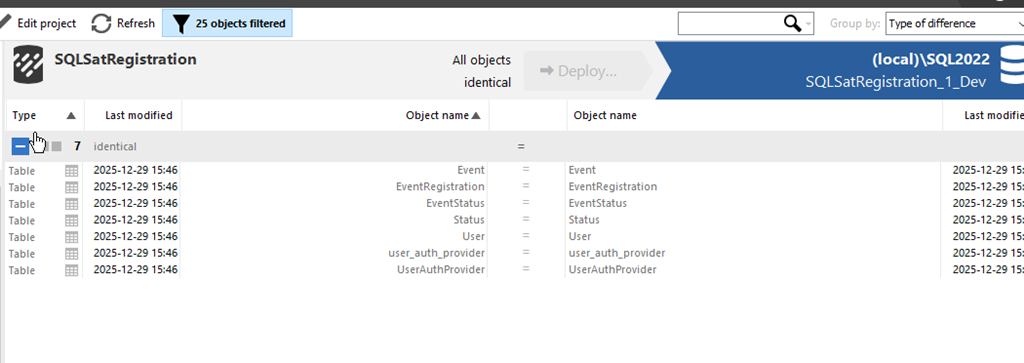
    As with the last article, everything was in sync with SQL Compare. You can see this below.

    2025-12_0099

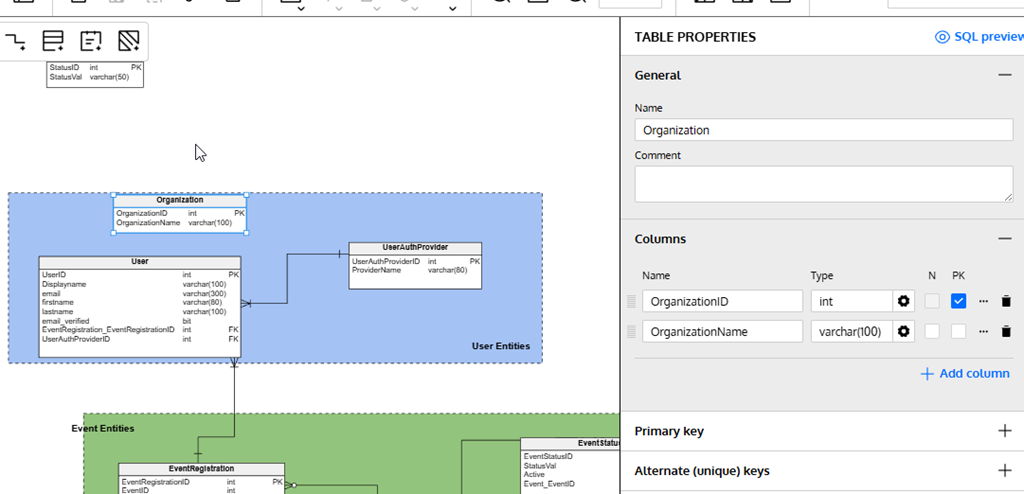
    Let’s alter a few things. First, I’ll add a new table. I wrote about this in another post, but I’ll click new table, click in the diagram and then fill in details. In this case, I’m creating the Organization table.

    2025-12_0101

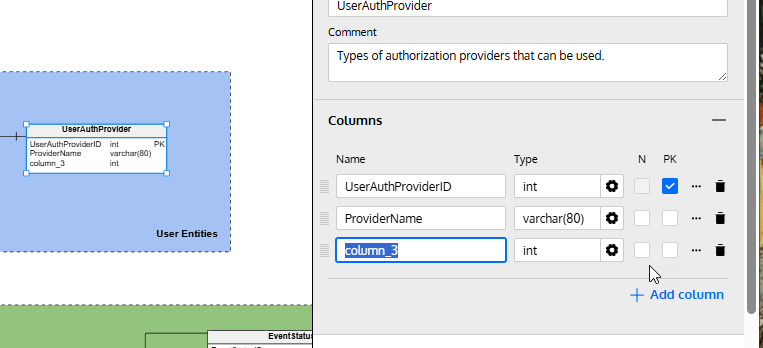
    I’ll also alter an existing table. I’ll click the “Add column” in the lower right of the properties blade after selecting the table in the diagram.

    2025-12_0102

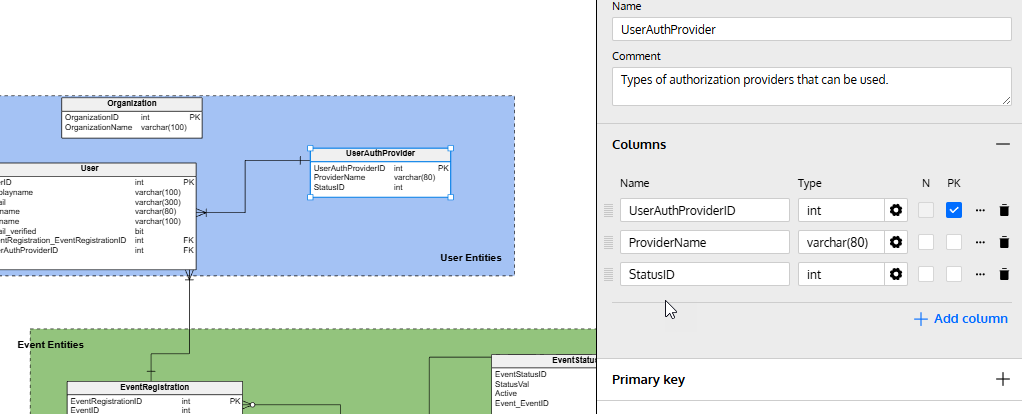
    I fill in some details here.

    2025-12_0103

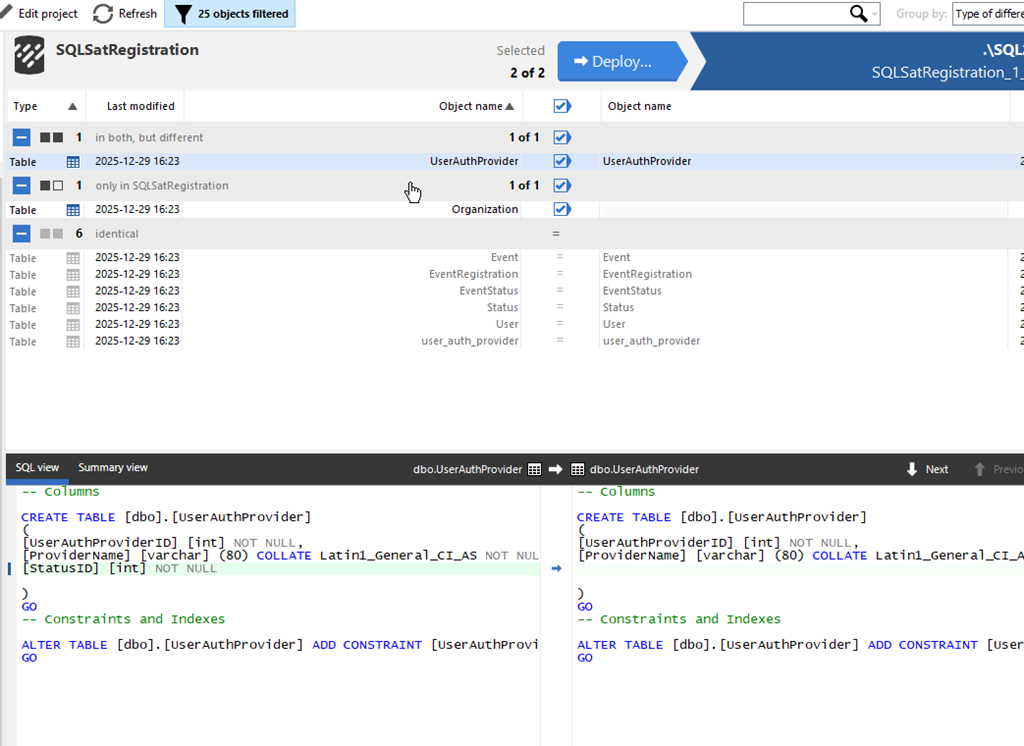
    I’ve made my changes, so let’s now return to SQL Compare and click “Refresh” at the top. This re-runs the comparison and as you can see, I have some changes. My new table is listed at the top, and I’ve clicked on the altered table, UserAuthProvider. At the bottom, I can see the change in the diff view.

    2025-12_0105

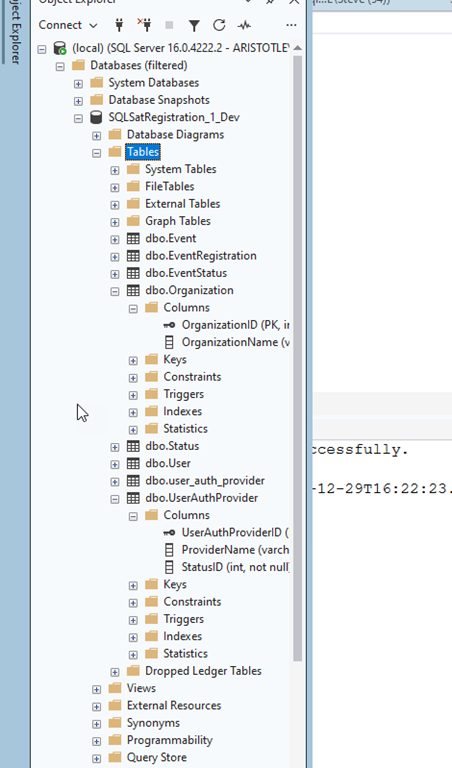
    I’ll click “Deploy” just as I did previously and run the deployment. Once it complete, I can see the changes in my database.

    2025-12_0107

    Summary

    If there’s one thing I’ve learned in many years of work, it’s that I’ll make mistakes in my design and I need to change things. Hopefully I catch these mistakes in development, but even when I do, I need to update my dev database.

    This post showed how I can adjust my model, or someone else can, and I can then pull the new changes into my database with SQL Compare 16.

    SQL Compare is an amazing tool that millions of users have enjoyed for 25 years. If you’ve never tried it, give it an eval today and see what you think. Give Redgate Data Modeler a try and see if it helps you and your team get a handle on your database.

    Video Walkthrough

    Here’s a short video of this post.