Tag: Azure

  • DP-900 Preparation Guide

    This is part of a series on my preparation for the DP-900 exam. This is the Microsoft Azure Data Fundamentals, part of a number of certification paths. You can read various posts I’ve created as part of this learning experience.

    I was asked to pursue a few Azure exams as part of Redgate’s partnership with Microsoft. I’ve been slowly studying some concepts and working towards exams in spare time, but getting more focused in January. I made this a part of my goals for 2022, and it’s been an interesting experience to work towards this exam.

    I’m providing an overview of my resources, and I’ll add new posts for various detailed items I found interesting with links as well.

    Overview of Preparation

    The first thing I did was look over the exam page. This lets the reader know what is being covered as well as the purpose of the exam. There is a note that some things have changed as of Oct 2021, and there is a new PDF to look at with the various areas being tested.

    Download the PDF.

    That’s first, and then check the scope of the exam. There is a lot here, including, but not limited to:

    • data workloads
    • relational Azure services (including PostgreSQL and MySQL/MariaDB)
    • Synapse
    • security (firewall, auth)
    • deployment options
    • query tools
    • DDL and DML
    • non-relational data
    • Azure Storage, Azure Files, Azure Tables, Azure queues
    • Azure CosmosDB
    • analytic workloads, including HD Insight, Databricks, ADS, and Synapse
    • Power BI

    That’s daunting.

    I also looked over some guides from others:

    This seems like a lot, but since the exam can only cover so much, I didn’t expect to be too detailed in each area. However, you do need to know quite a bit about a number of different areas.

    I looked over these, trying to determine what I knew and didn’t know. These gave me hints about which places to spend a little time. I didn’t watch all of the Andrew Brown video, but I did look over the others.

    Prep Process

    I started looking for an overview of each area. Microsoft Learning has some free reading courses, and sandboxes for practice, that I used. I went through these learning paths:

    These each are tens of minutes, but there is a lot of information to absorb about each area. Quite a few of these areas I hadn’t spent much time working in, so I found myself dropping into the MS Docs to get a little more clarification of the area.

    I also took the MS sample question test to get an idea of what I actually knew. I learned that I had quite a few holes in small areas, though overall I knew most of what was being covered.

    I haven’t taken the exam yet, as I’ve been spending an hour every 2-3 days going over some concept and trying to learn a solid overview of what it consists of and how it might be used for data work. Lots to learn here, and the thing I do like is that this forces me to actually dig into topics at a slightly deeper level and helps me to understand a bit more about the options in Azure.

    It also helps me to have better conversations with customers, which is important for my job. I’m not an expert, but I have an idea how of what Azure Table Storage is v. CosmosDB and can understand why someone might choose one of the other in a conversation. At least I can talk basics and know where to look for more detailed information.

  • Getting Started with KQL

    I saw an episode of Data Exposed with my good friend, Hamish Watson. He talked about KQL (Kusto Query Language) being the next query language you need to learn. I was skeptical of the title, but I decided to give this a try.

    In the episode, Hamish points out a cheat sheet from Microsoft, which I thought was a good resource. However, while watching the video, I browsed over to the demo site Microsoft has at https://aka.ms/lademo. You need an Azure account to log in, but this is a demo site where you can query some Log Analytics data. The new query window below is what appears when you go here:

    2021-12-22 14_37_43-Logs - Microsoft Azure

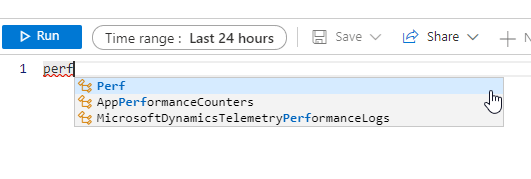
    Hamish shows some sample items, and I noted that to query a table, you just include the name. The query window in Azure has intellisense, and I used Hamish’ example to look at perf data.

    2021-12-22 14_38_36-Logs - Microsoft Azure

    The structure of queries is that you choose a table, then you can add a pipe (|) and add a where clause or other structures. I glanced at the cheat sheet, but really I played around a bit.

    For example, I saw in the demo there was a “take” option, so I tried this:

    Perf
    | take 6

    This gave me six results, so it’s like a TOP clause in T-SQL.

    2021-12-22 14_42_19-Logs - Microsoft Azure

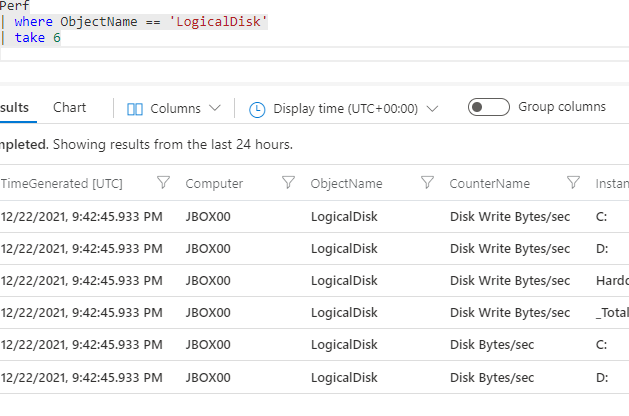
    Next, I tried a WHERE. This is also structured as a line after a pipe. I picked a value I saw and then ran the query.

    2021-12-22 14_45_03-Logs - Microsoft Azure

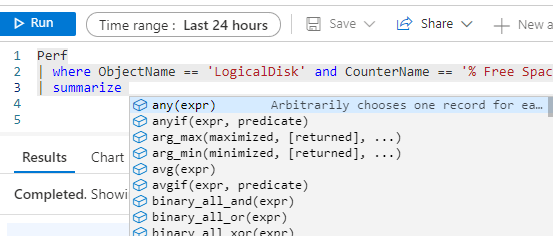
    I noticed there was a summarize option, so I tried entering this. What I liked was that I had some intellisense options to help me with the various aggregates.

    2021-12-22 14_46_15-Logs - Microsoft Azure

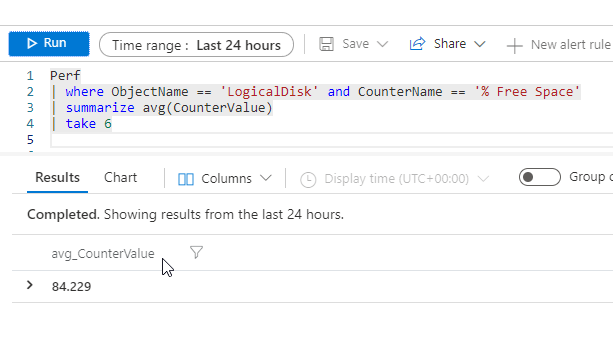
    I ran this query, and got an average of the free space across all disks.

    2021-12-22 14_47_04-Logs - Microsoft Azure

    That isn’t a number that really means anything. I tried GROUP BY in a few ways, but eventually had to look at the cheat sheet to see just “by” is needed. I ended up with this query to get space by disk.

    2021-12-22 14_48_54-Logs - Microsoft Azure

    In some ways, I found KQL to be easier to work with than SQL. It’s cleaner, and logically follows what I’d do when writing a query. I build this in a way similar to how the query is executed, which is unlike how SQL works.

    I don’t know if KQL is going to be that important to me, but I will play around with it a bit more.

  • T-SQL Tuesday #142–What is Bicep?

    It’s time for the monthly blog party, and this month the host is Frank Geisler. I was reaching out to various people last year to find hosts, and also (silly-ly) looking for first names to fill out the alphabet on the host page.

    Frank is a fellow MVP and a BI expert. He was gracious enough to agree to host and I thought he picked an interesting topic. This month’s invitation is about scripting to deploy resources. I don’t do a lot of deployments over and over, but I have been interested in one area. It’s actually been a tab in my browser open for a few weeks, so I took this opportunity to dig in.

    Bicep

    I’ve been seeing this term used in various blogs, and in the MVP email list we have. I wasn’t sure what it was, and I kept thinking of this:

    flexing-flex

    That’s not it at all, and I was glad I went through this resource.

    Bicep is a transpiler, meaning it takes one language and translates it into another. In this case, the Bicep language will move code into the ARM JSON templates. JSON is really for machines, not humans, so the idea is to give sysadmins and developers an easy way to describe resources they need to deploy into Azure.

    The language is new, and it’s on Github. This is a DSL (domain specific language), which means it was designed for a specific purpose. With the 0.3 release, the language is built into the Azure CLI and Azure PoSh utilities, so this will do the transpilation for you. There’s also a decompiler to go from an ARM template back to Bicep. It’s also supported by Microsoft, which is always a plus if you need to call for some issue.

    I don’t know a lot about Terraform, but this appears to be another language designed to do the same thing. The FAQ in GH notes this is a revision of ARM, which I guess makes sense. I’m guessing at some point they’ll try to get people to not use ARM (or stop supporting this) and only work with Bicep. Azure supports Terraform, so I’m guessing this is more an attempt to deprecate ARM and the challenges of customers working with JSON.

    A couple things I did like about this. First, there are modules, so you can reuse some code. There is also intellisense, validating and getting you actual resources from Azure that are available. I do worry about deprecation that makes it difficult to deploy a copy of an existing resource when Azure is trying to push you to use some new resource. However, I do think the intellisense and validation in the VS Code extension improve productivity for developers and sysadmins.

    Reuse also helps infrastructure teams assist developers by providing them modules that adhere to good or best practices.

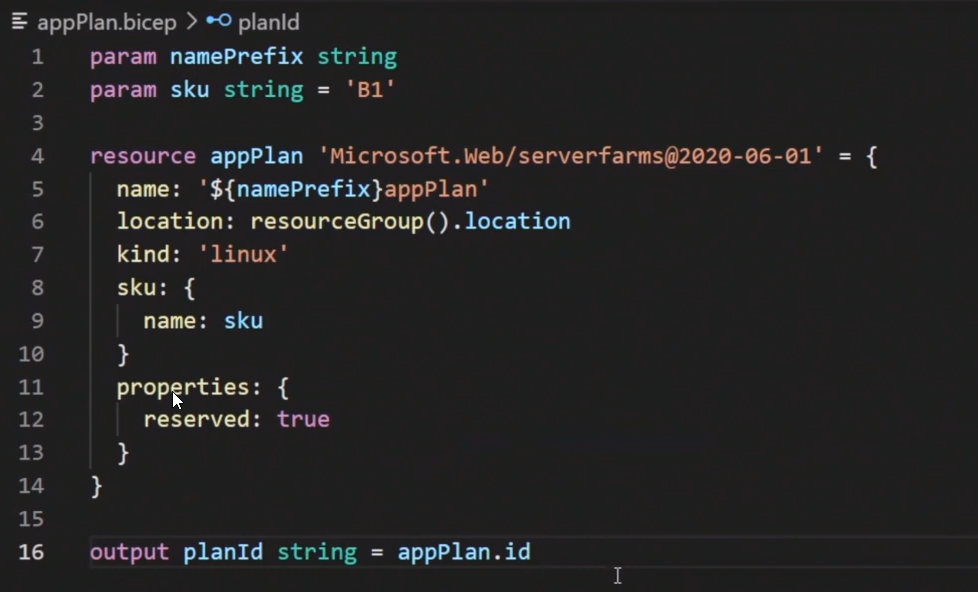
    The language looks like a mix of Python and YAML. Not too hard to understand, and with help, this should be easy to use to create a resource.

    2021-09-14 10_23_36-Bicep language for deploying Azure resources - Azure Resource Manager _ Microsof

    I’m pressed for time today, so I’m not going to experiment or set up an environment, but I need to add this to a list of things to do.

    Why call it Bicep?  No idea. I can’t find an answer, but I did someone say these are “ARMless deployments”. Not sure that fits with Bicep, but I like the logo.

    2021-09-14 10_22_05-Bicep meet Azure Pipelines _ I CAN MAKE THIS WORK

  • The PASS Pro Videos are Live

    The PASS Pro program was an interesting educational opportunity that came out last year. A number of people subscribed, including me. I did this more to support the org than for the content, but I did want to watch the videos and learn some new skills.

    When Redgate Software purchased the assets, this was one of the first things we wanted to release. The process took a couple weeks, but you can now access the materials for free.

    All the courses were added to the Redgate University, as this was the easiest way to organize them on our side. You watch each of these for free:

    You can now work through these courses, without the quiz gates, and just view the material.

    I do hope we get the quizzes live, but for now, you can access these for free.