Tag: Azure

  • Database DevOps Deployment to Azure–Webinar

    You can register now, but on Dec 3, I have a webinar with Microsoft on database devops and Azure. This is a joint effort with Redgate, so I’ll be showing some of our tools.

    In the webinar, which I recorded last week, I walk through the idea of Database DevOps in general, showing how we evolve our database development to incorporate automation, use Azure DevOps, and deploy code to an Azure database.

    Register today, and I’ll be ready for questions on Dec 3.

  • Moar Azure

    There are a number of choices for working in the cloud, aka, renting resources, but there are three big choices: Azure, AWS, and GCP. These three dominate the cloud services, though arguably AWS and Azure are way ahead. All three have lots of services, and all three can likely meet your cloud or hybrid needs, even if you work in a regulated industry or government.

    This week there was a piece on the work Microsoft is doing to increase their capacity. Between the 0365 Office services, Teams for collaboration, and their regular PaaS/IaaS workloads, they’ve grown quite a bit this year with the COVID-19 pandemic. As they try to increase their resources, they’ve had people working round-the-clock to add new servers. I’m sure they are still using containers, but likely they are struggling to fill these with new hardware.

    They’ve also been adding bandwidth, which is a bit need between the data centers. I had no idea they have their own undersea cables, but apparently they do. I suspect Amazon and Google do as well.  There is a note that they’re also coding, trying to improve efficiency. After all, while you can throw hardware at a problem, many of us know that bad code can overwhelm those efforts. We see it in our jobs every day. I would hope that many of our organizations that might be depending on software more realize that better code is an advantage for us and our customers.

    I know Microsoft runs a lot of their own stuff on Azure, including development work, and they’ve had to reschedule their internal workloads as well as move other work outside of regions. I think that’s fine in many cases, but with different laws in different countries, I hope they’re extremely careful about what moves. Data sovereignty can matter.

    If you read through the article, it seems that Microsoft has learned a lot about adapting their work methods, both with people and systems, to meet the increased workloads. This is one area that I hope we see some detailed technical blogs, which might help others learn how to better manage their own resource challenges, or even learn to code better. While some of this might be proprietary, with the move to having many things open source, why not share ways to improve application resource usage.

    Steve Jones

  • Resetting an Azure SQL Database Admin Password

    This is likely something that most people know, but it was a bit confusing for me. This post is really here to remind me and help cement this in my mind.

    I went to connect to a QA database that I don’t use very often, and for some reason, I couldn’t remember the password. I tried a number of them, but none worked. Not the best situation to find yourself in.

    I then decided to just reset the password and went to the database Overview. This is what I saw:

    2019-11-26 17_53_06-Sandbox (dkranchapps_Sandbox) - Microsoft Azure

    I could have sworn there was a “Reset” option here. I even tried searching a few places and there were people that mentioned there being a reset. Why wasn’t I seeing one?

    Because I was in the wrong place. Reading closer a post on the Tech Community, I see that I need to be in the SQL Server server blade, not the database.

    Once I realized that, I clicked over to that spot in the portal. Looking at my SQL Server, and I see the Reset.

    2019-11-26 17_56_42-dkranchstaging - Microsoft Azure

    Slightly confusing, and certainly something I hope I remember from here, but if a new developer is working with databases, they might not realize this.

  • How Serverless is Working in Azure SQL Database

    When Azure SQL Database introduced the serverless option, I decided to try it. I moved one of my databases to the tier, though I had to move to a vCore model instead of the basic DTU setup. I was nervous, but I did it back in May.

    Since then, I’ve only used the database sparingly, so I haven’t noticed much change, but the billing is lower. In October, the first database I moved over here cost me US$0.35. In fact, the last three months, this has cost me US$6.90

    2019-11-25 11_18_07-Cost Management_ VS_MSDN - Cost analysis - Microsoft Azure

    Let’s compare that with the 3 months until I went serverless. When I look at this, I see US$15.45, which is what I’d expect. About $5 a month.

    2019-11-25 11_20_33-Cost Management_ VS_MSDN - Cost analysis - Microsoft Azure

    On a low usage database, this has certainly saved me money. Would it be different if I used this more? That is harder to determine, and I need to run an experiment with something I use more often. I’ve tried to manage my Azure credits wisely, and with making a few changes across the last six months, I was slightly worried about the cost of this vCore system.

    Last month I did adjust this down to a 1 hour delay before shutting down the system, so if you had a normal vCore database and could cut down on usage during some periods, this certainly might help you.

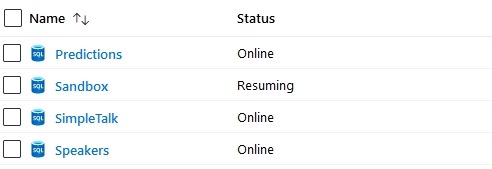
    The downside? Today I spun up a db, and saw this for about 15 minutes.

    2019-11-25 10_59_39-SQL databases - Microsoft Azure

    Now great, as this caused me SSMS issues as I tried to connect. More an SSMS issue, but still annoying.

    So far serverless has worked well for some test databases, which is where I think is shines.