Tag: backup

  • Using Backup-DbaDatabase for a Quick Backup

    I really like the dbatools project. This is a series of PowerShell cmdlets that are built by the community and incredibly useful for migrations between SQL Servers, but also for various administrative actions. I have a short series on these items.

    One of the core tasks of a DBA is backing up a database. In fact, I’d argue that it’s the most important thing for a DBA to know. Second would be restores.

    I’ve used the BACKUP DATABASE command so often from T-SQL that it’s a quick way for me to just get a backup of a database. I almost always have SSMS running, so I can easily just run the backup.

    For regular backups there are some great tools out there, SQL Backup Pro from Redgate, Minion Backup, Ola Hallengren’s scripts, and more. However, there still might be a time I want to make a few backups, perhaps copy them over, and that’s where I think dbatools and Backup-DbaDatabase might help.

    This is a nice, easy cmdlet to use. You can probably guess how to use it. Give it an instance, a database (or few), include a path, maybe create folders for each database, and let it go.

    That’s about it.

    If I run this interactively, I’d get the progress bar:

    2017-10-02 17_04_29-{15%} cmd - powershell (Admin)

    When the command is done, I see the results from each database. I get the file, folder, full path, and the script used.

    2017-10-02 17_04_36-cmd - powershell (Admin)

    I could include a different path if I wanted, and certainly I can chain this along with other PoSh commands.

    I don’t know that I’d use this often, but it is handy in places, and certainly if I want to script the movement of some files, perhaps for something like HA/DR testing or setup, or even to refresh other environments.

  • Using xp_delete_file

    First, this is an undocumented proc, and there’s nothing in BOL on this. Second, it’s a holdover from previous versions, so you’d be better served by using Powershell or some other type of scripting mechanism. This procedure is not supposed to be supported in the future, so I’d remove this from your code. In fact, if you want to just remove these, use Remove-DbaBackup from dbatools.

    If you use this, or want to know what to refactor, Patrick Keisler has a nice post on the proc as does Andy Leonard, and there’s a parameter list on StackOverflow. I dug in recently as a customer was having issues, and I needed to refresh my memory.

    Essentially, there are a few parameters that you use with this procedure, but bear in mind this only deletes SQL Server backup files or report files. You choose this with the first parameter, a 0 for backup files, and a 1 for report files.  The rest of the items are fairly self-explanatory, but keep a few things in mind.

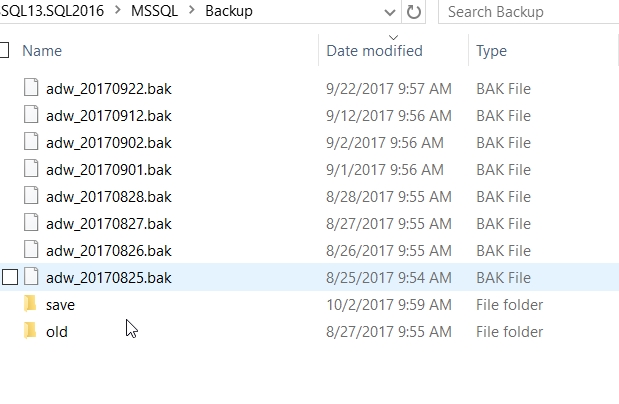
    First, the date is a datetime value. Meaning if you just include a date, this is the beginning of the day (midnight). You can see this here. I’ve got some backup files.

    I then run this code:

    EXEC xp_delete_file 
       0
       , N'D:\SQLServerBackup\MSSQL13.SQL2016\MSSQL\Backup'
       , N'bak'
       , '20170901'

    Now, I see this:

    The file from Sept 1 still exists because it’s at 9:56am, and the parameter is midnight (2017-09-01 00:00:00). Keep that in mind, and use the appropriate values. If I’d run this:

    EXEC xp_delete_file 
       0
       , N'D:\SQLServerBackup\MSSQL13.SQL2016\MSSQL\Backup'
       , N'bak'
       , '20170901 10:00:00am'

    The file from Sept 1 is removed.

    Next, you need to use the extension to decide which files to remove. That means you might need to have separate calls for .bak and .trn (and .dff), or just remove all old files. The choice depends on what your requirements may be.

    Lastly, make sure that if you use separate folders for each database, you set the last parameter.

    Again, I wouldn’t use this command, especially not in a modern system, but if you do use this, make sure it’s working.

  • Backups Aren’t Backups Until a Restore Is Made

    One of the interesting things I saw in the recent GitLab outage and data loss was the fact that none of their backups were available. They use PostgreSQL and I’m not familiar with the ways in which the modern PostgreSQL engine handles backups or the options you have, so I’m not knocking either GitLab or PostgreSQL. It’s possible one or the other had fewer options than we do with SQL Server with our full, differential, log, and filegroup backups, all during live database activity.

    There was a live stream and a Google Doc open during the incident, showing the response by their employees (and plenty of Hacker News comments). Kudos to GitLab for their bravery and transparency in showcasing their mistakes and choices. I’ve been in similar situations, and the war room can be chaotic and stressful. There have been no shortage of times when someone makes a mistake under pressure and we scramble to recover from the damage. I’ve made those mistakes and understand how they happen when you get desperate and are tired. This is one reason I’ve usually insisted that when an incident is declared, I immediately send at least one person home to rest. I never know what time I’ll need to get them back.

    In reading the notes, there are a number of issues. One of the respondents doesn’t know where the once a day backups are stored (1). The location they check has files only a few bytes in size, so backups might not be working (2). No disk snapshots in their Azure space for database servers (3), though the NFS servers get them. The snapshot process is incomplete, in that once snapshots are made, some data is removed from production, and will be lost in this recovery (4). The backups to S3 don’t work (5). All of this results in a backup that is six hours old being restored. For people that commit code often, this could be a lot of data. Hopefully there weren’t too many merges and branch deletions in this time for customers.

    A backup doesn’t matter. A restore matters. It doesn’t matter what backup process you have, if you don’t test it, then you don’t know if you can recover. In fact, with databases (really any system), you need to test the restores regularly because the backup process can fail. I learned this early in my career when one of our admins realized his fancy tape changer that let him only change tapes once a week was broken. The drive had stopped writing and he never noticed.

    Not only is it important to monitor that the backup process runs, it’s important to ensure the backup files exist, where we expect them to exist. If this is a remote location, you need monitoring there as well. It’s also important to restore backups regularly. Ideally you’d test every one, but at least get a regular rotation of testing once a week to ensure your process is working.

    If you don’t, then you risk not only data loss, as GitLab experienced, but an RGE. That’s a resume generating event, and it’s something none of us would like to experience.

    Steve Jones

    The Voice of the DBA Podcast

    Listen to the MP3 Audio ( 5.9MB) podcast or subscribe to the feed at iTunes and Libsyn.

  • Wow. Just Wow

    Wow. Just Wow.

    Yes, I meant to use a capital letter there. The Red Cross’ Blood Service in Australia had database backups on a website that anyone could access. That means that anyone could download the backup, which contained PII (Personally Identifiable Information) about donors. This was a mysql dump file, which is shockingly easy to restore, so anyone could have read the file inside of an hour.

    To be fair here, this wasn’t the Red Cross’ fault. A partner had put the file on a website, perhaps for developers or an analyst to download, but the web server had directory browsing available and was serving data on a public IP. That’s three major faults, and perhaps a fourth since the backup file wasn’t protected at all.

    How many of us have innocently taken a backup, put it in a location for someone else to download inside our company, and not thought anything of the action? If you have done this, would you know if the file were accessed and downloaded by the wrong person? In most cases we wouldn’t because the correct person might download the file as well and we wouldn’t think anything had ever gone wrong.

    That’s a problem with data. We don’t get necessarily notified if someone makes a copy. We certainly have no way of knowing if the backup files we create are ever restored by an unauthorized user, much less just copied. We often just assume that data at rest is just at rest and isn’t ever mishandled without our knowing about it.

    This is a good reason why we should be practicing security by default in most every case. All our backups should be protected at the very least with passwords. Even if everyone in the organization knows the password, some random person that might steal a laptop or browse an unsecured web server won’t know it. The password also shouldn’t be easily guessed, and if possible, the data should be encrypted. Always.

    What’s more, I would hope that we would use secure ways of moving information around with our fellow employees and partners. I know Dropbox is a very convenient and tempting mechanism to use, but is it really appropriate? It might be good enough if you’ve protected the data in other ways, but I’d be very, very wary of using any public service that doesn’t allow for some sort of security that can be tied to individual, authenticated users.

    No matter how you choose to protect and transfer database backups, I’d also be sure that you don’t leave the information there indefinitely. Have expiration times where files are removed. All encryption and protection can be cracked, given enough time and resources, so don’t leave your files there forever.

    Steve Jones

    The Voice of the DBA Podcast

    Listen to the MP3 Audio ( 3.8MB) podcast or subscribe to the feed at iTunes and Libsyn.