 This month Allen Kinsel hosts T-SQL Tuesday #19 with a disaster recovery theme. This is the blog party idea started by Adam Machanic where everyone that participates writes on a single theme.
If you want to host, contact Adam. If you want to participate, read Allen’s post and write your own post and link it in.
What’s a Disaster
It’s interesting that this is the theme since I already had two posts on DR scheduled this week and am working on modifying my “Preparation for Disaster” presentation for SQL in the City.
It’s hurricane season for Allen on the Gulf, and while hurricanes give you advance notice when they are coming, you have to be prepared. I’ve lived on the East coast, and we always were worried about getting hit in Virginia Beach. We never did get hit, but that didn’t stop us from being prepared and sometimes even initiating some of our disaster protocols.
As a side note, we had an office in High Point, NC, and it actually got hit by a hurricane, or the remnants of one and lost power. I was in a downtown hotel at the time and woke up without power.
The thing is large disasters are rare. You have very little chance of your data center getting hit by a hurricane, a tsunami as Japan recently had, a tornado such as the Northeast have experienced this year, They happen regularly, but the chance of them hitting your data center is low. The chance of you “losing” a data center is low. It just doesn’t happen that often, and the complete loss of a data center might mean you have bigger things to worry about.
However there are plenty of disasters that you are likely to experience. It’s possible that you could have a fire in your data center that affects the database server. Not likely, but it could happen. It’s more likely that you could have one of these:
- an operator spill coffee on your server
- someone trips over a power cord or fiber cable and brings down your system
- a memory chip go bad and get in memory corruption.
- it’s possible power goes out for some reason, even with a UPS.
- It’s highly likely that a drive will fail that contains data you need.
These are the types of disasters that you really have to prepare for, since they are possible, and even likely.
What’s more likely are the “Whoops” disasters as I like to call them. It’s very likely that someone will import the wrong file, update all prices instead of one, or even more likely, a developer or DBA will run the wrong code on the wrong server. The most likely disaster is probably this one:
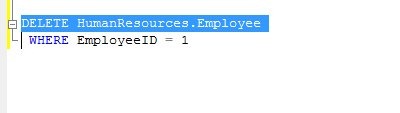
If the DBA hits “Execute” here, it’s a disaster. Not a big one, but if this is a critical table in a critical system, you might have an even bigger reaction from manangement than if a hurricane hit.
You have to prepare for disasters, but don’t get caught up in worrying about the data center being destroyed. Those disasters are rare. Most of your preparation, your practice, your checks, have to be focused on the more likely disasters, which are often smaller in scale and focused on your database.


