Tag: hardware

  • Laptop Build Quality

    I’ve been looking around at various laptops, in preparation for getting a new one. I wrote about considering the Surface Book, which is still on the list, but has dropped a bit. The hardware quality is great, but when I was in the UK last week, a few people had them and complained about some driver bugs. In particular, I was messing with one person’s touch keyboard, and they warned me not to pull if off.  If I did, the machine might crash.

    Ugh. At $2k and lots of hype, I wouldn’t expect any issues like that.

    In any case, this post is about build quality, not software.

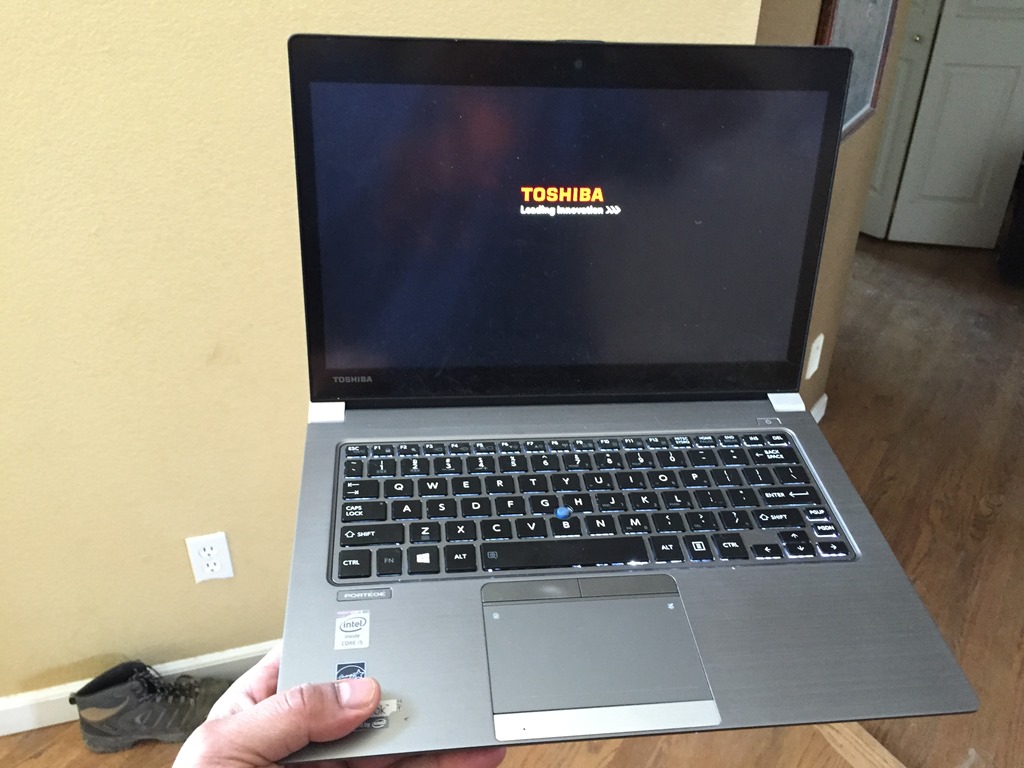
    I was laying in bed this week, working on some editorials when my daughter came in. She wanted me to look over a piece she was writing for school and handed me her laptop. She has a Macbook Air, and as soon as I put my Toshiba z30 down, I was impressed with the Air’s build. It’s solid, it’s light, but it feels strong. I remember loving my Macbook Air, and holding it as I reviewed her work, I was reminded of that.

    My z30 flexes, to the point that across a year, my touch point is unusable with the twisting of the frame. The trackpad was also far, far superior on the Air. I thought the Macbook Pro was like that, so I swung by a Best Buy to check. I walked in and went to the Apple section, picking up a Macbook and it feel solid. It’s just a better device than my Toshiba.

    However I was curious about others. I did walk over and look at a Surface Book. It’s a solid machine, about the size and weight of the MBP. However it has the touch screen, which is interesting. The trackpad works differently, but it’s a nice machine. Detaching the screen, it’s a tablet, which is nice. I still don’t know how much I’d use the tablet factor, but it’s tempting. However the weight distribution is strange. The screen is heavier than the keyboard, the opposite of most laptops.

    I also walked over to look at a Yoga 900, which I was curious about after reading Tim Mitchell’s review. I’m actually anxious to see how Tim’s machine looks next month in NM, but for now I contened myself with the display model. The hinge is neat, but this is a light laptop. At first glance, it also was solid. The flex I have on my Toshiba was not there. Despite a few reviewers noting this felt plastic and cheap, I didn’t get that feeling. It’s no Macbook, but it’s better than my Toshiba.

    This will be an interesting decision for me, but since I’m going to wait for Apple’s announcement in March and see what they might do. I doubt they’ll go touch screen, but you never know. I have gotten used to touching my screen for some reading, and I think I might miss that with a MBP.

  • Surface Book

    It’s almost time for me to get a new laptop. I’ve had a Toshiba for about a year, but it’s not held up well. The screen has gotten loose, the trackpad and clickers are not consistenly responsive, the pointer device sometimes drifts on its own, and I have had a couple memory related crashes. All in all, despite a similar travel schedule to what I’ve had the last couple years, this laptop is showing its age quicker than others. These are flaky issues, not easily reproducible, and something that the warranty doesn’t seem to cover.

    As I look to future travel and talks, I realize that I need to find something that might be more reliable. That’s always tricky as it seems people have a variety of different experiences with the same model machine. This last year has made me hesitant to think about chancing a new, or unpopular brand, something I did last year in trying to find a small, lightweight machine that can handle 16GB of RAM.

    I read a review of the Surface Book after two months, which is one I’d like to consider. I’ve been impressed with the Surface Pros, but prevented from using them as I need 16GB on the machine. The Surface 4, on which the Surface Book is based, has that capacity, so I am intrigued. I worried about the new hardware, but it seems that the Surface 4s have been fairly solid. A couple of firmware glitches relating to sleep mode, but I’m hoping those get ironed out in the next couple months. At least I hope they do because I really like the idea of a Surface machine.

    I do suspect that like the reviewer, I’d mainly use the machine as a laptop. That’s what I need, and I’m not a big consumer of media. However the option to use the machine as a tablet is interesting. I had the chance to use Rob Sewell‘s Surface 3 as a notebook with a stylus during a presentation at SQL Relay and enjoyed the experience. There are some nice OneNote integrations, though I’m not sure how often I’d want to take notes on a computer rather than paper.

    However the main contender for me is probably a MacBook Pro. I loved the MacBook Air I had, and was disappointed to move away from it. I also want to do some iOS and cross platform development, which a MacBook would allow. The hardware is solid and proven, and it’s a similar cost to the Surface. I have a few months to decide. If I go MacBook, I’ll wait for the March (rumored) refresh. If I’m unsure that that time, I’ll probably think about the Surface as a backup. Either way, I’ll be in hardware search mode across the next few months, with fingers crossed that my current machine survives.

    Steve Jones

    The Voice of the DBA Podcast

    Listen to the MP3 Audio ( 3.0MB) podcast or subscribe to the feed at iTunes and LibSyn.

  • Hardware Issues

    My backup drive failed last night. I was struggling with a few VM issues and when I finally resolved a few, I went to back up the VM in case I had more. I plugged the external, 2.5” SSD into my laptop and got nothing. No response, no new drive in Explorer.

    That’s not what I want to see, though I’m glad it was a backup drive, and not one I needed for presenting. Not much I could do at night, on the road, but in the morning I resolved to get a new one.

    I did have a California geek moment, heading to Fry’s for the first time to replace my drive. I’ve read about, and heard about the store for years. I’ve passed them in Northern California, but never gone in.

    Photo Apr 10, 8 33 10 AM

    It was a bit of a mistake, since I was late getting back to our Red Gate event. I got a little entranced with the various displays and options in there. It’s like a Best Buy++, combined with a Radio Shack and more. Microcenter in Denver is similar, but Fry’s has more.

    I decided to go mSata rather than a 2.5” one, mostly for space and weight. It’s amazing to me how small things have gotten. I got the Samsung 840EVO 500GB drive and a small case.

    Photo Apr 10, 11 35 00 AM

    I carry a screwdriver, but the case came with a tiny one that I used to mount the mSata drive. How small is this? Small.

    Photo Apr 10, 2 08 58 PM

    The picture above shows my hand, a 16.9 oz water bottle, my Arc mouse, and the 500GB mSata drive in an enclosure.

    500GB!

    I could probably carry 4TB worth of these one hand. For $249 for the drive and $20 for the case, it’s amazing. I’ve got a nice backup for multiple copies of my VMs, which is very handy and cost effective.

    If you haven’t tried mSata, take a look. I’m not sure I’d look at any other formats for portable storage.

  • Toshiba Portege Z30 Review

    I saw recently that Grant Fritchey wrote a review of his laptop, the Portege Z30. I had noted Grant’s issues with laptops and waited to see what he got last year before I replaced mine. I actually had the chance to compare his Z30 with my old Lenovo T430 in Washington DC and was impressed.

    With my old machine randomly failing, I decided to duplicate Grant’s efforts and get the same model. I figured we could support each other, and any issues one of us had, the IT department at Red Gate would gain knowledge as well.

    Size and Shape

    I used to have a MacBook Air and was thinking to go back to one, but since it wasn’t updated to contain 16GB, I couldn’t. I considered a MacBook pro, but they are a bit heavy, and the Z30 was fairly light. Here’s a shot of it.

    Photo Mar 30, 11 07 23 AM

    It’s definitely thicker and heavier than the Air, but it’s thinner and lighter than my Lenovo, so that’s nice. This is actually the test I use for laptops:

    Photo Mar 30, 11 07 34 AM

    Since I’m on the go, and I can be getting on and off podiums, I need to be able to easily carry this one handed. Not that I always do, but I want to. I can’t do this with a MacBook Pro and it was hard with the Lenovo. Here it seems to be OK.

    The construction is metal and fairly solid. Not a lot of flex. The thin frame with rounded corners also easily slips in and out of my Everki bag, something that wasn’t the case with the Lenovo.

    Keyboard

    I think the keyboard is important and I wished I’d spent a bit more time on Grant’s. It’s loud, There’s a noticeable clacking when I type and the travel isn’t great. I’m not sure what to make of it. It’s mildly annoying to me, but not overly so.

    the layout is good. Better than the Lenovo or Air for me. That’s the key, it’s better for me.

    Photo Mar 30, 11 20 23 AM

    I used the arrow keys a lot when demoing and having them separate is good. The Lenovo surrounded them with Page Up/Down, which forever caused me issues. Backspace/delete as well placed for me and I’ve easily learned where they are.

    Backlighting is automatic, as you type. Slightly annoying when I need to start typing in dim space, but I can hit a key and then backspace and be fine.

    The trackpad is too large for me. My palms always hit it, so I’ve disabled it. I use the pointed (blue button in the middle) exclusively, which is OK. I haven’t gotten it tuned well for my use. It’s either too slow or too fast (hence arrow key use). However it works just like the Lenovos.

    The buttons, however, on the trackpad feel cheap. They travel and click too much. We’ll see how they wear over time.

    Screen

    The screen is pretty nice. I didn’t notice this as being amazing, as I did with a few cell phones, but it does look good. It handles bright sunlight fairly well, and I haven’t add brightness issues during indoor use. You can get specs from the Toshiba site.

    It’s a 13" screen, which works for me. The resolution is fairly good, but I’m not too picky here so you’ll have to make your own judgment.

    I will say that I like the touch screen. I do a lot of reading and scrolling around, and I’ve found it handy to reach up with my right hand and scroll while I’m holding the laptop with the left hand. I don’t use it to select or press buttons often, especially as edit boxes often bring up the on screen keyboard. That’s really annoying.

    On the upside, I can use VGA or HDMI as outs to a screen.

    Ports

    I present with my laptop, so having a few USB ports is a must. The new Air with one port doesn’t even come close for me. I often need two USB ports for a mouse and my presentation device, plus power. Plus display.

    This is a good laptop for me. It has two USB-3 ports on the right side and 1 on the left. That allows me to move an adapter depending on where I’m presenting. This also has a hard Ethernet port, which has saved me in a few hotels or venues where the wi-fi didn’t work. Not a big deal, but nice.

    All ports are on the sides. Nothing in back.

    Power

    This is one of the big things for me. We have a power brick, but it’s tiny. It’s light. It’s a few ounces, which is amazing after the larger ones that I’ve had. It’s probably lighter than the Air adapter, though it’s still the power cord plugs into the adapter, which plugs into the laptop.

    One thing I’ll note is I forgot my adapter in Europe and had to buy a new one. A generic one, putting out the 19V worked fine. Nice to know I can easily find one, and now I have a US and UK adapter, which suits my work.

    Overall

    I’ve been using the laptop for about three months now, and it’s one of the better machines I’ve owned. The keyboard and mouse buttons are the only downsides for me. The i5 and 16GB of RAM perform great. The SSD has been fast, and I can hook up an external when I need it and still have my two ports free for other use.

    I’d have to say I’d recommend this if you need 16GB of RAM. If you can get by with less, I think you have some other choices in the ultrabook range that I’d look at.