Tag: powershell

  • Shutting Off PowerShell Warnings–#SQLNewBlogger

    Another post for me that is simple and hopefully serves as an example for people trying to get blogging as #SQLNewBloggers.

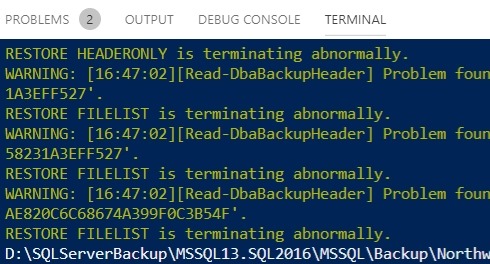
    Not really a SQL Server post, but I ran into this minor issue. While running a script, I saw this:

    2019-09-19 16_47_13-● RestoreUnknownStripedBackup.ps1 - SitC 2018 - CreateProtectManageDB - Visual S

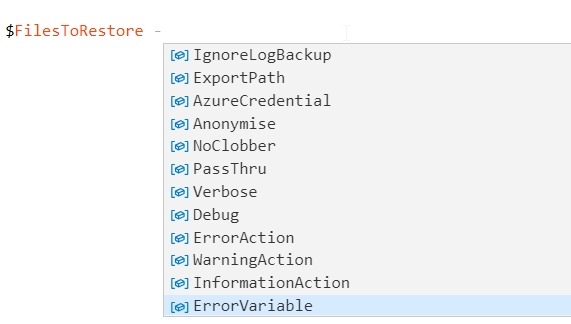
    The warnings aren’t a big deal, and in fact, have no bearing on my script. At least, not on this script. Since I needed to give this to a customer as a PoC item, I didn’t want any weird warnings. As a result, I needed to suppress these. A little intellisense in VS Code gave me a hint, but what value to use for the parameter?

    2019-09-19 16_47_46-● RestoreUnknownStripedBackup.ps1 - SitC 2018 - CreateProtectManageDB - Visual S

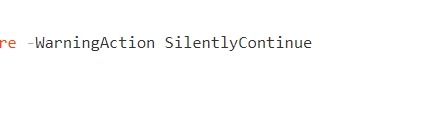
    A quick search brought me to Server Fault, where I saw the value. I added the SilentlyContinue to my script and messages suppressed.

    2019-09-19 16_48_11-● RestoreUnknownStripedBackup.ps1 - SitC 2018 - CreateProtectManageDB - Visual S

    SQLNewBlogger

    This is a helpful tip for me, and I think I showed you how I found an issue, researched, and solved it. It’s good to give a potential employer some confidence that you can work through issues and find answers.

    This took me less than 10 minutes. I bet you could do the same thing in the same time. Write about how you solve a small issue and drop it on your blog.

  • Quick PoSh SQL Provision Databases for New Developers

    As part of some presentation work, I wanted to demonstrate some onboarding of new developers. To that end, as part of a demo, I wanted to build a script that would take a few parameters and generate some SQL Provision databases for development. The idea is that an admin can have a script here to set up a developer with a database for a project with SQL Provision. I imagine this would be part of a script that also cloned a repo, set up a project, etc.

    The Process

    My thought here was that I needed a script that uses some pattern to build databases. The one I decided on was that the basic image name would be used with the developer name to prevent collisions. This would work if an admin used login names or even nicknames, as long as there is some uniqueness on the instances. Of course, if you’re provisioning to a local instance, this doesn’t matter.

    In any case, the images I make are often date driven, with a format like:

    SimpleTalk_Base_20181001

    Using formats like this, I can easily strip off the beginning part of the name (SimpleTalk) and then append my _developer to the end. For me, this means I’d get a database named: SimpleTalk_Steve

    This manifests itself as a script:

    2018-10-03 20_09_05-NewDeveloper.ps1 - Minimize impact Dev Test Environments - Visual Studio Code

    That produces a new database.

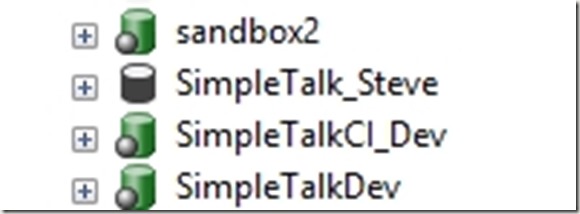
    2018-10-03 20_08_57-SQLQuery6.sql - Plato_SQL2016.DataMaskerDemo (PLATO_Steve (61)) - Microsoft SQL

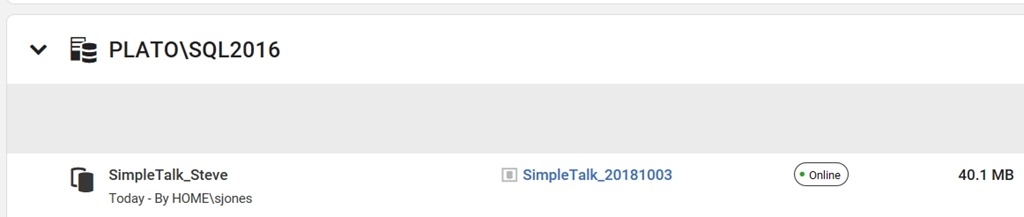
    I also see this in the SQL Provision dashboard as a new item.
    2018-10-03 20_10_14-Microsoft Edge

    The Script

    I started this with some simple PowerShell. The first part of this script is a few parameters and a variable. Note that I’m splitting the instance name here.
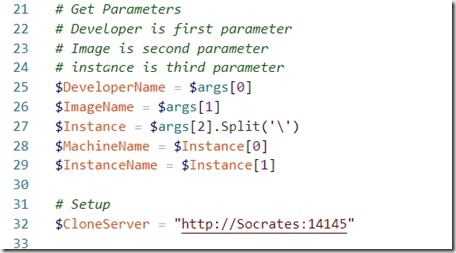
    2018-10-03 20_11_48-● NewDeveloper.ps1 - Minimize impact Dev Test Environments - Visual Studio Code

    From here, I connect to the SQL Provision server and then get the instance and image objects.

    2018-10-03 20_12_01-● NewDeveloper.ps1 - Minimize impact Dev Test Environments - Visual Studio Code

    Lastly, I create the clone, making a new name from the image, and if the word “base” is included (I do this often), I strip it out.

    2018-10-03 20_12_06-● NewDeveloper.ps1 - Minimize impact Dev Test Environments - Visual Studio Code

    Quick and easy, but this allows me to demo how to onboard a new developer.

    There are lots of enhancements, and I need to add some error checking if there isn’t an instance, and if the connection fails, but for now, PoSh lets me quickly start getting some useful scripts that I can use for demonstrating some functionality. This certainly would work in an environment where I knew the Clone server was there and I had control over imaging. If not, I’d be writing more PowerShell.

    SQL Provision is pretty amazing and lets you really leverage technology to provide developers with copies of databases in seconds. Download an evaluation and see what you think.
  • Hands off dbatools updates

    I really like the dbatools project. This is a series of PowerShell cmdlets that are built by the community and incredibly useful for migrations between SQL Servers, but also for various administrative actions. I have a short series on these items.

    One of the downsides of an active project is that updates happen often. I know when I’m working with new versions of Redgate tools, they’ll deliver new builds to me every day if I want them (I usually don’t).

    With dbatools, I find a similar issue, though at a slightly longer scale. I’ll see a tweet or post about a new cmdlet, only to find out that I don’t have the newest version. As a result, I need to update my modules, which means I need an elevated command window, which is distracting.

    I saw a post about someone that built a SQL Agent task to update their server, which I was thinking to do until Anthony Nocentino pointed out Watch-DbaUpdate.

    Install-DbaUpdate

    There’s actually a cmdlet that does what I want. It’s Install-DbaWatchUpdate, and it’s designed to setup a scheduled task that calls Watch-DbaUpdate and updates the module. That’s what I want, so I decided to check it out.

    First, I looked at Scheduled Tasks. In Windows 10, this is the Task Scheduler from the Start menu, and surprisingly, lots of software uses this. Google, Adobe, Microsoft, etc.

    2018-05-22 16_20_00-Task Scheduler

    I then tried the –WhatIf parameter for Install-DbaWatchUpdate, but it didn’t work. I know this is a fun cmdlet, but this should work.

    2018-05-22 16_21_02-cmd - powershell (Admin)

    In any case, let me just run it. I don’t get much detail back.

    2018-05-22 16_23_34-cmd - powershell (Admin)

    If I refresh scheduled tasks, I see a dbatools version check.

    2018-05-22 16_23_50-Task Scheduler

    If you look at the details, this is triggered at midnight and runs once an hour. The PoSh executable is called and it in turn calls the Watch-DbaUpdate cmdlet, which checks for a new version and should let me know if there are updates. Since I’m at the latest version, I’ll have to see if this works.

    So far, so good.

    I even tested the Uninstall-DbaWatchUpdate and it does remove the task.

  • Jobs in PoSh to Create a Load

    I saw this from Argenis Fernandez, and thought it was wonderful.

    1..128 | % { start-job -name ‘job name’ -scriptblock { & sqlcmd -S instanceName -U sa -P ‘iLovePoSh’ -i /home/username/test.sql } }

    Create 128 threads, each running a background job in PowerShell to connect to an instance and run a script file.

    Start-Job is used to begin a job, and then you can get information from Get-Job and use Stop-Job to turn things off.

    Very cool. Looking forward to trying to use this in a demo and make things happen.