Tag: powershell

  • Using a PoSh variable in a string- #SQLNewBlogger

    Another post for me that is simple and hopefully serves as an example for people trying to get blogging as #SQLNewBloggers.

    This is something I haven’t quite understood or used often, but I’ve been aware of it and wanted to learn more.

    A member at SQLServerCentral wanted to embed a value in a string, and was having issues. In this case, they had this code:

    $dt = get-date -format "_yyyyMMMdd_HHmss"
    Invoke-Sqlcmd -Query "SELECT * FROM [Sandbox].[dbo].[Customer]" -ServerInstance "Plato\SQL2017" |
    Export-Csv -Path E:\Documents\sql\$dt.csv -NoTypeInformation

    In this case, there was an error with the Export-Csv cmdlet, with a syntax issue near the period. I suspected this was some variable expansion that didn’t work.

    I found this post that helped me understand a bit more and decided to experiment a bit. Let’s try some things. First, I used to do this type of code:

    $dt = Get-Date –format “yyyyMMdd”
    write-host(“Today is “ + $dt)

    I then see this:

    2019-12-02 14_42_23-cmd - powershell

    However, I can use this code:

     write-host("Today is $dt")

    That gives me the same result. Apparently, I can include the variable in the string and it gets expanded. This works with just a string, as shown here:

    PS C:\Users\Steve> write-host("Today is $dt.csv")
    Today is 20191202.csv
    PS C:\Users\Steve>

    Not the error I expected, but this makes more sense with a value that’s needed in a parameter. The blog helps explain this with the following code:

    PS C:\Users\Steve> $directory = Get-Item 'c:\windows'
    PS C:\Users\Steve> $message = "Time: $directory.CreationTime"
    PS C:\Users\Steve> $message
    Time: C:\windows.CreationTime
    PS C:\Users\Steve>

    An issue. However, if I use the expression evaluation of $() inside, I get this:

    PS C:\Users\Steve> $message = "Time: $($directory.CreationTime)"
    PS C:\Users\Steve> $message
    Time: 09/15/2018 00:09:26
    PS C:\Users\Steve>

    That’s the trick I needed for Export-Csv. I used this code in the last line:

    Export-Csv -Path E:\Documents\sql\$($dt).csv –NoTypeInformation

    And the code worked as expected.

    There’s likely more I should know, but I will start to use varaiables inside strings when I just need the value of the variable as a string. If I need this to better work with some property, method, or parameter value, I’ll use $() around the variable.

    SQLNewBlogger

    This post was about 20 minutes of me experimenting with a few things and slowly working out how some variables worked. I somewhat wrote this as I was experimenting, adding in the code that ran.

    A good example of writing while learning. You could do this on your blog as you learn to work through some code or a feature.

  • Exporting a Table to CSV in PoSh–#SQLNewBlogger

    Another post for me that is simple and hopefully serves as an example for people trying to get blogging as #SQLNewBloggers.

    I saw someone struggling with exporting some data from a table in a CSV, and decided to give it a try. I think there were a few things that were broken, but here is the basic idea.

    The Scenario

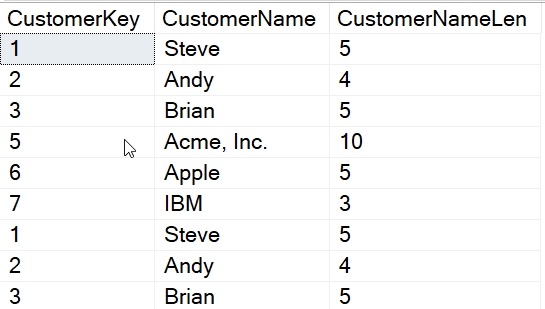
    I want to get all the data from a table into a CSV. As a setup, I have a table that looks like this:

    2019-12-02 13_01_11-SQLQuery10.sql - Plato_SQL2017.sandbox (PLATO_Steve (56))_ - Microsoft SQL Serve

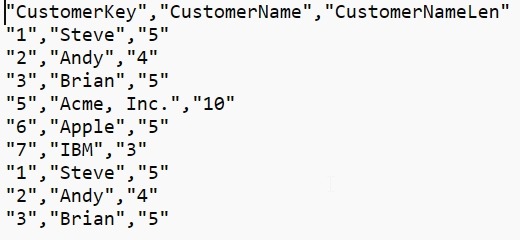
    What I’d like is this data in a CSV, with a format like this:

    "CustomerKey","CustomerName","CustomerNameLen"
    "1","Steve","5"
    "2","Andy","4"
    "3","Brian","5"
    "5","Acme, Inc.","10"
    "6","Apple","5"
    "7","IBM","3"
    "1","Steve","5"
    "2","Andy","4"
    "3","Brian","5"

    Let’s make that happen.

    PoSh to the Rescue

    If you have SQL Server and the Powershell module installed, you can use the Invoke-SqlCmd cmdlet. This takes parameters for a query and a server that you want to use. There are other parameters as well, but I’ll keep this simple.

    The parameters I’ll use are a query with three part naming and then an instance. Here is the command:

    Invoke-Sqlcmd -Query "SELECT * FROM [Sandbox].[dbo].[Customer]" -ServerInstance "Plato\SQL2017"

    Now we want to get that data out to a CSV, and we can use the Export-Csv cmdlet for this. For me, I often want to avoid extra work, though in the past, I’d have set the output of the Invoke-SqlCmd to a variable. I don’t need to here, so I can use pipe the output to the cmdlet like this:

    Invoke-Sqlcmd -Query "SELECT * FROM [Sandbox].[dbo].[Customer]" -ServerInstance "Plato\SQL2017" |
    Export-Csv -Path E:\Documents\sql\Customer.csv –NoTypeInformation

    This will create a new file for me, called Customer.csv.


    2019-12-02 13_15_17-sql

    In here, we have our data.

    2019-12-02 13_01_52-E__Documents_sql__2019Dec02_125737.csv - Sublime Text

    Easy, and quick. You could even type this from the command line, without saving the code.

    SQLNewBlogger

    A quick look at a common task. In this case, I was helping someone, but I’ve had the need to do this myself, and fixing someone else’s code actually taught me something here. I’d use this as a story of solving a problem in an interview with new technology (PoSh).

    Solving the problem was about 10 minutes work, and really, this took about 15 minutes to set up, get working, and clean the code a bit. I also had to change a few of the other issues to make this simpler, but those will be good posts in the future.

  • Arrays in PowerShell–#SQLNewBlogger

    Another post for me that is simple and hopefully serves as an example for people trying to get blogging as #SQLNewBloggers.

    This isn’t necessarily an expert post, but more a recognition that I learned something. I knew about objects in PowerShell, but I’d never actually used an array. Never had a need.

    However, while writing my article about striped backups, I ended up using arrays. This was mainly from the example shown by Anthony Notencino in his Restoring Backups from Azure Blob with dbatools.

    Here’s a way to initialize an array:

    $a = @()

    If I look at this, I get nothing back, which makes sense. There’s nothing in there.

    2019-10-10 14_41_05-cmd - powershell

    I can “add” values to this array with +, as in:

    $a += 1
    $a += 2

    If I now look at the variable, I see this:

    2019-10-10 14_44_41-cmd - powershell

    One interesting thing here is that += is different than Add(). Look at this:

    2019-10-10 14_52_15-cmd - powershell

    So why does += work? In the array doc, there’s this quote:

    When you use the += operator, PowerShell actually creates a new array with the values of the original array and the added value. This might cause performance issues if the operation is repeated several times or the size of the array is too big.

    Worth knowing this. I think for most scripts this isn’t a big issue, but be aware that you are allocating a new array.

    Working with arrays is a topic for another day, but this is a short look at how you might store something like a list of files in a single place.

    SQLNewBlogger

    While working on solving the problem for a customer, I realized this was a little thing I learned. A quick post to show that here, just about 10 minutes or writing and structuring code.

    A good chance to give an interviewer something to ask you. Write your own post on arrays.

  • Just Getting Specific Files in PoSh–#SQLNewBlogger

    Another post for me that is simple and hopefully serves as an example for people trying to get blogging as #SQLNewBloggers.

    Just a quick one today, but a tip I hope I remember. While working on a script, I wanted to just get backup files in PoSh. I tried this:

    Get-ChildItem -Path $BackupPath -File -Include *.bak

    That got me this:

    2019-09-23 10_06_19-cmd - powershell

    Nothing.

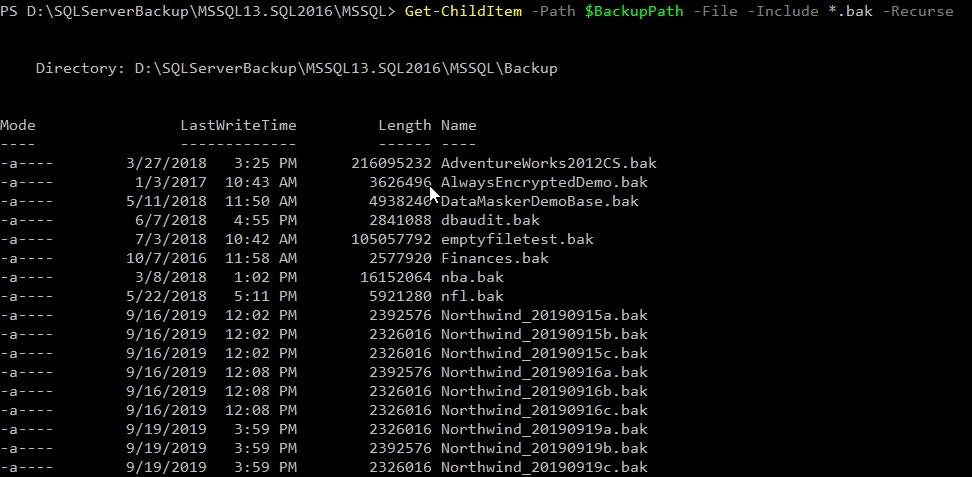
    Why not? Apparently, you need the –Recurse parameter, even though there are no subdirectories in this folder. A bug, IMHO, but who knows. In any case, adding the parameter makes things work. Thanks, SO.

    2019-09-23 10_11_59-cmd - powershell

    SQLNewBlogger

    This was a quick 5 minute thing. After researching and testing for 10 minutes, and finding the solution, I wrote this up.

    You could do that with anything you get working.