Tag: powershell

  • A Great Case for Powershell

    I think PowerShell is a great addition to the Microsoft stack. Given the previous versions of VBScript, Perl and Python ports, and more on Windows, PowerShell is a great improvement. Even for someone that spent a lot of time in the C Shell and Bourne Shell as a student and young professional, I think PowerShell is an improvement. There are certainly still things that make me crazy about PoSh, such as the -eq, but I’m getting more comfortable with the structures and flow.

    In SQL Server, we had the old SQLPS module, which was, well, a start. Then we got the SqlServer module, which is better. However, the best thing I’ve seen for us data professionals is the dbatools project from Chrissy LaMaire (@cl) and company. To me, this is incredibly useful for anyone that wants to use PoSh with SQL Server, but it’s really indespensible for SQL Server migrations from instance to instance. I’m not sure I’d even try anything else at this point.

    Not everyone wants to use PoSh with SQL Server, and that’s fine. There are certainly plenty of places where T-SQL works very well to manage and interact with SQL Server. I still prefer it for many things, but the more I work outside a database, whether for administrative actions or manipulating parts of the platform away from SSMS, PowerShell has some advantages. Not the least of which are cleaner file operations and certainly better string manipulation (IMHO).

    Recently I saw post from Drew Furgiuele about finding linked servers in your object code with PoSh. It’s a long, somewhat convoluted post, and some of you might wonder if it’s worth the effort. Hint, it’s not worth the effort because Drew has done it for you. He’s got the function on Github, and if you need to move linked servers, just use his code to help.

    My point is, however, that doing this in T-SQL would be a nightmare. Just going through search isn’t helpful, though SQL Search is a great tool. The work to find the objects would be hard, and this isn’t something you want to get wrong in a migration. It would be bad enough to have errors for non-existent linked servers, but it might be worse if you had code pointing to the wrong database. This is something you’d want to fix, and PoSh helps work with a complex problem here.

    There are other issues like this, other problems or requirements that look across instances or more intensely at parts of our systems outside of what we want to do with T-SQL. Certainly anything at scale, that might be something you do for many instances is better with PoSh, and certainly any infrastructure as code items that work to stand-up and configure SQL Server really should use PoSh.

    Don’t make PowerShell a hammer, and try to solve all issues, but for the future, you really ought to be sure you are comfortable reading PoSh scripts and know how to use them with SQL Server. Learn when PoSh is a good alternative, and certainly know where you can get scripts or help with your code.

    Steve Jones

    The Voice of the DBA Podcast

    Listen to the MP3 Audio ( 4.1MB) podcast or subscribe to the feed at iTunes and Libsyn.

  • Checking Tempdb with dbatools

    I really like the dbatools project. This is a series of PowerShell cmdlets that are built by the community and incredibly useful for migrations between SQL Servers, but also for various administrative actions. I have a short series on these items.

    In SQL Server 2016, the setup program was altered to better configure tempdb at installation time. This was in response to the observation that few people actually make any changes to the default configuration, which was suboptimal in SQL Server 2014-.

    Going through and checking all of the configurations you have isn’t easy, and isn’t necessarily the type of work that anyone wants to do. dbatools makes this really easy and quick with Test-DbaTempDbConfiguration.

    Using this cmdlet is easy. I’ll call this with an instance and get results of a number of checks that are useful for your tempdb configuration:

    2018-04-20 09_25_07-cmd - powershell

    This isn’t necessarily easy to read, so let’s add a Format-Table.

    2018-04-20 09_24_57-cmd - powershell

    That’s not great, as I’m missing the CurrentSetting field. I’ll add a SELECT and include the fields I want. I can even add multiple instances in here:

    2018-04-20 09_30_56-cmd - powershell

    Now I can scan through here, looking to see if my settings have deviated from the recommendations and best practices. This could easily be used to filter the results for items that don’t match, save the results as a CSV, and you now have a picklist of items to work on as you find time.

    dbatools is an essential tool for me. I’d urge you to download the module and experiment with the cmdlets.

  • Remove-DbaBackup with dbatools

    I really like the dbatools project. This is a series of PowerShell cmdlets that are built by the community and incredibly useful for migrations between SQL Servers, but also for various administrative actions. I have a short series on these items.

    One important item for any system administrator to manage is the removal of old files that aren’t useful. I know most of us hate to delete data, but there are log files, backups, and more that will clog up a drive over time if they’re not managed. I’ve had SQL Servers stop because old copies backups filled the disk and I’ve had IIS servers start throwing errors because 2 years worth of logs were on stored on the C drive.

    Maintenance plans had a way to remove files and we have xp_delete_file, but there are limitations to ensure that only backup files are deleted. I think those are silly, but it wasn’t my decision to include restrictions, and I don’t get a vote on future changes.

    In any case, dbatools has a cmdlet that can help: Remove-DbaBackup. I was interested to see if this worked on it’s own or had restrictions, but it seems to work wonderfully for me.

    Required Parameters

    Most cmdlets will allow quite a few parameters to be optional. In this case, however, there are some requirements. First, you need a path for the backup files. That makes sense and no big deal.

    However, you also need a retention period. You can’t skip this, as if you do, you get a prompt.

    2018-04-10 17_29_56-cmd - powershell

    The retention periods aren’t obvious, but not that hard to remember. There’s a numeric counter and a one character time period item. They are:

    • h for hours
    • d for days
    • w for weeks
    • m for months

    That’s it and not a big deal, though for testing I need to play with my system clock a bit.

    In any case, after this parameter, you need a backup extension. This is the file extension, without the period. You can put in anything, which is cool.

    There are some other params, but not required.

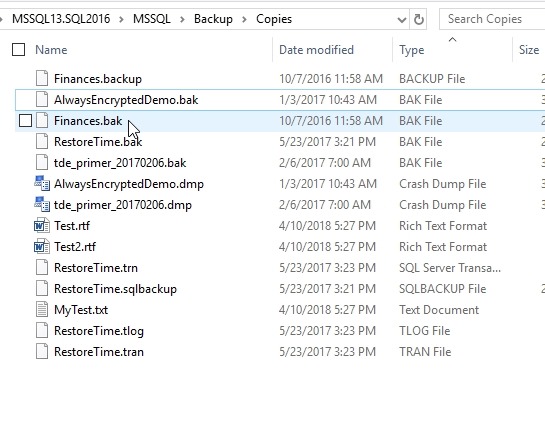
    For testing, I copied some backups and then changed some extensions. As you can see, my test folder has SQL backups with various extensions I’ve encountered as well as a few text documents.

    2018-04-10 17_27_38-Copies

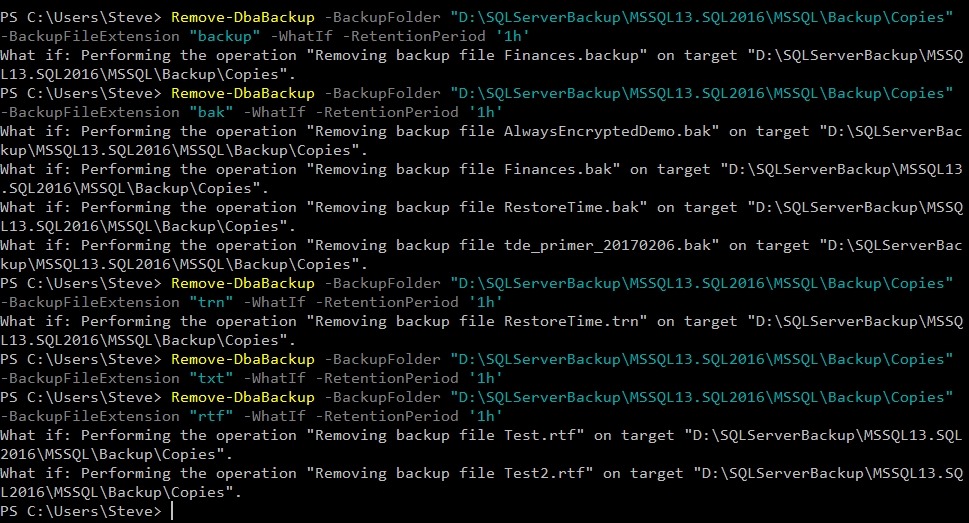
    If I run Remove-DbaBackup with some options, I’ll see what will happen with the –WhatIf parameter. I see plenty of files being marked for deletion as long as I have the right extension.

    2018-04-10 19_37_32-cmd - powershell

    This is handy, and it makes perfect sense when you read it. This is exactly the type of maintenance job that you want to set up on a server to remove old files. I don’t know that I’d use this for general cleaning of files that I might need soon for a backup, since I always want to be sure that I have a good backup before I remove old files, but for managing very old files, this is helpful.

    And, a little scripting logic would show you how to find the date of the most recent full backup and then remove files older than that. Or maybe older than the last two fulls.

  • dbatools is Growing Up

    The dbatools.io project is growing up rapidly. I went to check something the other day and I was amazed at the command list. This used to fit on one page. Now it’s not close. Here’s the first page:

    In fact, it doesn’t fit on two pages. Here’s the part below the fold.

    It’s crazy how quickly this project has grown, and how many cmdlets are available to help you not only migrate objects and settings between instances, but perform useful operations on your systems and test or change their configuration. I’m starting to think that this needs to be required for most people that manage systems. The ways that you can easily manage your systems in a programmatic manner has dramatically changed with this module.

    I was surprised the other day when I saw a blog post for a cmdlet I didn’t know existed. I went to try it on my system and it wasn’t available. I’d updated the module the previous week, but apparently there are new changes on a regular basis. I might need to update my module more often, and there’s a cmdlet to help me do that!

    Those of us that have a lot of experience with SQL Server might find some of these tasks easier in T-SQL. I certainly spend more time inside the platform than out of it, but there are definitely advantages to using PowerShell to enforce consistency and easily work with multiple machines is nice. These utilities are often like scripts or procedures I’ve written to handle simple tasks in a wrapper-like fashion. dbatools do that from PoSh, and allow me to easily string together disparate comands. I won’t give up T-SQL anytime soon, but I’ll do more with dbatools than I might do with PoSh otherwise.

    If you haven’t tried this project, you ought to. This will make it easier to learn PoSh and work with SQL Server. Maybe you’ll enjoy it enough to built your own module and contribute to the project. There are still holes, especially in the SSIS area, though I expect new cmdlets to appear any day.

    Steve Jones

    The Voice of the DBA Podcast

    Listen to the MP3 Audio ( 2.8MB) podcast or subscribe to the feed at iTunes and Libsyn.