Tag: powershell

  • Executing PoSh line by line in VS Code

    Another post for me that is simple and hopefully serves as an example for people trying to get blogging as #SQLNewBloggers.

    I’ve had to relearn this trick multiple times, so I decided to write a post. The simple answer is highlight code and press F8.

    I’ve come to enjoy writing PoSh in VS Code, but I often end up writing a bunch of the code in a command window, trying out specific things. Often this is because I’m working in a specific folder. Sometimes I’ll get caught up in typing in the VS Code terminal, forgetting to edit the actual script.

    Lots of sites have posts on this, but the simple thing is to pick a line and then click F8. The code will run in your terminal window, and you can see the results. Here’s an example for me.

    2020-04-21 12_51_44-● $filter = _e__Documents_GitHub_MultiTena • Untitled-2 - Visual Studio Code

    You can actually just put the cursor on a line and click F8. I’ve got a short gif that shows this.
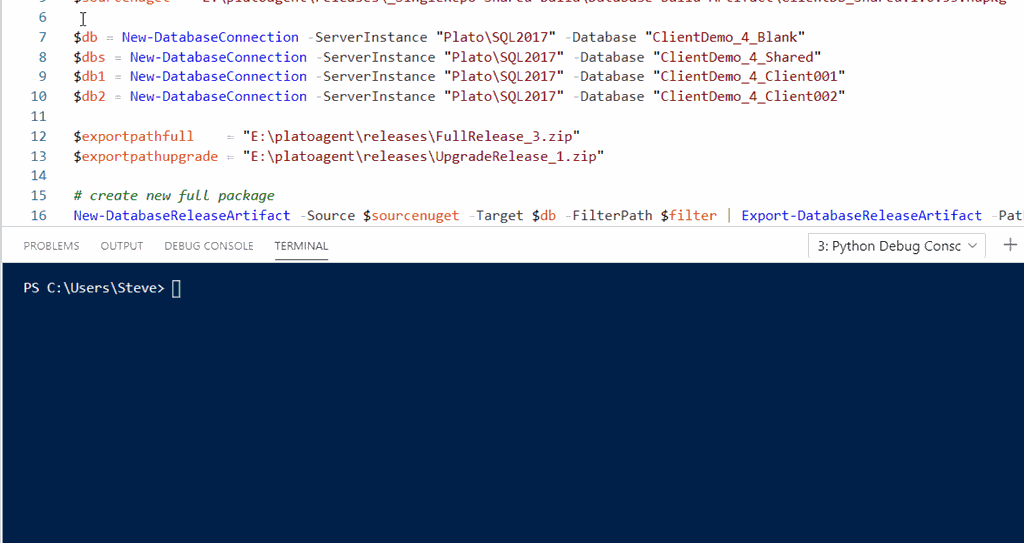
    poshvscode

    The next time you want to work through a PoSh problem line by line, consider using VS Code and F8.

    SQLNewBlogger

    This is one of those things I’ve googled too many times. So I took 4-5 minutes to just type this up, grab a couple screenshots, and put this together.

    It’s focused tightly on one thing, executing PoSh. I don’t need to explain more to show this piece of knowledge, and hopefully remember it in the future.

  • Getting Your dbatools Version–#SQLNewBlogger

    Another post for me that is simple and hopefully serves as an example for people trying to get blogging as #SQLNewBloggers.

    I was trying to test something recently and it didn’t work. One would think that I would remember to check versions, but I didn’t before posting on Twitter. I did get a response from @dbatools, and one of the questions was which version did I have.

    I wasn’t sure, and wasn’t sure how to check, so I had to do some Googling around. This post notes what I found and how I got the version.

    I have known that I can get the PowerShell version from $psversiontable. I can run that and see info about PowerShell..

    2020-03-30 09_42_37-cmd - powershell

    This doesn’t get me a view of modules I’ve installed. I tried Get-Help, but it wasn’t what I wanted.

    2020-03-30 09_44_06-cmd - powershell

    I then tried a search and stumbled upon Get-InstalledModule, which worked well, but it has a lot of info. When I run this, I get lots of data.

    2020-03-30 09_46_20-cmd - powershell

    Fortunately, it’s alphabetical and I don’t have a lot of modules that are named with something after “d”, so I could easily find the data.

    2020-03-30 09_46_39-cmd - powershell

    I know there’s an Update-Module and Install-Module, so I tried Get-Module. That actually works. I thought about this later, after I’d actually gone through the searching and posting results.

    As with anything, there are a couple methods here, but certainly it’s good to be able to solve a simple problem like this one.

    SQLNewBlogger

    This was something I figured out in about 2 minutes. Writing this post took longer, but I bet I now remember this. It also might be something I get asked in an interview.

    Try it yourself today. Start a blog and start documenting what you learn.

  • Running Powershell Scripts – #SQLNewBlogger

    Another post for me that is simple and hopefully serves as an example for people trying to get blogging as #SQLNewBloggers.

    When you install Windows, by default, the execution of scripts is prevented. If you try to run something on a new machine, you might get this error:

    2020-01-08 09_39_25-cmd - powershell

    The error message lets you know this is an issue with the Execution Policy. There’s a URL to help you, which takes you to the “About Execution Policies” page.

    2020-01-08 09_40_17-about_Execution_Policies - PowerShell _ Microsoft Docs

    You can set your execution policy to allow scripts, and Microsoft has a document that explains the implications.

    For my laptop, I usually go with unrestricted, since I create and run lots of random PoSh scripts.

    I DO NOT DOWNLOAD SCRIPTS and run them from the Internet. Be very, very careful about running scripts.

    From an administrator PoSh console, you can change this.

    2020-01-08 09_42_07-cmd - powershell (Admin)

    Read the docs and be sure you understand what is going on. You can change to signed scripts and then learn how to do this, which likely makes some sense for privileged workstations and building scripts in production environments.

    SQLNewBlogger

    I had to set this on a new machine recently and decided to blog about it, since I’ve had to look it up over and over. Hopefully this will help me remember how to do this.

    This took less than 10 minutes and it’s a good blog for you. Learn about signing and talk about why that is or isn’t appropriate for you in your own post.

  • Installing PowerShell for SQL Server – #SQLNewBlogger

    Another post for me that is simple and hopefully serves as an example for people trying to get blogging as #SQLNewBloggers.

    PowerShell is the hot new scripting language for working with processes outside of an application. It’s cross platform, and it has a lot of capabilities for working with SQL Server. The way that this gets installed has changed, so this is a quick post to ensure others know how to do this.

    Running a Command

    I know there is an Invoke-SqlCmd cmdlet in PowerShell. On a new laptop, I tried to run it and had issues.

    2019-12-17 15_57_22-cmd - powershell

    SQLPS is the old module, and SqlServer is the new one. The error message says to try importing the module, so let’s do that.

    2019-12-17 15_59_40-cmd - powershell

    That doesn’t work either. Hmmm. I think I need to install this. To do that, I need an elevated command prompt. I’m using ConEmu, and I can restart this session as an admin. Or you can use the start menu to find cmd and start this as an admin:

    2019-12-17 16_02_41-Installing PowerShell for SQL Server - #SQLNewBlogger - Open Live Writer

    Once you have an elevated prompt, start PowerShell and then run this:

    Install-Module SqlServer

    This will install the module if you answer the prompts correctly. I had to use the -AllowClobber parameter as I had some conflicting things installed from dbatools. I’ll likely update those after this with their own AllowClobber.

    2019-12-17 16_05_24-cmd - powershell (Admin)

    Once this is done, you should be able to use the cmdlets. First you import the module with this:

    Import-Module SqlServer

    Then you can run code:

    2019-12-17 16_08_05-cmd - powershell (Admin)

    SQLNewBlogger

    After getting a new laptop, I needed to set a few things up. PowerShell was one of those. As I started to do this, I grabbed screenshots to document the process for my blog. I then built this post in about 10 minutes.

    You could do this as well, to round out the knowledge you gain as you do something similar, and show you’re familiar with these concepts.