Tag: SSMS

  • Decouple the Tools

    For years, SQL Server included a complete set of add-ons with the main product. We got SSIS, SSRS, and more as part of an integrated installation. This also included things like Books Online and various tools, such as Profiler, bcp, and Management Studio (Enterprise Manager in earlier versions). Over the years, the number of tools has grown, but there has also been work to decouple some of these items from the installation media and allow them to be upgraded more rapidly. Books Online was the first to separate, though not without some pain for users that struggled to install the local help files.

    Last year SSMS was decoupled from SQL Server, which I think is a great idea. The tools team at Microsoft moved to their own release schedule, getting SSMS onto the Visual Studio 2015 platform. This wasn’t without some pain, and there were definitely some releases with issues, but overall the process has smoothed out and I’ve appreciated the updates. This separation has allowed new features to be added to the product without waiting for a new release. If you watch the changelog, you will see quite a few improvements and fixes being released, along with enhancements. SSMS is also free to download and install on workstations without SQL Server.

    However, if you examine the installation for SQL Server, there are plenty of other products that could benefit from being decoupled. While bcp and sqlcmd don’t change much, why are they a part of the server platform? These tools, along with others, are really client side tools, and would benefit from their own release cycles. Whether or not teams do significant work, or even if they only release updates when a new version of SQL Server comes out, having them as a separate set of tools, with a separate installer, means that fixes and enhancements could be sent out if there are issues. This seems especially important for security updates, which might be needed. In addition, maybe this would actually get teams to view any separate tools as worthy of new functionality if they see an opportunity.

    I’d actually love to see some integrated installer for the SQL tools that would allow me to download and update them each as needed. Let me know when SSMS is out of date, along with any updates for sqlcmd, sqlmaint, tablediff, and other tools. They might not change often, but I’d rather not have to run the SQL Server installer for a CU on all my client workstations. Let me update those tools as needed, if there are changes or improvements.

    Steve Jones

    The Voice of the DBA Podcast

    Listen to the MP3 Audio ( 4.0MB) podcast or subscribe to the feed at iTunes and Libsyn.

  • Classifying Data with SSMS 17.5

    I upgraded SSMS to 17.5 recently and found an interesting addition. This version has incorporated the ability to classify data. With the GDPR coming for many of us, this is a welcome addition.

    This is a quick look at this feature.

    Classify a Database

    If I select a database and right click it in SSMS, I get a few new items in the Tasks menu (as shown).

    2018-02-16 13_15_58-SQLQuery1.sql - Atlas.master (sa (51))_ - Microsoft SQL Server Management Studio

    I’ll select “Classify Data”, and I get a new tab opened. I see there are some recommendations and also a list of classifications of data.

    2018-02-16 13_16_28-Data Classification - NBA - Microsoft SQL Server Management Studio

    There’s a getting started link, which takes me to the SQL Server Security Blog. I suspect that’s an incorrect link. I think it should go here: SQL Data Discovery and Classification.

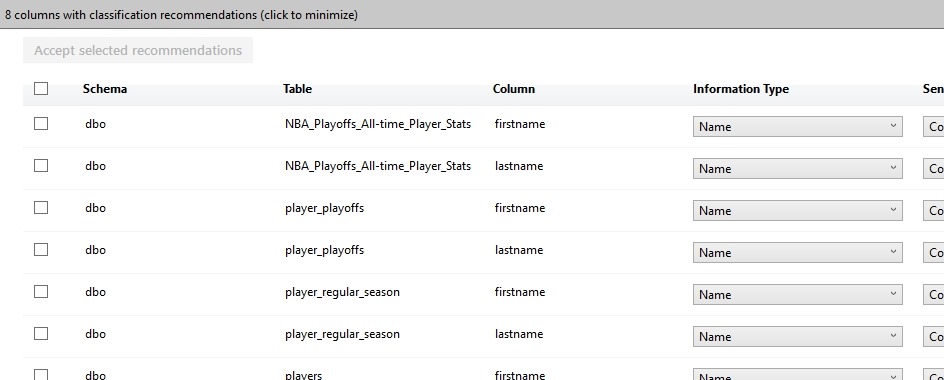
    Below this, I see a list of the recommendations. This has grabbed tables that appear to continue to contain some data that might be sensitive and require classification. One of the tenets of the GDPR  is that you know your data. You aren’t allowed to figure this out later, but rather you must proactively know what data you are collecting and processing.

    2018-02-16 13_17_47-Data Classification - NBA - Microsoft SQL Server Management Studio

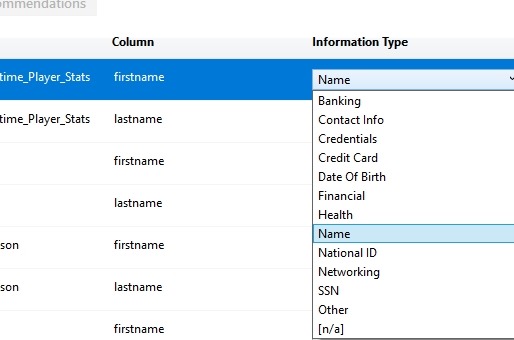
    Here we can see a few drop downs to the right. I’ll scroll and look at these. First is the Information Type. This is listed as a name, but I have other options I can set. The list is the types of that that might be sensitive information about a data subject (a human or entity) that I need to classify.

    2018-02-16 13_19_36-

    Beside this is the sensitivity label. My choices here are shown below. These range from public information, which removes some of my responsibility to highly confidential and applying to the GDPR.

    2018-02-16 13_21_14-Data Classification - NBA - Microsoft SQL Server Management Studio

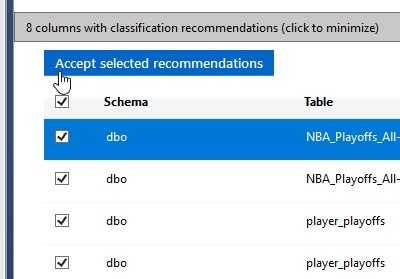
    If I’m happy with these recommendations, I can select them all (or a subset) on the left. I can click the “Accept” button to add them to the classifications I have for this database.

    2018-02-16 13_22_07-Data Classification - NBA - Microsoft SQL Server Management Studio

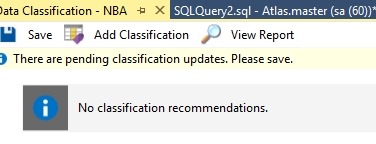
    This doesn’t save them, but adds them to the list. At the top of this tab I can see the need to “Save” my changes.

    2018-02-16 13_22_13-Data Classification - NBA - Microsoft SQL Server Management Studio

    Once I’ve done this, I could add more, or view a report. The report shows me this:

    2018-02-16 13_22_26-Data Classification - 2_16_2018 1_22 PM - PLATO_SQL2016 - Microsoft SQL Server M

    Implementation

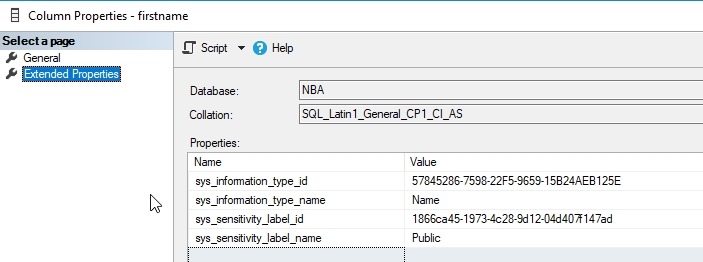
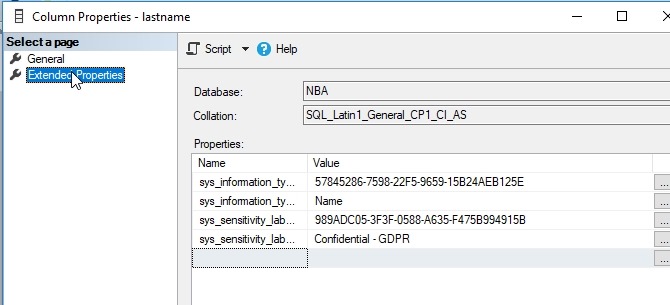
    My guess was that these are implemented as extended properties, which makes sense. That’s how many things could make SQL Server better, and I’m right. If I examine the EP for the firstname column in one table, I see this:

    2018-02-16 13_26_46-Column Properties - firstname

    This was the column I changed to public information. The lastname column in the same table is marked as confidential.

    2018-02-16 13_26_55-Column Properties - lastname

    Helpful?

    Ultimately is this useful? Yes. I can see other products taking advantage of this, such as the new Data Masker from Redgate, which could let you know which columns are sensitive and not masked. I’d also expect that this is useful and important for ETL and other operations to carry this metadata to new columns that might contain transformations or movement of this data.

  • SSMS Line Numbers

    I typically don’t turn on line numbers if SSMS, but while working with someone on a bit of code, they were referencing line numbers in a large script. By default SSMS shows you the line, column, and character at the bottom (as well as insert/overwrite status) in the status bar. See the image below, where my cursor is on line 597.

    2018-01-16 13_30_26-Semicolons.sql - [ReadOnly](local)_SQL2016.RLS (PLATO_Steve (64))_ - Microsoft

    However, it’s visually harder to see lines here if those are the way you’re getting oriented with a script. It’s actually easier to have the line numbers on the left side.

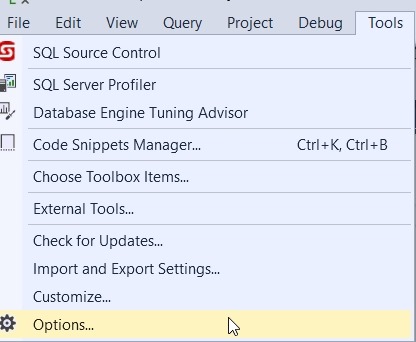
    This is easy to turn no in SSMS. First, click the Tools menu and choose options (as shown here).

    2018-01-16 12_28_26-

    Next, go down to the Text Editor section on the left, expand that and then expand the Transact-SQL area. Click General, and you’ll see a checkbox for Line numbers on the right. Click that.

    2018-01-16 12_28_38-Options

    And line numbers appear.

    2018-01-16 12_28_45-Semicolons.sql - [ReadOnly](local)_SQL2016.RLS (PLATO_Steve (64))_ - Microsoft

    I do find these distracting most of the time, but there are situations where the line numbers are handy, especially when collaborating with others.

  • SSMS Updates in 17.4

    SSMS 17.4 is out, and if you haven’t upgraded from SQL 204, 2012, 2008, etc., you should do so. You can run your bundled SSMS side by side with the new versions, but it seems that the 17x versions are improving andbecoming more stable.

    You can download the new version and use it for free. That alone should be a reason to update your workstations.

    This update includes a few new interesting items.

    • Vulnerability Assessment – Scanning for security and misconfiguration issues
    • Always On Dashboard – New latency reports
    • Showplan – some fixes and new operator icons
    • XE Profiler – Very cool to see this being enhanced.

    There are other updates and fixes as well. I’m sure there are some bugs, but for the most part, I think that SSMS 17.x is the way to go forward.