Tag: powershell

  • Experimenting with VSCode instead of the ISE

    I’ve been playing with PowerShell here and there, learning a few things. As I use the dbatools project, or

    I saw a tweet from Rob Sewell on using VS Code for PoSh, which I’ve tried, but it felt cumbersome and hard. I didn’t spend much time on it before dropping back to the ISE, which I was comfortable in.

    However, Rob’s tweet mentioned a post from Mike Robbins on configuring VSCode, so I decided to give it another try. It’s not that the ISE doesn’t work well, but I keep hearing people talking about VSCode, which has git support, and so I thought this might be worth trying.

    I won’t talk about anything in Mike’s post. You can try that out. I already at the PoSh extension, but it was upgraded since I first used it, and now pops the integrated console when I open a .ps1, which makes it like the ISE.

    2017-09-12 08_27_56-newdetachall.ps1 — Visual Studio Code

    I don’t remember that from before, and I certainly like that. I also skipped the VSCode-icons in place of VSCode Great Icons. I mean, I want to be great at this stuff.

    The one thing I did do was change the settings from Mike to set a new zoom level. Zero is a little low for my old eyes, and 2 (where I’ve been working) is too big here. I chose 1.

    vscode_ise

    Using VSCode

    The main thing you want to do with an editor is write code. So, I decided to write some simple code. I have a few things to do, but I decided to start with something simple. I wrote a few lines of PoSh. This isn’t terribly useful, but I wanted to play with the editor and the debugger.

    2017-09-12 08_56_19-newdetachall.ps1 — Visual Studio Code

    Now, in the ISE, I do get some intellisense and parameters. The parameters look better, but the screen capture ghosted them out a bit.

    2017-09-12 08_57_07-Windows PowerShell ISE

    In VSCode, this actually looks better. First, I enter a cmdlet name and see some basics.

    2017-09-12 08_58_08-● newdetachall.ps1 — Visual Studio Code

    After I’ve entered it, I see more details as I work with it.

    2017-09-12 08_58_13-● newdetachall.ps1 — Visual Studio Code

    Running code works OK. I can hit F5 and the code runs. Not ideal, as the function keys make my hands move off the keyboard. That isn’t different from the ISE. I definitely wish we had shortcuts, and I know there are extensions to help with this. I need to play with some.

    The debugging, however, is much easier. More in line with VS and other debuggers. Set a breakpoint, F5, and I have real debugger controls if I want them (as well as F10, F11).

    2017-09-12 09_03_32-newdetachall.ps1 — Visual Studio Code

    I can see variables in the debug window, or in the main window if I hover. This feels a bit cleaner than the ISE.
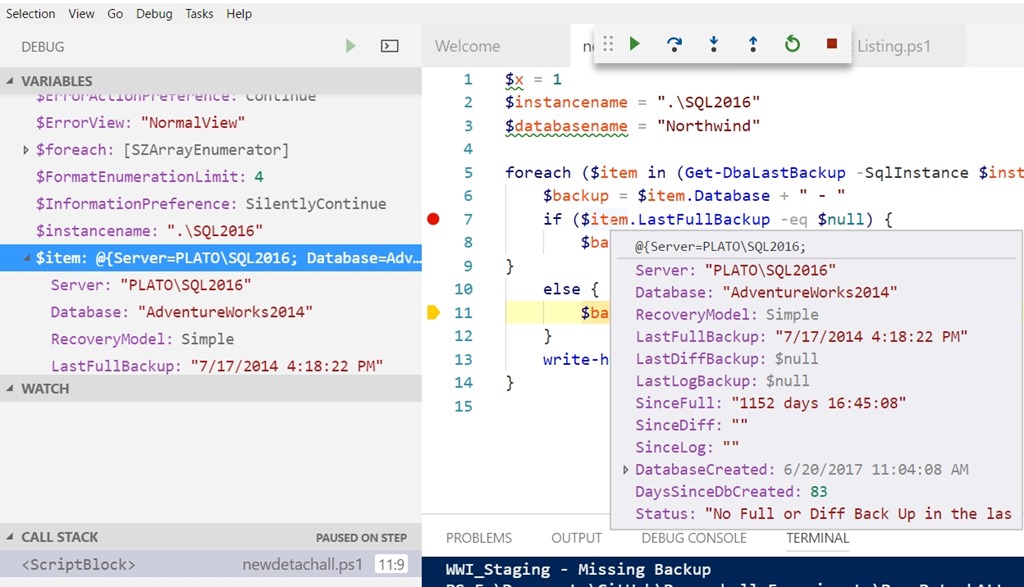
    2017-09-12 09_05_24-newdetachall.ps1 — Visual Studio Code

    There still are some issues. F10 seems to disappear sometime. I’ve tried to remove breakpoints and they don’t always remove. However, those are pretty minor items in the scheme of things.

    Overall, I’ve changed a bit of my view of VS Code here. It does seem to have improved since the last time I tried PoSh in here. Maybe I’ll give it another chance with other languages as well.
  • Automate Migrations–T-SQL Tuesday #94

    tsqltuesdayIt’s T-SQL Tuesday time again, and I’m slightly pressed for time, which is sad. This is a great topic.

    Rob Sewell hosts this month with his question about what we are going to automate? He’s a PowerShell advocate, so I’m not surprised here. As much as I enjoy working in various languages, PoSh becomes more and more handy to me when I need to work outside of the SQL Server platform. I’ve been trying to play with it, and I enjoy it more and more.

    If you want to participate, check out the rules:

    1. Write a post on the topic below
    2. Schedule the post to go live on Tuesday, September 12th (between zero am and midnight, UTC)
    3. Include the TSQL Tuesday logo in the top of your post
    4. Link the post back to this one (it’s easier if you comment on this post and link it)
    5. Optional: Tweet a link to your post using the #tsql2sday hash tag on Twitter

    Automate Things Between Instances

    The first time I saw the dbatools project in action was at SQL Saturday Cambridge, where Chrissy Lemaire gave a session with Rob. I was surprised at the power and ease of the project. I was impressed, and decided to help learn more as well as promote the project. I’ve tried to blog regularly about their cmdlets as I get a chance to play with them and I’m pretty much always impressed.

    The next time you need to move some object, setting, job, etc. from one instance to another, you should try this:

    1. install the dbatools module
    2. look through the command index
    3. try migrating your object(s) with PoSh.

    That’s it.

    Maybe you need to copy a database or login. Maybe you want to copy jobs to a new server. The dbatools module makes all of these things easy.

    So give it a try. There are some great tools for migrations as well as wonderful items for common DBA tasks.

  • Responsible Log Growth with dbatools

    I really like the dbatools project. This is a series of PowerShell cmdlets that are built by the community and incredibly useful for migrations between SQL Servers, but also for various administrative actions. I have a short series on these items.

    I love dbatools, and I’ve been trying to explore the various cmdlets over time, both to practice my PoSh and see if there are easier ways of accomplishing some tasks.

    Recently I was browsing the dbatools.io site to see what’s changed and noticed a new cmdlet, Expand-DbaLogResponsibly and just had to check this one out.

    Often I’ve considered proactive space management a part of my DBA responsibilities that is core to a well run system. I don’t look at storage every day, but I usually try to look monthly, with an eye towards keeping about 3 months worth of data growth as a pad in most systems. That’s a general guideline that varies by system.

    However, logs can be different. They are sized based on workload and backup schedule, which usually works. However, sometimes there are issues and I want to grow my log quickly. If you’ve read about growing log space (like this piece), you’ll realize that there are a variety of things to consider. And the rules change by version, or even patch level, of SQL Server. A lot to consider.

    Fortunately, this cmdlet wraps those things up into a command. Just call it with the server, database, target size, and optionally log FileID. It will capture the rules for growth and take appropriate actions.

    NOTE: This does not look at the current number of VLFs. You need to be sure you’ve managed your log file.

    If you wonder how this works, or if the rules are appropriate for your system, check out the code at Github. I’m sure you’ll find that this is the easiest way to manage a log file.

  • Using Test-DbaOptimizeForAdHoc

    I really like the dbatools project. This is a series of PowerShell cmdlets that are built by the community and incredibly useful for migrations between SQL Servers, but also for various administrative actions. I have a short series on these items.

    One of the cmdlets is Dba-OptimizeForadHoc, which is designed to help you determine if this particular setting is enabled on your servers. There are plenty of ways you could get this data from sp_configure or PoSh, but this is a setting you might want to check in a hurry when there are potential performance issues.

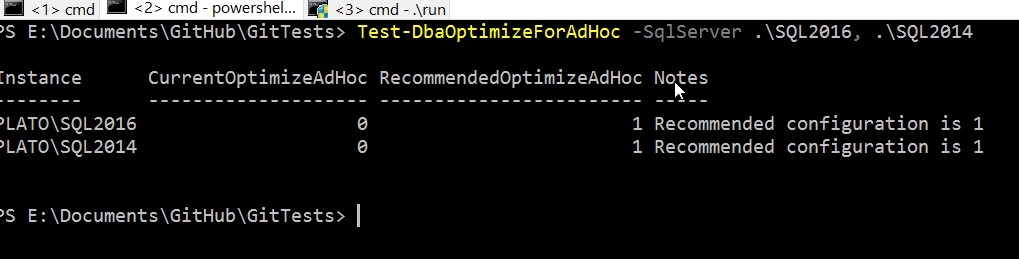
    The cmdlet is easy to use and takes a –SqlServer parameter where you can list multiple instances. There are options for credentials that can be used for a connection, just remember that this credential needs to have rights to read the setting.

    2017-07-07 18_32_11-cmd - powershell

    If this cmdlet isn’t useful, check out the full list. I bet you find some that you will want to try out.