Tag: sql server

  • A Billion Transactions

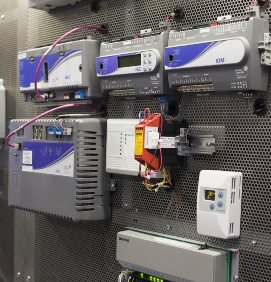
    These are some of the sensors generating that half billion transactions/day.
    These are some of the sensors generating that half billion transactions/day.

    How long would it take your systems at work to process a billion transactions? You’d expect some, heavily used and highly visible systems to be involved. The stock market systems process billions of trades a day, but I’m sure most of the systems in single companies, even large companies, deal with fewer transactions on a daily basis. A billion transactions a day is 11,000+ transactions a second, sustained across the entire day. That’s a heavy load, but it might be the level of transactions that more and more of us will see over time as our systems gather more data.

    The Microsoft corporate headquarters in Redmond consists of over 100 buildings on 500 acres. It’s grown over the years from its original 88 acres, which is also the title of a story about Microsoft and the relatively unknown work in automating their infrastructure. Not the computer systems their software developers use, but rather their facilities and physical buildings. It’s a fascinating story that outlines the way in which Microsoft saves millions of dollars in maintenance and repairs by using software.

    Across those buildings, Microsoft collects a huge amount of data, from disparate systems, which is the presented to the facilities personnel. The sensors and systems don’t process a billion transactions day; they process half a billion. Still an amazing amount of data, just from physical buildings and the infrastructure that ensures Microsoft employees have a pleasant place to work every day. Using a combination of SQL Server, Office, and Azure, Microsoft has built a software system that corrects many faults itself within sixty seconds. Those that can’t be fixed remotely often end up generating one of the 30,000 work orders produced for personnel every quarter. The system is forecasted to save 6-10% of the energy that might otherwise be wasted with a less efficient system.

    It’s a great read, and perhaps is a good case study for an application that is well suited for cloud services. There are a few great quotes from the article as well that are particularly pleasing to a data professional. “Give me a little data and I’ll tell you a little,” he (Darrell Smith) says. “Give me a lot of data and I’ll save the world.” That ought to be the model for data analysts. As SQL Server professionals and developers, we should be helping others to do just that.

    Steve Jones


    The Voice of the DBA Podcasts

    We publish three versions of the podcast each day for you to enjoy.

  • Upgrading to 2012

    I love this logo, and I love working with SQL Server.
    I love this logo, and I love working with SQL Server.

    It’s been a little over a year since SQL Server 2012 was released in its RTM version. In that time, I’ve been using it on most of my machines for testing and demos. I like working with the new features and enhancements, and I think this is the best version of SQL Server yet. However I also keep a version of SQL Server 2008 running in a virtual machine since this is the version that runsSQLServerCentral.

    In the last three years, we’ve continued to run the site on SQL Server 2008 because it works well. We don’t need the newer features, and since we have a clustered pair of instances, an upgrade would be a substantial cost. That cost is hard to justify when there isn’t a business benefit I can point to. I’m sure we could write more efficient code with the new T-SQL enhancements and improve performance, but since we’ve invested in beefy hardware, I’m not sure we would gain much with an upgrade. Quite a few of the people I’ve talked to in the last couple years feel the same way.

    This week I’m curious to see if any of you are looking to upgrade. I know for new systems it might make sense to just install the latest version of SQL Server, but what about existing systems? The question this week is:

    Are you upgrading any existing systems to SQL Server 2012 and why?

    I’m looking for those drivers that provide enough benefit for you to upgrade. There might be features you are taking advantage of that others can use, so share with us the exact reasons for your upgrade. As budgets shrink, especially for systems that are working well, it can be hard to justify upgrades across the board for all your servers, but there are sometimes reasons to upgrade individual instances.

    Steve Jones


    The Voice of the DBA Podcasts

    We publish three versions of the podcast each day for you to enjoy.

  • Customizing SSMS–Results

    This is a short series on some customizations in SSMS to make it visually more appealing.

    As a presenter, I’ve learned how to change the way Management Studio (SSMS) looks to make it easier for people to see the screen on a projector. I had wrongly assumed that so many people knew many of these tricks, which is a poor attitude on my part. That should be especially apparent as I saw a presentation recently where the speaker didn’t know how to make things easier to see.

    In a previous post I talked about changing the query font size. In this post we’ll look at result sizes.

    The Defaults

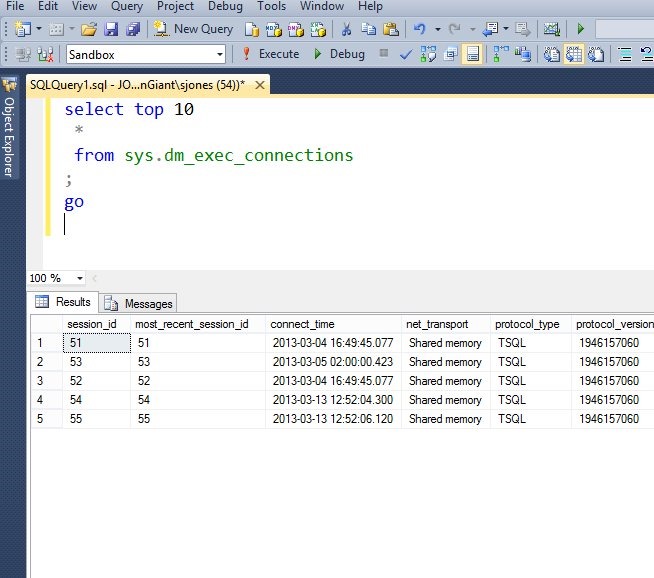
    This is what I see, and it’s not easy to read.

    Capture_009

    The results are much smaller than the query itself. How can we change this and make things easier to read?

    I wrote about one way: using results to text. This works well, but it isn’t the best solution for everyone, and you still want to change the size of your results. The technique I’ll show you works for that as well.

    Customization

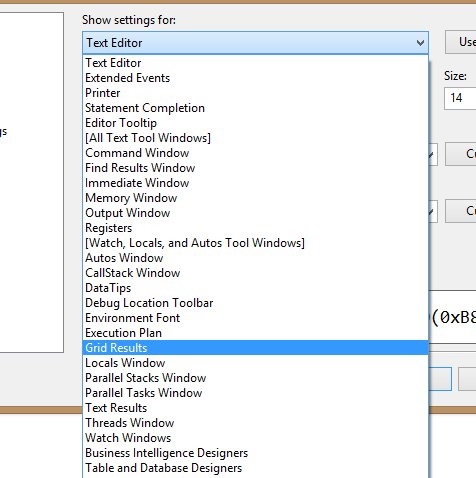
    If you go to the Tools | Options menu, in the Fonts tab as I showed in the last post, you’ll find there’s a drop down titled “Show settings for:” at the top. If you select Grid results, you can change the font settings.

    Capture_006

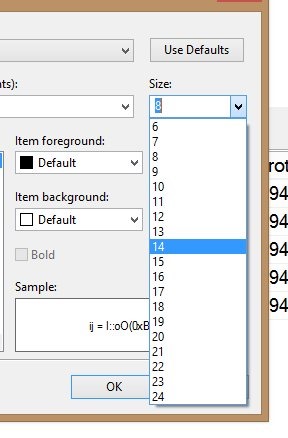
    The default is 8, and I usually up that a bit.

    Capture_007

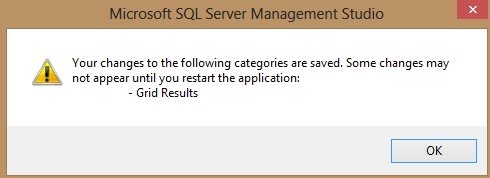
    Once that is done, you click OK, and get this note:

    Capture_008

    Make sure your tabs are saved, since you need to restart SSMS. Once you do, your results will be much easier to read.

    Capture_005

    Note that in the drop down for settings, there is an item for “Results to text”. If you change that, your text results will be larger.

  • Filestream and Filetable in SQL Server

    This talk is an update of my Unstructured Data in SQL Server talk that looks at the Filestream and Filetable features of SQL Server.

    This session begins by presenting a case why we will manage more binary (unstructured data) in the future. The growth of this data is amazing. From there we delve into the basics of the three main types of data:

    • structured
    • semi-structured
    • unstructured

    The session examines the basics of Filestream and how you get enable this feature, administer it from a DBA perspective, and move data in and out of Filestream columns.

    Filetable is introduced along with demos on how to enable this data, as well as a brief search demo to extract information from documents.

    Level: 200

    Length: 60-75 minutes

    Demo Code:

    Slides:

    Related Blogs:

    Presentation Schedule

    This session has been given at these places.

    Apr 9, 2013 – SQL Intersection Spring 2013