I’m getting home today,but not sure how wiped out I’ll be. So, one last republish: Embrace Stored Procedures
Tag: T-SQL
-
Finding Objects in a Schema #SQLNewblogger
Another post for me that is simple and hopefully serves as an example for people trying to get blogging as #SQLNewBloggers.
One of the things I needed to do recently was move some objects from one schema to another. I wrote about moving an object between schemas recently, but another part of that process was finding the objects to move.
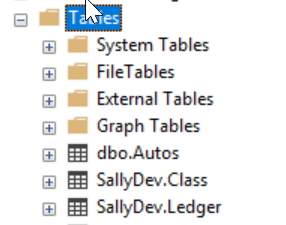
This is a quick post on how to find the objects in a schema. To start, here are a number of objects in a test database.

A schema has a name, which is the way that we would search for related objects. That means I want a parameter for my query, so I’ll start with a variable to store the name. For me, I’ll use a well named variable like this:
DECLARE @schema VARCHAR(100) = 'SallyDev';
Now I have a schema name, where do I find schema data? There is a DMV called sys.schemas, which contains a bit of meta data. If I query that, I see this:
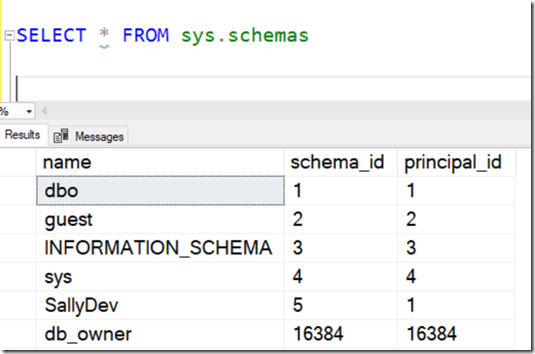
I can see my SallyDev schema, so I know I’ll query this DMV.
The other information I need is the object data, which is in sys.objects. I query that for the various data I want, but I want to limit data by the schema. In sys.objects, there is a schema_id, which is the data I’ll join with from sys.schemas.
When I do that, I build a query like this:
DECLARE @schema VARCHAR(100) = 'SallyDev';

SELECT
        o.type_desc,
        s.name AS 'Schema Name',
        o.name AS 'Object Name',
        o.object_id

FROM sys.objects o
     INNER JOIN sys.schemas s ON s.schema_id = o.schema_id

WHERE s.name = @schema;
I can execute that and I’ll see the objects I need.

SQLNewBlogger
This was a post related to the one on moving objects and I wrote this write after that one. It was only about 5 minutes longer to put this together, and it gives me a script I can easily search for on my blog if I need to do this task.
Once again, a quick and easy way to show some skills, practice explaining something, and get some knowledge stored for my own reference.
-
No More Mysterious Truncation
If you read the Microsoft White Paper on SQL Server 2019, there’s a gem buried on page 17. It mentions a trace flag, which some of you might appreciate.
Here’s a little repro:

As you can see, the plee I made has actually been heard. I don’t know if they listened to me, or if the collective complaints over the year grew to the point that this got fixed.
In any case, thank you, Microsoft. This is a very nice enhancement.
-
Moving Objects to a New Schema
Another post for me that is simple and hopefully serves as an example for people trying to get blogging as #SQLNewBloggers.
I haven’t had the need to move an object from one schema to another in years. Really since SQL Server 2000. I wrote about deleting a user that owns a schema recently, but that’s often a first step. The next thing I might need to do is actually move objects from that schema to a new one.
I actually ran across this command when I was looking how to move the schema to a new user. There’s actually a parameter for ALTER SCHEMA that will move objects. This is the TRANSFER argument and it works like this.
I need a new schema for the object. In this case, I’ve got a table called SallyDev.Class. I want to move this to a new schema, and I’ll choose dbo for this example. I often have had developers build in their own schema and then I’ll transfer to the dbo schema, which is almost like a merge of code from one branch (SallyDev) to another (dbo).
The format of the command is: ALTER SCHEMA <newschema> TRANSFER <object>
The new schema name is just the name, with brackets if needed. Hint, if you need brackets, rename your schema, please.
The object is the qualified name of the object, with the old schema. In this case, the command I’ll use is:
ALTER SCHEMA dbo TRANSFER SallyDev.Class
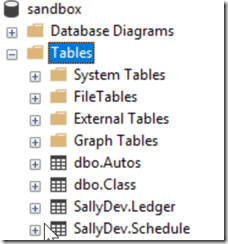
Here’s my before look:
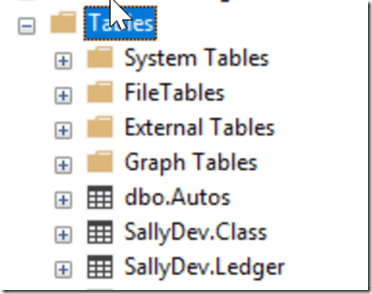
When I run the code, it works:
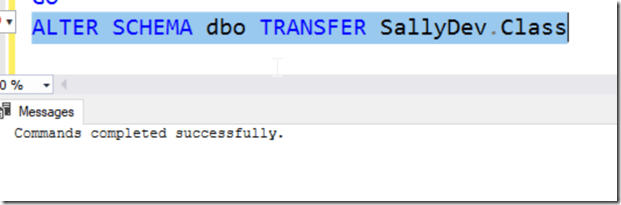
Now my object is moved. Success!
SQLNewBlogger
This is a quick view of a specific skill that can be handy. I won’t use this often, but if my team worked in this flow, or we had an issue, this not only shows how to resolve a single item move, but also helps me remember the command. I hadn’t seen this before, so a quick 10 minute blog is useful.
This also gives me ideas for other blogs, like how to automate this for a number of objects.