Tag: Redgate Monitor

  • Static Code Analysis Feedback for Operations with SQL Monitor

    One of the challenges with managing a production database is that the code that gets deployed sometimes causes lots of problems. Often a production DBA or sysadmin gets called about problems that they didn’t cause, and can’t necessarily fix.

    Helping developers learn what the impact of their code is, and if it is following good practices, is something many of us would like to do, but often don’t have the time, or a good report that we can easily pass on.

    I saw recently that the SQL Monitor team had deployed a new feature to the product that makes this a bit easier. They have incorporated the code analysis from SQL Prompt into SQL Monitor, which you can see at  https://monitor.red-gate.com/overviews/sqlmon-vmw-bm.red-gate.com/cluster/workload01.smdemo.local/sql/demo#?Zoom=1619213137440%2C1619220337440&MaxTime=1619220337440&Present=true

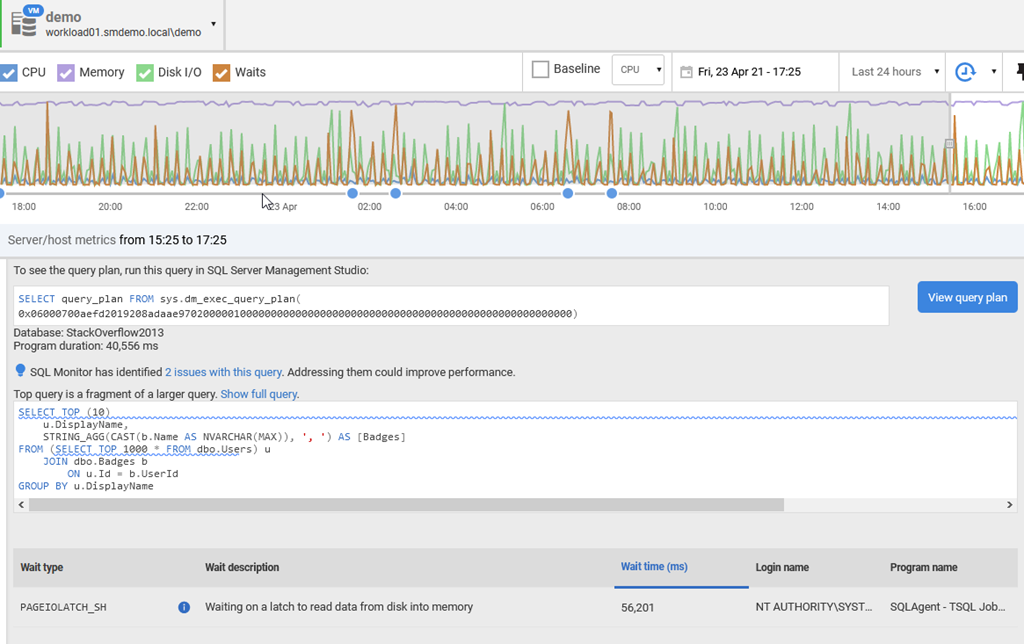
    I’ve linked to one of the workload demo systems being monitored. If you look at the top 10 queries, and pick one, you’ll see something like this:

    2021-04-23 17_26_30-demo - Server Overview — Mozilla Firefox

    Just below the query text, there is a blue lightbulb (for a new feature) and the text: SQL Monitor has identified 2 issues with this query. Addressing them could improve performance.

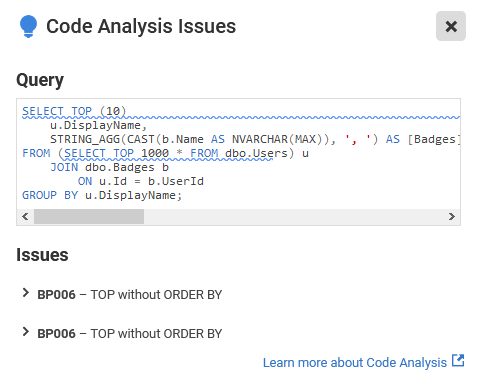
    Clicking the link gives you the issues. In this case, these are code smells that I’d want a developer to address. Having a TOP without any ordering could confuse clients, but it also might mean we are gathering the wrong data, since there isn’t a guarantee on which 10 rows come back.

    2021-04-23 17_26_41-demo - Server Overview — Mozilla Firefox 

    You can screen shot this, or send this link to developers, and ask them to fix this code for the next deployment.

    SQL Monitor has become an impressive product over the years, and with multiple teams adding to it now, it is constantly evolving to meet the needs of our customers. If you haven’t tried it, consider an evaluation before you purchase a monitoring tool (or before you build one).

  • Watch the State of SQL Server Monitoring tomorrow

    Tomorrow Redgate is running a webinar on the State of SQL Server Monitoring with Grant, Chris Yates, Annette Allen, and Tony Maddonna. You can register now and attend on June 25, at 4pm BST/11am EDT/8am PDT.

    What has Redgate’s latest survey revealed about the state of SQL Server monitoring in 2019? Each year we contract for a survey on monitoring and produce a report (similar to and in addition to the State of Database DevOps). This is the only industry report to benchmark monitoring in the SQL Server community, now in its second year.

    Join our panel of SQL Server experts as they discuss the key findings of our industry-leading report, that includes insights such as:

    • Getting to grips with growing estates
    • Issues caused by migrations
    • Which tooling is being used
    • Staying on top of multiple database systems
    • What is the next big challenge facing the industry.

    The report has data from over 800 participants across a range of sectors and from all around the globe. The key findings include: Estates are continuing to grow, migrations is predicted to be the biggest challenge facing database professionals this year, adoption of cloud technologies is increasing and Redgate’s SQL Monitor is the most popular third-party tool (even when we remove out customer base).

    The report will be available after the 25th June. Look for a link, or attend the webinar and we’ll send you the link.

    Register today.

  • Do You Have a SQL Server Estate?

    At Redgate, we do a lot of research. Maybe not as much as Microsoft Research, but we are always trying to investigate more about customer problems and challenges before we build or change software.

    Take our survey on SQL Server Configuration Management and you could win prizes. Or a prize.

    I’ve never thought about managing an estate, but not that I live on a horse ranch, that has a little more meaning. In the past, I’ve managed hundreds of instances and thousands of databases. That’s certainly an estate, but even when I had 5 servers, that is something of a small estate of things to keep me busy.

    At Redgate, we know there are lots of challenges in managing SQL Servers. We constantly have a team of people working on SQL Monitor, and they are releasing changes every week or two. In fact, we just released v9.0 this year, full of enhancements customers have asked for.

    In addition to the tactical team that’s building and fixing things day to day, we are doing future research into where to take our monitoring and tuning software. That’s some of what this survey is about. Let us know about which things might help you smooth the process of managing systems.

    Give us a few minutes and a little information and take our survey. You might find that a future version of SQL Monitor contains something you thought would be useful.

    Take the Survey today.

  • Versions and Patches in SQL Monitor

    SQL Monitor has grown from a basic alerting system to an amazing product over the years. From it’s early days as SQL Response, where Brad and I weren’t sure this was a good idea to the current version that has two teams and releases change almost every week. In fact, new features often come out before we bundle them into a major release.

    Not that the other teams aren’t doing well at Redgate Software, but across the last 3-4 years the SQL Monitor group has been the best development team in the company. First under Daniel and now under Ben, they’ve done amazing work and it’s hard to put into words how proud and impressed I am with their results. Lots of kudos to Adam as well, who helps with UX. I enjoy our monthly chats about the progress they’ve made and future directions they’re considering.

    This post covers one of those areas.

    The SQL Estate

    There’s a new tab that’s appeared at monitor.red-gate.com:Estate. Awhile ago we started talking about the idea of scale and how do fewer DBA resources manage all their instances easily. With pressure to be more efficient and still provide rapid responses when there are issues, there has been quite a bit of work over time to help users keep track of all their database resources.

    The Estate tab is one of those areas, which has grown to 4 areas: Installed Versions, Disk Usage, Backups, and SQL Agent Jobs. Some of these are in preview, with more work planned in the future.

    2018-12-20 11_03_16-Installed Versions

    If you have ideas or requests for features, let us know. Our goal is to find ways to better ensure you get alerted to issues, can solve problems, and keep track of work that needs to be done on all your databases, no matter where they are located.

    Installed Versions

    One of the tasks I’ve often had as a DBA or sysadmin is patching systems. It’s a hassle to keep track of versions and current patches, even with resources like the SQLServerCentral Build Lists. I’ve heard similar challenges from other DBAs.

    I made a suggestion to the SQL Monitor team and they came up with the Installed Versions on the Estate tab. This let’s you easily see which versions you have installed in your monitored environment. At a quick view, you can see which SQL Server versions are installed and are up to date.

    2018-12-20 11_05_41-Installed Versions

    You can play with filters to get a quick look at your estate, which is helpful when planning your patching resources.

    If you look below here, you’ll see more details on the instances, broken out into the groups you’ve configured. What’s nice here is that you see each database, as well as the version and an icon to let you know if you are behind in patching.

    2018-12-20 11_05_52-Installed Versions

    Perhaps even more helpful, there’s a link to the download for the latest patch. Makes it easy for you to find the files you need to update an instance. Perhaps even nicer, you can easily see when support ends, and use that to make plans for upgrades if you need to do so.

    This is one of the simpler, but amazingly handy features to have in a monitoring system. I’ve built scripts and tools to do this in the past, and while it’s not hard, it’s also not something that is necessarily a good use of my time. This is a task that’s tedious with limited value add for my salary. Much better to have a tool that gathers and manages this for me.

    If you haven’t tried SQL Monitor, run over to monitor.red-gate.com and give it a run, or even better, download an eval and try it in your environment.