

I was trying to get SQL Clone working recently and had an issue with the Agent. If you haven’t looked at SQL Clone, it’s a really cool product from Redgate that’s in beta right now. It will help you build and provision those large dev, test, customer service, etc. environments with full size copies of data without using the space (or time) for the actual files.
In any case, when I downloaded the agent and ran the installer, I saw this:

That struck me as funny because I have all sorts of VC++ runtimes on my machine. In fact, in debugging, I saw all these:

After the download completed, I got an error.
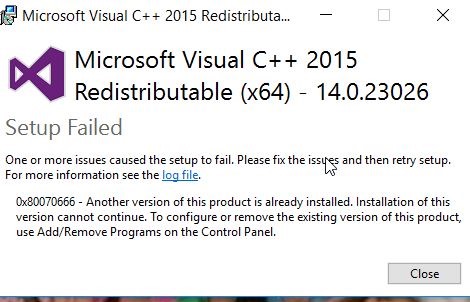
This was strange, since I actually had a 14.3 version, but apparently SQL Clone doesn’t realize this is the case. This should be fixed soon, but for now, here’s what to do.
First, run regedt32.exe. The setup program is checking for an installation in a key. I had the keys in the HKLM\SOFTWARE\Microsoft\VisualStudio\14.0\VC\Runtimes\x64, but not in the Wow6432 node.
Browse to HKLM\Software\Wow6432\Microsoft\VisualStudio\14.0\VC. Here’s what I had:

Here’s my x64 folder structure:

In here I have the sub-keys and the “Installed” value.
Since I know I have a later VC++ runtime, I did this. First, create the “Runtimes” key under VC, then add a “x64” key below that. Inside of x64, add an Installed value as a Reg_DWord with a value of 1. You should see this:

Now run the SQL Clone Agent installer:

Everything works.
If you’d like to learn more about SQL Clone, check out this short video:


Comments
One response to “Installing the SQL Clone Agent and the VC++ Runtime”
[…] that our developers are using. Chris is actually one of the SQL Clone developers, and he helped me solve the registry issue a few weeks […]
LikeLike