

I was experimenting with CHOOSE() recently after I was asked a question. In a previous post, I found it can take a (ridiculous) number of arguments. In this post, I’ll look more practically at how this works and where you might use it.
Another post for me that is simple and hopefully serves as an example for people trying to get blogging as #SQLNewBloggers.
The Setup
Let’s create a quick table with some data. In this case, I’ll create a table that stores some customer data. I’ll store a customer name and status in this table. There could be other data, but this shows the important parts.
CREATE TABLE dbo.Customer ( [CustomerID] int, [CustomerName] varchar(200), [CustomerStatus] int )

INSERT INTO dbo.Customer ([CustomerID], [CustomerName], [CustomerStatus])
VALUES
( 1, 'Steve', 1 ),
( 2, 'Andy ', 1 ),
( 3, 'Brian', 1 ),
( 4, 'Allan', 0 ),
( 5, 'Devin ', NULL )
This is something I’ll typically see a developer do, where they assume the customer status can be inferred. In this case, we’ll assume that:
- 0 = inactive
- 1 = active
This doesn’t handle NULL, but a lot of people might choose (no pun intended) to make this a 0.
Querying for Status
If we want to present something readable, we might do this:
SELECT CustomerID,
       CustomerName,
       CASE
           WHEN CustomerStatus = 0 THEN
               'Inactive'
           WHEN CustomerStatus = 1 THEN
               'Active'
           ELSE
               'Inactive'
       END AS CustomerStatus
FROM dbo.Customer;
That works, but it’s a bit cumbersome. Since 2012, we’ve had CHOOSE(), which makes this smoother. The new code would be:
SELECT CustomerID,
       CustomerName,
       CHOOSE(CustomerStatus, 'Inactive', 'Active') AS CustomerStatus
FROM dbo.Customer;
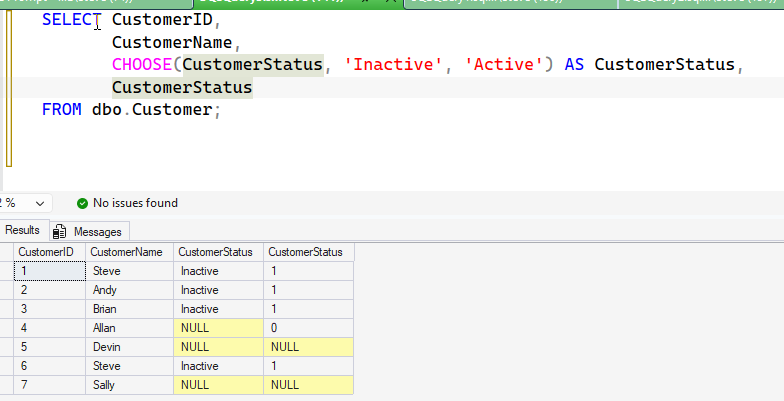
This doesn’t work great, as CHOOSE() is 1-based. This would return (I included the int value):
A better solution would be to add 1 to the value. This gives me new code:
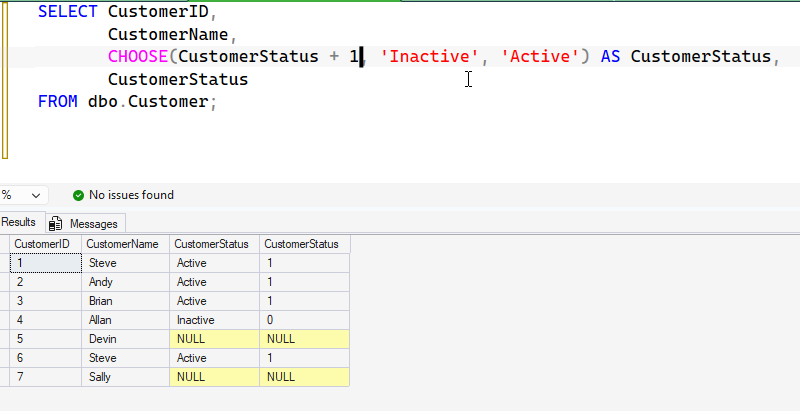
Better, but not great. Instead, I’d want to enclose this and handle the NULL.
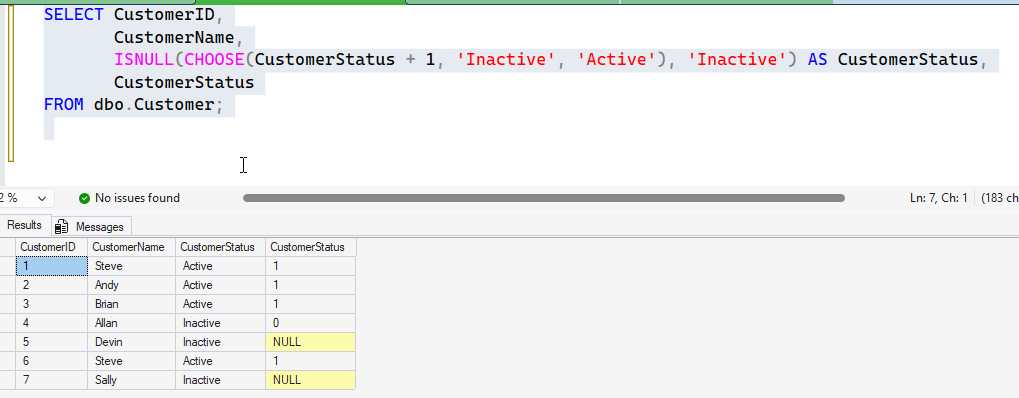
That works, but it’s not great. In general, I don’t like this use of coding CHOOSE() as it’s essentially hard coding values.
Instead, I would lean towards a lookup table with statuses, especially because someone might want to change this later. I’d prefer that a join to a table is better than hard coding these values.
Where to use CHOOSE()
To me, the best use of CHOOSE is with boolean or bit values. In this case, we store a 1 or 0, but we can’t easily convert these. The best way to handle this for display, is something like this. Suppose I have a table of answers for users that have bit values. Something like this:
CREATE TABLE dbo.Answers ( [QuestionID] INT, UserID INT, [Answer] bit)

INSERT INTO dbo.Answers
(
    QuestionID,
    UserID,
    Answer
)
VALUES
( 1, 1 , 1 ),
( 2, 1 , 1 ),
( 1, 2, 1 ),
( 2, 2, 0 ),
( 1, 3, 0 ),
( 1, 3, 0 )
If I want to query this, I can use the technique above and get my true/false values.
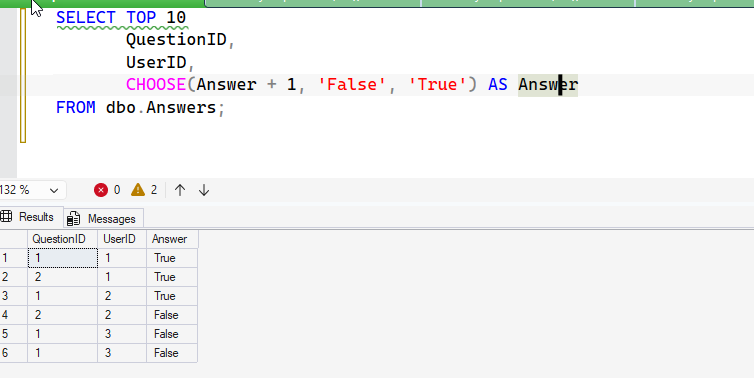
There is no chance this will be extended or changed. Booleans only store 2 values. Of course, I might want to wrap this to handle NULLs if those are allowed.
SQL New Blogger
This post took me about 15 minutes to setup and write. The code was simple, and the explanation was easy. However, thinking where CHOOSE() would work well and not be a design issue later took me about 10 minutes of thinking and searching a bit on the Internet.
Lots of people show CHOOSE() in a way that I disagree with, and really booleans only made sense to me.
This showcases my thoughts, an opinion, and an idea. Show how you can think, especially in the age of AI and impress a potential interview team.


Leave a Reply