

I don’t have SQL Server installed on my laptop. In an effort to keep things clean and smooth in case I need to rebuild things, I’ve gone with containers. I can easily copy a folder with all my docker compose files and data to another machine and be up and running.
One other benefit is upgrades. This post looks at the process of upgrading/patching SQL Server on my laptop.
Getting the Latest Version
A normal process for me in the past (and on my desktop) is to download a patch, run the installer, and then have SQL Server upgraded. Sometimes there’s a reboot involved as well. With a container, things are a little different. Here is the process:
- Edit the docker-compose.yml
- Restart the container
That’s it.
Once the image downloads and the container restarts, I have a new version. If I want to go back and test the previous CU/patch, I change my docker-compose file back. Most of the time, the database version hasn’t changed with a CU or GDR, so I can upgrade and downgrade easily.
Here’s how this works in practice.
There were a number of SQL Server patches released recently, including a few for SQL Server 2022. When I looked at my docker-compose file, I saw this:
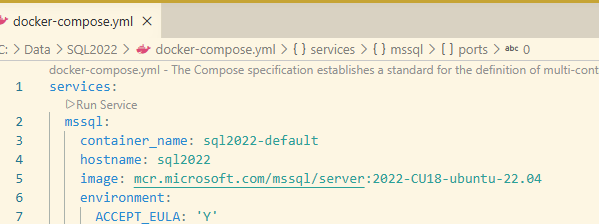
The latest version of SQL 2022 is CU24+the Apr 2026 GDR (I’ve been remiss here in patching this machine). If I want to patch this, I update line 5. I know that there is a page on the MS Artifact Repository that lists the tags for each CU. It’s an easy Google search away.
I change from this:
image: mcr.microsoft.com/mssql/server:2022-CU18-ubuntu-22.04
to this:
image: mcr.microsoft.com/mssql/server:2022-CU24-GDR1-ubuntu-22.04
Now, when I restart my container, I’ll see the new image downloading. Since images are built in layers, this isn’t the complete SQL Server image, but rather the changes from other images, so the download size and time are shorter.

As soon as this finishes, the container starts and SQL Server is patched.
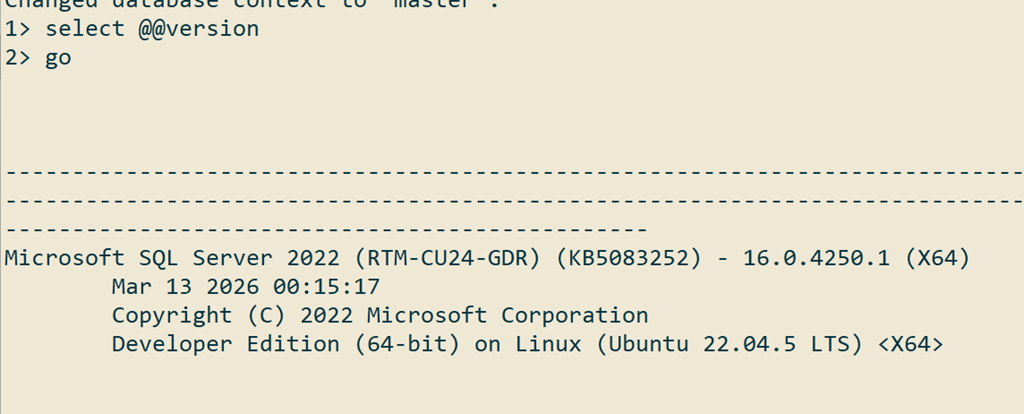
Now I need to check the other SQL compose files I have for 2019 and 2025 and update those version.
Video Walkthrough
Below is a video showing me doing this process.


