Tag: high availability

  • The Decision to Fail

    failoverWe have a number of automated technologies that we can us to seamlessly move from primary to secondary systems without human intervention. SQL Server incorporates a number of these, and many companies use them to ensure their applications are highly available. However things don’t always go as planned in a disaster and sometimes humans get involved.

    Unless you are one of the companies with a very large budget and high risk of business issues when systems failover, you probably have some sort of high availability (HA) or disaster recovery (DR) process that requires human intervention. Log shipping, for example, usually requires that some human reconfigure the application to use secondary servers. Even with Availability Groups, clustering, or database mirroring, you may need to manually fail back to primary systems.

    In those cases, it’s not always a clear decision to do so. Many of the switches are disruptive, or have the potential to be disruptive. Cluster fail-overs should not impact the application, but there is a brief period where clients may not connect. Outside of disasters, Management, and often technical people, usually want to schedule any failovers after they have prepared the end user for potential issues, however brief.

    In disaster situations, when there hasn’t been a complete failure of a system, you may not want to have unscheduled failovers right away. This week I want to know:

    How do you make the decision to fail over from one system to another?

    I’m speaking to you, the data professional or the administrator. I would guess that most of you are not the one that ultimately makes the decision to leave your primary systems. Often I’ve found that someone in management has to make the decision, but with input from the technical people. In that case, think about how you present the situation and pros and cons of the failover. Do you give hard numbers, like latency and relative CPU power in failover machines or do you attempt to quantify the effects on the business when secondary systems are in use.

    I’ve rarely had a large budget for secondary systems. Network bandwidth, CPU and memory, and more are sometimes sacrificed in secondary systems in order to align the cost of these systems with the risk of needing them. In many cases, we didn’t have automatic failover for many systems because we had to know our primary systems would be down for more than 5 or 6 hours before we would switch to the backup environment.

    If you have similar guidelines or processes in place, let us know.

    Steve Jones


    The Voice of the DBA Podcasts

    We publish three versions of the podcast each day for you to enjoy.

  • Understanding HA

    51JU2kM8vHL._SL160_PIsitb-sticker-arrow-dp,TopRight,12,-18_SH30_OU01_AA160_I’ve learned a lot about high availability (HA) and disaster recovery (DR) over the last two decades. Some of the things I’ve learned were from studying, some from experimentation and practice, and a few from hard lessons when some part of a system failed. The latter were how I learned the quickest and most effectively, but those were also the most stressful times in my career. Getting called by senior management because a system is down is not the way that I want to improve my skills.

    I know many people struggle with HA and DR, which are two different concepts. They are designed to solve different problems for different situations. SQL Server includes a number of options for how you might handle either HA or DR situations (or both), and the list of options continues to grow over time. We have the AlwaysOn suite of technologies, database mirroring, replication, log shipping, and more.

    All of the technologies that you might use to solve HA and/or DR problems may provide other benefits. The ability scale out, or spread load are a possibility with a few of these features. What I find, however, is that many accidental, junior, or otherwise inexperienced technology professionals that need to manage SQL Servers get confused. They seem to think HA and DR are the same thing, and one technology is somehow better than others.

    Whether you need HR or DR, or some other solution, it’s important the you research, understand, and practice working with the technologies that you will implement. Books Online gives you a good starting point, and there are plenty of online resources where you can ask additional questions or debate the particulars of your situation.

    Disasters rarely occur, but you should take the opportunities to hone your skills at working with the various technologies you may implement before things fail. Schedule failures of systems in your test environment. See if your HA technology keeps the system running if you remove a system, or test that you can recover using your DR techniques. When something actually goes wrong, you’ll be glad you prepared.

    Steve Jones


    The Voice of the DBA Podcasts

    We publish three versions of the podcast each day for you to enjoy.

  • AlwaysOn and Contained Databases in SQL Server 2012

    This talk is mostly based on contained databases in SQL Server 2012. The first part of the talk goes over the problems with current database movement, the idea of containment, and the implementation in SQL Server 2012. There are demos that cover the user and collation scenarios. The second part of the talk goes into the basics of AlwaysOn. I talk about the architecture, the various scenarios you can have, and the advantages and drawbacks of the technologies involved. There are no demos of AlwaysOn mostly due to time.

    Length: 60 minutes

    Slides: downloadable after the SQL in the City 2012 tour.

    Code: Demo code

  • The High Availability Poll

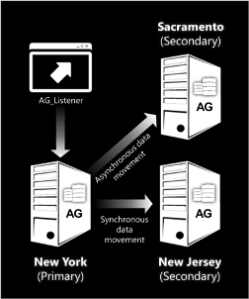
    Always On Diagram
    Is it worth it to you to build a highly available database?

    The cost of building highly available databases dropped with the introduction of Database Mirroring in 2005. Without the need to purchase identical hardware for a spare system, it became much easier and less expensive to set up extra systems that could handle a workload in the event of a disaster. This technology was improved in SQL Server 2008, and in SQL Server 2012 we have a new option: Always On.

    When I first heard about the changes coming in SQL Server 2012, I thought for sure that many people might upgrade to take advantage of the HA enhancements and provide more stability for their systems. However as I see the actual changes in detail, and talk to more and more data professionals, I’m not so sure. Many of us have spent years building systems that tolerate most issues meet the majority of our needs. With that in mind, I had a question for the DBAs out there.

    How important is a highly available database with automatic failover to your employer?

    Having a spare system that automatically picked up the load when a database server failed would seem to be on the wish list of every user, but plenty of environments don’t implement one. Many companies desire such a configuration, but when they see the cost or complexity, many forego an implementation.

    This Friday I’m wondering if your business sees this as critical and has implemented such a system, or are you more tolerant of minor issues, and willing to accept some downtime in a simpler environment.

    Steve Jones


    The Voice of the DBA Podcasts

    We publish three versions of the podcast each day for you to enjoy.