
Another post for me that is simple and hopefully serves as an example for people trying to get blogging as #SQLNewBloggers.
I often see people struggling to use triggers for auditing, or having issues with building them to handle multi row updates. However, there’s another choice: the OUTPUT clause.
Not many people use this clause, but it’s a great way to access the virtual inserted and deleted tables in your code.
Suppose I have a simple insert statement like this one:

I want to ensure that I get the data inserted into an audit table. Certainly I could have code that does the insert into two places, like this:
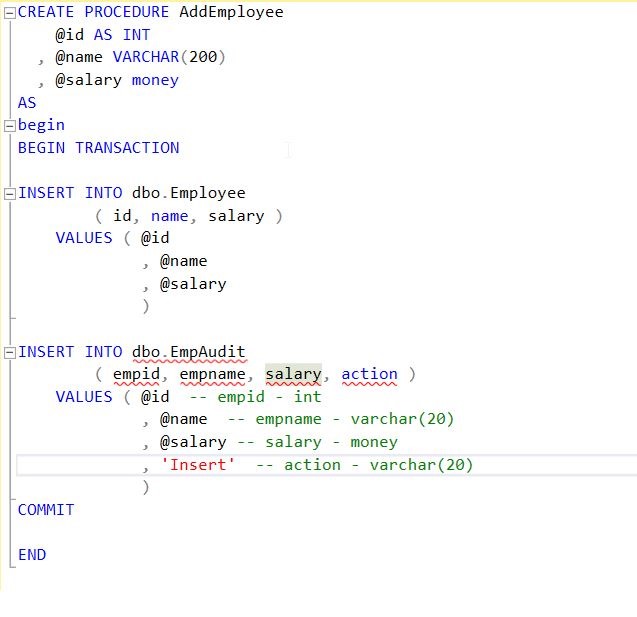
But it can be hard to get developers to use procs like this, they might forget or need to build dynamic SQL. There are the other issues of maintenance where I might update the first INSERT, but forget the second.
OUTPUT allows me to add a clause in my DML statement. I put this before the FROM clause, or in this case, before the Values clause. Then I include values from inserted or deleted along with any scalar values. That looks like this:

However, this returns the data to the console. What I’d really like is to put this into a table. For that reason, I then add an INTO clause, with my table name. Now when I execute this, I get the data from the inserted table added to my EmpAudit table.

A basic, quick look at the OUTPUT clause.
SQLNewBlogger
I ran into an issue with OUTPUT and realized that I hadn’t ever covered this basic concept for myself. As I learned a few things, I decided to write about OUTPUT. This took me about 10 minutes to cover the basics, and was part of a 30 minute session writing a few more pieces on OUTPUT.




 Voice of the DBA