

Another post for me that is simple and hopefully serves as an example for people trying to get blogging as #SQLNewBloggers.
This is a quick post on checking the port for your SQL Server instance. It’s in line with Tim Ford’s request for simple, beginning blog posts this year.
How do you know what port your instance is listening on? Many of you might not know, depending on the SQLBrowser to be running. That’s not necessarily a good idea, as some security protocols insist this be disabled.
There are ways to check. First, you could use a the Configuration Manager. On my desktop, this is in the Manage tool for the computer. Once inside, I can select the Server Network Utility.
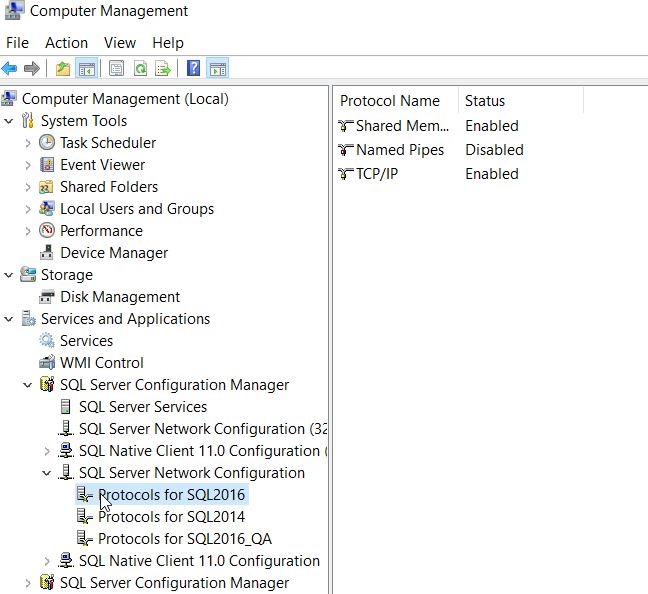
Notice that I have multiple instances here, so I need to choose one. Once I do, I see the protocols on the right. In this case, I want to look at the properties of TCP/IP, which is where I’ll get the port.
If I look at properties, I’ll start with the Protocol tab, but I want to switch to the IP Addresses tab. In here, you can see I’ll see an entry for each of the IPs my instance is listening on. I can see which ones are Active as well as the port. In my case, I have these set to dynamic ports.
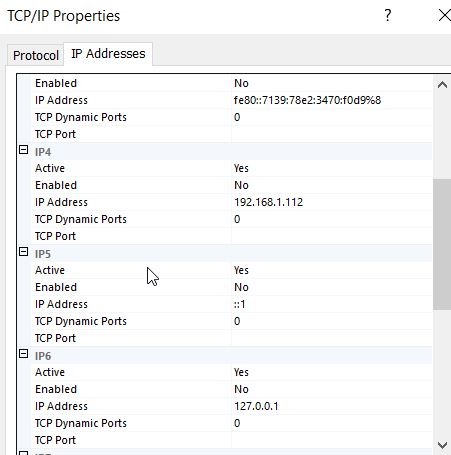
This doesn’t help. If I had specific ports, I’d see them listed for each IP.
The way I tend to check the specific port is that I will go to the SQL Server Error log.
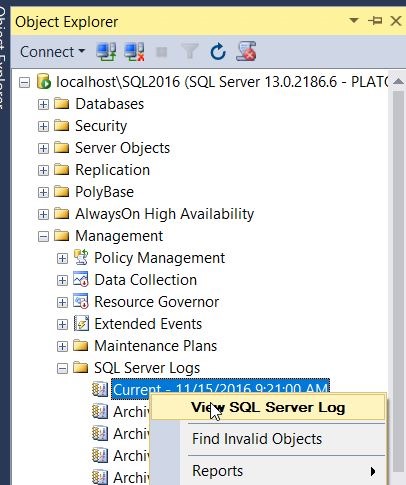
When I open this up, I see my error log entries. I want to look at the startup of my current session and scroll up slightly. At some point you will see an entry like “Server is listening on…”
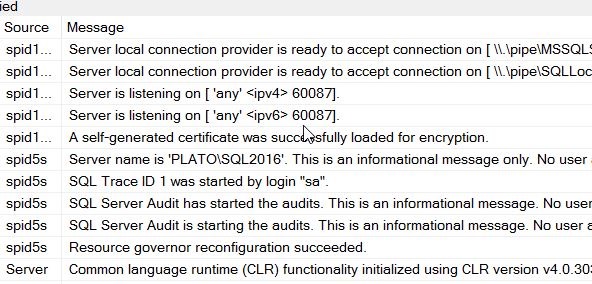
In my case, you can see above that I am listening for this instance on 60087. I can verify this with a connection in SSMS.
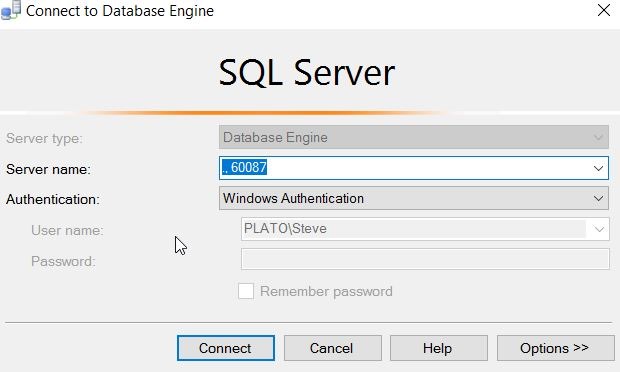
Note that this is a named instance, and I normally connect to “.\SQL2016”. The SQLBrowser determines the port, since I send the name in, and then get a port back to where I will then connect. However, here the name doesn’t matter. I just send in the port and I can connect.
#SQLNewBlogger
Everyone working with SQL Server should know this. It’s a simple item, like checking the printer is plugged in. Know how to check this.
And blog about it.


 Voice of the DBA
Comments
4 responses to “What Port Should I Use?–#SQLNewBlogger”
Good post! I had not thought about testing the port detection as a double-check of what you have found in the errorlog. One thing that amazes me, especially with all of the reports of systems being hacked in the news these days, is how many folks still depend on the Sql Browser and having their Sql Servers listening on the default port (1433). I will admit I am a bit of a fanatic about security but not even our test instances are set up that way.
Thanks
Richard
LikeLike
I can’t decide if this is helpful or not. Someone else pointed out that this obscurity doesn’t really help. Port scanners can easily find the service. However, this can protect from vandals and scripts looking for 1433. Not sure.
LikeLike
My thoughts here: http://thomaslarock.com/2016/12/using-non-default-ports-for-sql-server/
LikeLike
Great points, Tom. I have tended to use some security by obscurity, not for a CYA or because I think it stops the determined attacker, but because there are lots of vandals. The random attacker that downloads a script, or gets a virus running, and the simplistic nature of the script means that only 1433 (or UDP 1434) is scanned. Slammer did this, and those instances that were not browse-able or off 1433, were fine.
LikeLike