
I ran across an interesting gotcha while trying to run a Flyway command from PowerShell. Specifically, the snapshot command and providing a parameter that is the snapshot.filename parameter.
Someone reported an issue with Snapshot, so I tried it from a command line. It worked fine for me, but a sharp Redgate developer noted that the person was running something like this from PowerShell:
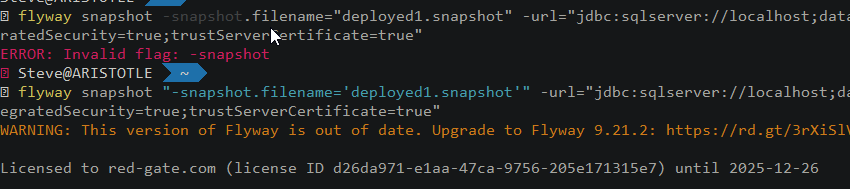
flyway snapshot -snapshot.filename="deployed1.snapshot" -url="jdbc:sqlserver://localhost;databaseName=FWSimpleTalk_1_Dev;encrypt=true;integratedSecurity=true;trustServerCertificate=true"
As you can see below, this caused an error.

I checked my version. Surely “flyway snapshot” was valid, and it was.
However, there is an issue here with PowerShell and the parameter. In this case, the PoSh will try to interpret this as
The issue is lightly explained in this SO question, though I can’t quite figure out where this is documented. However, using quotes around the parameter name fixes this. Note, I switched the parameter value to single quotes.
flyway snapshot "-snapshot.filename='deployed1.snapshot'" -url="jdbc:sqlserver://localhost;databaseName=FWSimpleTalk_1_Dev;encrypt=true;integratedSecurity=true;trustServerCertificate=true"
As you can see, this works.
PowerShell is closed to command shell, but not the same. Keep that in mind as you build automation. Be wary of how your parameter values might be interpreted and test lots of values.




 Voice of the DBA
Prepending / Using the call operator & may also “force PowerShell to treat the string as a command to be executed”. I think it disables parsing of the command similar to Invoke-Expression.
https://ss64.com/ps/call.html
LikeLike
The other way to do this is to use the [“stop-parsing token”](https://learn.microsoft.com/powershell/module/microsoft.powershell.core/about/about_parsing#the-stop-parsing-token) to prevent any PowerShell parsing of the command line before the application gets it:
“`powershell
flyway –% snapshot -snapshot.filename=”deployed1.snapshot” -url=”jdbc:sqlserver://localhost;databaseName=FWSimpleTalk_1_Dev;encrypt=true;integratedSecurity=true;trustServerCertificate=true”
“`
LikeLike
The other way to do this is to use the “stop-parsing token” to prevent any PowerShell parsing of the command line before the application gets it:
LikeLike