

This was an interesting error, and I was able to duplicate it, so I decided to write a post on how to find the problem and fix it. The error after running DBCC CLONEDATABASE is:
NO_STATISTICS and NO_QUERYSTORE options turned ON as part of VERIFY_CLONE.
Database cloning for 'atest' has started with target as 'aSmallTest'.
Msg 2601, Level 14, State 1, Line 11
Cannot insert duplicate key row in object 'sys.sysschobjs' with unique index 'clst'. The duplicate key value is (885578193).
The final key value (885578193) for you might be different, but the error is the same.
Note: In SQL Server 2022 RTM + GDR, this error occurs with system objects collisions. Upgrading to CU12 fixed this. Possibly earlier CUs fix it, but that’s all I’ve tested.
The Scenario
I connected to a SQL Server instance and ran this:
DBCC CLONEDATABASE(aTest, aSmallTest) WITH VERIFY_CLONEDB;
I was just trying to copy a database to do some testing against a copy. The command too quite a few seconds (11 for me) to run before returning the error above. You can see the screenshot below.

Strange. Why would a copy of a database cause an error here? I’ve run DBCC CLONEDATABASE on this instance before and it worked.
I’m not sure of the exact problem, and my searches note that
The Fix
I found a post that describes a similar issue, but certainly isn’t the case here. Another post from Pinal shows how to query sys.sysschoobhs, which isn’t reachable with a DAC connection. I finally found in the docs that SQL Server doesn’t support cloning with objects in the model database.
So, I need to delete objects in the model database. In my case, I took this query (from the first link above) and ran it from the source database. That’s important. Running from anywhere else doesn’t work.
SELECT m.id, m.name, c.name, c.id, m.type
FROM model.sys.sysobjects m
FULL OUTER JOIN sys.sysobjects c
ON m.id = c.id
JOIN sys.objects o
ON c.id = o.object_id
WHERE --o.is_ms_shipped <> 1
m.name <> c.name
AND m.id IS NOT NULL;
As you can see below, this returns two objects.

If I look in model, I see these, one if you just look at tables, but the PK is attached.
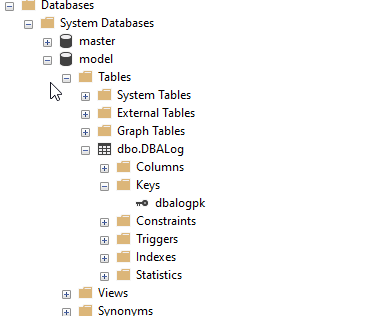
If I delete these two objects, then DBCC CLONEDATABASE works.
Summary
This is a strange error, and I’m not sure why it appears, but the documentation notes that running dbcc clonedatabase with objects in model is not supported. I suspect this is a change across one of the CUs, as I know this used to work.
In any case, the fix is remove the objects in model. If you really need these, then I’d create a script to remove and add those objects back, with a call to dbcc clonedatabase in the middle.


 Voice of the DBA
Comments
3 responses to “Fixing DBCC CloneDatabase Dup Key error in sys.sysschobjs”
Instead of cloning the model database, just do a restore?
LikeLike
This isn’t for model, but for other dbs with schema in them. So a restore would include data, but often you don’t want data, just schema.
SQL Compare works well, but it’s not as simple as dbcc clonedatabase
LikeLike
[…] Steve Jones runs into an issue: […]
LikeLike