
I recently installed SnagIt and it was annoyingly saving both PNG and SNAGX files. This post shows how to get rid of the SNAGX file. If you just need the solution, scroll to the bottom.
I installed Snagit recently with a new machine. The old screenshot software I had been using was banned by IT as it had an unpatched vulnerability.
The main reason I want a screen capture tool is for sharing an image. This might be for a note for me, feedback to a product team, a part of a screen for a blog or article, or even showcasing something for a customer.
What I have done for a couple of decades:
- hit a hotkey
- select a region of the screen
- move on
I expect to have the region of the screen saved in a folder on my workstation, where I can then grab it later and send it somewhere.
The SnagIt Problem
When I added SnagIt, I set up a automatic capture with these settings.
- select: region
- Effects: non
- Share: File, automatic filename, specific folder
- No preview, no delay, capture the cursor
- Preset – One set up
- hotkey: CTRL+Shift+B
- Image type set to PNG
This worked well, with my images being captured.
Except, with every PNG, I also had a SNAGX file. That was really annoying because if I edit, I’m editing the PNG and resaving it. I don’t need 2 image files.
Customer Support
I had a chat with customer support, who was not helpful. They suggested this article: Save to another format. I eventually got the person to understand I didn’t need that, and they said this wasn’t supported.
I complained a bit on Twitter, mostly just annoyed. The person who responded gave me the same article, but then they responded later with the solution.
The Solution
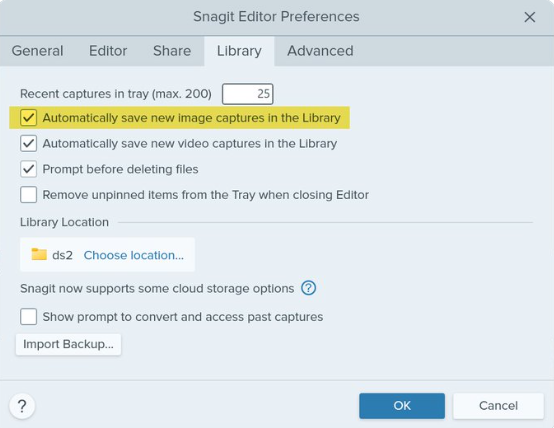
The place to configure this isn’t the SnagIt app, which is where I’d expect it. It’s in the Snagit Editor. I’m guessing that the capture process calls the editor somehow, which is why this design exists.
Go to the Edit menu, then select Editor Preferences. Go to the Library tab. In there, uncheck the “automatically save new image captures to library”. It’s checked below, but remove that and it should stop with the SNAGX versions.
Summary
No screenshots because, well, when I try to capture one the SnagIt app and Editor disappear. The one above is from Twitter.
This is a weird architectural design. The capture widget would be the place I’d expect this, but the “save new image captures” implies to me all image captures, not just the SNAGX format. It’s poorly worded, IMHO, for users to understand.
However, my problem is solved and I don’t need the job I created that runs every day and deletes *.SNAGX from my folder.:




 Voice of the DBA