
I saw this as a question submitted at SQL Server Central, and wasn’t sure it was correct, but when I checked, I was surprised. If you choose to designate columns as sparse, but you have a lot of data, you can use more space.
This post looks at how things are stored and the impact if much of your data isn’t null.
Another post for me that is simple and hopefully serves as an example for people trying to get blogging as #SQLNewBloggers.
Setting Up
Let’s create a couple of tables that are the same, but with sparse columns for one of them.
CREATE TABLE [dbo].[NoSparseColumnTest](
     [ID] [int] NOT NULL,
     [CustomerID] [int] NULL,
     [TrackingDate] [datetime] NULL,
     [SomeFlag] [tinyint] NULL,
     [aNumber] [numeric](38, 4) NULL,
  CONSTRAINT [NoSparseColumnsPK] PRIMARY KEY CLUSTERED
(
     [ID] ASC
)WITH (PAD_INDEX = OFF, STATISTICS_NORECOMPUTE = OFF, IGNORE_DUP_KEY = OFF, ALLOW_ROW_LOCKS = ON, ALLOW_PAGE_LOCKS = ON, OPTIMIZE_FOR_SEQUENTIAL_KEY = OFF) ON [PRIMARY]
) ON [PRIMARY]
GO
CREATE TABLE [dbo].[SparseColumnTest](
     [ID] [int] NOT NULL,
     [CustomerID] [int] NULL,
     [TrackingDate] [datetime] SPARSE  NULL,
     [SomeFlag] [tinyint] SPARSE  NULL,
     [aNumber] [numeric](38, 4) SPARSE  NULL,
  CONSTRAINT [SparseColumnPK] PRIMARY KEY CLUSTERED
(
     [ID] ASC
)WITH (PAD_INDEX = OFF, STATISTICS_NORECOMPUTE = OFF, IGNORE_DUP_KEY = OFF, ALLOW_ROW_LOCKS = ON, ALLOW_PAGE_LOCKS = ON, OPTIMIZE_FOR_SEQUENTIAL_KEY = OFF) ON [PRIMARY]
) ON [PRIMARY]
GO
Once we have these, I used claude to help me fill this with data. That’s coming in another post, but I uploaded the script here. This is for the SparseTable Test, where I replaced the select on line 59 with NULL values. In the NoSparse table, this selected random data.
If I select data from the tables and count rows, I see 1,000,000 rows in each. However, the Sparse table is all NULL values in these columns.

Checking the Sizes
I can use sp_spaceused to check sizes. The results of running this is below, but here is the summary
-
NoSparse Columns – 42MB and 168KB for the index
-
Sparse Columns – 16MB and 72KB for the index
A good set of savings. Here is the raw data:

Adding Sparse Data
I’m going to update 10% of the rows to be not null in different columns. Not 10% total, but a random 10% amongst all the columns. Again, Claude gave me a script to do this and I have run it. This is the SparseTest_UpdateData.sql in the zip file above.
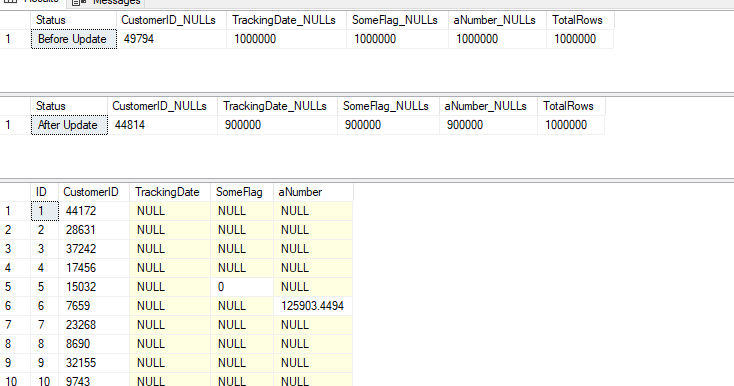
After running this, I have 900,000 nulls i the TRackingDate, as well as the other columns. You can see the counts below, and a sample of data.
If we re-run the size comparison, it’s changed. Now I have:
-
NoSparse Columns – 42MB and 168KB for the
index -
Sparse Columns – 33.7MB and 88KB for the index
Not bad, and still savings.
Let’s re-run the update script and aim not for 10% updates, but 65% updates. This gets me to only 315k NULL values in the tables, or a little over 70% of my sparse columns are full of data. My sizes now are:
-
NoSparse Columns – 42MB and 168KB for the
index -
Sparse Columns – 67MB and 192KB for the index
My sparse columns now use more space than my regular columns.
Beware of using the sparse option unless you truly have sparse data. I didn’t test to find out where the tipping point it, but I’d hope it was less than 50% of data being populated.
SQL New Blogger
This is another post in my series that tries to inspire you to blog. It’s a simple post looking at a concept that not a lot of people might get, but which might trigger a question in an interview. That’s why you blog. You can share knowledge, but you build your brand and get interviewers to ask you questions about your blog.
This post took a little longer, about 30 minutes to write, though the AI made it go quicker to actually generate the data for my tables. There were a few errors, which I’ll document, but pasting in the error got the GenAI to fix things.
This post showed me testing something I was wondering about. In a quick set of tests, I learned that I need to be careful if I use a sparse option. You could showcase this and update in 10% increments (or less) and keep testing sizes until you find when there is a tipping point. Bonus if you use a column from an actual table in your system.




 Voice of the DBA
Most people don’t know this but the left to right column position from most dense to least dense can make a huge difference in storage… even more that supposed “sparse” columns.
For example, if you have 10 VARCHAR(10) columns (for example) named Col01 thru Col10 in left to right order and they’re all NULL, then (contrary to popular belief) they take zero space on the row.
If you add just 1 byte to Col01, then it adds 5 bytes… 2 for the variable width column count, 2 for the column offset (it does NOT save the number of bytes… it saves the column offset in the row), and the single byte of data for a total of 5 bytes.
If, instead, we add the 1 byte to Col10 (the right most Varchar column), the a whopping 23 bytes are added…
2 for the variable width column count,
20 because the 2 byte offset is added for every column left to right up to and including the column with the single byte entry.
1 for the single byte entry.
I have a mostly done article on this subject… I’ll try to finish it up and publish it.
LikeLike
That’s crazy. Not sure I knew the impact was that high
LikeLike
Pingback: Sparse Columns and Space Utilization – Curated SQL