
This is a short post on how to rename a column in a SQL Server table.
Another post for me that is simple and hopefully serves as an example for people trying to get blogging as #SQLNewBloggers.
I Typo’d a Name
I was testing something recently and created this table:
CREATE TABLE BinaryData
(
     BinaryDataID INT NOT NULL
         CONSTRAINT BinaryDataPK PRIMARY KEY,
     Emoji VARBINARY(16),
     UserPic VARBINARY(MAX),
     BinaryTexet VARBINARY(250)
)
GO
I didn’t realize at first that the last column was BinaryTexet and not BinaryText. I added data, wrote a few queries, and had done some testing. Using SQL Prompt is great, but it hid my silly mistake. As I went to send this code elsewhere, I realized my mistake.
I could have dropped the table, created a new one with the right name, saved the data or moved it, and done more, but that’s a lot of work. It also might cause me issues with the dependencies from other code. Not this column name, as any dependencies have to be fixed, but I could have other FKs or things that I don’t want to recreate.
I could, I mean I use version control and tools to make refactoring easy, but everything is more complex than renaming this column.
Renames
In SQL Server, we have an sp_rename function to handle this. I had hoped there was a way with ALTER TABLE ALTER COLUMN, but while I can change types, nulls, etc., I can’t change the name.
SQL is such a weird language.
Certainly for SQL Server. PostgreSQL and Oracle have an alter table rename column a to b in the DDL. We have a function. Vote for a cleanup here.
In any case, the syntax is: sp_rename <objname>, <newname>,<objtype>.
For me, the code is easy. I qualify out the old name:
EXEC sp_rename 'dbo.BinaryData.BinaryTexet', 'BinaryText', 'column'
If I try just the column name, even though this is unique in sys.columns, I get an error. I could do just the table and column like this:
EXEC sp_rename 'BinaryData.BinaryTexet', 'BinaryText', 'column'
One really interesting thing is that if I fully qualify things, I definitely don’t get what I want. Be careful here. Another reason why an ALTER TABLE RENAME COLUMN syntax should exist.
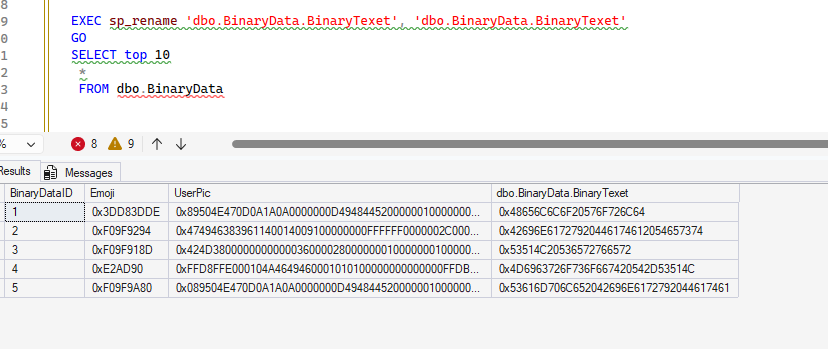
After all my experiments, I can fix this:
EXEC sp_rename 'dbo.BinaryData.[dbo.BinaryData.BinaryTexet]', 'BinaryText'
SQL New Blogger
This was a short post I made after realizing I made a mistake. I took about 10 minutes to experiment with renames, and another 5 searching to be sure I couldn’t rename things.
In the experiment, I realized how I could break things, so I captured that mistake (and fixed it), and pointed it out. Showcase how you learn. For bonus points, write a blog where you use AI to help you do this.




 Voice of the DBA