Recently I was trying to delete a folder and kept getting the “something is using this, try again” dialog. It was annoying, but I couldn’t figure out what process had this folder locked. I know there are ways to do this, but I decided to ask Copilot how to do this.
I did this in the Edge browser, since that’s the easy thing. Note: I was actually on Windows 10, not 11.
I got this response.
I then hit Ctrl+Shift+Esc and got the Task Manager. From there, I can see Resource Monitor at the bottom of the Performance tab.
I opened this and it started in the CPU tab. I typed in the name of my folder, and I saw that there was a CMD window open with the handle. I then realized I had a window in my list, which I exited.
Once I did this, I could delete the folder.
It This Better?
Not necessarily. If I run a search, I see lots of results. In this case, any of these could be clicked, but in the past, I’ve often had to click multiple results to find something that works. I supposed Copilot could have given me a poor answer, and I’d have to refine the prompt, so the process might be the same.
Except.
Here I am working in one place and not clicking other links, potentially finding down sites, 404s, or other issues. It feels slightly cleaner. It also means I can have context if I refine my search.
I don’t know if it’s better, but I find myself leaving an Edge tab open to Copilot to try stuff.
Several years ago, I heard about a new product coming in Azure that would provide an IaaS (infrastructure as a service) VM to run SQL Server, with Microsoft managing most of the admin tasks for the instance, like patching and backups. That didn’t seem like a big load to me, and I wondered if anyone would actually pay for this product. After all, don’t most companies find managing patches and backups fairly easy to manage?
That product became Azure SQL Managed Instance, and I’ve been surprised at the adoption. Quite a few clients have adopted this as a way to lift and shift (mostly) to the cloud in an easy fashion without the restrictions of Azure SQL Database. This looks like a “normal” on-premises SQL Server, and there are both high-performance (Business Critical tier) and average-performance (General Purpose tier) versions of the product that let you choose what level of price/performance you need to achieve.
I’m curious today, and I have a question. What are your impressions of Managed Instance (MI)? Whether you use it, you have heard of it, or if you just read this description. Give me a few thoughts on whether this makes sense, performs well, or has issues you need (or wish would be) addressed.
I’ve heard there are some issues with I/O, but I also have clients who find it performs very well for them. I hear similar things from on-premises SQL Server instances, so I often think that either the software is designed well or the hardware architecture doesn’t match the workload. There have been a lot of enhancements to MI since its release, including the ability to backup and restore to/from SQL Server 2022.
There is even an offer from Microsoft that lets you try out MI for free (for a period of time). This is a way for you to test migrate a database to the cloud and measure the performance. You might need to do some work to measure your current performance in a way that lets you determine how MI stacks up. You will also need to do some financial number crunching to decide whether there is an ROI that makes sense. If you do that, be sure you reach out to your internal finance people to understand the differences between CapEx and OpEx expenditures for your analysis. Paying $50k a year for an MI license isn’t the same as spending $50k for a server and hosting.
I’m not sure what I think of MI. Like many offerings, I think there are places where it makes sense and places where it doesn’t. It’s not a simple decision for me as an abstract question. For specific situations, I might lean one way or the other, but I’d want to do some workload analysis to justify or discard my initial thoughts.
Share your thoughts and impressions today. You might help some of us learn more about why we might or might not use MI. You might even help clarify your own thoughts by writing them down.
Most of the people I know who speak at a SQL Saturday or user group aren’t paid for their efforts. At many of the community events, the speakers are volunteering their time. Many are also paying for their own way to those events not located in their area. A few, such as me, might get a company to cover their travel expenses, but often this doesn’t include time. If I attend a SQL Saturday, I still have a bunch of work on M-F that needs to be done. No comp time for these events. That being said, I’m happy to donate some time and money to community events.
Some speakers build and teach full-day sessions, usually called pre-conference sessions, for which they are paid. There can be competition at large events like the PASS Data Community Summit and SQL Bits to get a session since the payment can be rewarding. I’ve seen some speakers make USD$1k or so, which can cover travel expenses, and others make over USD$10k, which is a nice payday.
Most of us don’t want to teach a full day of sessions, usually because it’s a lot of work to build a day of training. It’s also very nerve-wracking to try and teach people who have paid you. A lot of speakers don’t really want to deal with that stress. I’ve done it, and it is hard work. I don’t deliver pre-cons at events because I get expenses covered at lots of events and prefer not to compete with others who might want to earn some money while growing their careers.
However, lots of people want to share their knowledge and teach others something useful. It’s been amazing to me how many people have stepped up to submit sessions and present them at events all over the world. I’ve been lucky and honored to meet many of these volunteers and call them friends.
When Andy, Brian, and I started SQL Saturday, we weren’t sure there would be enough speakers to run 10 events in a year in 10 cities. At the time, the PASS Summit and a few other conferences were the only places to speak outside of user groups and we weren’t sure there would actually be enough people in a community willing to speak to run a conference. We also weren’t sure that many people would travel outside their home area to speak.
I’m thrilled we were wrong. So many people have volunteered their time and energy to build a session and then deliver it at user groups and local events that there are often more speakers than spaces available for them. I’m also glad that so many of you attend and support local events.
Speaking can be intimidating, but I know many of you can do it. It’s scary, and it’s something I never thought I’d do when I left university. It is a lot of work, it interrupts your free time, and it doesn’t pay you any hard currency after a session. However, it’s also thrilling to help others, exciting to have them listen to you, it hones your communication skills, and it is impressive to employers. On balance, I’d say that even delivering a presentation at your local user group is a profitable endeavor and a memorable experience.
I hope we continue to see more of you willing to deliver a session for your peers, share some of your knowledge. I also hope that we see more of you stepping up to help organize a SQL Saturday or another local event in your community.
Recently the Flyway Desktop (FWD) team release support for state-based deployments. These are similar to SQL Compare deployments, but with your code source control, which is where you want it. This post looks at how this works.
I’ve been working with Flyway Desktop for work more and more as we transition from older SSMS plugins to the standalone tool. This series looks at some tips I’ve gotten along the way.
State-based Projects
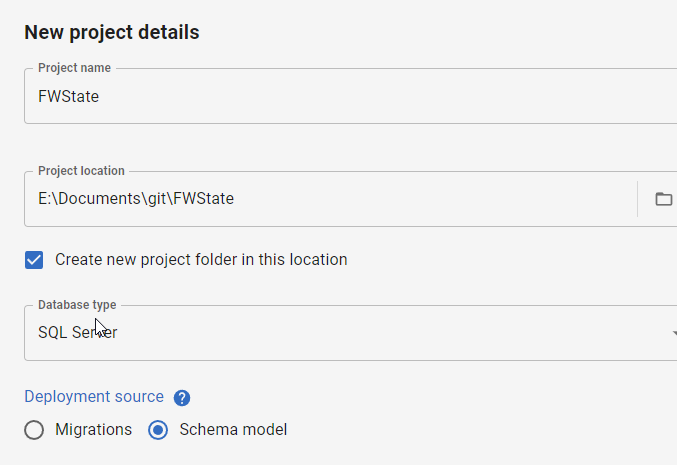
When I create a new project, I now have a choice: migrations or schema model (state-based). You can see the choice below.
I’ll demonstrate this now by creating a new project. I give it a name, folder, type, and then I pick the Schema model deployment source.
Once that is complete, the project is set up and I need to link a development database. I’ll do that first, picking a database with a few objects. In this case, I’ve picked my FWState_1_Dev database.
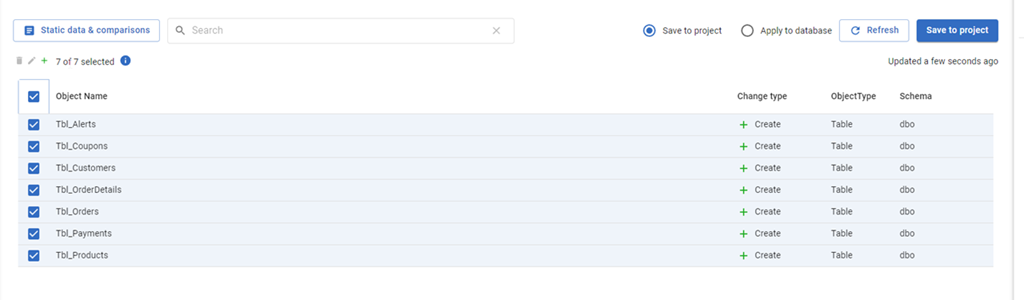
Once this is linked, the FWD tool will read the database, compare to my filesystem and tell me which objects have changed. Since this is a new project, all the objects are new and show up. I’ll select them all and click “Save to project”.
This gets all the code for my objects into the file system (and a VCS). I won’t commit these now in this demo, but normally I would save this code.
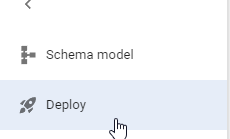
The main change in FWD is the change on the left side menu. Where we have “Generate migration scripts” and “Migration scripts” as options for a migration based project, for a state-based project, we have just a “Deploy” option. I’ll select that.
Once this happens, I have to pick a target. I haven’t configured anything (this is a new project), so I’ll select the “Manage environments” in the upper right section of FWD.
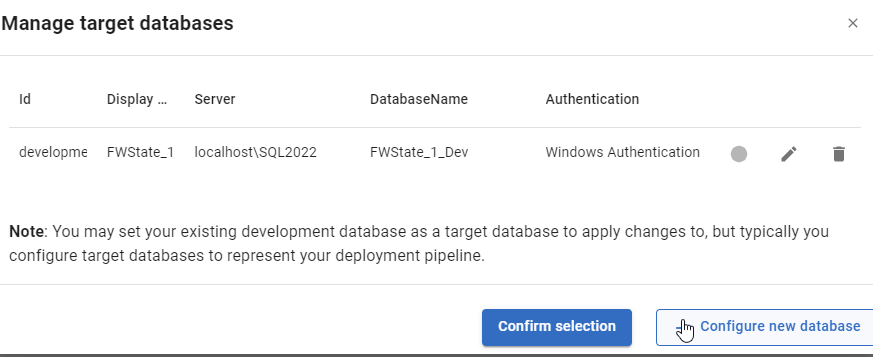
When I do this, I see the environments I’ve configured. So far, I’ve only configured a development environment, but I can click “Configure new database” to add a downstream target.
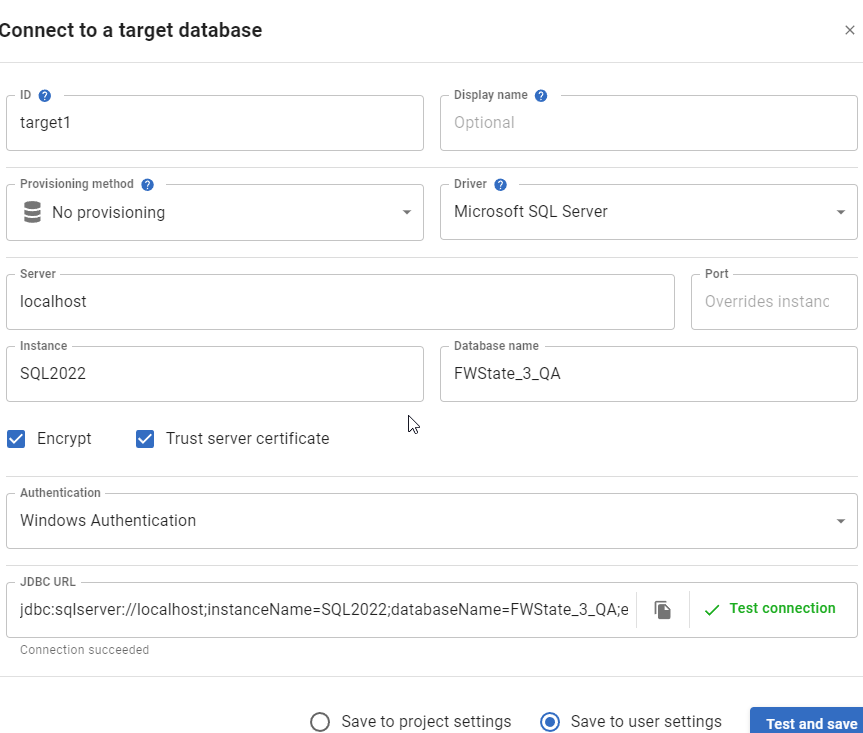
I get the standard FWD connection dialog, and I’ll enter details for my QA database. I usually also click “Test” to ensure I haven’t typo’d something. You can see I didn’t make a mistake below.
Once this is added, it is selected by default. However, I can always click the radio button in the Manage environments dialog and click “Confirm”.
This brings me back to the FWD screen where I see the changes that exist in the project, but haven’t been deployed to the target. In this case, it’s everything (QA is empty). I’ll just click the tbl_Customers table.
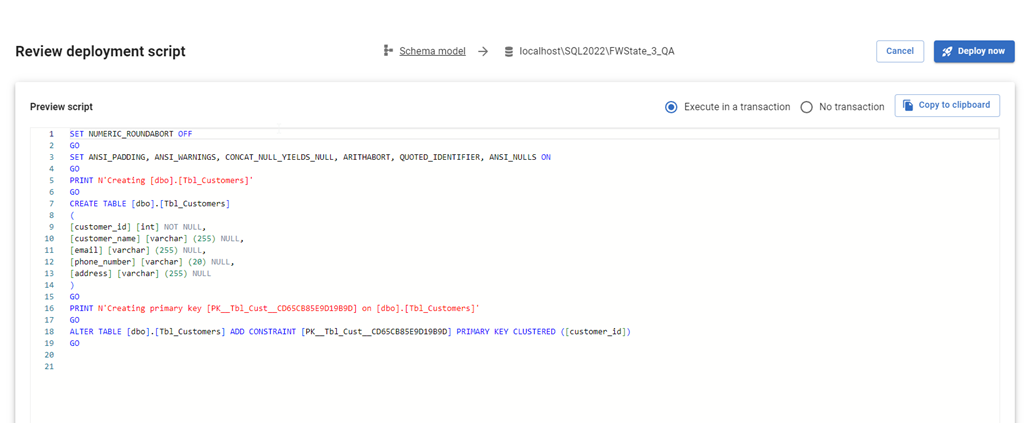
When I click Deploy, the script is generated just as it would be in SQL Compare to update the target with the code from the source. I can review the script, as well as change options. I can add an explicit transaction around all changes, or let them run with the default implicit transaction for each statement. I can also copy the script to the clipboard if I want.
If I check QA, I see no tables.
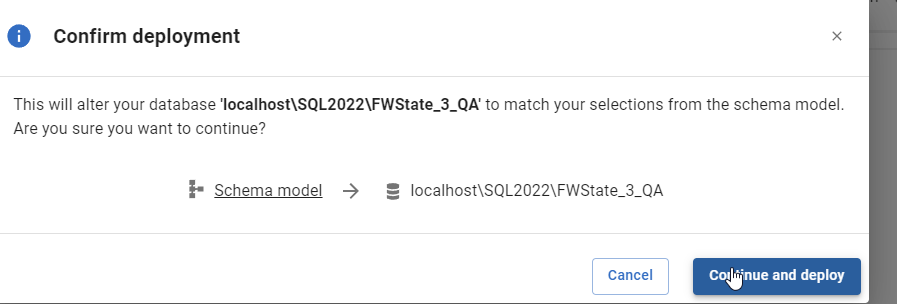
I’ll click “Deploy now” in FWD and the deployment starts. I confirm this is what I want to do.
Once this is done, FWD returns to the screen of objects. Note that tbl_Customers is no longer listed. The project and the target are in sync for this object.
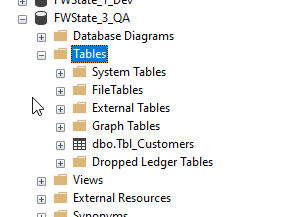
If I go back and refresh QA in SSMS, I see the table exists.
Summary
This short post shows how FWD and the Flyway system can be used to perform state based deployments, similar to SQL Compare or SQL Source Control. If you are used to working in SQL Source Control, this is an easy transition for you to a more modern tech, which will also support Oracle, PostgreSQL, and MySQL.
Try Flyway Enterprise out today. If you haven’t worked with Flyway Desktop, download it today. There is a free version that organizes migrations and paid versions with many more features.
If you use Flyway Community, download Flyway Desktop and get a GUI for your migration scripts.