Rename a Database: #SQLNewBlogger

I had someone ask me how to rename a SQL Server database recently. They were doing some development work and wanted to rename databases to test an application. I thought I remembered, but in this post, I show I learned something.

Another post for me that is simple and hopefully serves as an example for people trying to get blogging as #SQLNewBloggers.

Using sp_rename

I thought sp_rename would work, and sure enough, it did.
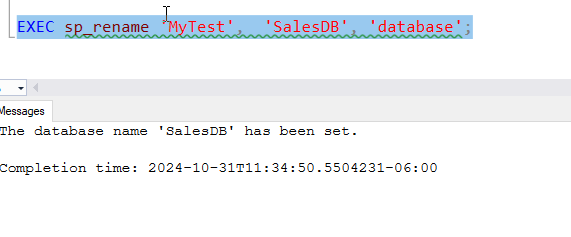
2024-10_0232

However, I need to object type. If I remove that parameter, it fails:

2024-10_0233

The command is looking for an object in the current database by default.

Technically, I ought to do this to be explicit, naming the parameters.
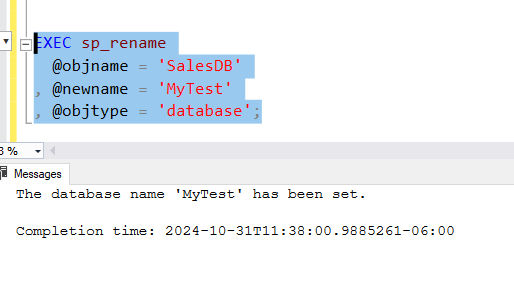
2024-10_0234

I have a better way, however. Note: it’s not sp_renamedb, which is marked for deprecation.

ALTER DATABASE

I don’t know when this changed, or if, but you can use ALTER DATABASE to change the database name. There is a MODIFY NAME option for this command that works well. You can see this below.

2024-10_0235

This is very clear and seems like better DDL For this process, which can easily be captured as code without worrying about parameters or ordering or anything else. I’d recommend using this.

SQL New Blogger

This post took me about 10 minutes to write. Easy. I had done a few experiments and I had code ready (which went to the customer), so I didn’t spend time there. Just rewrote what I did and learned in a few minutes.

You could do this, add to your blog, and maybe get an interviewer to ask you about this after they saw your post.

Posted in Blog | Tagged , , | 1 Comment

Separate Reads

Recently I was watching a presentation on how to scale performance in your SQL Server environment and one of the suggestions was setting up Availability Groups (AGs) and having read-intent connections that would query the secondary and not the primary. It’s not a bad idea, and the SQL Native Client (and other drivers) support this and make it easy to implement.

The pattern of using multiple connections in an application, one for reads and one for writes, has been suggested often. However, in practice, I’ve rarely seen this work. Apparently having a connection variable, named dbConn, for writes and a second one, named dbConnReadOnly, for reads is too complex for most developers or teams.

Or maybe the idea of having to pick the right access point is a human problem? I’ve seen no shortage of problems in restaurants when we have specific “in” and “out” doors. Lots of people go through the wrong one and we end up with plates and food on the floor. Even broken noses or fingers at times. Perhaps I shouldn’t pick on software developers too much.

How many of you use two connections from apps? Meaning, do you think about reads and writes in separate connections. Even if you read and write from the same database, this can be a nice practice that future proofs code. It’s a small change, but it gives you room to grow if you get a read replica for analytics or reporting.

Of course, you could take it too far with different connections for different “services”, aiming for a microservice-style architecture. We could have dbUser for user stuff and dbOrders for the business side, and other connections for other services. I wouldn’t do that, as I think many of us will get confused, and we’ll often be doing two different type of service things in the same code. If I need something from a customer to write an order, do I have two connections in my method? I could, but I bet lots of developers would try to re-use a single one.

Plus, if developers get into trouble with two connections, then what will they do with 5 or more? There are lots of ORMs that might even support this, or if they do, not make this easy to code.

I’ve always liked the idea of separating reads and writes, but maybe the better solution is using one connection whenever we have simple CRUD work and another one for any sort of complex querying or reporting. That would make more sense as I suspect many of us will eventually offload reporting or analytics in some way to another system. A Delta Lakehouse of some sort seems likely if the current trend takes hold in more organizations.

Let me know today if you used (or have tried) different connections for reads and writes.

Steve Jones

Listen to the podcast at Libsyn, Spotify, or iTunes.

Note, podcasts are only available for a limited time online.

Posted in Editorial | Tagged , | 2 Comments

Simple Talks Episode 9–Data masking and subsetting

The episode on data masking and subetting is out. You can see it here:

Watch and check this out. This is especially close to my heart as I’ve been pushing for subsetting from Redgate for a long time. I think subsetting is incredibly important for development agility.

Some interesting thoughts on the problem space, which isn’t a simple thing to solve. It’s not that complex (hard to understand), but it is complicated (lots of moving parts). As I’ve talked with others and worked on the problem, it’s not something that you can just knock out quickly.

What’s funny to me is that Andy Warren and I asked Redgate for this in the early 2000s and they didn’t build it.

We have a subsetter and masker at Redgate in our Protect/TDM area. Check those out if you need a solution for your org.

Posted in Blog | Tagged , , , | Comments Off on Simple Talks Episode 9–Data masking and subsetting

Monday Monitor Tips: Tracking The Cost of Instances

One of the things that I’ve been asked in every operations situation is what licenses do we need for our servers. This is a rare request, often once a year, but it results in a bunch of work to figure out what’s running.

I hate these requests because they always cause delays in other work.

This is part of a series of posts on Redgate Monitor. Click to see the other posts

What’s Running?

Redgate Monitor makes this easy to track (if you’re monitoring all your servers). In the Estate tab, there is a Licensing item. If you check this out, you see something like this:

2024-10_0192

This is a quick view of our systems, letting me know what cores we have in service based on the edition. This is a quick report, and if you’re monitoring all prod systems, this gives you a pretty close look at what you need.

The exceptions here are that we are reporting all cores for all nodes in HA/DR setups, and that might be more licenses than you need. However, you can subtract all the standby nodes if you have Software Assurance on those systems since you do not need to license those.

Of course, you shouldn’t need to license dev/test systems if you run developer edition, and you should.

You can filter by groups or other items that can help you focus on part of your estate. This is the standard Redgate Monitor at the top set of filters.

2024-10_0193

There also is an “Export” button on this page, so you can save off your data as an Excel XLSX.

Summary

This section of the Estate tab gives you a quick view of your obligations to Microsoft for licensing. It’s a nice way to track this and report on it when you need to audit this information without spending a lot of time compiling the information.

Your Finance group will thank you.

Redgate Monitor is a world class monitoring solution for your database estate. Download a trial today and see how it can help you manage your estate more efficiently.

Posted in Blog | Tagged , , , | Comments Off on Monday Monitor Tips: Tracking The Cost of Instances
