Take A Vote and Accept Your Loss

I feel differently today than in the past about many of the things I’ve seen technical people argue about. I’ve written about Tabs vs. Spaces and Singular vs. Plural, and others have debated commas before or after among other topics. While these might be interesting sidebars at lunch, I see them sometimes devolve into time sinks with teams revisiting the issues over and over during their daily work.

These types of religious wars stifle a lot of productivity and often can linger for years. However, in many cases what I see is debate across weeks or months and then time spent to shift the way that large groups of people work inside of a company. In the last few years, I’ve seen customers argue about which VCS to use, which new CI tool to choose, or even about which secret store to use for their database credentials. Often these debates happen when there is already a technology in use.

In most cases, the differences between many of these arguments are negligible. Lots of teams fall down on either side of a debate and find themselves very productive. Or not productive, but it often seems the difference is the staff, not the tool, platform, language, or style. Good people are productive no matter which way we choose to work.

My view is that for most of these items, we ought to have a (relatively) short meeting. Give each side a few days to prepare, but then one spokesperson for each side gets 5 minutes to present their case on why the group should adopt their idea. Once everyone has presented, we debate for a limited time, maybe 15-20 minutes, vote, and then move in that direction. Ultimately, we’re trying to get software written (or deployed or managed or something) and not trying to decide the best way to format that code or choose a tool for CI/CD.

This teaches people to communicate and learn to present a rational, coherent, succinct idea, which is a valuable skill. This also teaches us to work as a team and learn to accept decisions that don’t go our way. None of us wins 100% of the time in life, so make a good effort to lead others in your direction, but accept that they might choose a different path. In that case, learn to support the team in their efforts.

The caveat to all of this is that inside of an organization, we often want a standard, so if something is already heavily used, just adopt that pattern or technology.

Steve Jones

Listen to the podcast at Libsyn, Spotify, or iTunes.

Posted in Editorial | Tagged | Comments Off on Take A Vote and Accept Your Loss

Moving SQL Prompt History to Another Machine

A customer was asking about SQL Prompt recently and how their history is stored and if it can be moved to another machine. This post shows how this works, and how you could move it. There is also a video walk through at the bottom.

Caution: This is history for your specific queries, and moving the database means you overwrite history on the new machine. Don’t do this to share code. Do this only if you are upgrading your own machine.

This is part of a series of posts on SQL Prompt. You can see all my posts on SQL Prompt under that tag.

SQL Prompt History

History in SQL Prompt is a slightly hidden, but amazing piece of technology. A number of customers find it incredibly valuable to see the history of their queries, especially when they’ve gotten busy with a number of different pieces of code.

In SSMS, when SQL Prompt is installed, it is keeping track of what you write in queries. Don’t worry, this is local, and it’s on your machine. Let’s look at this.

Say I have a query window, like this:

2024-01-09 12_59_53-SQLQuery10.sql - ARISTOTLE_SQL2022.compare2 (ARISTOTLE_Steve (121)) - Microsoft

I can’t remember who the users are, but I add a new query to this window, as shown here.

2024-01-09 13_00_25-SQLQuery10.sql - ARISTOTLE_SQL2022.compare2 (ARISTOTLE_Steve (121))_ - Microsoft

All that is captured in SQL History. In one of the menu bars in SSMS, you can see this listed with other Redgate products.

2024-01-09 13_00_35-SQLQuery10.sql - ARISTOTLE_SQL2022.compare2 (ARISTOTLE_Steve (121))_ - Microsoft

When I click this and open it, I see my query windows in the upper left, with the window text in the right, and below on the left, a timeline.

2024-01-09 13_00_45-Moving SQL Prompt History to Another Machine - Open Live Writer

This is the latest version, but if I click down, I see the previous version without the SELECT.

2024-01-09 13_00_54-

I can go back further and see before I added the ALTER ROLE statement.

2024-01-09 13_01_00-SQL History - Microsoft SQL Server Management Studio

Finding History

All of my data is stored in my local profile. I can browse the path under AppData \ Local for my user, and inside there is a Redgate folder. Under that is SQL Prompt 10 (or your version). If I sort by date modified, I see my SqlHistory.db file, which is the database of my SQL History in Prompt.

2024-01-09 13_10_37-SQL Prompt 10

If I were changing to a new machine and wanted history to move with me, I’d copy this file to the new machine. Unfortunately, I can’t put this in a VCS, as the path is set.

As I cautioned above, this isn’t something you send to colleagues. This is an individual file of your work and only copy this to a new machine when you are upgrading, not trying to sync work. Use a VCS for proper code control.

Browsing the Database

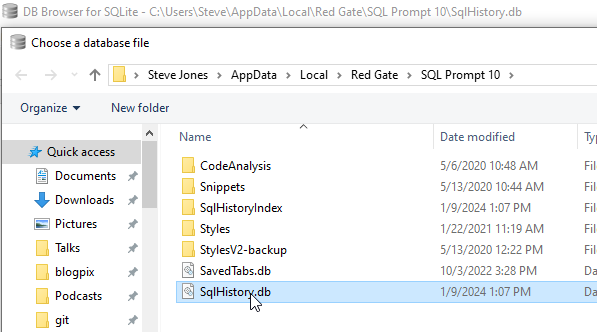
This is a SQLLite database, and any tools that let you look at the data work. I have the sqllitebrowser tool on Windows, which works great. I can click “Open Database in this tool and browse to my file.

2024-01-09 13_13_43-Choose a database file

Inside here, I see my schema and tables and if I scroll down to the bottom of the QueryVersions table, I can see my query in the last entry in the Contents field. Note the query on the right looks like the one in SSMS.

2024-01-09 13_14_32-DB Browser for SQLite - C__Users_Steve_AppData_Local_Red Gate_SQL Prompt 10_SqlH

If I click up a few, I see the other version.

2024-01-09 13_14_40-DB Browser for SQLite - C__Users_Steve_AppData_Local_Red Gate_SQL Prompt 10_SqlH

No magic here, just good solid programming that saves you a lot of time and helps you deal with the chaos of software development and the frailty of the human mind.

If you haven’t tried SQL Prompt, download the eval and give it a try. I think you’ll find this is one of the best tools to increase your productivity writing SQL.

Video Walkthrough

I made a video of how this works if you’d prefer to watch this. You can also see all my SQL Prompt Tips.


Posted in Blog | Tagged , , | Comments Off on Moving SQL Prompt History to Another Machine

Webinar Tomorrow: Navigating the Database Landscape in 2024

You can still register and join me tomorrow. I’ll actually be in Austin at the Redgate office doing the webinar, which should be interesting.

Send your questions, comments, and have some fun as we look at the results from our survey of 3500+ database professionals.

Posted in Blog | Tagged , , | Comments Off on Webinar Tomorrow: Navigating the Database Landscape in 2024

Hire Well

In the last few years, I’ve noticed that the quality of technical workers can vary quite a bit in many organizations. I think most people get things done, but often not at a high-quality level. It’s one reason that I write, speak, and try to motivate more of you to work on your skills and your career. I want to see better software being built.

I tend to work with more database developers than application developers and I tend to see more SQL code than C#/Java/etc. And I see a lot of poorly written SQL Code and poor data models that seem to have been built without a lot of thought put into them. Whether this is because of ignorance or just poor skills is hard to know, but I see a lot of code that makes me slightly cringe.

Over time, many of us see that this technical debt limits our ability to improve things or make changes. Often these systemic issues linger because the development staff a) doesn’t know how to fix them, b) has other, higher priorities, or c) is afraid to try and make changes. Often it’s a combination of all three, which further limits the agility of the database and application teams. We end up struggling to keep up with customer demands, or we may pile on more and more technical debt. Often this leads to increased performance problems in the database.

I was reading about development and staffing in this piece, which had an interesting quote: “I currently believe that there’s only one way to buy yourself out of technical issues and bad data models, and that’s buying a really talented engineer whose sole focus is fixing the problem.” Essentially, you need to do two things here. First, hire a smart engineer, and second, empower them to effect change. In many cases, I think you actually need two smart engineers: one database engineer and one application software engineer. Those people have to focus on improvements, refactoring bad data models and the code that depends on them, and slowly raising the level of quality.

The piece gets a little sidetracked with the way vendors promise their products will fix your problems. In general, that’s not true, at least not without you adapting your process to their software. In my role, I’m careful not to promise more than I can deliver, and not try to minimize the effort required to change. I know it’s somewhere between using 10% time and a major overhaul, and I hope I convey that to clients.

Ultimately, I think that we haven’t commoditized lots of software development, which is the point of the piece and the quote above. We need to get talented people, or we need to train them, or both. We need people that enjoy their jobs and find some purpose or satisfaction. Part of that is making their jobs more interesting and enjoyable.

That also means there are many opportunities if you learn to be good at your job. Learn to build good data models. Keep up your skills that write efficient code, learn how to troubleshoot, and learn how to work well with others. None of those are easy skills to develop, nor are they quick to learn, but they can be learned with some effort. Document your progress, blog/write/speak, and I bet you’ll find your career prospects improving.

Listen to the podcast at Libsyn, Spotify, or iTunes.

Posted in Editorial | Tagged | 1 Comment