Backing up the Teslamate Database

I was worried about some of my data, so I wanted to be sure I had a backup of my Teslamate system. This post covers the config I’d added and how I backed things up.

This is part of a series that covers my experience with a Tesla Model Y.

The Backup Volume

In my Teslamate docker-compose file, I had added a backup volume some time ago. My config section looks like this:

2023-12-19 15_02_56-docker-compose.yml - PublicDocuments - Visual Studio Code

For this database container, I’d added the volumes for data and explicitly set a location that maps from a folder on my e: drive to a folder called backup in the postgresql location inside the container.

This ensures I can easily find my PostgreSQL backup file if I need it, which I hope I never do, but you never know.

Once this is set up, you can restart your container and the folder is mapped.

Running the Backup

There are instructions on the Teslamate Docs site, but I kept getting errors. I think some of those were because I was on docker compose v1, but I didn’t want to update without a backup.

So.

I used this code to connect to the container.

docker exec -ti teslamate_database_1 /bin/bash

Next, I ran this to backup the database.

pg_dump -U teslamate teslamate > backup/teslamate_20231219.bck

As you can see, it worked.

2023-12-19 14_55_16-Custom Selection

And I had a backup file in my folder.

2023-12-19 15_14_52-backup

Now to upgrade things.

Posted in Blog | Tagged , | Comments Off on Backing up the Teslamate Database

Advice for Business

During the last few months, I’ve seen a few different advice posts that caught me eye. One was Kevin Kelley’s blog (and his book) on life advice that I previously wrote about, I look at the book once a week or two, read 1-2 items, and think about them. I think some of them are geared more for younger people growing into life, but quite a few are still things that I appreciate as learnings or reminders.

Recently I ran across another one, Sam Altman’s post looking back from a business point of view. I’ve worked in business for a long time, used to own one, and I tend to enjoy smaller businesses than larger ones. While I enjoyed my time at JD Edwards, I prefer companies with a few hundred people rather than 10,000 or more.

This is an interesting list and one that looks at the world more from a startup perspective. Sam Altman was the CEO of OpenAI (maybe still is), and has worked in several small tech companies in his career. Some of these items are things that I’ve seen or used. Maybe one of the more interesting ones from a business perspective is about incentives. These really do drive and change how people work, and often management gets this wrong by incentivizing one thing, but saying or preaching another.

However, the advice I think resonates more with me, as someone who works inside of an organization and with others, are the items that relate to people. One is about cohesive teams, and how they can get things done with both calmness and urgency. I’ve always wanted to interview with and know who I work with at many companies because having a team I enjoy and work with is powerful. I think Grant and Ryan are amazing, and I wish our jobs were a little more closely aligned. Unfortunately, we all tend to work on slightly different things most of the time, and work more solo, but I do appreciate the projects we tackle together.

Another is that things that matter are important. You (and I) need a sense of purpose, which is why hard things that matter are easier than easy things that don’t. In life and at work. I also think that recruiting is important. I do look for people who I like, appreciate their views, and can work alongside more than those who know all the skills. We can learn from each other and teach each other when people have that potential (in addition to intelligence and drive). That’s why I think it’s almost always worth hiring good people, even if you don’t have a specific use for them. Too often we hire people for a need, and they’re way less qualified than others.

Maybe my view is summarized well in the last entry: working with great people is one of the best parts of life. We spend so much time at work, so it better be enjoyable.

By the way, if you want to find and enjoy great opportunities, learn to be better. Better at your profession, better at learning, better at being part of a team.

Steve Jones

Listen to the podcast at Libsyn, Spotify, or iTunes.

Posted in Editorial | Tagged | Comments Off on Advice for Business

Has AI Changed Software Development?

I saw a piece that asked the question about AI and software development, specifically ChatGPT, a year after its release. Has software development changed? It’s a question I’ve been trying to ask for myself, though I do think the way AI works for lots of code is fundamentally different than how it works for databases. Databases need a lot of context, with schema and relationships, whereas a lot of other code can be structured in a more narrow sense, focused on an algorithm rather than specifically needing to reference other objects.

That’s not to say that a generative AI can write application code better than database code. I think in both cases it can be helpful or hurtful. As I read the article, I find myself agreeing that AI has changed software development. It’s a tool, and it can be useful. It can help structure code, point out issues, and help with building tests.

That being said, I also agree with this sentence in the article: “…given that to write anything resembling maintainable code with AI, you’ll need some level of expertise in programming.” Everything I’ve seen from AIs still requires a review from a human that understands if the AI is on the right track in approaching the problem. I’ve written this a few times (and discussed it with others) that I think an AI produces junior level code in many cases, and it takes a subject matter expert to decide if that’s OK for the situation.

However, I feel that AI does a few things really well. First, it’s a great search engine, able to understand multiple prompts in a row that narrow in the thing I might spend much more time searching for. It also does some nice predictive things in guessing what code is needed next. In most application languages, this is helpful. In SQL, not so much, since the SQL language lays code out in a way that makes it harder to predict things. The LINQ structure of from, where, select is much more cleaner in many ways. If only RDBMSes natively executed LINQ…

If you’ve tried AI, what has worked, what prompts give you help? Is there anything especially time-saving you’ve found? I, and many others, are looking to understand where it can help us.

Steve Jones

Posted in Editorial | Tagged , | Comments Off on Has AI Changed Software Development?

Prompt EAP AI Experiments: Creating a History Table

SQL Prompt has an EAP using an AI model to help write code. I’ve been lightly experimenting with it, since I think AI is an interesting tech and it’s going to change our jobs. Maybe for the better, maybe for the worse, but I want to know if this will help me get work done sooner.

This post looks at one experiment.

This is part of a series of experiments with AI systems.

Building a New Table

I’ve written a lot of SQL code in my career. I know how to structure things and I can often whip something up quickly in response to requests from users or customers. Recently I was trying to mock up a change for a scenario and I decided to use the SQL Prompt AI beta.

In this case, I wanted a create a history table, similar to a temporal table. I started writing some code, but decided to use the AI to see if things were easier. I tried two experiments here, one using temporal tables, one using just normal T-SQL. Here’s what happened.

Create a Temporal Table

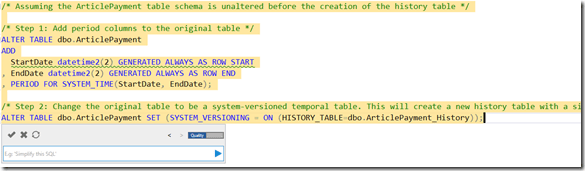
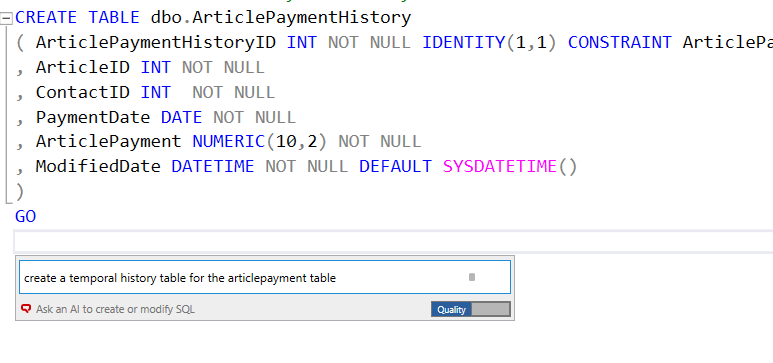
As I started documenting this, I decided to ask for a temporal table. You can see my basic code I sketched, but stopped before I created the table. Then I asked SQL Prompt to create the temporal able.
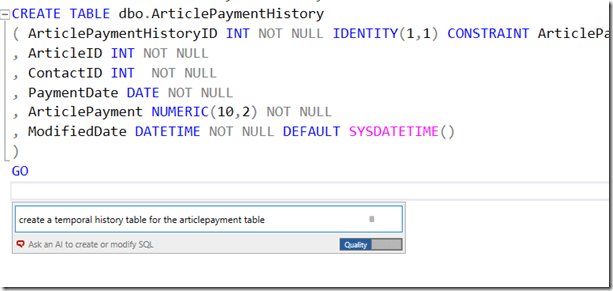
2024-01-02 14_30_35-SQLQuery2.sql - ARISTOTLE.dlm_1_dev (ARISTOTLE_Steve (64))_ - Microsoft SQL Serv

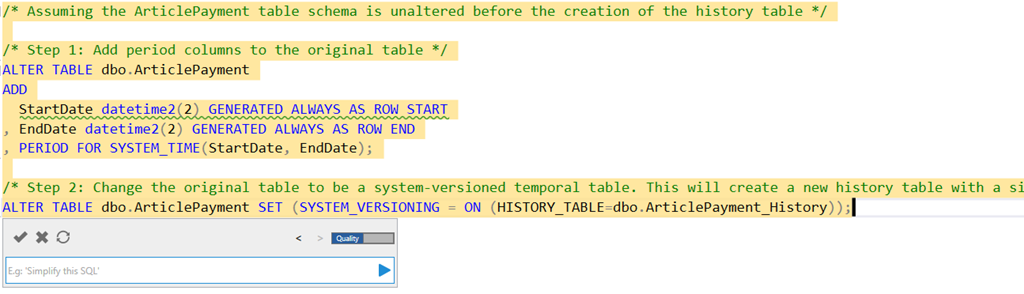
Here’s what I got:

2024-01-02 14_32_42-SQLQuery2.sql - ARISTOTLE.dlm_1_dev (ARISTOTLE_Steve (64))_ - Microsoft SQL Serv

The actual code is:

/* Assuming the ArticlePayment table schema is unaltered before the creation of the history table */

/* Step 1: Add period columns to the original table */
ALTER TABLE dbo.ArticlePayment
ADD
   StartDate datetime2(2) GENERATED ALWAYS AS ROW START
, EndDate datetime2(2) GENERATED ALWAYS AS ROW END
, PERIOD FOR SYSTEM_TIME(StartDate, EndDate);

/* Step 2: Change the original table to be a system-versioned temporal table. This will create a new history table with a similar structure as the original table. */
ALTER TABLE dbo.ArticlePayment SET (SYSTEM_VERSIONING = ON (HISTORY_TABLE=dbo.ArticlePayment_History));

That’s pretty good. I don’t usually remember what to do and often end up scanning an article like this one. An AI that provides this code might be a nice time saver, especially if I needed to do a few tables.

Building an Audit Copy

The way I’ve often tracked history in the past is essentially copying a table and adding some date columns.

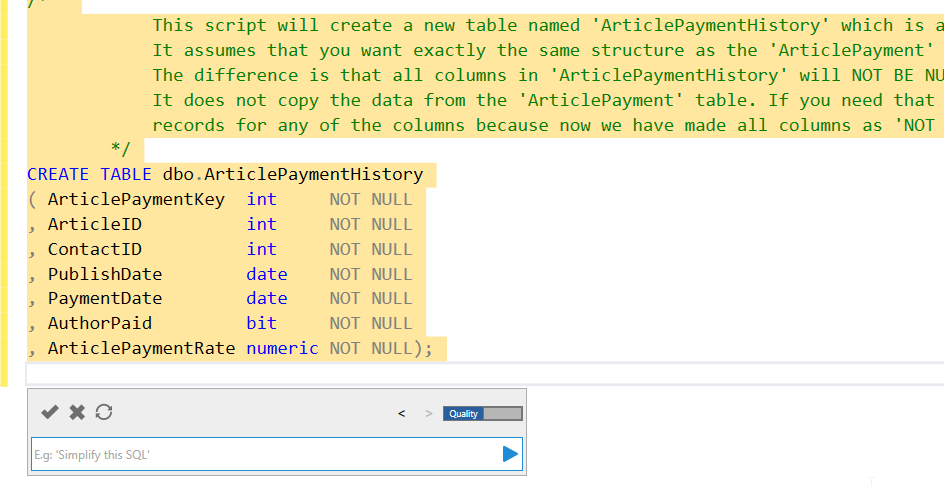
2024-01-02 14_37_03-SQLQuery2.sql - ARISTOTLE.dlm_1_dev (ARISTOTLE_Steve (64))_ - Microsoft SQL Serv

This is helpful and quick. It gets the datatypes and names, and replicates what’s in the original dbo.ArticlePayment table.

2024-01-02 14_37_37-SQLQuery2.sql - ARISTOTLE.dlm_1_dev (ARISTOTLE_Steve (64))_ - Microsoft SQL Serv

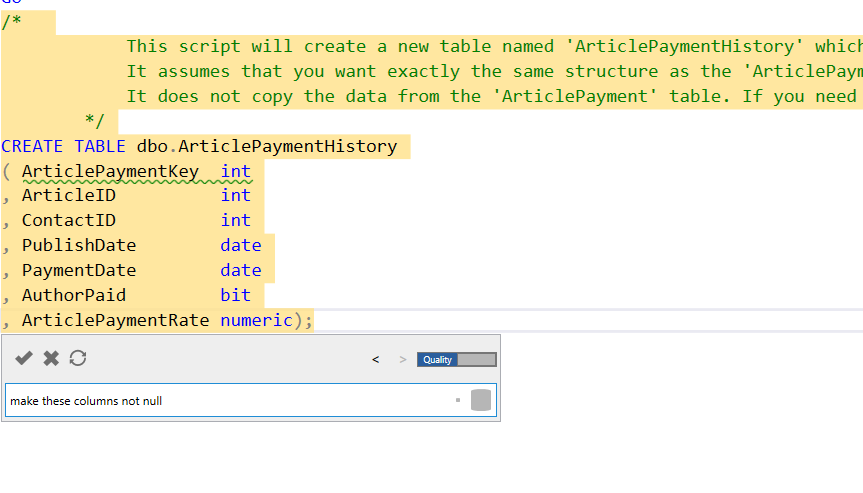
I want to add nullability, so I asked above. You can see the results below.
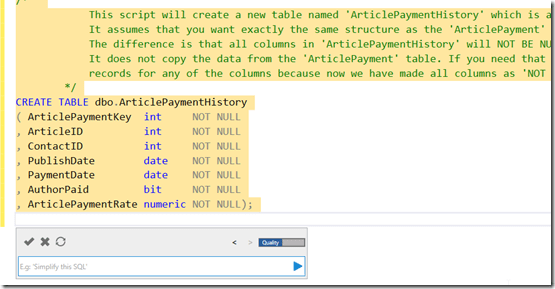
2024-01-02 14_37_51-SQLQuery2.sql - ARISTOTLE.dlm_1_dev (ARISTOTLE_Steve (64))_ - Microsoft SQL Serv

One more prompt:

2024-01-02 14_40_20-SQLQuery2.sql - ARISTOTLE.dlm_1_dev (ARISTOTLE_Steve (64))_ - Microsoft SQL Serv

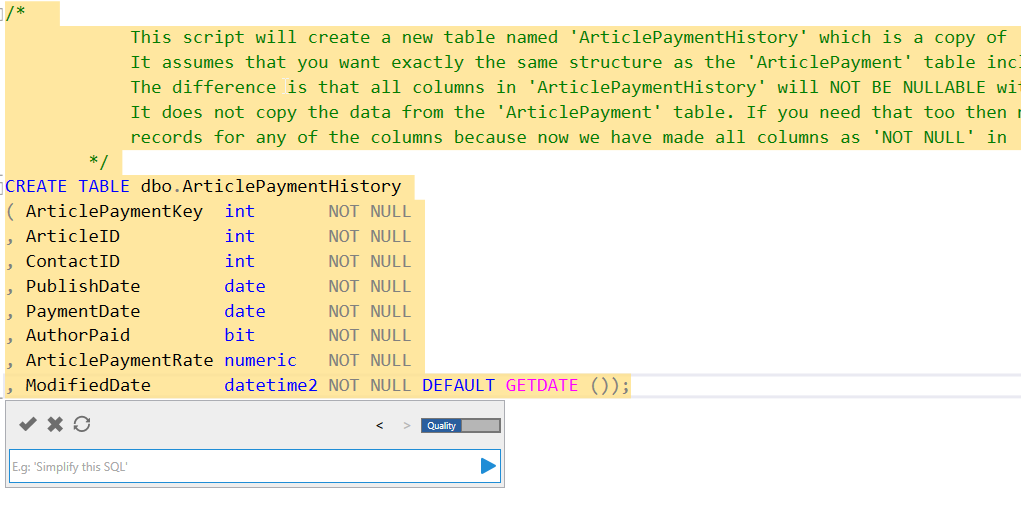
The result includes a new column with a default, which I like.
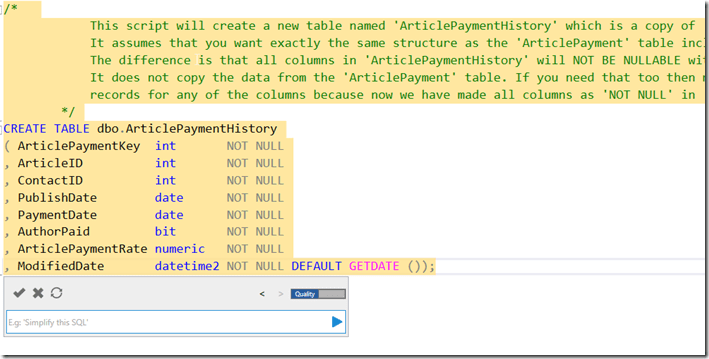
2024-01-02 14_40_43-SQLQuery2.sql - ARISTOTLE.dlm_1_dev (ARISTOTLE_Steve (64))_ - Microsoft SQL Serv

I can click the check in the upper left of the Prompt dialog to get this code accepted in my query window. From there, I can run this and then check the code into my VCS with Flyway Winking smile

Comparison with ADS

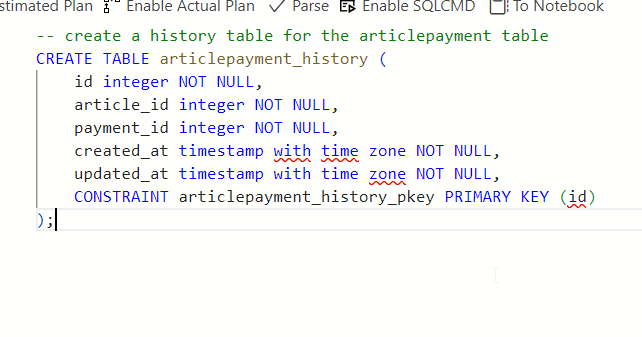
In many cases, I struggle to use an AI well. The public ones don’t see my schema, so if I were to prompt this in Copilot or some equivalent, I’d have to include my schema. If I don’t, I get something like this:
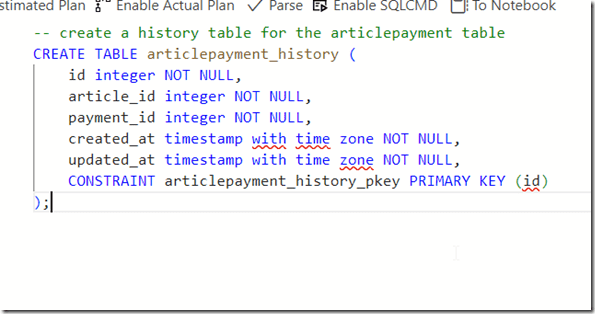
2024-01-02 14_43_10-● SQLQuery_1 - SQL 2019 sandbox - Azure Data Studio

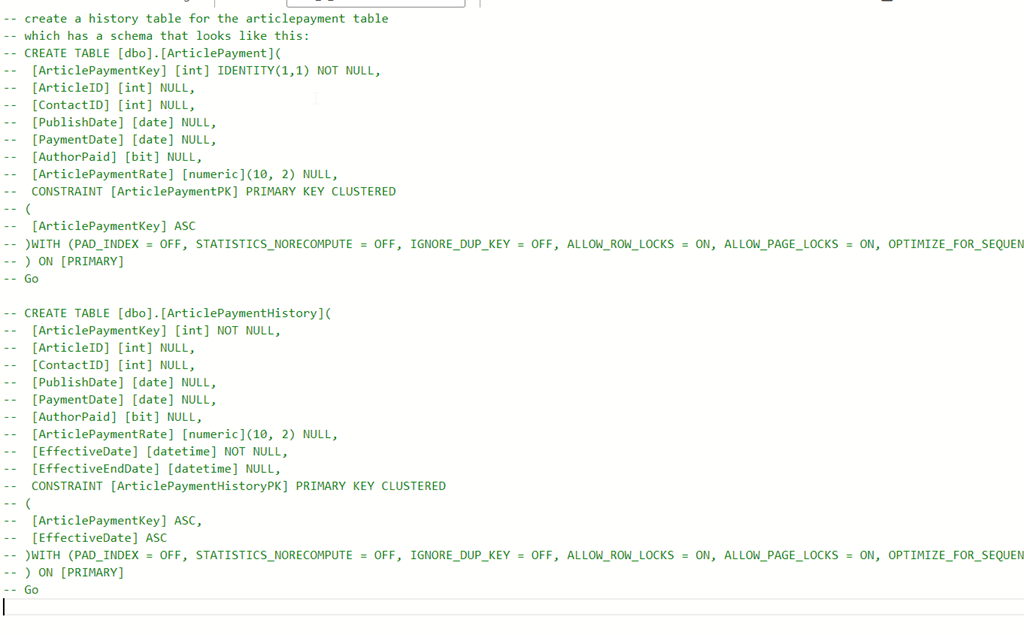
If I include the schema (annoying, pasted from SSMS scripting and then commented out and edited, I get something that works, but I get a line at a time and have to accept each line.
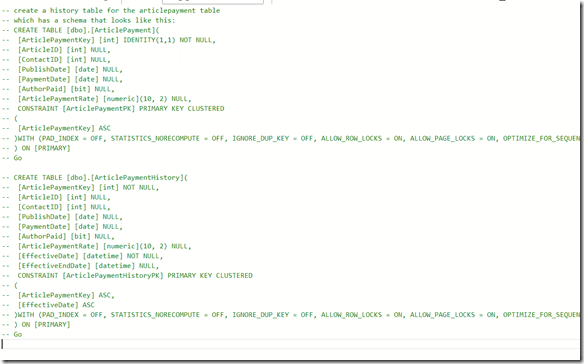
2024-01-02 14_45_10-● SQLQuery_1 - SQL 2019 sandbox - Azure Data Studio

Thoughts on the Prompt EAP AI

The EAP AI version of SQL Prompt is reading my schema, as SQL Prompt does, and then running my prompt through an AI LLM with the schema to decide what I mean. In this case, it knows temporal tables are system versioned ones. It produces good code there. Really, this has done the search engine lookup of how to convert a table to temporal, copied the code, and then edited it for my situation.

If I ignore the temporal aspect and ask for a history table, it creates what I’d do, which is a copy of the table. If I need this altered, it does a good job if doing the edits. Using a little English here, instead of manually editing, actually worked pretty efficiently for me. I’d know what prompts to use now, and I can go back in my prompts copy them, and alter them for other tables.

Even better, I asked: “create history tables for all article tables”

I got the code below, which is pretty cool. This is a subset of related tables to articles, not all the tables in my database. Comments from Prompt at the top and then the code.

/*  

            These scripts will create new tables named 'ArticlePaymentHistory', 'ArticlesHistory', 'ArticleAuthorHistory', 'RatingsHistory', 'UserRatingHistory' which are copies of 'ArticlePayment', 'Articles', 'ArticleAuthor', 'Ratings', 'UserRating'.

            It assume that you want exactly the same structure as the respective tables including all the columns and their types.

            The difference is that all columns in these history tables will NOT BE NULLABLE with an additional column 'ModifiedDate' that defaults to the current date and time.

            It does not copy the data from the original tables. If you need that too then make sure first none of your records from these tables have null

            records for any of the columns because now we have made all columns as 'NOT NULL' in the history tables.

        */

CREATE TABLE dbo.ArticlePaymentHistory
( ArticlePaymentKey  int       NOT NULL
, ArticleID          int       NOT NULL
, ContactID          int       NOT NULL
, PublishDate        date      NOT NULL
, PaymentDate        date      NOT NULL
, AuthorPaid         bit       NOT NULL
, ArticlePaymentRate numeric   NOT NULL
, ModifiedDate       datetime2 NOT NULL DEFAULT GETDATE ());
CREATE TABLE dbo.ArticlesHistory
( ArticlesID          int       NOT NULL
, AuthorID            int       NOT NULL
, Title               char      NOT NULL
, Description         varchar   NOT NULL
, Article             varchar   NOT NULL
, PublishDate         datetime  NOT NULL
, ModifiedDate        datetime  NOT NULL
, URL                 char      NOT NULL
, Comments            int       NOT NULL
, ReadingTimeEstimate time
, CreatedDate         datetime2 NOT NULL
, ModifiedBy          nvarchar  NOT NULL
, HistoryModifiedDate datetime2 NOT NULL DEFAULT GETDATE ());
CREATE TABLE dbo.ArticleAuthorHistory
( ArticleAuthorKey int       NOT NULL
, ArticleID        int       NOT NULL
, ContactID        int       NOT NULL
, AuthorOrder      tinyint   NOT NULL
, ModifiedDate     datetime2 NOT NULL DEFAULT GETDATE ());
CREATE TABLE dbo.RatingsHistory
( RatingKey    int       NOT NULL
, ArticlesID   int       NOT NULL
, RatingDate   datetime2
, Rating       tinyint   NOT NULL
, UserKey      int       NOT NULL
, ModifiedDate datetime2 NOT NULL DEFAULT GETDATE ());
CREATE TABLE dbo.UserRatingHistory
( UserRatingKey int       NOT NULL
, UserID        int       NOT NULL
, ArticleID     int       NOT NULL
, Rating        numeric   NOT NULL
, ModifiedDate  datetime2 NOT NULL DEFAULT GETDATE ());

Posted in Blog | Tagged , , , | Comments Off on Prompt EAP AI Experiments: Creating a History Table