Building CyberSecurity Skills with an Advent Challenge

I’ve been working on the Advent of Cyber challenge this December. It’s more of a walkthrough of some puzzles than it is solving them yourself, but it has given me a brush up on some skills and helped me learn some basics of how people in charge of (or looking to break) security look at the world. Plus it’s been a little fun with a silly storyline each day.

The first challenge starts with a chatbot and trying to social engineer answers out of it. This was interesting to me, even though it was likely (hopefully) not a representative example of how AIs would work in most systems. However, it got me to think more about how I pose questions to an AI and how I can grow my prompts. The neat thing about AI is that you don’t have to ask the perfect question and then re-ask the same question with more info to get an answer. The AI keeps context in a conversation, which is way more powerful than previous Q&A search systems.

The second day was Python and Jupyter Notebook basics, which were a nice refresher for me on a couple of concepts, but not that interesting. However, the third day introduced some password-cracking tools, the fourth day added other ones, and a few subsequent days showed some software that is devious in how it can be used to penetrate security. Other challenges have me the chance to brush up on Linux and network skills I hadn’t used in a long time.

The SQL Injection module (day 10) is well done, and I might recommend most developers go through that to see why their easy, convenient build-a-sql-string-to-execute code is an incredibly bad idea. It’s also why they can’t also use stored procedures as built-up batch commands. Use the stored procedure objects to execute with named parameters.

The idea of using a little plot and story, with a simple challenge to teach some skills is a good one. I’ve been lucky in my career to be exposed to a lot of different technologies and ways of working with systems. I’ve set up bridges, routers, and firewalls. I’ve had to get network links and cables to work and talk with different protocols, including configuring T1 connections. I’ve built machines, dealt with different types of local and remote storage, and had to program and administer systems at all levels of the OSI model. Does anyone remember that?

This was a fun break from work, doing a module or two every other day, remembering there are a lot of complexities to our systems outside the database, or outside the application software. It’s also reminded me of all the different ways that security can be breached.

Take the challenge and learn some new skills. I think many of you will learn something and you might enjoy yourself along the journey.

Steve Jones

Listen to the podcast at Libsyn, Spotify, or iTunes.
Posted in Editorial | Tagged , | 1 Comment

A New Word: the whipgraft delusion

whipgraft delusion – n. the phenomenon in which you catch your reflection in the mirror and get the sense that you’re peering into the eyes of a strange, as if you’re looking at a police sketch of your own face aged forward twenty years, which would imply the real you is out there somewhere, wandering the streets of your old neighborhood, still at large.

Twenty years? More like thirty.

I thought about this as I don’t really look at myself in the mirror often.I certainly see myself, putting in contacts, brushing teeth, shaving, but I don’t often look closely.

However, once in awhile I’ll look at myself and while I don’t always mentally feel or act my age, I don’t feel this old. However, if I look closely, I realize I look old. As old as my knees and back feel some days. Definitely some whipgraft delusion.

From the Dictionary of Obscure Sorrows

Posted in Blog | Tagged , | Comments Off on A New Word: the whipgraft delusion

Creating a Scripts Folder in SQL Compare

While I was at a conference recently, someone asked me about the Scripts Folder feature in SQL Compare and how to set that up. This post just looks at how to get SQL Compare to set up a Scripts folder on a machine.

This is a part of a series of posts on SQL Compare on my blog. You can read other posts I’ve written by clicking the link.

Getting Started

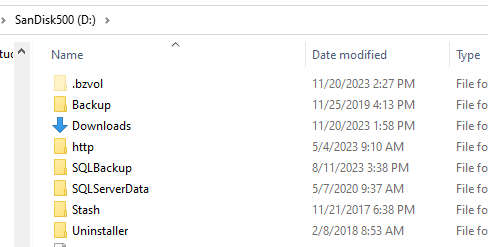
I’ve got a D: drive on my machine that looks like this.

2023-11-20 14_34_40-SanDisk500 (D_)

I’m going to create a folder, called “Compare Script Folders”, which you can see is empty. This is where I’ll store the scripts for various databases.

2023-11-20 14_35_29-Compare Script Folders

I also have a couple databases I use to test things on a local instance. You can see below my “compare1” database has a few things in it.

2023-11-20 14_49_17-googlemaps.sql - ARISTOTLE_SQL2022.way0utwest_dev (ARISTOTLE_Steve (53))_ - Micr

Now, I want to get a text copy of my schema from SQL Compare that I can use to check for changes, so let’s do that.

Creating a Scripts Folder

In order to create a scripts folder, I need to run SQL Compare. Once I do that, I see a screen like that shown below.

2023-11-20 14_51_31-SQL Compare

By default, SQL Compare looks to compare two databases. However, I can change the source. If I click the drop down next to Source, I see all of the options I have available. One of these is Scripts folder, which I’ll select.

2023-11-20 14_51_41-(local)_SQL2017.SimpleTalk_1_Dev v localhost.SimpleTalk_1_Dev.scp

Once I do this, my dialog changes. Now, I have the ability to compare a Scripts folder to a database. How do I get the Scripts folder? I click the Create link shown below.

2023-11-20 14_51_49-(local)_SQL2017.SimpleTalk_1_Dev v localhost.SimpleTalk_1_Dev.scp_

I missed this a few times, so that’s part of why I wrote this post. Once I click that, I get a new dialog. This is the one that let’s me choose the way I want to create the folder.

2023-11-20 14_52_30-Create new scripts folder

Just like the comparison, I have a number of choices for the source. I can use various items, but in my case, I’ll choose database.

2023-11-20 14_52_02-(local)_SQL2017.SimpleTalk_1_Dev v localhost.SimpleTalk_1_Dev.scp_

Once I do this, I enter the credentials to access the database. Note that I’ve clicked “Trust”, which is required for all modern versions of SQL Server. I have also selected the new folder I created.

2023-11-20 14_52_30-Create new scripts folder

Once I click Create, the engine will start to script out my database into separate files. This is the same process used when running a comparison, but in this case the results are just output to files rather than held in memory to compare with another set of objects.

2023-11-20 14_52_38-Creating scripts folder - Completed

Once the comparison completes, I see a new folder created below the folder that was in my dialog.

2023-11-20 14_52_54-Compare Script Folders

Inside this folder are all my objects, separated into different folders, which is the SQL Compare structure. This is the same structure used in SQL Source Control and Flyway.

2023-11-20 14_53_09-Tables

Now I can use this as the basis for a source or target against another source or target in SQL Compare.

If you want to do this from the menu, there’s also an item in the File menu to get the Create Scripts folder dialog.

2023-11-20 15_04_12-SQL Compare

SQL Compare is a fantastic product for simplifying work and it does so much more than this. Give it a try if you own it or download an evaluation today.

Posted in Blog | Tagged , , | Comments Off on Creating a Scripts Folder in SQL Compare

AI In the Nov 2023 Enterprise

AI is everywhere. I can’t seem to get away from stories on the technology in 2023, and while I don’t know that I’ve found it that helpful, I keep looking at it because it’s becoming a pervasive technology that most enterprises will experiment with in some way. There is a look at generative AI in the Enterprise in the O’Reilly Radar, which tracks how technology is changing and influencing the world.

The report talks about most of the respondents to a survey using AI, which makes sense as the people responding likely have some interest in the technology. I always take these trends with a grain of salt as people who are busy and not interested might not respond. Only a small percentage of uninterested people will actually answer these things.

As I look at the numbers with that in mind, I find it interesting that about half of the users think AI will lead to greater productivity and a small number (4%) think this means less headcount. However, only a minority (41%) have been using this for over a year. That likely means in most cases that people are experimenting like I am. This isn’t a pervasive technology in the enterprise, though I’d argue that while DevOps might be in use in most enterprises, I wonder if it’s in use in most projects at most enterprises. Culture change is hard for most people and I still meet lots of people who aren’t trying to get better at building software.

The big challenge in many companies is finding appropriate business cases. I think that’s my struggle as well, in trying to think about how to use AI to write or build code, I struggle to think of how to prompt or what to prompt. Often by the time I define the problem, I can just write the code. If I were scaffolding out basic classes or tables, maybe I’d feel differently, but as our CTO put it, we spend most of our time figuring out the problem, not writing the code. There are legal concerns, but those are from a minority of respondents. I have a meeting with our legal department soon, which will help me iron out some of my concerns and get guidance.

Interestingly, 77% of people are using AI in programming, with about half of those using it for work. I don’t know if we’ve done a good job understanding the IP/copyright issues here, so that’s surprising. I would guess in many organizations that don’t sell software, they don’t care about this at all. If they get code from an AI that was copied from somewhere else, if it works, who cares?

I find that much of the code generated isn’t great. It’s junior developer level, which might not matter to many organizations. After all, they employ junior developers, and some employ senior developers with 6 months of experience 10-20 times over who write that level of code. If the AI does it faster, all the better.

I think AI is a technology that is going to impact our lives as technical and data professionals. Whether you use it to write code or use it as a glorified search engine, it’s a tool that you want to understand and develop some skill with. Writing prompts and learning how to navigate an AI system is helpful. If it actually gives you something useful, even better. And if you learn more about building models and prompt engineering, you might find yourself with some interested opportunities in the future as I expect those jobs to grow in number across the next few years.

Steve Jones

Listen to the podcast at Libsyn, Spotify, or iTunes.

Posted in Editorial | Tagged | 2 Comments
