SQL Prompt Tips–Using $surroundtext$ in a Snippet

A user on the SQL Community Slack was asking about what the $surroundtext$ variable. This post looks at how this can be used in snippets.

This is part of a series of posts on SQL Prompt. You can see all my posts on SQL Prompt under that tag.

A Scenario

I find that I want to convert some inline SQL to a stored procedure. We have a lot of code in an application that looks like this:

SELECT 
     SUM(sod.OrderQty) OVER(ORDER BY sod.SalesOrderID, sod.ProductID) AS Total
  FROM Sales.SalesOrderDetail AS sod
  WHERE sod.ProductID = <somevalue>

The application replaces <somevalue> with an actual value and runs this code. This potentially is a SQL Injection vector, but this also isn’t easily tuned on the server, and can get copied and pasted into different places in the code. It would be better to have this as a stored procedure.

Make the Conversion Easy

To make this a stored procedure, I would want this query to look like this:

CREATE PROCEDURE dbo.GetGroupedSales
     @Id INT
AS
BEGIN
SELECT 
     SUM(sod.OrderQty) OVER(ORDER BY sod.SalesOrderID, sod.ProductID) AS Total
  FROM Sales.SalesOrderDetail AS sod
  WHERE sod.ProductID = @id

END

I can create a snippet that looks like the skeleton of a stored procedure with this code:

create procedure $procname$
$param1$ $paramdt$
as
begin
$SELECTEDTEXT$
end
go

I’ve got a screenshot of this below, showing some default values for the various parameters. This makes it easy for me to build a proc. However, there is one variable that isn’t in the list: $SELECTEDTEXT$.

This variable will take any text that is selected in SSMS (or VS) and put it inside of the snippet in that location specified.  That will help us wrap our query with the other code in the snippet.

Here is my snippet:

2023-11-10 14_17_05-SQL Prompt - Edit Snippet

Using the Snippet

Let’s see this in action. In SSMS, I have highlighted my query.Notice the little Prompt popup near the cursor.

2023-11-10 14_23_22-SQLQuery2.sql - ARISTOTLE_SQL2022.AdventureWorks2017 (ARISTOTLE_Steve (71))_ - M

When I see this, I can hit the CTRL key and I’ll get a drop down list. I will type “mp” which is my snippet code.
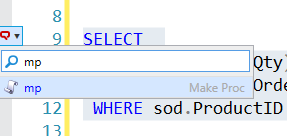
2023-11-10 14_23_29-SQLQuery2.sql - ARISTOTLE_SQL2022.AdventureWorks2017 (ARISTOTLE_Steve (71))_ - M

This finds my snippet. I can hit Tab and my snippet is inserted, with my default variable values and also the text I selected in the place where $SELECTEDTEXT$ was in the snippet.
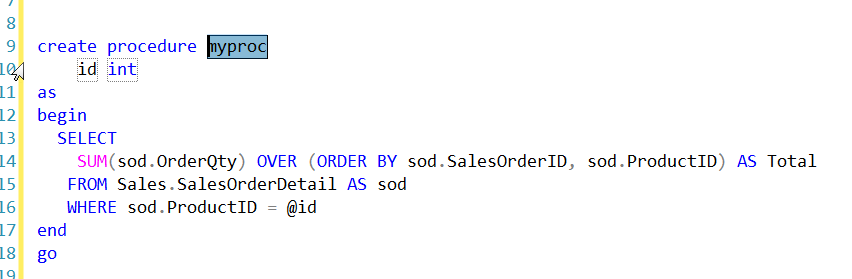
2023-11-10 14_23_58-SQLQuery2.sql - ARISTOTLE_SQL2022.AdventureWorks2017 (ARISTOTLE_Steve (71))_ - M

Now like any other snippet, I can tab between the variables and change them. When I’m done, I hit Enter and I have my code.

Now I just need to save this in version control and deploy it to my production system.

If you haven’t tried SQL Prompt, download the eval and give it a try. I think you’ll find this is one of the best tools to increase your productivity writing SQL.

Video Walkthrough

I made a video of using $surroundtext$ that you can watch. All my SQL Prompt tips are in this playlist.
 

Posted in Blog | Tagged , , | 1 Comment

A Lack of Privacy in Smart Cars

I own a Tesla, and I love having a bunch of data about my usage of the car. I can see how much I’ve charged it, what it costs to power, where I drive, aggregates of my monthly usage, and more. It’s especially cool when my wife is coming to pick me up, and I can see where the car is, so I know when to go outside if the weather isn’t great. I also like the ability to cool or heat the car in advance of going outside in extreme temperatures.

However, all that data also means there are potential issues with privacy and certainly security. I am well aware that location and other data are being captured by Tesla as I use the car. However, it’s not just Tesla. Lots of modern cars are collecting lots of data. Mozilla had a report on data privacy in cars, and all the manufacturers failed their data privacy test. There’s also a summary at Engadget of the results.

Reading through the report, it seems that many of the manufacturers of cars are covering themselves from liability. Cars are sold and used in many jurisdictions and often there can be a wide variety of regulations about data, even inside of a single country. It seems that the policies are often written just in case something happens and they collect data from your use of the car (or they record you using the car).

A point I hadn’t considered in the article dealt with the deletion of data when a car is sold. That could get tricky as not only is your usage data in the car, some data might potentially be in a manufacturer’s database. Or it might be stored in devices at a service center. Who knows what gets stored and copied in modern cars as they are serviced. Will we potentially have issues with mechanics or other workers stealing and selling data from entertainment or other information systems in cars? The possibilities make my head hurt in this modern world where everything can, and often does, collect data.

I don’t know what data is stored inside modern vehicles or other systems. In some sense, I think that companies ought to disclose what they collect, and include examples of what this data looks like. Even when I read policies, like this one from Microsoft, I’m not completely sure if I know what data they may be collecting.

The world of data privacy is complex, and as I’ve written before, I’m not even sure exactly how I would like my data handled. I think the GDPR is a good start, but I hope that we continue to evolve protections that ensure humans have more control over their data than the companies that collect it.

Steve Jones

Listen to the podcast at Libsyn, Spotify, or iTunes.

Posted in Editorial | Tagged | 2 Comments

Data Security and AI

I ran across an article on the best AI meeting assistants, which can help you with note-taking and summarization tasks. Most of these cost money, but there was something that struck me about these tools.

They aren’t allowed for a lot of my meetings.

At Redgate, I’m not sure if these are allowed. Our policy is to seek permission before using a tool, so I’ve sent a query off for more information. In many of my customer meetings or in Microsoft meetings, I’ve been told these tools aren’t allowed as there isn’t sufficient data security to allow their usage.

I think a lot of people are concerned about their data when these AI LLMs (large language models) are involved and if their data is being used to train future models. If it is, then that could be a security problem. Already many people and organizations are upset about their data sets being used for training without their knowledge. Not everyone agrees.

I don’t quite know how I feel about this issue, but I do think there ought to be guidelines and discussions about how data is used, and where data is stored (or where it transits a network). Certainly, organizations might need to set this in place to ensure their employees aren’t exposing confidential or internal data in ways that could increase their risk of a breach. After all, without any guidelines or rules, you may have no recourse if employees just use tools and data escapes your network.

At Redgate, we’ve begun experimenting with SQL Prompt and AI. As of now, we’ve had quite a few queries about how customer data is being used. Our EAP EULA notes that schema information will leave your network, but not data in rows. That might be a problem or might not, but it’s important to disclose that, which we’ve done.

I’d like to think that as hardware power increases and models become more mature, we’ll stop having to send data for many AI-related tasks away from a device that might perform a task. At some point, I hope your mobile phone or laptop can process the AI model without a network connection, which would be helpful for data security.

AI is here to stay, and we have to learn how to work with it, and where it works well. It feels a little like we haven’t really answered many of these questions as an industry or inside our organizations. That’s something that needs to change and quickly as the number of places AI is being used continues to rapidly increase.

Steve Jones

Listen to the podcast at Libsyn, Spotify, or iTunes.

Posted in Editorial | Tagged | Comments Off on Data Security and AI

Comparing Two Scripts with kdiff3

I had a customer recently ask if SQL Compare could show them the differences in two scripts they’ve written. They weren’t using version control (tsk, tsk, shame), but saw SQL Compare and the “Scripts folder” option. This isn’t used for random scripts, but I do have a better solution: KDiff3.

KDiff is an old project that is used to analyze multiple files and merge the differences. There is an archived SoundForge location, but the more modern version is here. That’s the current code location, and you can see the readme for details. To get started, download and install it.

Using KDiff3

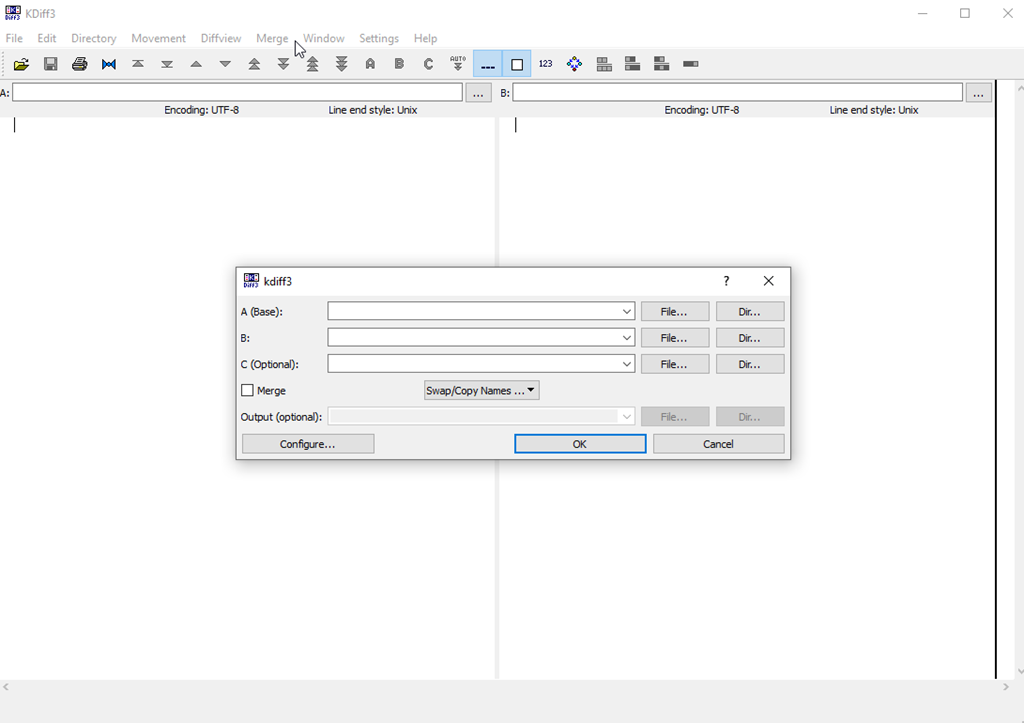
I’ve used this in a few VCS tools in the past, and it can be very handy. However, I’ve rarely run it on it’s own. When I start it, I see the A, B, and (optional) C files to pick.

2023-11-20 14_06_25-KDiff3

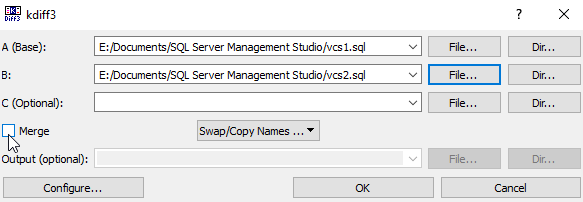
If I click the “File” selector next to A or B, I can pick files. In my case, I’ll pick two files I’ve used to demonstrate where a VCS is helpful. You can see below I’ve selected files. I didn’t select the merge button, but I could. In this case, I just want to see the differences.

2023-11-20 14_08_00-kdiff3

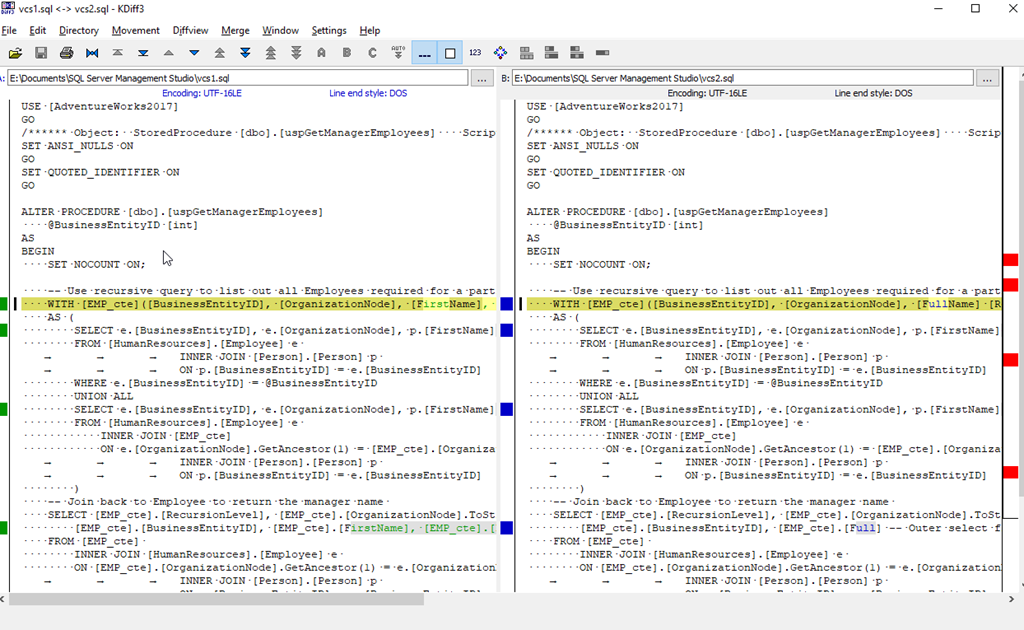
Wen I click OK, both files are opened, and I see a VCS-like difference listing of the files. You can see there are a few differences highlighted with the lines marked and then the changes highlighted.

2023-11-20 14_09_12-vcs1.sql _-_ vcs2.sql - KDiff3

I can now see what’s changed. In a proper VCS environment, I would then choose which changes I need to pull from each file to reconcile the differences.

If I pick two disparate files, KDiff3 tries to match them up as easily as possible. In my case, I had a few different demo files that happen to share some code. A pretty good analysis of the files shows me what’s different

2023-11-20 14_11_27-sequence_a.sql _-_ sequence_3.sql - KDiff3

There are navigation items in the toolbar that let you jump among the various differences in files if you want to. This is primarily a tool for reconciling files, not just finding differences, but it can be useful to see what’s changed.

If you’ve never tried it, give it a go and see if it’s helpful.

Posted in Blog | Tagged , , | 1 Comment