A SQL Prompt AI Experiment with Window Clauses

SQL Prompt has an EAP with some AI capabilities. I was asked to do some testing, and while I’ve done relatively little, I did find some time to play with this recently and decided to document what happened.

I completed this and then clicked the < back arrow to return through previous versions of the code, which also shows what the prompt was that produced this code.

This is part of a series of posts on SQL Prompt. You can see all my posts on SQL Prompt under that tag.

My Experiment

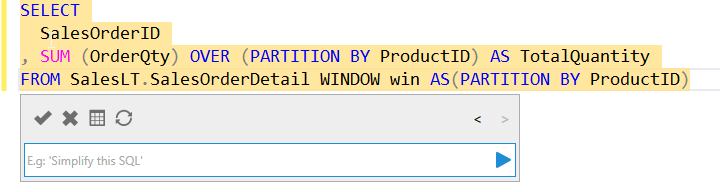
I wanted to write a windowing function to test something. Instead, I decided to ask SQL Prompt to do this for me. I connected to a database, hit ALT+Z, and then entered this prompt in the popup. You can see the code produced.

2023-11-10 16_04_38-SQLQuery1.sql - ARISTOTLE.AdventureWorksLT2019 (ARISTOTLE_Steve (67))_ - Microso

I only entered the prompt in the dialog. SQL Prompt wrote the highlighted code.

This wasn’t what I wanted, so I changed the prompt. You can see what I typed and what changed below.

2023-11-10 16_04_32-SQLQuery1.sql - ARISTOTLE.AdventureWorksLT2019 (ARISTOTLE_Steve (67))_ - Microso

Not bad, but not what I wanted. Next I asked to move this to the window clause. I got a window clause, but it wasn’t used in the OVER() clause.
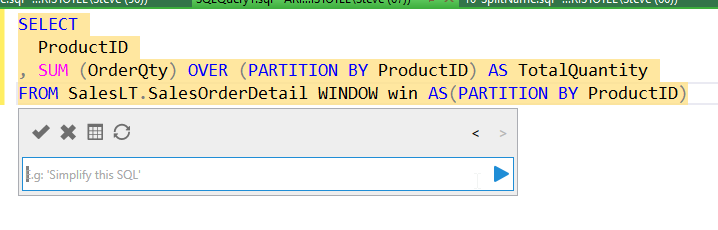
2023-11-10 16_04_21-SQLQuery1.sql - ARISTOTLE.AdventureWorksLT2019 (ARISTOTLE_Steve (67))_ - Microso

Hmm, I tried again. Once I hit the play button, the AI does something and clears the prompt. That happened above, and this is the prompt I tried next:

2023-11-10 16_14_31-SQLQuery1.sql - ARISTOTLE.AdventureWorksLT2019 (ARISTOTLE_Steve (67))_ - Microso

It still didn’t work. Actually, it really didn’t work. I’m glad I have a back button.

2023-11-10 16_14_42-SQLQuery1.sql - ARISTOTLE.AdventureWorksLT2019 (ARISTOTLE_Steve (67))_ - Microso

Let me move on. I can fix that myself. Now I’ll change the column list.

2023-11-10 16_17_08-SQLQuery1.sql - ARISTOTLE.AdventureWorksLT2019 (ARISTOTLE_Steve (67))_ - Microso

That worked:

2023-11-10 16_17_18-SQLQuery1.sql - ARISTOTLE.AdventureWorksLT2019 (ARISTOTLE_Steve (67))_ - Microso

Can I add a second aggregate? I’ll try that.

2023-11-10 16_18_03-SQLQuery1.sql - ARISTOTLE.AdventureWorksLT2019 (ARISTOTLE_Steve (67))_ - Microso

That didn’t work. It changed my SUM to the COUNT I wanted. Interesting.

Thoughts

This is interesting in that it can help me structure queries, but knowing how to prompt them matters. I do like the back and forth, as I hit back above and then added to my prompt, which worked.

2023-11-10 16_20_35-SQLQuery1.sql - ARISTOTLE.AdventureWorksLT2019 (ARISTOTLE_Steve (67))_ - Microso

This doesn’t feel faster to me, but I’ve written a lot of SQL code. I could structure this stuff quickly and easily. In fact, I’d likely use a * in the column list and try to build the window clauses I need first, then go back and add aggregates. Normal SQL Prompt would help me, and I think it would be faster than the AI.

However, I also know the AI is new, and there are possibilities here, which might be easier than me playing with syntax and looking through suggestions, even with SQL Prompt.

I’ll keep playing and hopefully I’ll find this useful. Or at least useful enough that I can give good feedback to the team experimenting here.

Posted in Blog | Tagged , , | 10 Comments

T-SQL Tuesday #168–Roundup

Last week was the 168th T-SQL Tuesday, which I hosted. The invitation is here.

I didn’t get much of a chance to check out the posts as I was at the PASS Data Community Summit, but I came home and started to work through them.

This was the 8th one I’ve hosted, which makes sense as I’ve taken over managing the party from Adam Machanic and there have been a few places I’ve had to fill in for missing hosts. In any case, here’s the roundup. I’m going in order of the comments as I see them on the blog.

Rod writes about using LAG to rewrite older cursor code that summarizes data by period. for a 30x reduction in runtime. Plus, one less cursor in the world.

Aaron Bertrand has probably done most, if not all, of the T-SQL Tuesday parties. He’s been an expert in many aspects of T-SQL and I always look forward to reading his posts. In this one, he writes about a few different problems he’s solved with different window functions on the Stack Overflow database.

Deb the DBA was in Seattle with me last week, but she found time to give us a way she gets visibility into long running processes from an audit table. In this case she wraps a few window functions inside of a set of MAX() queries of the data.

Andy Brownsword a few relative queries that perform better with window functions. A good set of examples you might use in your work.

Hugo warned me he was going to write a long post. He did. Worth a read as he delves into the execution plans behind window functions.

My own post was on a change in SQL Server 2022 that makes it easy to re-use window definitions and not have to copy/paste them.

I believe Rob Farley has done every T-SQL Tuesday, and this month is no exception. In this case, he shows how to look at temporal table data.

Chad Callihan looks at Stack Overflow and how Lead() can find gaps.

And from Twitter, I caught Barney Lawrence’s post on using FIRST_VALUE, LAST_VALUE and NULLs. I don’t often see too many people looking at first_value() and last_value(), so I liked this one.

That’s it. If you want to host in 2024, I’ve still got some spots near the end of the year. Ping me and participate in a few of the other parties on your blog.

Posted in Blog | Tagged , | 1 Comment

Changing the Data Type of a Primary Key–#SQLNewBlogger

A client asked this question recently: How do I change my numeric PK to a character type?

I decided to write a short blog on how to do this. This is the happy path, and not intended to cover all situations. I’ll write about some exceptions in a separate post.

Another post for me that is simple and hopefully serves as an example for people trying to get blogging as #SQLNewBloggers.

The Scenario

A customer had a table where the PK was a number and wanted to change this to a character field. Here’s an example table with some data.

CREATE TABLE Invoice
( InvoiceID   INT NOT NULL CONSTRAINT InvoicePK PRIMARY KEY
, InvoiceDate DATE
, CustomerID  INT);
GO
INSERT dbo.Invoice
   (InvoiceID, InvoiceDate, CustomerID)
VALUES
   (1, '20230102', 3)
, (2, '20230103', 3)
, (3, '20230105', 4)
, (4, '20230106', 8)
, (5, '20230108', 11)
, (6, '20230109', 37);
GO

Now, the situation was really that the customer was generating numbers for documents, but they realized their business had changed and they needed to add characters to the data.

The Problem

There are two things to think about here. First, what happens with the data? In this case, converting an integer to a character is easy and works. As long as the character field is long enough, this works fine. We first want to be aware of the data loss potential, though SQL Server won’t allow this.

Second, we can’t change the data type because the PK is a constraint. If we try to change this type, we get an error:

2023-10-23 11_01_39-SQLQuery1.sql - ARISTOTLE.sandbox (ARISTOTLE_Steve (69))_ - Microsoft SQL Server

We really need to remove this constraint.

If we have an outage window, this isn’t hard. If we don’t, then we have to be careful. In this case, I’ll assume we can pause the system and can make the changes without data changing in the table.

The Solution

The process to change the type is a few steps. I’ve shown them here.

  1. remove the PK constraint
  2. change the column
  3. add the PK constraint back

This code will do this. I run three statements to make the change, wrapped in a transaction, with error handling to rollback if one fails

BEGIN TRAN
DECLARE @e INT = 0
ALTER TABLE dbo.Invoice DROP CONSTRAINT InvoicePK
IF @@ERROR<> 0 
  SELECT @e = 1
ALTER TABLE dbo.Invoice ALTER COLUMN InvoiceID VARCHAR(20) NOT NULL
IF @@ERROR<> 0 
  SELECT @e = 1
ALTER TABLE dbo.Invoice ADD CONSTRAINT InvoicePK PRIMARY KEY (InvoiceID)
IF @@ERROR<> 0 
  SELECT @e = 1
IF @e = 0
     COMMIT
ELSE 
     ROLLBACK

This will change the data type and then reset the PK, as you can see below. With all my data intact.

2023-10-23 11_10_38-SQLQuery1.sql - ARISTOTLE.sandbox (ARISTOTLE_Steve (69))_ - Microsoft SQL Server

This is a simple scenario, and there are more considerations, but those are for another post.

SQL New Blogger

This post took me about 15 minutes to write. I took something I’d mocked up as a test for a client and then added that to this post. The code was barely changed, and I really renamed something and removed a few columns. Adding the text around this took most of the time.

This is something that all of you could do to show that you have this skill. Changing a PK isn’t something you want to do, and it is unusual, but it does happen at times. I’ve had this happen before, and there are various other exceptions. Note I’ve added a note at the bottom to link this in to a series looking at other changes. What if the data isn’t compatible? what if the type is too short? What decisions would you make about the new PK, as int to bigint is easy, but what about char to date and possible collisions? What about identity values?

You can do this and easily build 3-4 posts on this topic. Showcase your knowledge and you might create (and control) a fun discussion in an interview.

Posted in Blog | Tagged , , | 2 Comments

Ten Database Commandments

I love the Notorious B.I.G. His music isn’t for everyone, but I enjoy it. This piece takes one of his songs (NSFW – Ten Crack Commandments) and applies the list to databases. Each item from the song is listed, along with the way it might be changed for database work. The list is from Ottertune, which is a service designed to help you optimize your use of AWS RDS and Aurora databases, with AI. If you believe their hype, their service will get better performance and lower costs for you.

In any case, with regard to databases, I suspect that the author is having some fun with the rules, and a few of them made me smile. They are cloud-related, but a few will apply to any environment.

The first one is about budgets, noting you should not disclose your budget, which is in general a good rule whenever you are buying something. Don’t disclose information, and someone working for a vendor of tools, I think that most budget conversations aren’t something technical people should worry about. Decide what value you get from some tool/service/process/etc. and if there are time savings. Then let someone else decide if the ROI is worth the cost.

Rule 2 is a stretch, but I do think that looking at new tools can be helpful. The caveat here is that many people, don’t often learn enough about existing tools to understand if they will solve issues. There are a lot of things you can do with many tools, so don’t just look for some magical new tool. Learn to use your tools well, and if you want to try a new one, keep in mind you will need to invest some time both learning about it and practicing some skills before you really know if it’s helpful. The other thing to remember is every new tool increases the bar for new staff. Try to limit the number of tools you use to those you need.

Security is important and rule 3 is remembering not to give out more permissions than needed, especially to developers. I love this quote: “You don’t want randos at your organization logging in and running queries that they found on Stack Overflow.”

A number of the other rules have to do with performance, which is certainly Ottertune’s business, but these are good basic practices that I see organizations not following. Too often management wants to save money and technical people make decisions that compromise performance. Lots of people overload systems, and then they can’t handle the workload well. I get that many CFOs and others want to see high CPU usage, which means they’re using the resources they pay for, but databases can be very bursty with resource usage. At the same time, you don’t want to over-provision resources because you are scared. Learn to find a balance that doesn’t waste money, but handles your workload well.

Perhaps one of the best things about the cloud is that if we do make bad decisions, we can often provision more resources. It can take time to move to a new tier of service, so don’t expect instance response up or down, but if you need to double the CPUs for month-end processing, you can likely plan for the time to scale up your database instance and then scale down again when all the work is complete.

It’s a fun article, and if you’re looking for some fun Notorious B.I.G.-related database content, grab a cup of coffee when you need a break and a smile.

Steve Jones

Listen to the podcast at Libsyn, Spotify, or iTunes.

Posted in Editorial | Tagged , , | Comments Off on Ten Database Commandments